
JSON TUI
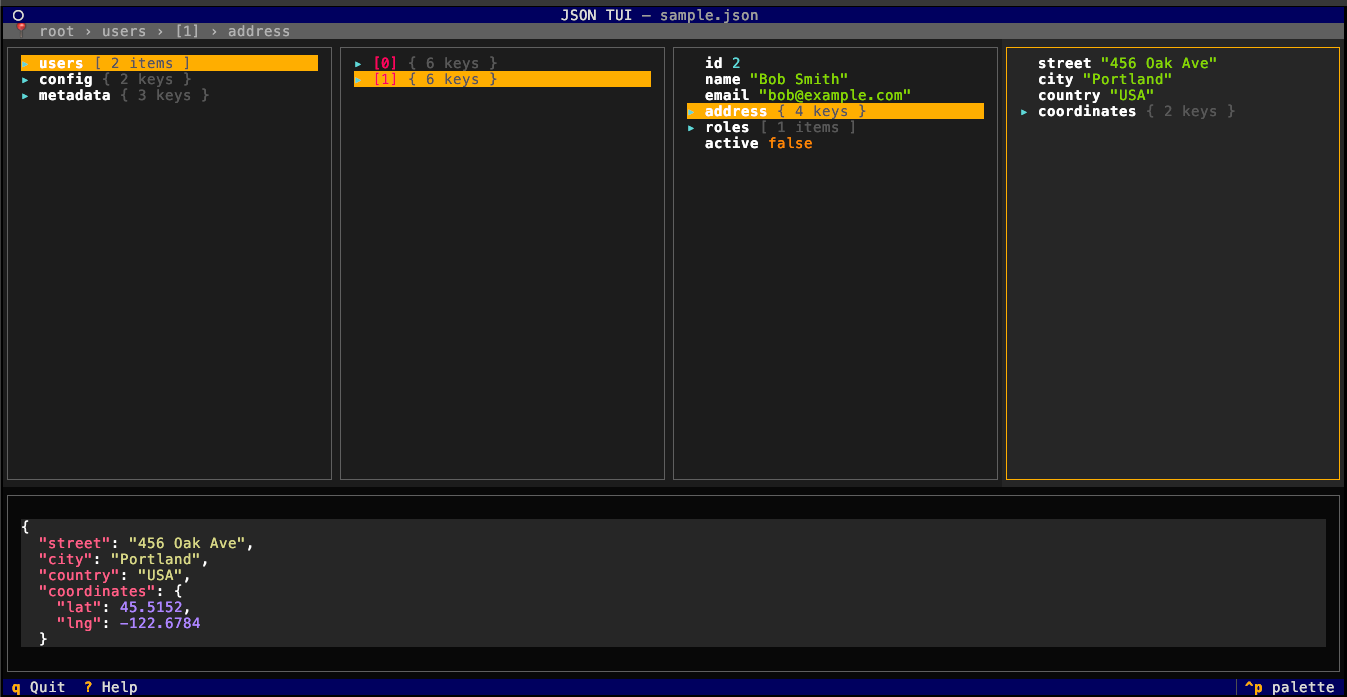
A terminal JSON viewer with columnar navigation, inspired by JSON Hero.

Why?
I love JSON Hero, but in real life, privacy is a serious issue. In some companies I've worked at, leaked client data can get you fired or worse. In my everyday work, unreadable JSON responses (very long ones) happen frequently, so this viewer gives me a similar experience without any data leak risk.
What's it solving?
- Offline - no data sent to any server
- Terminal-based - no need for a browser or GUI (works over SSH or inside pods/containers)
- Python-based - easy to install and extend
- Performance - using Python means I can extend it with Rust for performance-critical parts if needed
- UV compatibility - can be easily installed and run with UV
Features
- Columnar Navigation: Navigate nested JSON structures in a multi-column view
- Keyboard-driven: Vim-style keybindings (hjkl) and arrow keys
- Syntax Highlighting: Color-coded values by type (strings, numbers, booleans, null)
- Live Preview: See full values in the preview panel
- Path Breadcrumbs: Always know where you are in the structure
- Stdin Support: Pipe JSON directly from curl or other commands
Installation
# Easy with UV
uv tool install json-tui

# Also pip works
pip install json-tui
Usage
# View a JSON file
json-tui data.json

# Pipe from stdin
curl https://api.example.com/data | json-tui --stdin

# Or use echo
echo '{"hello": "world", "nested": {"key": "value"}}' | json-tui -s
Keybindings
| Key | Action |
|---|---|
↑ / k |
Move up in current column |
↓ / j |
Move down in current column |
← / h |
Focus previous column |
→ / l |
Focus next column / expand |
Enter |
Expand selected node |
Backspace / Esc |
Collapse / go back |
/ |
Fuzzy search the whole JSON (Enter/click a result to jump to it) |
? |
Show help |
q |
Quit |
Development
# Run directly with UV
uv run json-tui sample.json

# Or activate the venv
source .venv/bin/activate
json-tui examples/sample.json
Next Steps
- parse json using rust for better performance or py threads
- improve long columns handling
- copy curent value/node to clipboard
Complementary Tools
Before start working on this project i've looked at existing tools, and here are some that helped me and i'm still using some of them:
- Visi Data : json and a lot more visualization on your terminal.
- fx : polished dropdown based viewer using go.
- jless : json reader and searcher in rust
- jq: the mature solution on json search and prettify, not "real time" or tui.
- jqp : the missing part of jq, tui + live preview.
- json-tui: using c++ similar to fx.
License
MIT
1 maintainer

Metadata
1 maintainer
Release files for json-tui 1.3.0
For a detailed explanation of source distributions (sdists) and built distributions (wheels), please see the package formats documentation.
Source distribution (sdist)
| File | Size | Uploaded | |
|---|---|---|---|
| json_tui-1.3.0.tar.gz | 474.0 kB | Details |
Built distribution (wheel)
| File | Interpreter | ABI | Platform | Reset |
|---|---|---|---|---|
| json_tui-1.3.0-py3-none-any.whl | Python 3 | none | any | Details |
Total release size: 493.0 kB
Release files / json_tui-1.3.0.tar.gz
| Download URL | json_tui-1.3.0.tar.gz |
|---|---|
| Size | 474.0 kB |
| Tags | Source |
|
SHA-256 checksum How to use checksums |
516574a4240dd938f58d79f4d2e31b467521294d7bdb358e3a91aac92cf53b77
|
|
BLAKE2b-256 checksum How to use checksums |
57d9acaa21863882f4c72ba1b9e91ec27577d7e84fb18c017ed4bb308e1464c9
|
| Upload date | |
|
Uploaded using Trusted Publishing? What is trusted publishing? |
No |
| Uploaded via |
uv/0.11.30 {"installer":{"name":"uv","version":"0.11.30","subcommand":["publish"]},"python":null,"implementation":{"name":null,"version":null},"distro":{"name":"Ubuntu","version":"26.04","id":"resolute","libc":null},"system":{"name":null,"release":null},"cpu":null,"openssl_version":null,"setuptools_version":null,"rustc_version":null,"ci":null}
|
Release files / json_tui-1.3.0-py3-none-any.whl
| Download URL | json_tui-1.3.0-py3-none-any.whl |
|---|---|
| Size | 19.0 kB |
| Tags | Python 3 |
|
SHA-256 checksum How to use checksums |
e18240053a51e9520e4b9590061865103c96fca0eb5ed9725cacc9b521568edd
|
|
BLAKE2b-256 checksum How to use checksums |
cc5583851a3270a115a3954d3c0b04ffc4e1a20ba1ff79fc86de147aeda9fa6b
|
| Upload date | |
|
Uploaded using Trusted Publishing? What is trusted publishing? |
No |
| Uploaded via |
uv/0.11.30 {"installer":{"name":"uv","version":"0.11.30","subcommand":["publish"]},"python":null,"implementation":{"name":null,"version":null},"distro":{"name":"Ubuntu","version":"26.04","id":"resolute","libc":null},"system":{"name":null,"release":null},"cpu":null,"openssl_version":null,"setuptools_version":null,"rustc_version":null,"ci":null}
|














