
jsonMore
A command-line tool for reading, formatting, and analyzing JSON files with syntax highlighting, automatic error repair, and smart paging.



Quick Start 🚀
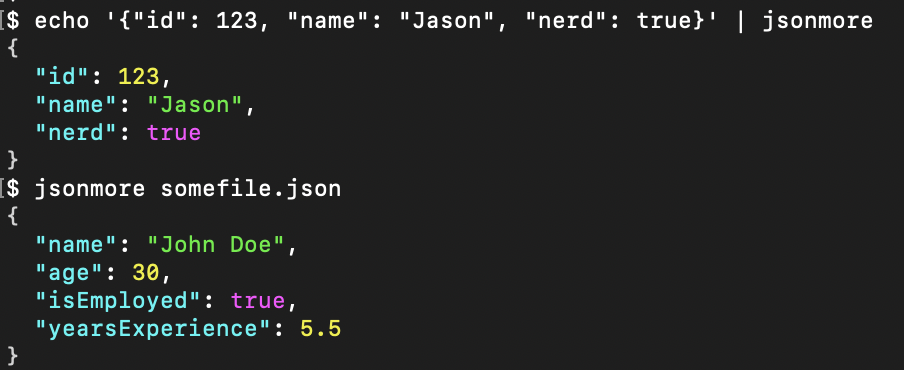
After installation, use the jsonmore command directly:
# Install
pip install jsonmore

# Pipe Test
echo '{"id": 123, "name": "Jason", "nerd": true}' | jsonmore

# File Test
jsonmore somefile.json
Installation
For Users (Recommended)
Install globally using your preferred Python package manager:
# Using pip
pip install jsonmore

# Using pipx (recommended for CLI tools)
pipx install jsonmore

# Using uv
uv pip install jsonmore
For Developers
Clone the repository and install in development mode:
git clone https://github.com/yourusername/jsonmore.git
cd jsonmore
pip install -e ".[dev]"
Usage
Command Line Interface
# Basic file reading
jsonmore file.json

# Large files with custom size limit
jsonmore large_file.json --max-size 100

# Disable paging for direct output
jsonmore file.json --no-pager

# Handle malformed JSON
jsonmore broken.json              # Auto-repair (default)
jsonmore broken.json --no-repair  # Disable auto-repair

# Custom formatting
jsonmore file.json --indent 4 --no-colors
Command Line Options
| Option | Description |
|---|---|
--no-colors |
Disable color output for plain text |
--max-size N |
Maximum file size in MB (default: 50) |
--indent N |
Indentation spaces (default: 2) |
--no-pager |
Disable automatic paging |
--no-repair |
Disable automatic JSON repair |
--verbose |
Show headers and JSON structure info |
--help |
Show help message and examples |
Python API
You can also use jsonmore as a Python library:
from jsonmore import JSONReader, JSONFormatter

# Read and parse JSON file
reader = JSONReader()
result = reader.read_file('data.json')

if result['status'] == 'valid':
    data = result['data']
    print(f"Successfully parsed JSON with {len(data)} keys")

# Format JSON with colors
formatter = JSONFormatter(use_colors=True, indent=2)
formatted = formatter.format_json(data)
print(formatted)
🔧 JSON Repair Capabilities
The tool can automatically detect and fix common JSON syntax errors:
Supported Repairs
- Missing quotes around object keys
- Single quotes instead of double quotes
- Trailing commas in objects and arrays
- Missing commas between properties
- JavaScript-style comments (
//and/* */) - Missing braces in nested objects
- Malformed structure patterns
Example Repairs
Before (broken JSON):
{
  name: "John",           // Missing quotes on key
  'age': 25,              // Single quotes
  "skills": ["Python",],  // Trailing comma
  "active": true,         // Trailing comma
}
After (auto-repaired):
{
  "name": "John",
  "age": 25,
  "skills": ["Python"],
  "active": true
}
Package Structure
For developers and contributors, here's the package organization:
jsonmore/
├── __init__.py          # Package initialization and public API
├── cli.py              # Command-line interface entry point
├── colors.py           # ANSI color definitions
├── core.py             # Core JSON processing (JSONReader, JSONFormatter, JSONRepair)
├── utils.py            # Utility functions (paging, terminal handling)
└── py.typed            # Type hints marker file
Module Overview
jsonmore.cli: Command-line interface and argument parsingjsonmore.core: Main business logic for JSON reading, formatting, and repairjsonmore.colors: ANSI color code definitions for terminal outputjsonmore.utils: Utility functions for paging and terminal interactionjsonmore: Public API exports for library usage
Development API
Setting Up Development Environment
# Clone the repository
git clone https://github.com/yourusername/jsonmore.git
cd jsonmore

# Install in development mode with dev dependencies
pip install -e ".[dev]"

# Install development tools
pip install -r requirements-dev.txt
Running Tests
# Basic tests
python test_jsonmore.py

# With pytest (if installed)
pytest test_jsonmore.py -v
Code Quality
# Format code
black jsonmore/

# Lint code
flake8 jsonmore/

# Type checking
mypy jsonmore/
Error Handling
The tool provides multiple levels of error handling:
- Valid JSON: Normal parsing and display
- Auto-Repair: Attempts to fix common errors
- Partial Parsing: Extracts valid JSON fragments
- Raw Display: Shows content with error highlighting
Color-Coded Output
- Keys: Cyan
- Strings: Green
- Numbers: Yellow
- Booleans: Magenta
- Null: Gray
- Brackets/Braces: White
Error Highlighting
{
  "name": "John",
  ►a◄ge: 30,  // Error highlighted here
  "city": "NYC"
}
Contributing
We welcome contributions! Here's how to get started:
- Fork the repository on GitHub
- Create a feature branch:
git checkout -b feature-name - Make your changes and add tests
- Run the test suite:
python test_jsonmore.py - Submit a pull request
Guidelines
- Maintain compatibility with Python 3.8+
- Follow the existing code style (use
blackfor formatting) - Add tests for new features
- Update documentation as needed
License
MIT License - see LICENSE file for details.
Acknowledgments
- Built with Python's standard library for maximum compatibility
- Inspired by tools like
jq,bat, andless - Thanks to the JSON specification and repair techniques community
Happy JSON reading!
1 maintainer

Metadata
1 maintainer
Release files for jsonmore 1.0.3
For a detailed explanation of source distributions (sdists) and built distributions (wheels), please see the package formats documentation.
Source distribution (sdist)
| File | Size | Uploaded | |
|---|---|---|---|
| jsonmore-1.0.3.tar.gz | 26.1 kB | Details |
Built distribution (wheel)
| File | Interpreter | ABI | Platform | Reset |
|---|---|---|---|---|
| jsonmore-1.0.3-py3-none-any.whl | Python 3 | none | any | Details |
Total release size: 43.7 kB
Release files / jsonmore-1.0.3.tar.gz
| Download URL | jsonmore-1.0.3.tar.gz |
|---|---|
| Size | 26.1 kB |
| Tags | Source |
|
SHA-256 checksum How to use checksums |
d984e50ff3a8fc14e24fbd2295fa7d14c68e829156b9b229f4b382691b14932a
|
|
BLAKE2b-256 checksum How to use checksums |
40572a9ab097f9182609e9c519c3050da82d5b91684364c4e29719dc0f22076e
|
| Upload date | |
|
Uploaded using Trusted Publishing? What is trusted publishing? |
No |
| Uploaded via |
twine/6.1.0 CPython/3.10.12
|
Release files / jsonmore-1.0.3-py3-none-any.whl
| Download URL | jsonmore-1.0.3-py3-none-any.whl |
|---|---|
| Size | 17.5 kB |
| Tags | Python 3 |
|
SHA-256 checksum How to use checksums |
50f53c4930ce8713c56cbb7f75380251b7e5e4b28ee626b03f587d2499b5e7d7
|
|
BLAKE2b-256 checksum How to use checksums |
198dcbf3a7a538efc0aadaba826d2ef607383e949a323ec5ea7deee2fd9df1a8
|
| Upload date | |
|
Uploaded using Trusted Publishing? What is trusted publishing? |
No |
| Uploaded via |
twine/6.1.0 CPython/3.10.12
|














