
jsonpit
Daemon-free distributed storage over Cloud Drives for developers and AI agents — multi-process, immutable history, zero dependencies.
100% C# JsonPit Parity · Zero Third-Party Runtime Dependencies · Smalltalk-Grade Object-Oriented Architecture
JsonPit change requests and release notes are centralized in the RAIkeep doc/ directory under JsonPit_... filenames; they are not stored separately in this child repository.
JsonPit stores JSON documents with value history across processes, machines, and servers using asynchronous persistence with eventual durability.
CLI tools: use pits (see PitSeeder) or jpit to seed, export, inspect, and maintain JsonPits. Use amafu init to detect cloud drives and create the shared RAIkeep configuration.
The canonical reference (lead) implementation is C# JsonPit and the pits CLI in RAIkeep. jsonpit is the pure-Python implementation engineered for 100% behavioral and physical storage parity with zero deviation.
Latest Version 4.6.1
Show the executing machine as "on " in the CLI banner. Size both decorative rules to the complete heading, including the hostname; preserve bold cyan styling and plain redirected output. Apply it to both jsonpit and jpit entry points and the standalone artifact.
Latest release notes: jsonpit-python 4.6.1 release notes.
Previous Versions
See the jsonpit-python 4.x release notes.
Key Features
- The Persistence Fabric for AI Agents: Autonomous agents running across macOS desktop apps, backend servers, and web runtimes synchronize memory and living state across shared cloud drives without managing database servers, connection pools, or cloud credentials.
- 0% Deviation from C# JsonPit: Reads, merges, and writes pits with identical canonical JSON serialization, UTC timestamp precision, and tombstone semantics.
- Zero Third-Party Runtime Dependencies: Built strictly on the Python Standard Library (
json,pathlib,typing,dataclasses,datetime,hashlib,socket). - Cloud-Safe Filesystem Invariants (CR022): In-place sibling writes (
.pit.tmp$\rightarrow$ atomic rename within the same cloud volume). Prevents cross-device link errors (EXDEV) and OneDrive mass-deletion alarms. - Full Distributed Lease Protocol: Implements master writer leases (
Master.flag) and PID-specific process activity windows ({Machine}-{Process}-{PID}.flag) with automatic process naming fromsys.argv[0]. - Ecosystem Configuration: Seamlessly reads machine cloud paths from
~/.config/RAIkeep.json5(with~/.config/jsonpit.json5fallback). - Pure Object-Oriented Design: Rich domain entities (
Pit,PitItem,PitItems) implementing standard Python protocols (MutableMapping,ContextManager).
Object-Oriented Architecture
jsonpit models distributed state through rich, encapsulated domain classes implementing standard Python protocols (MutableMapping, ContextManager):
Pit: Living collection and coordinator of distributed leases, change files, and storage compaction.PitItem: Polymorphic living entity. Emits pure sparse deltas without read-modify-write cycles (CR040).PitItems: Immutable fragment stack managing value history and accurate point-in-time state projection.JsonPitBase: Shared foundation for storage resolution, subscriber roles, and cloud synchronization.PitMaintenanceOptions/PitMaintenanceResult: Automated reconciliation, 10-minute receipt grace periods, and flag pruning (CR021/CR022).PitAudit/PitAuditEvent: Read-only durable recovery event inspection without acquiring leases or flags (CR003).
1. Core Replicated Storage Architecture
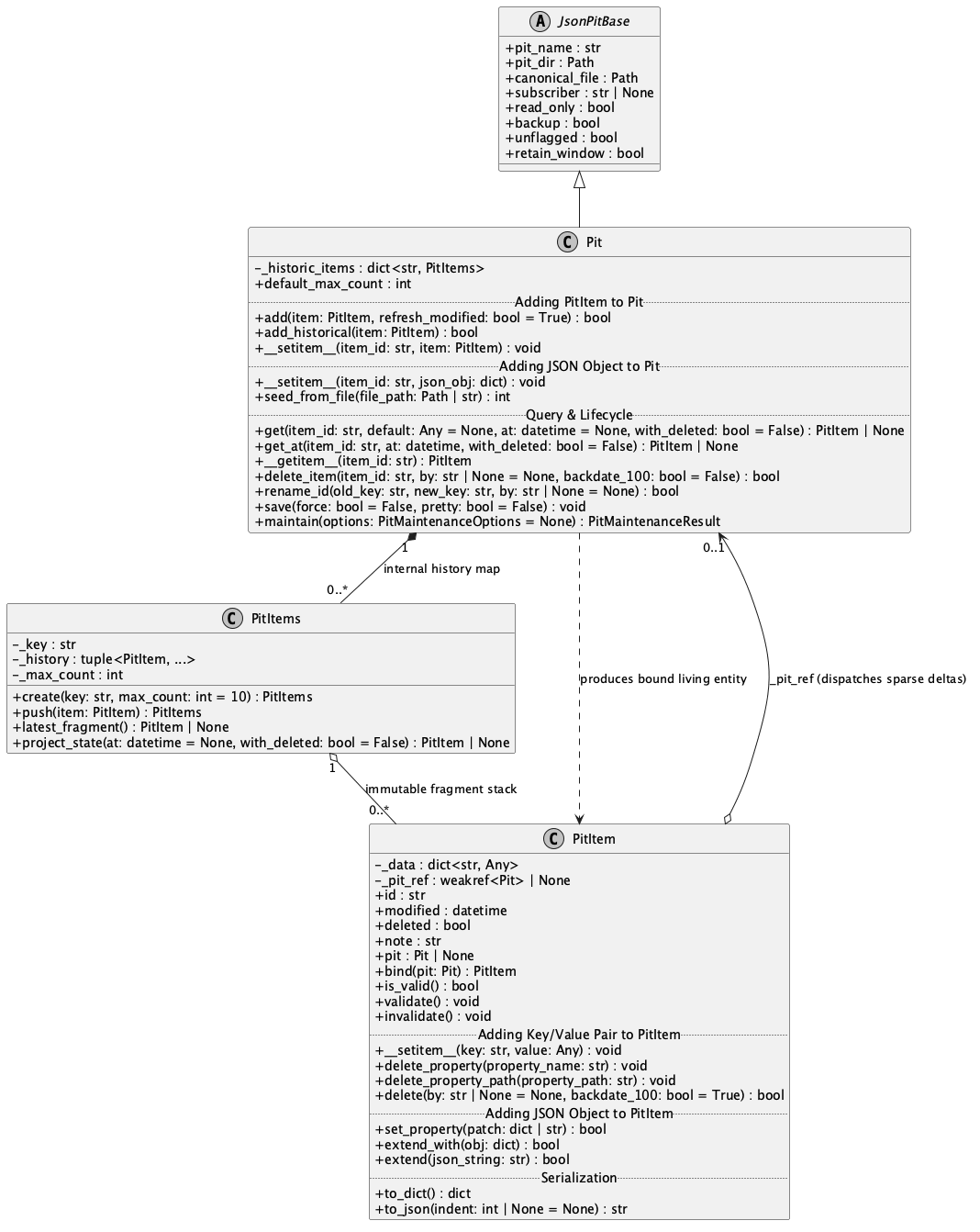
Core Living Entity Model · Vector SVG: jsonpitCD.svg
2. Storage Maintenance & Event Recovery Audit Architecture
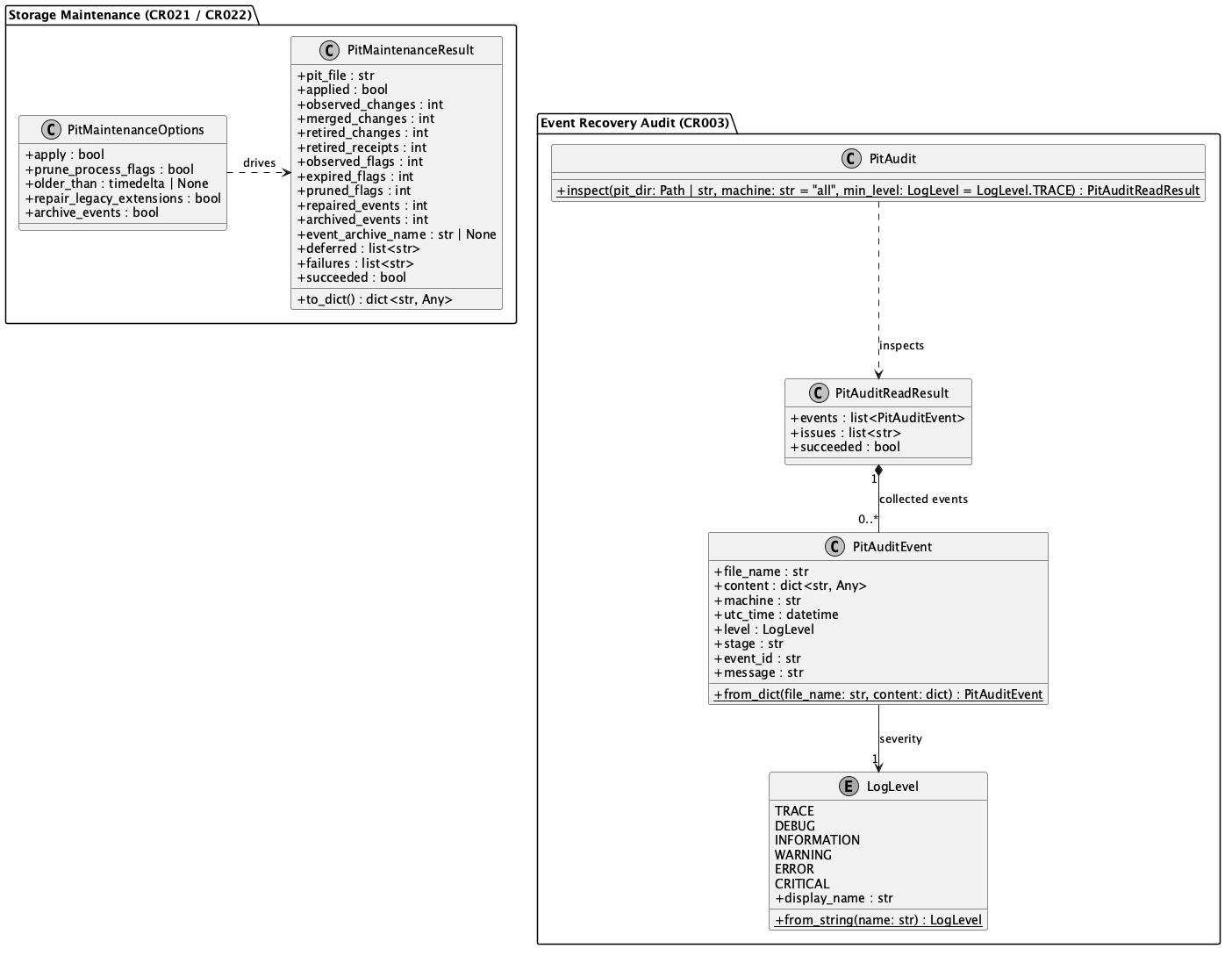
Maintenance & Recovery Audit · Vector SVG: jsonpit_opsCD.svg
📖 Architecture, Guides & Full API:
• For a hands-on practical walkthrough with Python library and CLI examples, see GettingStarted.md.
• For the complete unified architecture across all subsystems, see jsonpit_unifiedCD.svg.
• For comprehensive method signatures, exception contracts, and protocol details, see API.md.
Installation & Upgrade
Python 3.12 or newer is required.
CLI with pipx
Install one environment for both commands:
pipx install "jsonpit==4.6.1"
jpit --version
jsonpit --version
To upgrade:
pipx upgrade jsonpit
The expected outputs are jpit v4.6.1 and jsonpit v4.6.1. Do not install both
jsonpit and the jpit companion into separate pipx environments: both expose
the same commands. If both were previously installed, remove the redundant
companion environment and restore the command links:
pipx uninstall jpit
pipx install --force "jsonpit==4.6.1"
On Ubuntu/Debian, install pipx with sudo apt install pipx if needed. On macOS,
use brew install pipx. Run pipx ensurepath and start a new shell if the commands
are not on PATH. System Python may reject direct pip installation with
externally-managed-environment; use pipx for the CLI.
Library in a virtual environment
python3 -m venv .venv
source .venv/bin/activate
python -m pip install "jsonpit==4.6.1"
The jpit companion distribution is an alternative installation name for the
same CLI and depends on the matching jsonpit release. Prefer jsonpit for a new
installation.
Quickstart
1. Cloud-First Triad (The Standard Pattern)
Given a machine configured with ~/.config/RAIkeep.json5:
from jsonpit import Pit, PitItem

# Automatically resolves cloud storage (OneDriveData/AfricaStage/Person/):
with Pit.open("Person", cloud="OneDrive", root="AfricaStage") as pit:
    # Get an entity (projected state)
    sipho = pit.get("Sipho")
    if sipho:
        print(f"Sipho's current role: {sipho.get('Role')}")
        # Mutate an entity: sparse append-only mutation, auto-sets Deleted=False
        sipho.set_property({"Status": "Active", "Location": "RehearsalStage"})

    # Add a new entity
    hugh = PitItem(id="HughMasekela")
    hugh.set_property({"Genre": "Jazz", "Instruments": ["Flugelhorn", "Cornet"]})
    pit.add(hugh)

# On exit of the context manager:
# 1. Point-in-time snapshot captured
# 2. In-place sibling temporary file written (CR022 cloud-safe)
# 3. Atomically replaces Person.pit on the cloud volume
# 4. Owned process activity flag cleanly released
2. Local / Explicit Filesystem Path
For local test directories or custom scripts:
with Pit.open("/path/to/my/Person") as pit:
    for item in pit.values():
        print(item.id, item.modified)
3. Developer Companion CLI: jpit
The package installs both jpit and jsonpit commands:
# Fast semantic search across one or all pits ("Pit-Grep"):
jpit grep "Adele" Person
jpit grep "Burkhardt" --root AIA

# Pipe search results directly into jq:
jpit grep "Jazz" Person --json | jq '.[].Genre'

# Inspect entity living state or full immutable history:
jpit get Person Rainer
jpit history Person Rainer

# Pipe JSON5 / JSON mutations directly into a pit:
cat update.json5 | jpit put Person
echo '{id: "AlanKay", dynabook: true}' | jpit put Person

# Set individual properties or tombstone an entity:
jpit set Person AlanKay Status "Visionary"
jpit del Person ObsoleteEntity

# Automated maintenance and dead flag pruning (100% C# pits maintain parity):
jpit maintain Activity -c OneDrive -r AIA
jpit maintain Activity -c OneDrive -r AIA --apply --prune-process-flags --older-than 01:00:00 --json
jpit maintain --wwwa -c OneDrive -r AIA --apply --prune-process-flags --older-than 7.00:00:00

# Read-only audit of durable recovery events (100% C# pits audit parity):
jpit audit Activity -c OneDrive -r AIA
jpit audit Activity -c OneDrive -r AIA --machine local --level Warning
jpit audit --wwwa -c OneDrive -r AIA --json
The Physical Structure of a Pit
A Pit is not a single file—it is a Directory Ecosystem:
Person/
├── Person.pit                     # Canonical point-in-time snapshot
├── Master.flag                    # Master writer lease ticket (Owner|Timestamp)
├── Nkosikazi-python-59346.flag    # Process activity window ({Machine}-{App}-{PID}.flag)
├── Events/                        # Immutable change streams & compaction archives
└── Changes/                       # Hashed, collision-safe change files & receipts
Autonomous Agents & Cross-Platform State
jsonpit solves the distributed state dilemma for autonomous AI agents:
- Zero Database Infrastructure: An agent needs only a directory path on a synchronized cloud drive (e.g.
OneDriveData/AIA/AgentMemory). It never requires cloud database API keys, connection pools, firewall punch-through, or hosted database servers. - Auditability & Time-Travel: Because history is strictly append-only and stamped with .NET
UtcTicks, every agent mutation retains full provenance. Operators or supervising agents can time-travel and inspect exact state at any millisecond. - Multi-Agent Collision-Proof Coordination: Multiple agents (or desktop apps + background agents) coordinate through collision-free change files (
Changes/) and opportunistic master writer leases (Master.flag), guaranteeing eventual consistency without write collisions.
Development & Testing
Cross-Library Differential Parity Battery
To ensure 100% interoperability with C# JsonPit, this repository includes a dedicated Differential Cross-Testing Suite (tests/suites/*.json5 & tests/sequence_runner.py). The test harness orchestrates bidirectional interaction between the Python runtime (jpit) and the C# CLI binary (pits):
- Python Writes $\rightarrow$ C# Validates: Python writes
.pitsnapshots and sparse changes; C#pits exportandpits verifyassert physical byte formatting, timestamp precision, and schema invariants. - C# Writes $\rightarrow$ Python Validates: C#
pits seed,delete-property, andmaintainmutate state; Pythonjpit get,history, andPitStoreverify projections and receipt mechanics. - 7 Parity Suites (41 Cross-Engine Steps): Covers persistence CRUD, CR041 clean change files, receipt grace periods, nested property tombstones, compaction/events archiving, process flag lifecycles, and split-master partition recovery.
For full suite descriptions, architecture diagrams, and certification tables, see:
👉 doc/CROSS_ENGINE_PARITY_SPECIFICATION.md
# Run the full test battery (Unit Tests + 7 Cross-Engine Parity Suites):
python3 tests/run_all.py

# Run a specific declarative parity suite directly:
python3 -m tests.sequence_runner tests/suites/01_persistence_and_crud.json5
1 maintainer

Metadata
1 maintainer
Release files for jsonpit 4.6.1
For a detailed explanation of source distributions (sdists) and built distributions (wheels), please see the package formats documentation.
Source distribution (sdist)
| File | Size | Uploaded | Provenance | Actions |
|---|---|---|---|---|
| jsonpit-4.6.1.tar.gz | 230.2 kB | Without provenance | Details for jsonpit-4.6.1.tar.gz |
Built distribution (wheel)
| File | Interpreter | ABI | Platform | Actions Reset |
|---|---|---|---|---|
| jsonpit-4.6.1-py3-none-any.whl | Python 3 | none | any | Details for jsonpit-4.6.1-py3-none-any.whl |
Total release size: 294.4 kB
Release files / jsonpit-4.6.1.tar.gz
| Download URL | jsonpit-4.6.1.tar.gz |
|---|---|
| Size | 230.2 kB |
| Tags | Source |
|
SHA-256 checksum How to use checksums |
ef87bc19b601a79e4bb6819299b80d3f167d9cc0fde90e8b19a3175a68f8d082
|
|
BLAKE2b-256 checksum How to use checksums |
0104f14258676984b56956af51f8fad56872a29dd15cd198ba481ea70c86deee
|
| Upload date | |
|
Uploaded using Trusted Publishing? What is trusted publishing? |
No |
| Uploaded via |
twine/7.0.0 CPython/3.14.8
|
Release files / jsonpit-4.6.1-py3-none-any.whl
| Download URL | jsonpit-4.6.1-py3-none-any.whl |
|---|---|
| Size | 64.2 kB |
| Tags | Python 3 |
|
SHA-256 checksum How to use checksums |
81caa2c52f8da142a6351a29118cd5c04317226a6800307f13134359abb4c577
|
|
BLAKE2b-256 checksum How to use checksums |
7a82b67eee07e7c5dd7d5d32666b1a4c2c986241146397dee5554b6440c2aa0a
|
| Upload date | |
|
Uploaded using Trusted Publishing? What is trusted publishing? |
No |
| Uploaded via |
twine/7.0.0 CPython/3.14.8
|
Security for jsonpit 4.6.1
Provenance
Provenance describes where a file came from. On PyPI, provenance is shared via attestations, which provide a verifiable record of the build or publishing details. View details, limitations and caveats.
No provenance found
None of the files in this release were uploaded with provenance metadata.
A note on package security
PyPI is a repository for distributing packages, not a service for auditing them. While third-party security researchers and our staff do their best to detect and remove malicious packages, PyPI cannot guarantee the quality, security or suitability of any given package.
To learn more about protecting yourself from malicious actors, visit our package security documentation.

















