
jsonreshape





A desktop application and CLI for huge JSON files (from 100 MB to several GB): viewing, search, filtering, sorting,
conversion, editing, restructuring, statistics, duplicates, JSON Schema, split/merge, repair and comparison.
A file is never loaded into memory as a whole: it is indexed once (the byte boundaries of every record), then
only the pieces that are needed are read. The original file is never modified: edits live in a separate layer,
and saving atomically replaces the file with a new one (by default with a .bak backup copy).
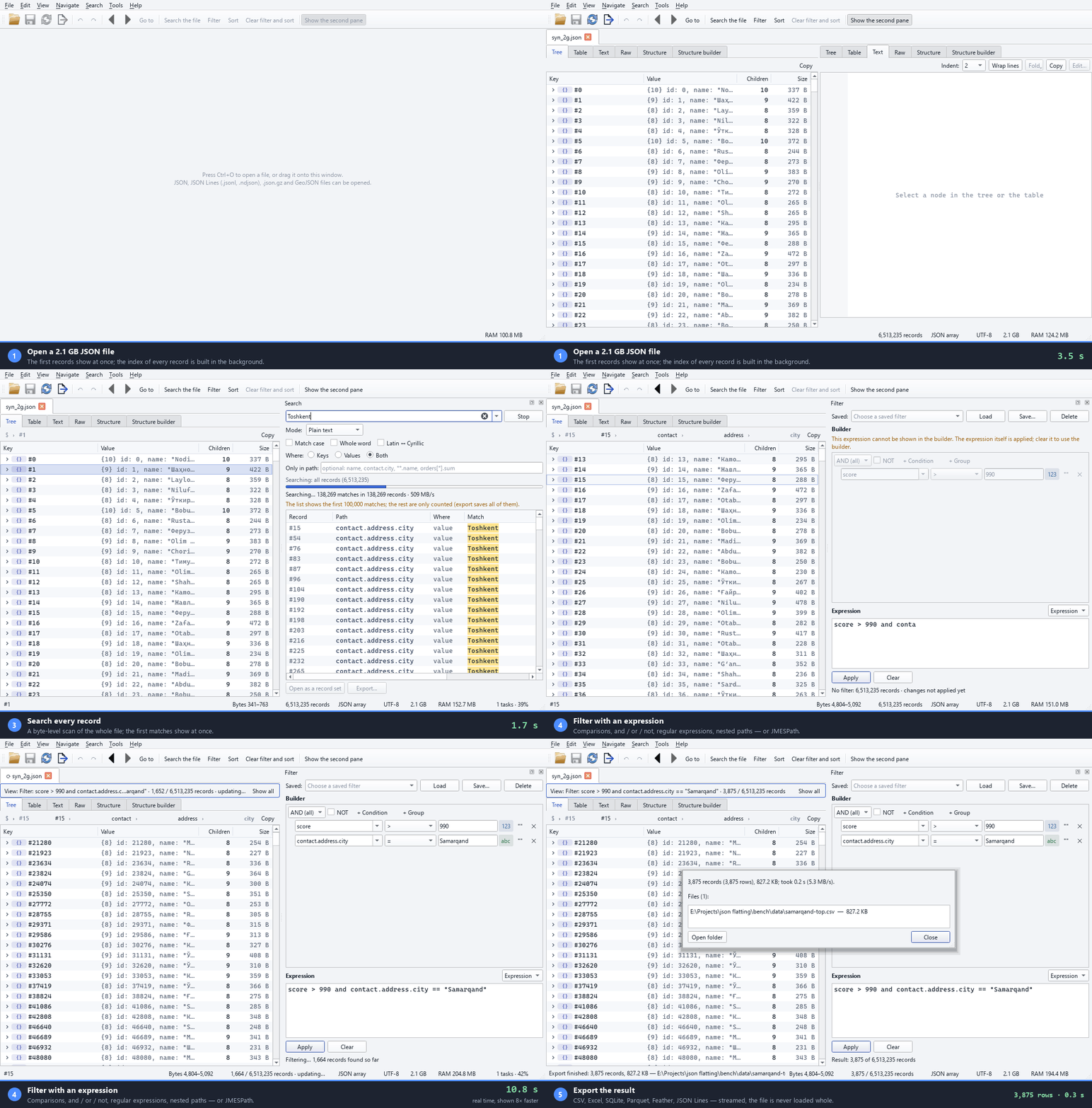
A 2.1 GB file with 6.5 million records: opening, browsing, a search over every record, a filter and a CSV export.
The clock under the window is real time (only the filter is played 8× faster, and the strip says so); recorded
offscreen by scripts/make_demo_gif.py.
Status: done — the 6 core stages (2026-10-19) plus a distribution & extensions round (stage 7, 2026-10-21). Author: Erkin Pardayev · built with Claude Opus 5.5 (author, contact and copyright).
 |
 |
|---|---|
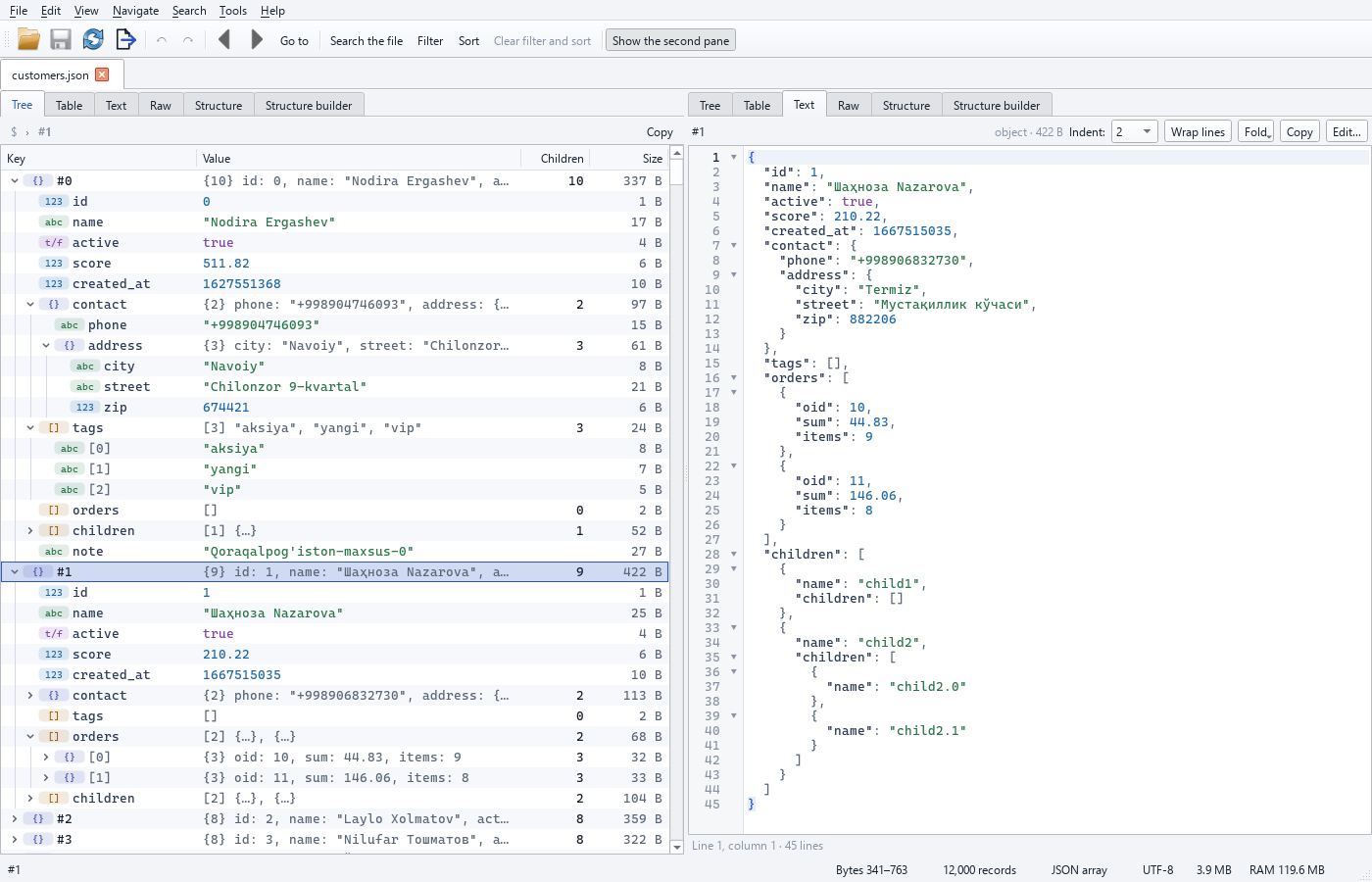
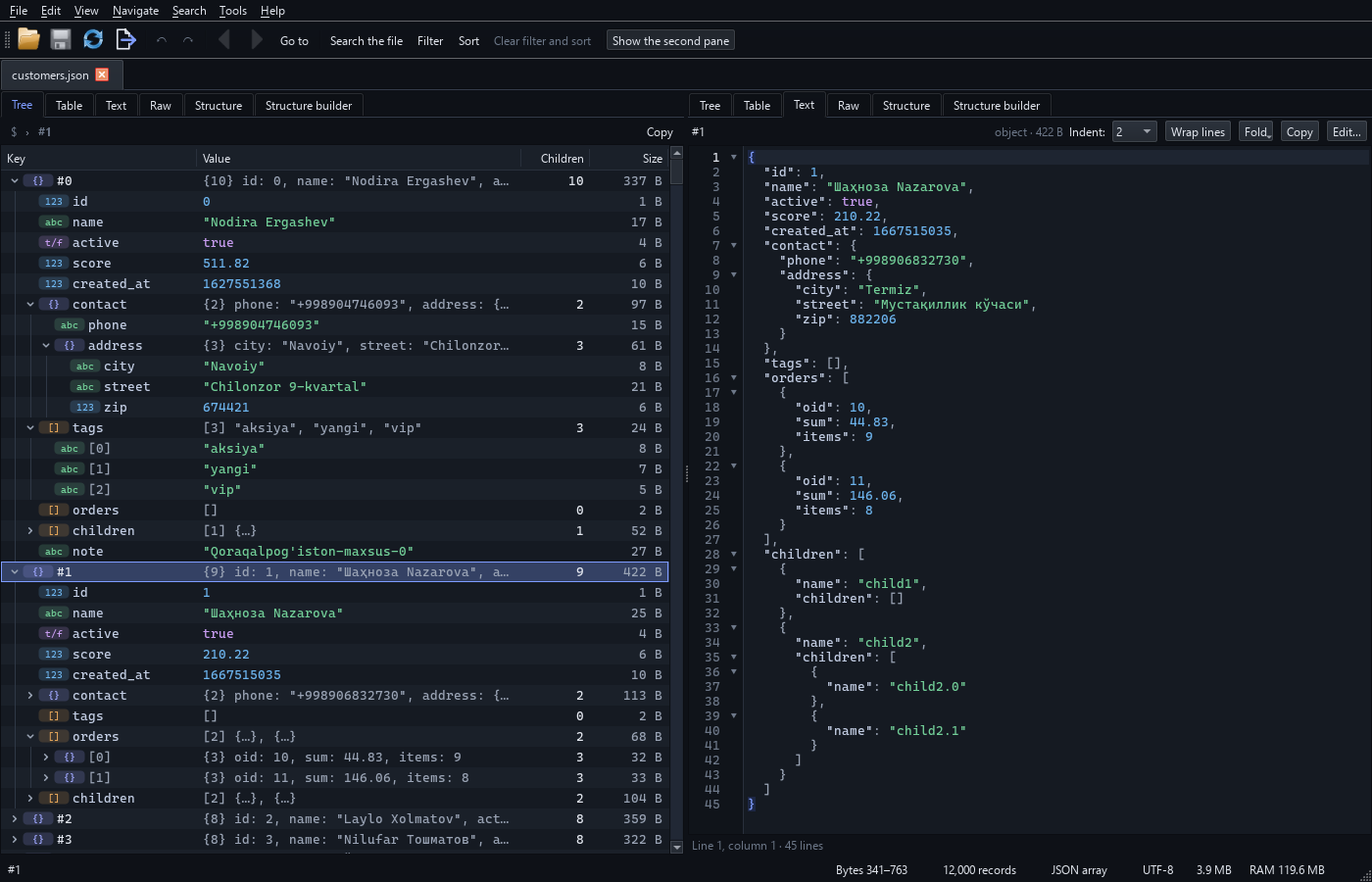
| Light theme | Dark theme |
The viewer: the tree with type badges and byte sizes on the left, the selected record as text on the right — the real
window at 1400 × 900 (English UI; Uzbek is the default), rendered offscreen by scripts/make_screenshots.py.
| # | Stage | Status |
|---|---|---|
| 1 | Core: reader + index (Rust core and Python fallback), RecordSet, search, filter, sort, writer, CLI (inspect, search, filter, sort, convert) |
✅ done |
| 2 | Viewer GUI (PySide6): tree, table, text, raw bytes, Schema view, navigation, search pane, filter builder, sorting, export, background tasks, status bar | ✅ done |
| 3 | Editing: node editing (value, key, type, insert, delete, duplicate, move, drag and drop), bulk operations (with an exact count beforehand), JSON Patch, undo/redo, edit layer (SQLite + segment files, continuous autosave and recovery), safe saving, CLI patch |
✅ done |
| 4 | Structure builder: mapping engine (results identical to json-tuzilma.html), GUI (drag and drop, live preview), mapping files, CLI apply, flatten |
✅ done |
| 5 | Tools: field statistics, duplicates, JSON Schema (generate and validate), split / merge / extract, repair, compare (diff), "smart" values; CLI stats, dupes, schema, validate, split, merge, extract, repair, diff |
✅ done |
| 6 | Polish: command palette, shortcut settings, session restore, workspace files, themes, Windows "Open with", PyInstaller .exe; worker processes for heavy exports; the final benchmark |
✅ done |
| 7 | Distribution & extensions: Apache-2.0, CI / release pipeline (exe installer, wheels), Parquet and Feather / Arrow IPC export, CSV/YAML/XML import, Python API, Russian UI, stats histograms, stdin, fast XLSX/SQLite export (≥ 50 MB/s) | ✅ done |
Contents
- Installation
- Quick start (CLI)
- Graphical interface (GUI)
- Supported formats
- Number precision
- Search
- Filter language
- Sorting
- Export and conversion
- Index, cache and memory
- Errors and logs
- Architecture
- Tests
- Measurements (benchmark)
- Decisions and open questions
- Author, contact and copyright
1. Installation
Requirements: Windows 10/11 (also works on Linux/macOS), Python 3.11+ (tested on 3.14), and, for the fast core, Rust (stable) and Visual Studio Build Tools (MSVC).
py -3.14 -m venv .venv
.venv\Scripts\python -m pip install -U pip maturin
.venv\Scripts\maturin develop --release          # builds the Rust core and installs the package
.venv\Scripts\python -m pip install -e ".[dev]"  # test tools (pytest, hypothesis, openpyxl ...)
The program works without Rust too: there is a pure Python version of the core (fallback) that gives exactly the same
results (checked by tests), only slower. To force it: JSONRESHAPE_BACKEND=python
(or --backend python in the CLI).
For the graphical interface: .venv\Scripts\python -m pip install -e ".[gui]" (PySide6).
Parquet and Feather / Arrow IPC export need the optional pyarrow package: pip install "jsonreshape[parquet]"
(the program works without it; such an export then says how to install it).
Running: jsonreshape ... (CLI) or python -m jsonreshape ...; GUI — jsonreshape-gui [file ...]
or python -m jsonreshape.gui (section 3).
Ready-made downloads (GitHub Releases)
Every version has its files on the Releases page:
| File | What it is |
|---|---|
jsonreshape-<version>-setup-x64.exe |
Windows installer (Inno Setup): for the current user (no administrator rights) or for all users; a Start menu shortcut, an optional desktop shortcut, optionally the jsonreshape command on the PATH; uninstall from Settings ▸ Apps. |
jsonreshape-<version>-windows-x64.zip |
Windows, portable: unzip anywhere and run jsonreshape-gui.exe (the window) or jsonreshape.exe (the command line); both share the _internal\ folder. |
jsonreshape-<version>-linux-x86_64.tar.gz, jsonreshape-<version>-macos-arm64.tar.gz |
Linux / macOS (Apple silicon), portable: tar xzf …, then jsonreshape/jsonreshape-gui or jsonreshape/jsonreshape. |
*.whl, jsonreshape-<version>.tar.gz |
The Python package (3.11+): pip install <file>; pip install "jsonreshape[gui]" adds the window. |
SHA256SUMS.txt |
Verify a download: sha256sum -c SHA256SUMS.txt --ignore-missing (Linux / macOS) or Get-FileHash <file> (PowerShell). |
PyPI (from v0.1.1): pip install jsonreshape — one wheel with the Rust core per platform (Windows x64,
Linux x86_64, macOS universal) that works with every Python ≥ 3.11; elsewhere the sdist builds the Rust core itself
(without Rust the pure-Python core is used). winget (once the winget-pkgs pull request is merged):
winget install Erkinbek.jsonreshape.
The downloads are not code-signed yet: Windows SmartScreen may warn on the first start ("More info" ▸ "Run anyway"). The program sends nothing over the network, whichever way it is installed.
.exe for Windows (run without installing Python)
powershell -ExecutionPolicy Bypass -File scripts\build_exe.ps1
# -SkipTests: build only; -NoInstall: do not use pip; -Installer: also the Inno Setup installer; -Sign <thumbprint>: code signing
The script installs PyInstaller (6.22.3) into the venv (network access is needed only for this step; the program
itself works offline), creates the icon, builds from packaging\jsonreshape.spec and runs smoke tests on the finished
exe (-m packaging). The result is the dist\jsonreshape\ folder (~78 MB): jsonreshape-gui.exe (window) and
jsonreshape.exe (CLI) share one _internal\ folder; give users the whole folder. Startup: CLI ~0.10 s,
GUI window ~0.28 s. Manually:
.venv\Scripts\python -m pip install "pyinstaller==6.22.3" "pyinstaller-hooks-contrib==2026.8"
.venv\Scripts\python packaging\make_icon.py build\jsonreshape.ico
.venv\Scripts\python -m PyInstaller --noconfirm --clean --distpath dist --workpath build\pyinstaller packaging\jsonreshape.spec
.venv\Scripts\python -m pytest -q -m packaging tests\test_packaging.py
The program sends nothing over the network (no telemetry and no update check).
2. Quick start (CLI)
The commands below work the same in cmd.exe, Windows PowerShell 5.1, PowerShell 7 and bash
(lines starting with # are comments; do not type them into the terminal).
Rule: put the expression in double quotes ("...") and any text inside it in single quotes ('...').
# File info: format, encoding, record count, indexing speed, structure (sample: 10,000 records)
jsonreshape inspect data.json --sample 10000

# Search: in keys and values, case-insensitive, apostrophe variants treated as equal
jsonreshape search data.json "O'zbekiston"
# Latin/Cyrillic-insensitive: Тошкент is found too
jsonreshape search data.json Toshkent --translit
jsonreshape search data.json toshkent --path contact.address.city --values
jsonreshape search data.json "^Tosh.*t$" --regex
jsonreshape search data.json "> 1000" --number
# all matches to a CSV file
jsonreshape search data.json maxsus --export results.csv

# Filter (safe expression language or JMESPath); saved filters (presets)
jsonreshape filter data.json tashkent.json --where "contact.address.city == 'Toshkent' and len(children) > 2"
jsonreshape filter data.json top.json --jmespath "active && score > to_number('100')"
jsonreshape filter data.json tashkent.json --where "contact.address.city == 'Toshkent'" --save-preset toshkent
jsonreshape filter data.json tashkent.csv --preset toshkent
# list of saved filters
jsonreshape presets

# Sort (one or more fields; "-" means descending order)
jsonreshape sort data.json sorted.json --by name --by -id

# Conversion (+ optional filter and sort)
jsonreshape convert data.json data.jsonl
# rebuild the keyed object from the JSONL form of a keyed file ({"key": value} lines)
jsonreshape convert keyed.jsonl keyed.json --as-keyed
jsonreshape convert data.json table.csv --columns "id,name,contact.address.city"
jsonreshape convert data.json table.xlsx --array-mode rows --explode orders
jsonreshape convert data.json db.sqlite
# Parquet and Feather / Arrow IPC (.feather or .arrow); the optional pyarrow: pip install "jsonreshape[parquet]"
jsonreshape convert data.json data.parquet
jsonreshape convert data.json data.feather --feather-compression lz4
jsonreshape convert data.json pretty.json --indent 4 --sort-keys --where "active == true" --sort-by -score
# only selected records (numbered from 0: 0:100 = 0..99) or a single node
jsonreshape convert data.json selection.csv --select "0:100,500"
jsonreshape convert data.json orders.json --node "#5.orders"

# JSON Patch (RFC 6902): the result goes to a new file, in the same format and encoding as the input file
jsonreshape patch data.json fix.patch.json result.json
# data.json.bak is made first; --no-backup
jsonreshape patch data.json fix.patch.json --in-place

# Apply a mapping saved in the structure builder to the whole file (streaming, in parallel processes)
jsonreshape apply structure.mapping.json data.json new.json
# flatten nested children lists into a single list with a level number (_depth)
jsonreshape flatten data.json flat.jsonl --children-key children

# Statistics, duplicates, JSON Schema
jsonreshape stats data.json --field contact.address.city
jsonreshape stats data.json --where "active == true" --json
jsonreshape stats data.json --field score --histogram --bins 20
jsonreshape dupes data.json --key id --top 10 -o dupes.jsonl
jsonreshape schema data.json data.schema.json --strict
jsonreshape validate data.json --schema data.schema.json --export errors.csv

# Split, merge, extract
# or --size 500MB / --records 100000; -o folder
jsonreshape split data.json --parts 10
# the program expands the pattern itself
jsonreshape merge "part_*.json" -o all.jsonl --dedupe-by id
jsonreshape extract big.json items.json --path data.items
jsonreshape extract data.json orders.jsonl --gather "orders[*]"

# Repair (the original file is not changed) and compare
# --check: check only
jsonreshape repair broken.json repaired.json --report fixes.csv
jsonreshape diff old.json new.json --key id --exit-code

# Import: CSV / TSV, YAML or XML -> JSON Lines (default) or a JSON array (.json); numbers keep their text
jsonreshape import data.csv data.jsonl
jsonreshape import data.csv data.json --indent 4
jsonreshape import table.tsv -o table.jsonl --no-header --types string
jsonreshape import export.csv -o export.jsonl --delimiter ";" --encoding cp1251 --skip-bad
jsonreshape import config.yaml config.json
jsonreshape import catalog.xml -o catalog.jsonl --record-tag item

# Standard input: "-" instead of INPUT (pipelines); see the note on shells below
curl -s https://example.com/data.json | jsonreshape convert - data.jsonl
jsonreshape inspect - < data.json.gz
If JMESPath needs a literal such as `100`: use a single-quoted string in PowerShell
(--jmespath 'score > `100`'), double quotes in cmd.exe (--jmespath "score > `100`"),
or write it without a literal: to_number('100').
Common input options: --record-path data (for an object that contains a large array; data[0],
/data/0, data.0 also work), --format auto|array|jsonl|brace_list|wrapped|keyed|single|stream,
--allow-partial (on a JSON error, work with the records before the error), --no-cache.
Global: --lang uz|en|ru, --backend auto|rust|python, -q, -v/-vv, --version.
Standard input: - in place of INPUT reads standard input — in every command with one INPUT, and as one of the
inputs of merge / diff; outputs are always files (- as an output is refused). The data is first copied in 1 MiB
pieces to a temporary file in the work folder (%LOCALAPPDATA%\jsonreshape\tmp, or the tmp folder of a configured
cache folder) with a progress line, then opened like a named file: --format, --record-path and the gzip detection
work as usual, and an info line says how many bytes were read. The temporary file is removed when the command ends,
also after an error. Because the length of a pipe is unknown, the folder must keep 64 MiB free beyond the bytes read
so far (checked every 256 MiB). - is refused when standard input is the terminal; split - needs -o DIR,
import - needs --from csv|yaml|xml, patch --in-place cannot work on -. Shells: cmd.exe and bash pass the bytes
of a pipe or of a < redirection unchanged; Windows PowerShell 5.1 (and PowerShell 7 before 7.4) re-encodes a
pipeline as text, which corrupts gzip and non-ASCII data, and has no < — give the file name there, or use
PowerShell 7.4 or newer.
Exit codes:
| Code | Meaning |
|---|---|
0 |
success |
1 |
user error: invalid command/option/expression, file not found, a --record-path that does not exist (the array paths found are suggested), output file is the same as the input file |
2 |
JSON error in the input file (line/column/byte and its surroundings are shown) or the file was changed by another program during the run (the result is not saved) |
3 |
cancelled (Ctrl+C / Ctrl+Break) — no partial output file is left behind |
4 |
internal error (a short message and the path of the log file) |
5 |
data mismatch: validate found errors or diff --exit-code found differences |
Full options of each command: jsonreshape COMMAND --help (in Uzbek; --lang en for English, --lang ru for
Russian).
In PowerShell and bash, write $key in single quotes: '$key'.
The original file is never changed on its own: all results are written to a separate file under a temporary name
and atomically swapped in at the end; if the output file is the input file (even under a different spelling or through
a link), it is refused. The file itself is replaced only when explicitly requested (patch --in-place, Save in the
GUI): after the new copy is verified, atomically and, by default, with a .bak backup. If the input file changes
during the run (another program rewrites it, or deletes and recreates it), this is detected and no corrupt result is
written.
3. Graphical interface (GUI)
jsonreshape-gui
jsonreshape-gui big.json other.jsonl
python -m jsonreshape.gui big.json
PySide6 is required (pip install -e ".[gui]"). You can also drag files onto the window or use File → Open
(Ctrl+O); the File → Recent files list is kept. The first records appear as soon as the file opens (while the
index is built in the background), and the record count updates live.
Window layout
- Every file opens in its own tab. Inside a tab, two panes sit side by side (default: Tree | Text); each pane chooses its view: Tree, Table, Text, Raw, Structure (Ctrl+1…5). The views are linked: a node selected in one is selected in the other too (also a table cell, the cursor in the text, the raw bytes).
- Message bars at the top of the tab: a JSON error (line, column, byte, reason; Go to the error; the records
before the error stay open), the list of broken lines in JSON Lines, format warnings, the record path (
data) and changing it, and Reopen when the file is changed by another program. - While a filter, sort or search result is shown, a banner says "View: Filter … · 22 / 300 records" with Show all.
- Status bar: file size, record count (with the indexing percentage), format and record path, encoding, current path, selection, the node's byte range, memory (RAM), background tasks.
- Side panels: Search (Ctrl+Shift+F), Filter (Ctrl+Shift+L), Background tasks (for each task: %, MB/s, time left, "Cancel").
Views
- Tree. Records are
#0,#1, … (numbered from 0); in a keyed file, the keys; in a wrapped file ({"meta": …, "data": […]}) the first row is "(wrapper)". Columns: key (type icon and colour), value, number of children, size (bytes). → expands, ← collapses,*expands everything (asks first when there are more than 1,000 rows), "Expand to level" (1–9), "Collapse all". A large node (for example 1 million children) is indexed in the background and shown virtually. A clickable path (breadcrumb) at the top. Expanded nodes stay expanded when the filter or sort changes. View-only sorting: object keys alphabetically, array elements by a field (the original indices are shown). Space opens the full value window. - Table. Records are rows, fields are columns (nested ones too:
contact.address.city). The columns are taken from the structure automatically; the "Columns…" dialog chooses and orders them and adds your own path; the header menu hides a column or freezes the first column. The layout is remembered per file (and record path). Array/object cells show[3]/{5}; a double-click opens them in the tree. Clicking a header sorts (click again for descending, Shift adds a secondary key). Quick filters under the header (Alt+↓):Toshkent(contains),=12,!=x,>5,<=5,5..10,~regex,null,!null,exists,missing,empty. Ctrl+C copies the selected cells as TSV (for pasting into Excel). - Text. The selected node, pretty-printed: colours, line numbers, bracket folding, line wrap,
indentation 2 / 4 / tab. Numbers and strings stay byte for byte as in the file (
1e400,1.10,-0.0). The node under the cursor is selected in the tree too. For text larger than 4 MB the beginning is shown; to see all of it, use "Open in the raw view". - Raw. The file's bytes, page by page (the whole file is not read): byte offset and line number, "Go to offset"
(
123456,0x1E240), "Go to line", the location of a JSON error is marked. - Structure (Schema view). A tree of the fields: type distribution, presence %, examples, length/number ranges; from a 10,000-record sample or a "Full scan" (in the background). Menu: add as a table column, "exists" / "missing" filter, sort, add to the filter builder.
Navigation
- Ctrl+G:
data[120].contact.address,$.data[120],/data/120,#120,#120.contact. - Alt+← / Alt+→ — selection history; Ctrl+B — bookmark (named, saved; since stage 3 Ctrl+D is "Duplicate"), Ctrl+Shift+D — the list of bookmarks.
- Every node's context menu: copy the value (JSON pretty / compact, Python, CSV row), copy the path
(dotted
a.b[0].c, JSONPath, JSON Pointer, Python["a"]["b"][0], JavaScript), copy the key; "Filter by this value", "Sort by this field ↑/↓", "Show in the tree", "Open in a new tab", the full value.
Search, filter, sort
- Quick find (Ctrl+F) in the tree, table, text and raw views, within the loaded part; F3 / Shift+F3.
- Full search (Ctrl+Shift+F): in keys / values / both, optionally only in a given path; plain text, regex,
number (
> 1000); match case, whole word, Latin ↔ Cyrillic; apostrophe variants always count as the same. Results appear as they are found; clicking one goes to the node; "Open as a record set"; export of all results to CSV/JSON; search history. A search does not start while a filter or sort is still running (you are asked to wait until the view is ready). - Filter (Ctrl+Shift+L): a visual builder (field + operator + value; AND / OR / NOT groups) and an expression line (the expression language or JMESPath) — changing one updates the other; named presets. The result is computed in the background and shows up as it fills in.
- Sort (Search → Sort…): several fields, ascending / descending,
nulllast or first, natural order (child2 < child10), Uzbek alphabet (default) / simple / Unicode. - The filter and the sort apply equally to every view and to export; when a search result is open, the filter and sort work on those records.
Export (Ctrl+E)
JSON (indentation 2 / 4 / tab / compact, sort keys, keep the wrapper, rebuild the keyed object), JSONL, CSV, XLSX,
SQLite. Scope: the current view (filter + sort), all records, the selected records, the current node (an array or
object node — also to CSV/XLSX/SQLite) or a record set produced by another tool (for example, the duplicates).
"Keep the wrapper" works in every format; an output named .gz is compressed. Writing to the source file itself
(also through another name or a link) is not allowed. Export runs in the background: it goes on even if you close
the dialog or reopen the file; at the end there is a report (records, files, warnings).
Editing (stage 3)
The original file is not changed while you edit: every change is written to a separate edit layer, and the file is replaced atomically with a verified new copy only when you press Save.
- On a node (in the tree and the table): Enter — edit the value (a short value in the cell itself, long text
in a separate window; a number opens with its original spelling —
1.10does not turn into1.1); Shift+Enter — as JSON text (live validation, the error line and column are marked, "Format"); F2 — rename the key; Ins — insert (inside / before / after: key, type, value); Del — delete; Ctrl+D — duplicate; Alt+↑ / Alt+↓ — move; Ctrl+V — paste JSON from the clipboard; "Change type" in the menu (only the types that are possible). Errors such as an existing key, an invalid number or invalid JSON are reported in the edit box itself or in the status bar (no error dialog opens). In the tree, records and elements can be dragged with the mouse (before / inside / after). With several selected nodes (Shift / Ctrl): delete, duplicate and move — up to 10,000; for more, use bulk operations. - In the table you edit the cell of that exact column (a field the record does not have is added); F2 in the
$keycolumn changes the record key in a keyed file;$indexis read-only. - Undo Ctrl+Z, redo Ctrl+Y / Ctrl+Shift+Z. Every action (a bulk operation too) is one step, shown by name in the menu ("Undo: …"); 1,000 steps by default (a setting, at least 200).
- Bulk operations (Ctrl+H): find and replace (plain text or regex, optionally in a given path), rename key, delete field, set field (always / if missing / if present), clean strings (leading/trailing and extra spaces), convert type, remove duplicates (by key, keeping the first or the last). Scope: all records, the current view (filter / sort) or the selected records. First Preview: the exact number of records that will change, 5 examples (before → after) and problems; then Apply — the result matches the counted number exactly.
- JSON Patch (RFC 6902): Edit → "Import JSON Patch…" (one step; if any operation fails, nothing changes) and "Export changes as JSON Patch…" (the net difference from the original file).
- Save (Ctrl+S) runs in the background. The file is written in its own format (array, keyed object, wrapper,
JSONL, stream, single value), encoding (UTF-8, BOM, UTF-16), compression (gzip) and with its attributes (hidden,
system, NTFS compression); unchanged records are copied byte for byte. The new file is first written to a
temporary file and checked by the core scanner (the record count too), then put in place of the original with a
single atomic operation. By default the old file stays as
file.json.bak(a setting turns this off). A value typed into an open edit box is applied before saving. If an export or another background task is running on this file, the save waits for it (or stops it — you are asked). Save As (Ctrl+Shift+S) writes to another file (a.gzname means gzip); overwriting a file that is open in another tab with unsaved changes is refused. - Autosave and recovery. Every step is written to disk at once (SQLite WAL + checksummed segment files, fsync): changes are not lost even if the program or the computer shuts down. The next time the file opens, a bar appears: "Unsaved changes were found: time, N steps" — restore, discard or save as JSON Patch. If a save was interrupted midway (even if the file has gone missing) — Finish the save: the decision rests on evidence (file identity, time, size, hashes); when in doubt nothing is deleted and the files are named one by one. If the file was changed by another program, you are offered to save the changes as a JSON Patch (they can be applied again to the new file).
- Layer location:
%LOCALAPPDATA%\jsonreshape\edits\(the "Next to the file" setting —file.json.jredit\). Only one tab or window edits a file at a time (also through a differently spelled path or a link); the others can only view it. - Closing a tab, reopening (F5) and exiting ask about unsaved changes or a save in progress. The tab and window
titles show
*, the status bar shows "● N changes". - Limitations: a single record larger than 50 MB cannot be edited (bulk operations skip it and report the
count); a file with a JSON error (partially opened) is read-only — "Repair" it first; a
brace_listfile is saved as a JSON array, broken lines in JSONL are dropped on save, and extra data after the end of the gzip stream (when saving without a backup) is discarded — all three are asked about first.
Structure builder (stage 4, Ctrl+6)
Rebuild the structure of the records with the mouse and apply the result to the whole file. The reference is the
json-tuzilma.html prototype: the result is identical to it (checked with acceptance tests 1–10 and 4,000 random
cases). The only differences come from JavaScript limitations: numbers are kept exactly (1.10, 1e400,
12345678901234567890), the key order does not change, there is redo, record numbers start at 0.
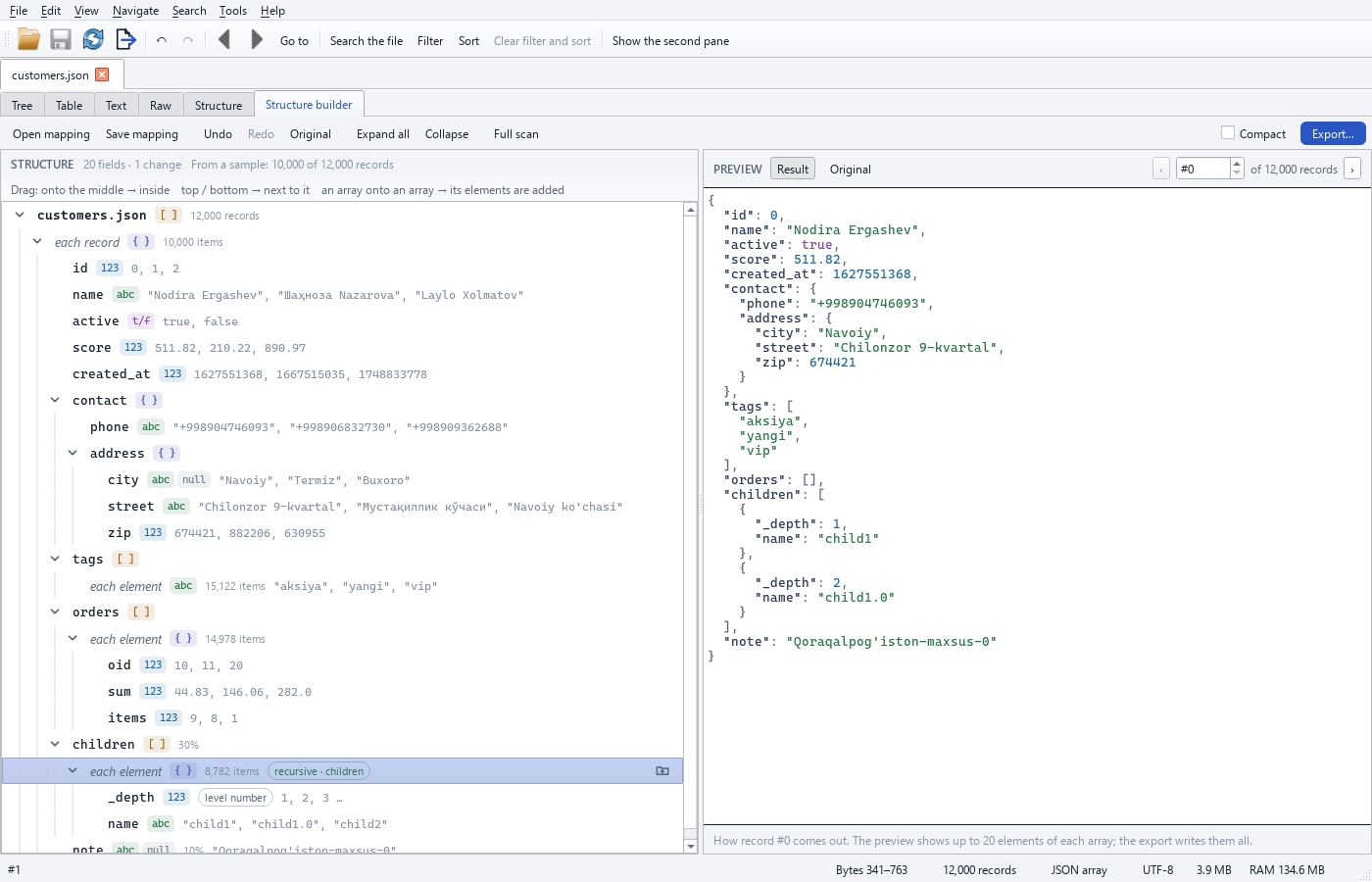
- The "Structure builder…" button in the Schema view, or Ctrl+6. On the left, the structure tree (from a sample —
10,000 records by default — or from all records with "Full scan"); on the right, the live result ("Result" /
"Original", the
‹ #N ›record picker). - Drag and drop: onto the middle of a row — inside; onto its top or bottom edge — before or after. Moving a field
from inside an array out of it — "collected into a list"; moving an outer field into an array element —
"repeated in every element". New group (Ins), rename (F2), remove (Del), move the contents one level up
(Ctrl+Shift+U), recursive flatten (
children→ with the level number_depth), move up/down (Alt+↑ / Alt+↓), move (Ctrl+X, Ctrl+V); the row menu shows every action and why it is not possible. - Every change is marked with a badge (
moved,original name,new group,recursive, …); Ctrl+Z / Ctrl+Y — the builder's own history; "Original" (reset). - Save the mapping to a file and open it; Export with the mapping (Ctrl+E): JSON or JSON Lines, the whole file
or the current view; in the background, in parallel processes for large files. CLI:
jsonreshape apply,jsonreshape flatten. - Fields not seen in the sample do not reach the result (the reference rule) — the export report gives the number of such records; use "Full scan" if needed.
Tools (stage 5)
Everything is in the Tools menu, the node menu and the relevant views. Heavy work runs in the background (with progress and cancel); an edited file is used as shown (with its unsaved changes); result files never overwrite the source file or a file that is open in another tab with unsaved changes.
-
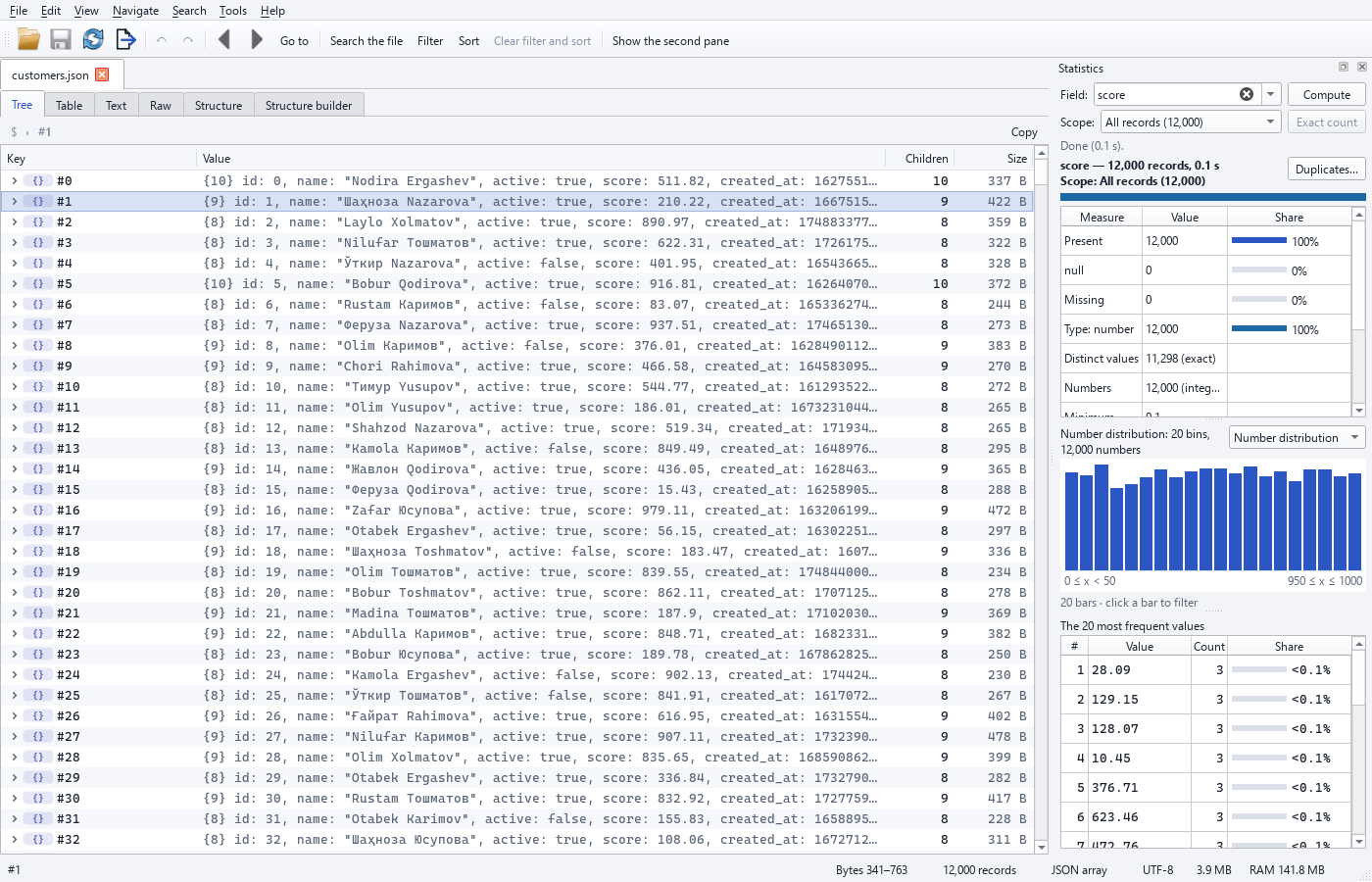
Field statistics (Tools → "Field statistics…"; "Statistics" in the node menu, the table header and the Schema view; right-hand panel): presence (present /
null/ missing), types, number of distinct values (exact or "≈" with an error bound), min / max / mean / sum for numbers (in exact notation), string lengths, the 20 most frequent values (with share; for multi-valued fields also the record count). While computing, the result refreshes every ~1 second. Double-clicking a value filters by it; the menu has filters bynull, missing, type and length, and "Show in tree". Scope: the current view or all records; "Exact count". Charts. Under the summary the statistics dock draws a chart of the field: for numbers a histogram (up to 32 "nice" bins — steps of 1, 2, 2.5 or 5 × 10ᵏ, integer bins for integer fields), for strings the distribution of the string lengths, and for every field the 20 most frequent values as bars with their share; a small combo switches between the kinds the field offers. Hovering a bar shows its range, count and share (tooltip and the line under the chart); clicking a histogram bar filters the view by that range (age >= 20 and age <= 29,score >= 0.5 and score < 1,len(name) >= 3 and len(name) <= 4— a quick filter keyed by the field, so the next click replaces it), clicking a top-value bar filters by the value (city == "Toshkent"). The histogram is exact while the field has at most 65 536 distinct numbers; beyond that it is drawn from a uniform random sample of 65 536 values scaled to the total (marked "≈", the tooltip says so). The numbers stay exact:1e400and12345678901234567890keep their text in the bin labels and the filters. The chart follows the live result while the statistics are computed. In the CLI,stats --histogramprints the same histograms under each field (numbers and string lengths;--bins N— at most N bins, 1–4096, default 32, implies--histogram); with--jsoneach field getshistogramandlength_histogram(bins, exactedges,counts,exact,sample_size;nullwhen the field has no numbers / strings). Without the option the output is unchanged. -
Duplicate records (Tools → "Duplicate records…", Schema view): key field (
$key— the member key,$— the whole record), keep the first or the last; the number of duplicates, 20 example groups (click to go to the record; filter by group); "Show the duplicates" (as a record set), "Export…", "Remove the duplicates…" (a bulk operation: shows the exact count first). -
JSON Schema (Tools → JSON Schema): "Generate a schema…" — for the whole document or for one record, loose or strict, from the structure cache or with a full scan; "Validate against a schema…" — schema file, scope, formats; problems are listed as they are found (
#record | path | message | keyword), clicking one goes to the node; "Show the invalid records", export to CSV/JSONL, a summary (by keyword and by path). -
Repair (Tools → "Repair JSON…"; the button on the JSON error, broken lines and
brace_listbars): "Check" (writes nothing) and "Repair" — the result goes to a new file; report: fixes by type (the first location opens in the raw view), the truncated part, the spot that cannot be fixed (with line, column and^), a table of all fixes, saving the report, "Open the repaired file", and when needed "Save the partial result". -
Split and merge (Tools menu; node menu → "Split this node into parts…"). Split: the whole file, the current view or a node; by number of parts, records per part or part size, with a live plan (part names, records, size); format, name pattern, without the wrapper, delete old parts. Merge: files and open tabs (with unsaved edits — as shown), change the order, JSON/JSONL, indentation, sort keys, keep the wrapper, remove duplicates by key.
-
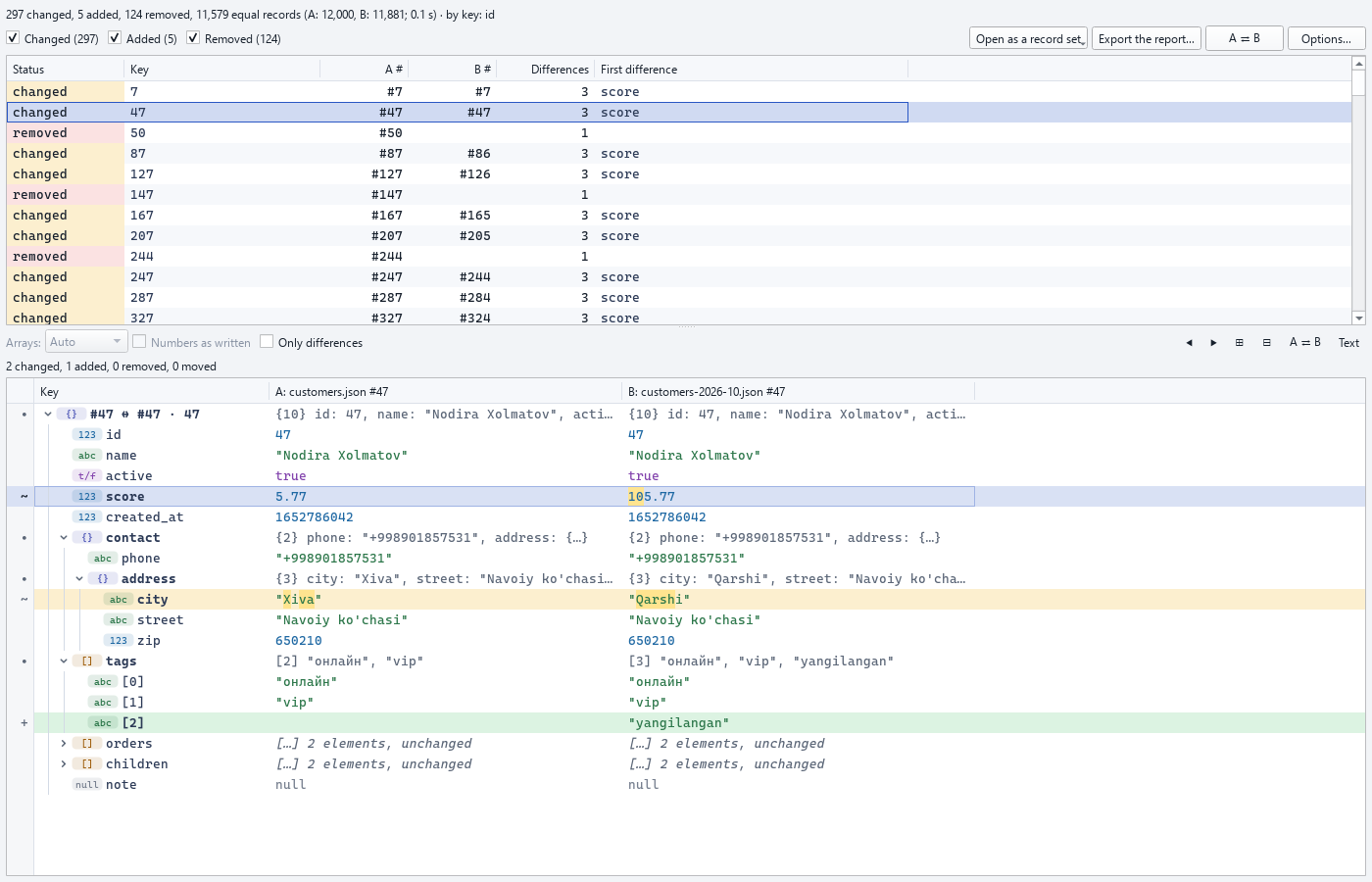
Compare (Tools → "Compare two files…"; node menu → "Mark for comparison" / "Compare with the marked node"; two selected nodes → "Compare the two selected"). Files are compared by key, by alignment or by position: a results table (status, key, A#, B#, number of changes, first path) and a side-by-side tree of the selected pair
Key | A | B— added in green, removed in red, changed in yellow, moved in blue; changed characters are marked in short strings; F7 / Shift+F7 — next / previous difference; "Only differences", array matching (index / auto / key / unordered), A ⇄ B, "Text" mode; open the differing records as a record set; export the report. -
"Smart" values (tree, table, full value window): unix times and ISO dates get a note with the Tashkent time and the weekday; URLs are underlined, Ctrl+click → "Open in the browser?" → opens only after you confirm;
#rgb/#rrggbbcolours get a small swatch; base64 images get a thumbnail in the full value window. -
Schema view: a "null / missing" column (from the sample or a full scan — the header says which), the share of integers; "Statistics" (a double-click too) and "Duplicate records…".
-
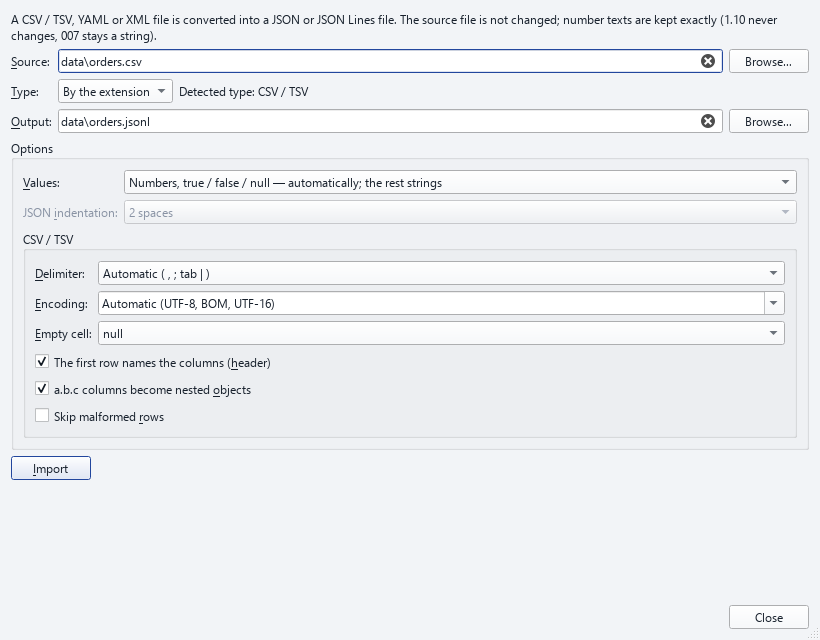
Import (CSV, YAML, XML) (File → "Import (CSV, YAML, XML)…"): converts a CSV / TSV, YAML or XML file into a new JSON Lines or JSON file and opens it in a new tab ("Open the result"). The type is detected from the extension (it can be overridden); options: delimiter (automatic or
,;tab|), header row, nesteda.b.ccolumns, encoding, skipping malformed rows, values (automatic numbers /true/false/null, or everything as text), empty cells (nullor""), the XML record tag or record path, the JSON indentation of a.jsonresult. The source file is never changed; the result is never written over the source or over a file with unsaved changes; the import runs in the background with progress and "Stop"; the report shows the records, the converted numbers, literals and empty cells, skipped rows and warnings.
Convenience (stage 6)
-
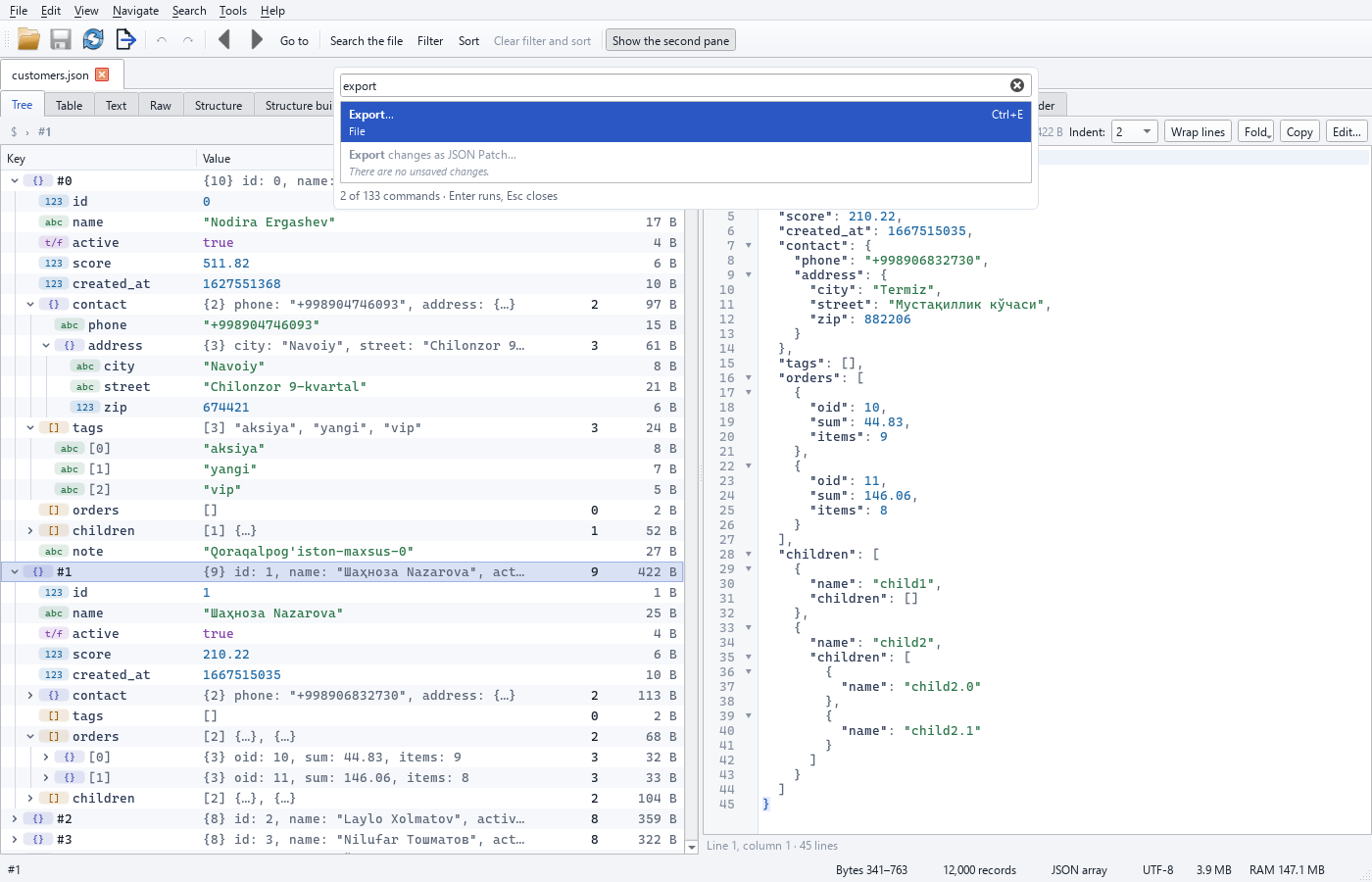
Command palette (Ctrl+Shift+P) — a search box that opens over the window: every menu command ("File ▸ …", "Tools ▸ …"), the current node's menu ("Node ▸ …"), open tabs ("Tab: …") and recent files ("Open: …"). Each row shows the command name, its menu path and its key. The search ignores case, apostrophe variants (o' / oʻ / o‘) and the Latin–Cyrillic difference ("сақлаш" also finds "Saqlash" in the Uzbek UI); first come names that start with the typed word, then matches at the start of a word, then letter sequences. With an empty search — the last 20 commands used. A command that cannot run right now is greyed out, with the reason. Enter runs it, Esc closes.
-
Keyboard (Settings ▸ Keyboard): change, remove or reset the key of any command; a key that is taken is refused, naming the command it belongs to. The tree's and table's own keys (↑↓→←,
*, Space, Enter, F2, Ins, Del, Ctrl+D, Alt+↑/↓, Ctrl+V, Ctrl+C …) do not change and are shown as a list. -
Restore the last session. When the program starts without a file, the last session reopens: the files (with the chosen format / record path), the views of both panes, the current node, the expanded nodes (up to 2,000 per tab), the filter, quick filters, sort and search query. The session is saved when the window closes and every minute (protection against an unexpected stop). Settings ▸ General ▸ "Restore the last session": Always (default) / Ask every time / Never. When a file is given on the command line or through "Open with", only that file opens. Files that are not found are skipped; unsaved changes are offered only through the recovery bar.
-
Workspace (File ▸ "Save workspace…" / "Open workspace…" / "Recent workspaces"): the open tabs are written to a
*.jrworkspacefile — everything in the session, plus bookmarks, table columns and the structure builder's tree; paths are also stored relative to the workspace file (it still works when the folder is moved); the file is validated strictly (on an error, the JSON pointer of the broken part is reported). Edit layers are not copied into the workspace. -
Windows "Open with" (Settings ▸ General): add jsonreshape to, or remove it from, the "Open with" list of
.json,.jsonl,.ndjson,.geojson,.gzfiles (you are asked first). It is written for the current user only (HKCU\Software\Classes), the default program is not changed; removing deletes only what it wrote itself. -
Themes: follow the system / light / dark — every window (the stage 3–5 windows too) uses only theme colours and updates at once when the theme changes.
Settings and logs
Tools → Settings: sample size, cache folder and size limit, memory limit, memory for sorting, large node thresholds, export defaults, language (Uzbek / English / Russian), theme (follow the system / light / dark), monospace font and its size. Logs: Tools → Open the logs folder; every error dialog has "Open log".
Keyboard
| Key | Action |
|---|---|
| Ctrl+O / Ctrl+W / F5 / Ctrl+Q | open / close tab / reopen / exit |
| Ctrl+S / Ctrl+Shift+S | save / Save As |
| Ctrl+Z / Ctrl+Y (Ctrl+Shift+Z) | undo / redo (in the structure builder — its own history) |
| Ctrl+1 … Ctrl+6 | in the active pane: Tree, Table, Text, Raw, Structure, Structure builder |
| ↑ ↓, PgUp PgDn, Home End | move |
→ / ← / * |
expand node / collapse node / expand all (tree) |
| Space | full value window |
| Ctrl+C / Ctrl+Shift+C | copy the value (in the table, the selected cells as TSV) / the path |
| Ctrl+F, F3, Shift+F3 | quick find, next / previous match |
| Ctrl+Shift+F / Ctrl+Shift+L | full search / filter panel |
| Ctrl+G | go to a path |
| Alt+← / Alt+→ | back / forward |
| Enter / Shift+Enter / F2 | edit value / edit as JSON / rename key |
| Ins / Del / Ctrl+D | insert / delete / duplicate |
| Alt+↑ / Alt+↓ | move node (in the tree) |
| Ctrl+V | paste JSON from the clipboard |
| Ctrl+H | bulk operations |
| Ctrl+B / Ctrl+Shift+D | add bookmark / bookmarks |
| Ctrl+E | export (in the structure builder — export with the mapping) |
| Ctrl+Shift+P | command palette |
| F7 / Shift+F7 | next / previous difference in the compare window |
| Ctrl+= / Ctrl+- / Ctrl+0 | larger font / smaller font / reset |
| Alt+↓ | quick filter row in the table |
How it stays responsive
Indexing, search, filter, sort, structure inference, export — all of it runs in the background (with progress and cancel). Lists, the table and the tree are drawn by our own virtual widget: only the rows on screen are read, so even 100 million rows and more scroll smoothly (Qt's ready-made tables and trees take memory for every row). The visible rows are loaded in a separate thread, and the caches are bounded. Python's garbage collector runs only on the GUI thread and the GIL switches quickly between threads — the window stays responsive even during heavy background tasks (measurements: section 14).
4. Supported formats
The format is detected automatically (inspect shows it) or given with --format / --record-path.
| Format | Looks like | Record |
|---|---|---|
array |
[ {...}, {...} ] |
an array element |
jsonl |
one JSON value per line (.jsonl, .ndjson, or JSON Lines named .json) |
a line; broken lines are skipped and listed |
brace_list |
broken { {...}, {...} } |
the values inside (with a warning) |
wrapped |
{"meta": {...}, "data": [ ... ]} |
the elements of data (the record path); the outer wrapper is kept and shown by inspect |
keyed |
{"id1": {...}, "id2": {...}} |
the top-level members (key + value, the key is $key) |
single |
one huge value | inner containers are indexed on demand |
stream |
consecutive JSON values (without separators or spanning several lines) | each value |
Encoding: UTF-8 (with or without BOM), UTF-16 LE/BE (with or without BOM), .json.gz (and any gzip). UTF-16 and
gzip files are first converted to a UTF-8 copy (streamed, with bounded memory) and cached; the first records are
not visible until the copy is ready (~0.5 s for 200 MB of data). UTF-32 is rejected (with a clear message).
Output formats (convert, filter, sort, the export dialog): JSON, JSON Lines, CSV, XLSX, SQLite,
Parquet (.parquet) and Feather / Arrow IPC (.feather or .arrow); the last two need
pip install "jsonreshape[parquet]". The four table formats — CSV, XLSX, Parquet, Feather — share one column
model (--columns, automatic columns, a.b.c, --array-mode, --explode), so the same export gives the same
header and rows in each of them. .parquet.gz and .feather.gz are refused like .xlsx.gz: Parquet and Arrow
IPC compress their own data (--parquet-compression zstd|snappy|gzip|none, --feather-compression zstd|lz4|none;
zstd by default).
Import of other formats (jsonreshape import, File → "Import (CSV, YAML, XML)…"; README §2): CSV / TSV, YAML
and XML files become JSON Lines (one record per line) or one JSON array / value. Numbers keep their text exactly
(1.10 stays 1.10, 12345678901234567890 is not rounded; 007 stays a string). CSV: UTF-8 with or without BOM,
UTF-16 with a BOM, or a given --encoding; the delimiter is detected (, ; tab |) or given; RFC 4180 quoting
with newlines inside fields; the header names the columns (a.b.c → nested objects); empty cell → null. YAML:
needs the optional pyyaml (pip install jsonreshape[import]), one document → JSON, a --- stream → JSON Lines;
read into memory whole (PyYAML cannot stream: a warning above 256 MiB, refused above twice the memory limit); safe
loader only. XML: streamed; attributes → "@name", text → "#text", repeated child elements → arrays, an element
with text only → that text; records are the children of the root or the elements named by --record-tag /
--record-path; documents with <!ENTITY declarations are refused (safety). Compressed (.gz) inputs are not
imported (unpack them first).
Detection rules for a file with an object root: if the start of the file (head_bytes, default 4 MiB) contains a
large array that is not closed yet — wrapped (that array's path is chosen automatically and a warning is shown);
in a small file, if an array whose values are mostly objects takes up most of the file — wrapped; if ≥ 80% of
the members are objects — keyed; otherwise — single. All array paths found (candidates) are shown in the
inspect result. A JSON Lines file whose first record is larger than 4 MiB is also detected correctly (the first
value is scanned to its end, at most 256 MiB).
5. Number precision
The text of numbers is kept exactly: 0.1, 1e400, 12345678901234567890, -0.0, 1.10, 1E5, -0,
123456789012345678901234567890 come out in exactly this form after filtering, sorting, conversion and a JSONL
round trip, and are never turned into strings. Internal model: numbers that orjson can write back exactly
("plain") are ordinary int/float; the rest are JsonFloat/JsonInt (value + original text).
Comparison is the same and exact everywhere: the filter (--where), search --number and sorting compare numbers
by their exact decimal value (1.10 == 1.1, 1e-400 > 0, 1e400 < 2e400, large integers exactly). In XLSX,
numbers with more than 15 significant digits or outside the double range are written as text (with a warning),
because Excel cannot store them exactly. In SQLite, numbers whose value fits a double exactly are written as
REAL, 64-bit integers as INTEGER, and those that do not fit (1e400, very long numbers) as TEXT (with a
warning).
6. Search
jsonreshape search FILE MATN: in keys (--keys), in values (--values) or in both; only on a given path
(--path name, --path contact.address, any depth: --path "**.name").
Modes: plain text (default: case-insensitive, full Unicode casefold), --case-sensitive, --whole-word,
--regex (Python re), --number (> 1000, >= 5, < -2.5, = 3, != 0, 1000..2000).
Conveniences for Uzbek:
- apostrophe variants are always treated as equal:
'‘’ʻʼ`´(O'zbekiston=Oʻzbekiston=O’zbekiston); --translit: Latin ↔ Cyrillic insensitive (Toshkent↔Тошкент,O'zbekiston↔Ўзбекистон,G'ulom↔Ғулом,Shahrisabz↔Шаҳрисабз,Moʻjiza↔Мўъжиза,Isʼhoq↔Исҳоқ,sirk/tsirk↔цирк,militsiya/milisiya↔милиция). Rules:еisyeat the start of a word and after a vowel;ъafterў/ғ/қis dropped; the separating apostrophe betweensandhis ignored;цand Latintsare both compared ass(this is a "soft" mode, so the difference betweentsandsis ignored).
Speed: first a byte-level prefilter (Rust: Aho-Corasick/memchr; case and apostrophe variants are precomputed),
then only the candidate records are checked to confirm the exact path and match. If the file is written with
\uXXXX escapes or --translit/--regex/--number is chosen — parse-based search. Results start to appear as
soon as they are found (even while the index is still being built); the result list is also available as a
RecordSet; --export writes all matches to CSV/JSON (bounded memory); --count prints only the count; search
history is kept.
7. Filter language
A safe expression language (eval is not used — checked by a test). Strings are written in single ('...') or
double ("...") quotes; on the command line, put the expression in double quotes and the strings inside it in
single quotes:
contact.address.city == 'Toshkent' and len(children) > 2
orders[*].sum > 100 or tags contains 'vip'
name ~ '^Tosh' and not (note is null)
score between 10 and 20
id in [1, 7, 9]
exists(contact.address) and type(score) == 'number'
$key startswith 'user'          # record key in the keyed format
$index < 1000                   # record number (from 0)
`key with spaces` == 1         # awkward keys: `...` or $["and"]
- Logic:
and/&&,or/||,not/!, parentheses (precedence:not>and>or). - Comparison:
===!=≠<<=≤>>=≥,between … and …(bounds given in reverse order are swapped),in/not in,contains,startswith,endswith,matches/~(regex),is null,is empty,is missing(andis not …). - Functions:
len,exists,missing,empty,lower,upper,trim,type,number,string. - Paths:
a.b[0].c,a["x.y"],orders[*].oid([]too),*,**; array paths mean "at least one". - Semantics:
!=isnot (==); types are not coerced ("5" == 5is false); ordering comparisons work only number–number or string–string;is null— the field exists and isnull;is missing— the field is absent. - JMESPath:
--jmespath(for experts; JMESPath truthiness rules). If the expression cannot be evaluated on a record (for example, a function applied to anullfield), that record is treated as not matching and the warning shows how many records were affected and the number of the first one — the whole filter does not stop. - Saved filters (presets): saved with
--save-preset NAME, used with--preset NAME;jsonreshape presetsshows the list (--delete NAME). - The visual builder model (for the stage 2 GUI) is
query.Condition/query.Group: operators=,≠, contains, starts with, matches regex,>,<,≥,≤, between, exists, does not exist,null, is empty, is in list, length. The builder and the expression line give the same result (test 18).
The filter runs in the background, streaming. If the expression refers to only a few fields, the Rust core extracts the bytes of those fields without parsing the whole record (the "extract" strategy, ~2× faster). Records larger than 50 MB are evaluated with an ijson stream: containers are not collected in full and there is a memory budget for the selected values (if it is exceeded, the record is skipped with a warning). Limitation: a single very long string value (for example, hundreds of MB of base64) takes about twice its own size in memory while it is being checked.
8. Sorting
jsonreshape sort IN OUT --by name --by -id — one or more fields, ascending/descending (-).
- Type order: numbers < strings < booleans (false < true) < arrays < objects;
nulland missing values go last by default (--nulls first|last, regardless of direction). - Numbers by exact decimal value (
1.1 == 1.10, large integers,1e400). - Strings by the Uzbek alphabet (
--collation uz, default): a b d e f g h i j k l m n o p q r s t u v x y z oʻ gʻ sh ch ng, then Cyrillic: а б в г д е ё ж з и й к л м н о п р с т у ф х ц ч ш ъ ь э ю я ў қ ғ ҳ. For example: Abdulla, Bobur, Gulnora, Nodira, Olim, Sardor, Zafar, Oʻtkir, Gʻani, Shahzod, Chori.--collation simple— oʻ/gʻ/sh/ch/ng are not treated as separate letters;unicode— plain code point order. - "Natural" order:
child2 < child10(turned off with--no-natural); case is a secondary level. - Stable: records with equal keys keep their original order.
- If the field is not found in any record (for example, its name is misspelled), a warning is shown.
- Large file: keys are extracted by the Rust core (without parsing the whole record) and sorted in memory if they
fit, otherwise with an external merge sort on disk. Memory:
--memory-limit(a number without a unit = MB, at least 16 MiB, default 256 MiB, at most half of the general Memory limit setting). The result is a RecordSet and is exported in that order (sorted export also runs at ≥ 50 MB/s).
9. Export and conversion
- JSON / JSONL: pretty or compact, indent 2 / 4 / tab;
--sort-keyssorts object keys alphabetically (Uzbek order;--sort-keys codepoint— code point order); Unicode is not escaped to\u; records are reformatted at the byte level without parsing (numbers and strings are kept byte for byte). In awrappedfile the outer wrapper is kept (--no-wrapper— the array only); akeyedfile stays a keyed object in JSON. Since JSONL is a one record = one line format, it cannot keep the wrapper or the keyed object structure:keyedrecords become{"key": value}lines.--as-keyed(for JSON output only) rebuilds the keyed object from such lines:{"kalit1": ..., "kalit2": ...}— keys and values byte for byte;--indent/--sort-keysgive exactly the same result as a plain JSON export of the keyed file; it works withfilter/sort/convert; no outer wrapper is written. Every record must be an object with exactly one member: on an array, a number,{}or an object with 2 members, an error with the record number is reported (code 1) and nothing is saved. Duplicate keys are written unchanged and counted in a warning (to save memory, the first 1,000,000 keys are checked).--as-keyedwith other formats is an error (code 1). - CSV / XLSX: selected columns (
--columns "a,b.c") or automatic — automatic columns are determined by looking through all selected records first (no field is lost; this is an extra read, skipped with--columns). Nested fields becomea.b.ccolumns; arrays are joined with;(--array-mode join,--sep) or get one row per element (--array-mode rows,--explode orders). In "dictionary" objects whose keys are ids, dates and the like (very many different, rarely occurring keys), keys that occur in at least 1% of records stay columns, and the rare "tail" is gathered into a single JSON column named<path>.*(with a warning); the top level of a record is never gathered into one column. Columns given in--columnsbut not found in any record are named in a warning (to catch typos). In records larger than 50 MB a very large cell is truncated (with a warning), but the row is still written. CSV: UTF-8 BOM (for Excel;--no-bom), delimiter--delimiter. XLSX: above 1,048,576 rows the output is split automatically into new sheets (--xlsx-split sheets) or files (files). - Parquet (
out.parquet,--to parquet; optionalpyarrow,pip install "jsonreshape[parquet]"): the columns and rows of CSV/XLSX (the same--columns, automatic columns,--array-mode,--explode,--sep) with typed columns:int64for columns of integers that fit 64 bits,doubleonly for numbers a double holds exactly as written (0.1,1.10,1E3,3.141592653589793),bool, andstringfor text and for every column whose values mix types or hold numbers no type keeps exactly — integers beyond 64 bits,1e400,123456789.123456789are written as their exact text (named in a warning), so no digit is ever lost. Arrays in join mode are one joined string, objects not expanded into columns are JSON text,nullis null in any type. The types are decided from the first 65 536 rows; when a later value does not fit (an integer column meets a decimal), the export is redone in two passes with the types decided from every row — never an error, never a lost value — and a warning names the column and the record. Row groups of ~64 MiB (at most 1 048 576 rows); compression--parquet-compression zstd(default) |snappy|gzip|none; the rows are built in worker processes exactly as for CSV (the file is byte for byte the same with one thread). In the export dialog Parquet is a third table format (the columns page), also for an array / object node. - Feather / Arrow IPC (
out.featherorout.arrow,--to feather/--to arrow; the same optionalpyarrow): the Parquet table — the same columns, typed columns and type rules, the same two-pass restart — written in the Arrow IPC file format, which Feather v2 is, so pandas (read_feather), Polars (read_ipc) and pyarrow open it directly. The two names write byte-identical files. One record batch per Parquet row group; compression--feather-compression zstd(default) |lz4|none; worker processes as for Parquet (byte for byte the same file with one thread). In the export dialog both names are table formats (the columns page), also for an array / object node. - SQLite: a separate table for each array, with parent–child links (
_id,_parent,_idx); if a table has more than 1,500 columns, the remaining fields are written to the_extra(JSON text) column; "dictionary" objects are stored as JSON text; up to 200 child tables (the rest as JSON text). - Only a selected part: the result of
filter/sort,convert --where ... --sort-by ..., record numbers (--select "0:100,500", numbers from 0) or a single node (convert --node "#5.orders"). - Extra tables in SQLite:
_jsonreshape(list of tables: name, path, parent, type, row count),_wrapper(JSON text of the outer wrapper),_ordin every table (original order);_parent— withREFERENCES. - Output files named
.json.gz,.jsonl.gz,.csv.gzare gzip-compressed;--no-wrapperworks with every format. - Split, merge and extract —
split,merge,extract(section 2, Tools). - All exports run in the background, with progress; the result is written to a temporary file and then renamed atomically. If the input file changes during the work, the result is not saved (exit code 2).
10. Index, cache and memory
- The index is built in the background; the first records appear immediately (in milliseconds), and the record count grows live.
- The index is cached on disk:
%LOCALAPPDATA%\jsonreshape\index\<sha256>.jri— binary, read withmmap(not loaded into RAM). Key: path + size + mtime + hash of the first and last 1 MiB + hashes of 16 blocks of 4 KiB spread across the file + format + record path. If the file changes, the index becomes invalid; record boundaries are also checked while reading. Limitation: an edit that keeps the size and mtime and touches only bytes in the middle (which are not hashed) may go unnoticed — in that case use--no-cache. - If the file is only appended to (for example, a JSONL log that is being written), the program keeps working with the state at the time it was opened and shows the warning "N bytes were appended after the file was opened; they were not included". Any other change (rewrite, truncation, replacement) is an error (code 2).
- Cache size
cache_limit_bytes(default 20 GiB) — shared by indexes and gzip/UTF-16 copies; when it is exceeded, the oldest entries are deleted (LRU). Copies in use right now or used recently (within 1 hour) are not deleted and are not counted. If thecache_dirsetting is given, indexes, gzip/UTF-16 copies, and the temporary files of sorting and XLSX go to that folder. If the folder cannot be used (for example, a disconnected drive), the default folder is used and one warning is shown. - If several processes index the same file at the same time, one builds the index and the others wait and use it.
- Inner containers on demand: a node larger than 50 MB or with more than 10,000 children is not parsed — only its children's offsets are scanned and cached on disk (a node with 1 million children ~80 ms, +6 MB RAM).
- The file is not locked exclusively (Windows:
FILE_SHARE_READ|WRITE|DELETE): other programs can read it, write to it, rename it and delete it. Limitation: while the file is open, another program cannot replace it withMoveFileEx/os.replace(a Windows rule); changes, however, are detected. Long paths (\\?\, longer than 260 characters) are supported. - Settings:
%LOCALAPPDATA%\jsonreshape\settings.json— sample size, cache folder and limit, memory limit (memory_limit_bytes, default 512 MiB: a shared budget for sorting, export blocks, search and huge records), sort memory, export defaults, language. The whole folder can be changed withJSONRESHAPE_HOME. - Edit layer (stage 3):
%LOCALAPPDATA%\jsonreshape\edits\<key>\—layer.sqlite(steps, WAL),seg-*.dat(new bytes of edited records, with checksums),layer-*.bin(results of bulk operations). Size on disk ≈ the size of the changed records (per applied bulk operation); free space is checked before and during a bulk operation. After a save or a discard the layer is deleted (once any export still reading it has finished). Settings:edits_location(appdata|beside— a.jreditfolder next to the file),backup_on_save(default: on),undo_limit(1000, at least 200). - Stage 5 settings:
diff_align_max_bytes(200 MB: larger files are not compared without a key —--keyor--by-positionis needed); statistics and duplicates work withinmemory_limit_bytes(when it is exceeded, they switch to disk or to an approximate count, and the result says so).
11. Errors and logs
- JSON error: byte offset (in a UTF-16 file — the byte in the user's file; in gzip — the byte in the decompressed
data, which the message states), line and column (in characters), the surrounding text and a
^marker; the records before the error can be used (--allow-partial). A truncated file opens up to the last complete record. If a JSON Lines file appears to have been detected with the wrong format,--format jsonlis suggested. - In JSONL, broken lines are skipped and listed (line number, reason).
- Messages are in plain language: what happened and how to fix it (Uzbek;
--lang en— English,--lang ru— Russian); OS errors (file in use, read-only, disk full, path not found) are translated too. - Logs:
%LOCALAPPDATA%\jsonreshape\logs\jsonreshape.log(5 MB × 3, rotating); on an internal error the CLI shows the log file's path; if the log file cannot be opened, the program keeps working. - A file with a JSON error can be repaired (GUI: Repair… on the error panel, CLI:
jsonreshape repair): the result is written to a new file, with a report of every fix location (line, column, byte) and its reason (Tools). - If saving an edited file is interrupted (power loss, the process being killed), Finish the save is offered
the next time the file is opened; temporary
.jrsavefiles are cleaned up automatically when they are older than 3 minutes and no journal points to them (the status bar says so).
12. Architecture
Detailed interface specification: docs/ARCHITECTURE.md.
Python API
The package is a library too: pip install jsonreshape, then from jsonreshape import Document, export, ExportOptions — the same streaming, exact-number, never-modify-the-input code the CLI and the GUI run.
Open a file, iterate its records, search, filter (expression language or JMESPath), sort, export to
JSON / JSON Lines / CSV / XLSX / SQLite, edit and save a copy, apply a mapping, compute statistics, validate
against a JSON Schema, split, merge, repair and diff — each with progress and cancellation. The reference with
one runnable example per area (executed by tests/test_api_docs.py) and the stability policy is
docs/API.md.
rust/                 Rust core (PyO3 0.30, maturin): validating scanner, reformatter, Aho-Corasick search,
                      value extraction by path, number checks — the GIL is released
jsonreshape/
  core/               core API: _rscore (Rust) or _pycore (pure Python reference) — identical results
  codec.py            exact-number JSON loads/dumps (orjson + exact fallback)
  paths.py            paths: dotted, JSONPath, JSON Pointer, Python, JS; wildcards
  fileio.py           Windows shared-read, long paths, gzip/UTF-16 preparation, atomic write
  reader.py           format detection, index, record access, Node tree, error location
  index.py            on-disk binary index (mmap), cache key, LRU
  stream.py           ijson (yajl2_c) streaming for huge records
  recordset.py        RecordSet, filter and sort (external merge sort)
  sortkeys.py         type-aware sort keys, Uzbek collation, natural order
  query.py            filter language, visual builder model, JMESPath
  textmatch.py        search modes, casefold, apostrophes, Latin↔Cyrillic
  search.py           full-file search (byte prefilter + confirmation), export, history
  schema.py           structure: type distribution, presence percentage, examples
  writer.py           streaming writers: JSON, JSONL, CSV, XLSX, SQLite; multiple inputs, node export
  writer_xlsx.py      own streaming XLSX writer: sheet XML deflated in worker processes, zip64
  writer_sqlite.py    SQLite export: rows split in worker processes, merged with INSERT … SELECT
  overlay.py          edit state (immutable): piece table, content layers, virtual addresses, ChangeSet
  editstore.py        edit layer on disk: SQLite (WAL) steps, segment files, lock, recovery
  editops.py          byte-level edits and formatting (pure functions)
  edits.py            EditSession: all edit commands, undo/redo, key index
  bulk.py             bulk operations: exact count up front (preview) -> apply
  dupes.py            duplicates: canonical key hashes, sorting that spills to disk
  saver.py            save: verified new copy, atomic replace, .bak, journal and recovery
  jsonpatch.py        RFC 6902 / 6901: apply, and export of the pure diff
  mapping.py          structure builder model: tree, operations, undo/redo, mapping file
  engine.py           applying a mapping (identical to json-tuzilma.html, compilation, process pool)
  stats.py            field statistics (exact; HyperLogLog + Misra-Gries when needed)
  jschema.py          JSON Schema 2020-12: generation and our own validator (exact numbers, ECMA regex)
  filetools.py        split, merge, extract
  repair.py           repair of broken JSON (hybrid: Rust scanner + tokenizer), report
  diff.py             structural compare: key / flatten / position / document modes
  smartvalues.py      detection of times, dates, URLs, colours, base64 images (Tashkent time UTC+05:00)
  cli.py              command line
  i18n.py             all UI texts (Uzbek primary, English fallback) — a single dictionary file
  i18n_ru.py          Russian UI texts (one string per key; a missing one falls back to English)
  gui/                PySide6: virtual grid (100 M+ rows), tree/table/text/raw/Schema views,
                      session (filter -> sort -> view), background tasks, panels; edit controller
                      (editing.py), edit dialogs (editors.py), bulk operations (bulkdialog.py), structure
                      builder (mapview.py, mapmodel.py), statistics (statspanel.py), duplicates
                      (dupesdialog.py), JSON Schema (validatepanel.py), repair (repairdialog.py),
                      split/merge (filetoolsdialog.py), compare (difftree.py, diffview.py,
                      comparewindow.py), command palette (palette.py), shortcuts (keymap.py), session and
                      workspace (sessionstore.py, workspace.py), Windows "Open with" (osintegration.py)
packaging/            PyInstaller spec, launch scripts, version info (scripts/build_exe.ps1)
tests/                pytest (+ hypothesis) tests
bench/                synthetic large-file generator and benchmark
13. Tests
.venv\Scripts\python -m pytest -q                                  # with the Rust core
$env:JSONRESHAPE_BACKEND="python"; .venv\Scripts\python -m pytest -q  # with the pure Python fallback
.venv\Scripts\python -m pytest -q -m bench                         # 2 GB benchmark (test 25) + GUI benchmark
.venv\Scripts\python -m pytest -q -m gui                           # GUI tests only (headless, pytest-qt)
.venv\Scripts\python -m pytest -q -m packaging                     # on the built .exe (run scripts\build_exe.ps1 first)
Full suite: 12,954 tests (with the Feather / Arrow IPC export, with the Rust core, ~61 minutes; it was 12,910 at
the end of stage 7, 12,660 at the end of stage 6, 12,238 at the end of stage 5 and 5,431 at the end of stage 2; plus
14 -m packaging tests on the built .exe); the non-GUI part with the pure Python core — 9,394 tests at the end of
stage 7 (~24 minutes).
The -m packaging tests are skipped when dist\jsonreshape does not exist. GUI tests run headless
(QT_QPA_PLATFORM=offscreen). Crash and memory tests run in separate processes (a crash does not stop
pytest; the test fails).
Stage 1 acceptance tests per AGENT_PROMPT §14:
| No. | What is tested | Test files |
|---|---|---|
| 11 | every (start, end) span is identical to the original record, all formats |
test_reader_formats.py |
| 12 | the Rust core and the Python fallback give identical results | test_core.py, test_core_fuzz.py, test_core_rust_smoke.py |
| 13 | error location (line/column), truncated file | test_reader_errors.py |
| 14 | a node with 1 million elements does not fill memory | test_nodes.py |
| 15 | search results are identical to a full parse + plain check | test_search.py |
| 16 | apostrophes and Latin↔Cyrillic | test_textmatch.py, test_search.py |
| 17 | stable sort, types, natural order, external sort = in-memory sort | test_sortkeys.py, test_sort_runner.py |
| 18 | filter expression = visual builder, no eval |
test_query.py, test_filter_runner.py, test_static.py |
| 22 | JSON → JSONL → JSON (also a keyed file with --as-keyed), CSV/XLSX columns, XLSX splitting |
test_writer.py, test_keyed_rebuild.py |
| 24 | number precision and Unicode | test_codec.py, test_numbers_e2e.py, test_cli.py |
| 25 | 2 GB file: index, search, sort, export times and peak RSS | test_bench.py (-m bench) |
Stage 2 (viewer GUI) tests:
| No. | What is tested | Test files |
|---|---|---|
| 26 (stage 2 part) | opening a file (command line, drag and drop), expanding/collapsing the tree, jumping to a search result, sorting in the table, filter, go to path and history, the export button, closing — through the real window (the full scenario is in the stage 6 table) | test_gui_e2e.py |
| — | every view and panel: tree, table, text, raw, Schema, search, filter, sort, export, settings, navigation, status bar, background tasks | test_gui_*.py (37 files) |
| — | virtual grid (10¹² rows), FlatTree (hypothesis model tests), loader, session | test_gui_vgrid.py, test_flattree.py, test_gui_loader.py, test_gui_session.py |
| — | regression tests for bugs found in review (crashes, memory leaks, GIL, large text) | test_gui_fix_*.py, test_schema_walk.py, test_recordset_locks.py |
| 25 (GUI) | GUI on large files: first records, index, scrolling, a node with 1 million children, search, filter, sort, export, RAM | test_bench_gui.py (-m bench), bench/gui_bench.py |
Stage 3 (editing) tests:
| No. | What is tested | Test files |
|---|---|---|
| 19 | save with edits and reopen (all 7 formats, encodings, gzip, BOM), the original file does not change, undo/redo fully restores | test_saver*.py (8 files), test_edits*.py, test_overlay*.py, test_jsonpatch*.py, test_cli_patch.py |
| 20 | the count shown before a bulk operation = the actual changes (compared with a simple reference, also on edited documents) | test_bulk.py, test_bulk_matrix*.py, test_bulk_scopes.py |
| 21 | autosave and recovery after a crash: the process is really killed at every stage of save/commit, then recovered; a corrupted layer is detected | test_edits_crash.py, test_editstore_crash.py, test_fix3_journal.py, test_fix3_layer.py, test_gui_editing_recovery.py |
| — | GUI editing: tree, table, text, drag and drop, edit dialogs, controller, bugs found in review | test_gui_*edit*.py, test_gui_editors.py, test_gui_bulkdialog*.py, test_fix3_ctl*.py, test_fix3_gui.py |
Stage 4 (structure builder) tests:
| No. | What is tested | Test files |
|---|---|---|
| 1–9 | identity, recursive flatten, move, unwrap, gather, broadcast, group, merge, drag-and-drop rules | test_mapping.py, test_engine.py, test_mapping_golden.py |
| 10 | comparison with the reference: golden results are produced by running the json-tuzilma.html engine via node; the Python result is identical (without node — against the stored goldens) |
test_mapping_golden.py, tests/golden/ |
| — | differential fuzz with random edit scripts (plain port, compiled engine, reference), streaming apply with every format and with the process pool, CLI apply/flatten, GUI builder |
test_mapping_random.py, test_engine_apply.py, test_mapping_document.py, test_cli_mapping.py, test_gui_mapview*.py, test_gui_mapmodel.py |
Stage 5 (tools) tests:
| No. | What is tested | Test files |
|---|---|---|
| 22 | JSON → JSONL → JSON round trip, CSV/XLSX columns and splitting; split → merge round trip identical value for value | test_writer*.py, test_keyed_rebuild.py, test_filetools_*.py |
| 23 | repair: a test for every kind of damage, the report (location, reason, codes) is correct, the result is always valid JSON, every changed byte is in the report | test_repair.py, test_repair_props.py, test_cli_repair.py |
| — | statistics (accuracy against a simple reference, sketch error bounds), duplicates, JSON Schema (official test suite + differential against jsonschema), diff (modes, exact numbers), smart values, CLI commands, GUI windows |
test_stats*.py, test_dupes*.py, test_jschema*.py, test_diff*.py, test_smartvalues.py, test_cli_*.py, test_gui_statspanel.py, test_gui_dupesdialog.py, test_gui_validatepanel.py, test_gui_repairdialog.py, test_gui_filetoolsdialog.py, test_gui_diffview.py, test_gui_comparewindow.py, test_fix5_*.py |
Stage 6 (polish) tests:
| No. | What is tested | Test files |
|---|---|---|
| 26 | the whole scenario in the real window with keyboard and mouse: opening, expanding/collapsing the tree, from a search result to the node, sorting by the table header, editing with Enter, Ctrl+Z / Ctrl+Y, Ctrl+S (disk byte for byte, .bak), the export button, the command palette, session restore on restart |
test_gui_e2e.py::test_acceptance_26_the_whole_scenario |
| — | command palette (gathering commands, Latin/Cyrillic search, order, disabled commands), shortcut customization (taken and fixed keys are rejected) | test_gui_palette.py, test_gui_keymap.py |
| — | session restore and workspace (model, .jrworkspace validation, relative paths, expanded nodes, restart) |
test_sessionstore.py, test_gui_session_restore.py, test_workspace.py, test_gui_workspace.py |
| — | Windows "Open with" (fake registry: HKCU only, removal deletes only what it wrote itself) | test_osintegration.py |
| — | themes: a static test that forbids colours outside the theme, contrast, stage 3–5 windows in dark mode | test_theme_colours.py |
| — | .exe: worker processes in the frozen app, smoke tests on the built exe (-m packaging, when dist\jsonreshape exists) |
test_frozen_spawn.py, test_packaging.py |
| — | P6 performance: CSV worker processes (byte for byte identical to a single stream), layer checksums in parallel, benchmark scripts | test_perf6_*.py, test_bench_tools.py, test_bench.py |
Continuous integration: every push and pull request to main runs the fast test selection on Windows with the Rust
core and on Linux with the pure-Python core, and builds the Windows .exe as a workflow artifact
(.github/workflows/ci.yml). A tag vX.Y.Z builds every release asset (installer, zip, Linux / macOS bundles, wheels,
sdist, SHA256SUMS.txt) and opens a draft GitHub release for review (.github/workflows/release.yml).
14. Measurements (benchmark)
Final measurement — 2026-10-19, with the code at the end of stage 6; no other agent or heavy work was running on the
computer (system load before the measurements ~2–17 %, average ~6 %). Full results, every repetition, measurement
conditions and the computer description: core, CLI and mapping — bench/results/latest.md
(in Uzbek; the scripts write English with --lang en); GUI — gui_latest.md;
edits — edit_latest.md; table exports (CSV, XLSX, SQLite) —
export_latest.md; stage 5 tools —
tools_latest.md. To measure again: .venv\Scripts\python bench\run_bench.py,
bench\gui_bench.py, bench\edit_bench.py --work DIR, bench\tools_bench.py --work-dir DIR.
Computer: Intel Core Ultra 9 285 (24 cores: 8 P + 16 E), 205 GB RAM, two NVMe SSDs (data files on E:, output files
on C: — it is 89 % full, so fsync takes ~2–7 s when a large file is written), Windows 11, Python 3.14, Rust core.
Each operation runs in a separate new process with a new empty JSONRESHAPE_HOME; the data files are in the OS cache
(warm cache), and one cold read was measured separately. RAM — the whole program: for operations with worker
processes, the simultaneous sum of the working sets of the main process and the worker processes (sampled every
20 ms) or the exact peak of a single process — whichever is larger. The §12 targets are for a 5 GB file and an
"ordinary laptop": the speeds do not depend on the file size (a 5.4 GB array was measured too); on a laptop,
CPU-bound operations will be slower.
One fix was made at the end of the measurements: small files (mapping, JSON Schema, workspace, settings, GUI state,
the list of edit layers) are now read by their file size (fileio.read_limited; before, read(limit + 1) allocated
a buffer the size of the limit every time — 128 MiB for a mapping — and on Windows raised the working set by as much).
The apply rows and the tools benchmark were measured after this fix; for the other measurements it can only reduce
memory (≤ 17 MB when restoring an edit layer).
Core and CLI
| Operation (AGENT_PROMPT §12) | Target | Result | Status |
|---|---|---|---|
| Open, first records shown (2.1 GB; 5.4 GB; cold disk) | < 1 s | 11 ms; 12 ms; 36 ms | ✅ |
| Full index, Rust core (2.1 GB array; 5.4 GB; 3.3 GB JSONL) | ≥ 150 MB/s | 725; 634; 666 MB/s (cold disk: 805 MB/s) | ✅ |
| Opening a node with 1,000,000 children (virtual) | < 200 ms | 95 ms (again from cache: 4.3 ms) | ✅ |
| Full text search, byte mode: rare word (2.1 GB; 5.4 GB) | ≥ 100 MB/s, results immediately | 745; 854 MB/s, first result 11–12 ms | ✅ |
| … medium-frequency word "Toshkent" (in 6 % of records) | ≥ 100 MB/s | 621 MB/s, first result 12 ms | ✅ |
| … frequent word "ko'chasi" (in 60 % of records) | ≥ 100 MB/s | 272 MB/s, first result 14 ms | ✅ |
Sorting 10,000,000 records by one field and writing the result (like jsonreshape sort, from opening to the end) |
< 2 minutes, RAM < 1 GB | 77.6 s, peak 379 MB (index 5.1 s, sort 22.9 s, sorted export 66.3 MB/s) | ✅ |
| Export JSON → JSONL / JSON (indent 2), 2.1 GB, without mapping or edits | ≥ 50 MB/s, RAM < 300 MB | 180 / 214 MB/s, peak 89 / 71 MB | ✅ |
| Export CSV: automatic columns / 9 scalar columns (4 worker processes) | ≥ 50 MB/s, RAM < 300 MB | 105 / 224 MB/s, RAM 226 / 222 MB (private 175 / 167 MB) | ✅ |
| Export JSON → Parquet, automatic columns (zstd, 4 workers) | — | 83.6 MB/s (25.7 s; output 220.7 MB, 20 row groups) | — |
| Export JSON → Feather / Arrow IPC, automatic columns (zstd / lz4, 4 workers) | — | 97.4 / 98.8 MB/s (22.0 / 21.7 s; output 338.7 / 550.5 MB, 20 record batches; Parquet in the same run: 81.9 MB/s) | — |
| Total memory of the program (the largest of all operations except sorting, with worker processes) | < 500 MB | 299 MB (flatten, with 3 worker processes; private 246 MB) |
✅ |
Additionally: filter (extract) 207 MB/s; filter + writing the result (2.1 GB, from opening to the end) 16.9 s; schema sample (10,000 records) 176 ms; reopening with a cached index 9.2 ms; index with the pure Python core 70.8 MB/s (fallback target ≥ 15 MB/s). The stage 2 shortcoming "CSV automatic columns 26 MB/s" was closed in stage 6: detecting the rows and columns runs in worker processes (the result is byte-for-byte identical to the single-threaded one).
Structure builder: export with a mapping (jsonreshape apply / flatten, 2.1 GB → 3.3–3.7 GB)
Mapping — bench/mapping_syn.json: a tree taken from a 10,000-record sample + 6 steps (contact.address.city moved
to the record level, contact unwrapped, orders[].oid gathered, tags deleted, score → ball, a new holat
group). Speed — the part of the command after the index (in the GUI the index is built when the file is opened; index
2.8–3.2 s).
| Operation | Target | Result | Status |
|---|---|---|---|
apply → JSON (indent 2), worker processes automatic (3) |
≥ 50 MB/s, RAM < 300 MB | 97.5 MB/s; RAM 264 MB (4 processes, private 242 MB) | ✅ |
apply → JSONL, automatic (3) |
≥ 50 MB/s, RAM < 300 MB | 101 MB/s; RAM 258 MB (private 238 MB) | ✅ |
apply --workers 1 (single process) |
≥ 50 MB/s, RAM < 300 MB | 47.5 MB/s; RAM 101 MB | ❌ (speed) |
flatten --children-key children → JSON, automatic (3) |
≥ 50 MB/s, RAM < 300 MB | 129 MB/s; RAM 299 MB (private 246 MB) | ✅ * |
flatten --workers 1 |
≥ 50 MB/s, RAM < 300 MB | 46.0 MB/s; RAM 141 MB | ❌ (speed) |
The number of worker processes is computed from the memory limit (3 with the default 512 MiB; decision 40): with 4,
apply was 13–20 % faster (113–127 MB/s) and flatten ran at the same speed (127 MB/s), but the whole program would
take 321–355 MB. * Of flatten's 299 MB, ~55 MB are memory-mapped pages of the input file from reading the
10,000-record sample (the OS frees them immediately if needed; the main process's private memory is the same as in
apply, ~77 MB).
Export and save with edits (stage 3; 2.1 GB, 6.5 M records)
Four cases: 100 point edits; every 3rd record changed; every record changed; 10 % of the records deleted + 1,000
inserted (made with bulk operations). The "Before" column (the code before the stage 3 performance work) and every
row are in edit_latest.md.
| Operation | Target | Result (four cases) | Status |
|---|---|---|---|
| Export JSON (indent 2) | ≥ 50 MB/s, RAM < 300 MB | 147; 84.5; 118; 101 MB/s; RAM 73–135 MB | ✅ |
| Export JSON Lines | ≥ 50 MB/s, RAM < 300 MB | 227; 105; 139; 115 MB/s; RAM 91–126 MB | ✅ |
| Export CSV (9 scalar columns; 4 worker processes) | ≥ 50 MB/s, RAM < 300 MB | 231; 187; 199; 186 MB/s; RAM 222–244 MB | ✅ |
| Save As | ≥ 50 MB/s, RAM < 300 MB | 458; 111; 272; 309 MB/s; RAM 57–111 MB | ✅ |
| Bulk operation preview, all 6.5 M records: set_field, replace, rename_key, delete_field, convert_type | ≥ 50 MB/s, program < 500 MB | 102–151 MB/s; RAM 294–303 MB | ✅ |
| … clean_strings (nothing changes) / dedupe (by id) | program < 500 MB | 193 / 162 MB/s; RAM 234 / 238 MB | ✅ |
| JSON Patch export / import (into a new session), every record changed — 6.5 M operations | program < 500 MB | 18.4 s (121 MB/s) / 132 s (49,197 operations/s); RAM 358 / 422 MB | ✅ |
| Open + restore the layer (cached index): 100 edits; every record changed | — | 22 ms; 423 ms | — |
| Undo / redo (with every record changed) | — | 6 / 3 ms | — |
| Total memory of the program (all edit operations) | < 500 MB | 422 MB (JSON Patch import, 6.5 M operations) | ✅ |
Table exports (export_latest.md): CSV with automatic columns — 117 MB/s without edits, 84–102 MB/s with edits ✅;
XLSX (9 columns) 116 MB/s, also with every record changed, and SQLite 79.1 MB/s (78.6 MB/s), RAM 250–282 MB
with 4 worker processes ✅ (stage 7: our own XLSX writer and the pooled SQLite export; before: 7.8–12.0 and
10.6–16.4 MB/s). The XLSX file is half the size of the xlsxwriter one (217 MB instead of 399 MB for 2.1 GB).
GUI
Each measurement runs in a separate process, with the real window (jsonreshape.gui.app.main), on the Qt offscreen
platform; "UI responsiveness" is the longest gap between 5 ms timer ticks in the GUI thread (a key the user pressed
waits that long).
| Operation | Target | Result | Status |
|---|---|---|---|
| From process start until the first records are drawn in the tree (2.1 GB; 5.4 GB; 3.3 GB JSONL) | < 1 s | 641; 627; 621 ms (from main(): 463; 456; 457 ms) |
✅ |
| Full index inside the GUI, the UI stays responsive (2.1 GB; 5.4 GB; 3.3 GB JSONL) | ≥ 150 MB/s | 772; 749; 722 MB/s; UI max gap 7–10 ms | ✅ |
| Jumping the scrollbar to the end (6.5 M; 16 M; 10 M rows) | — | 5.8; 5.6; 5.6 ms | — |
| Opening a node with 1,000,000 children | < 200 ms | first time 104 ms (children index 98 + drawing 6); again 3.0 ms | ✅ |
| Full search (search panel): rare word; "Toshkent" | ≥ 100 MB/s, first result < 1 s | 1,086 MB/s, 46 ms; 818 MB/s, 20 ms | ✅ |
| Filter on 10 M records (filter panel) | — | first partial results 143 ms; all 14.0 s (236 MB/s); UI max 12 ms | — |
Sorting 10 M records by name (through the GUI) |
< 2 minutes, RAM < 1 GB | 17.2 s, peak RSS 470 MB; UI max 23 ms | ✅ |
| Exporting the sorted view to JSONL (export dialog) | ≥ 50 MB/s, RAM < 300 MB | 79.7 MB/s; private memory 127 MB (RSS 429 MB) | ✅ * |
| Showing a node with 1 M elements in the text panel | — | 0.78 s, RAM +78 MB | — |
| The whole GUI session, without sorting (open, index, scroll, table, search, filter, schema, text, export) | < 500 MB | peak RSS 290 MB; 147 MB after the tab is closed (116 MB before opening) | ✅ |
* Per the 2026-10-18 decision, the "RAM < 300 MB" target of the sorted export is measured by the process's private
memory: the rest of the RSS is the memory-mapped pages of the index (.jri, 160 MB) and RecordSet (.u64, 80 MB)
files read in sort order (the OS frees them immediately if needed). The gui_latest.md table shows ❌ based on RSS.
Test 26 (tests/test_gui_e2e.py::test_acceptance_26_the_whole_scenario) runs the whole scenario in the real window
with the keyboard and mouse: opening the file, expanding/collapsing the tree, going from a search result to its node,
sorting by a table header, editing with Enter + typing + Enter, Ctrl+Z / Ctrl+Y, Ctrl+S (the file on disk is checked
byte for byte, .bak is the old copy), the export button, the command palette (Ctrl+Shift+P, typing "saqlash" — Uzbek for "save" — and Enter) and
session restore when main() is started again.
Tools (stage 5; jsonreshape <command>, 2.1 GB, 6.5 M records)
§12 sets only the overall memory target for the tools; speed is the part of the command after the index (index 2.6–2.7 s, 5.5 s for two-file commands).
| Operation | Target | Result | Status |
|---|---|---|---|
| Statistics: 1 field; 4 fields; exact count (4.6 M distinct values) | program < 500 MB | 556; 124; 108 MB/s; RAM 81; 105; 197 MB | ✅ |
Duplicates (--key contact.phone, 1.5 M groups) |
program < 500 MB | 170 MB/s; RAM 263 MB | ✅ |
| JSON Schema: generate from all records; validate | program < 500 MB | 42.5; 74.0 MB/s; RAM 81 MB | ✅ |
| Split into 4 parts: byte copy; to JSON Lines | program < 500 MB | 758; 288 MB/s; RAM 65; 102 MB | ✅ |
Merge, --dedupe-by id (2 × 2.1 GB) |
program < 500 MB | 117 MB/s; RAM 264 MB | ✅ |
Extract (--gather "orders[*]", 9.8 M values) |
program < 500 MB | 383 MB/s; RAM 87 MB | ✅ |
| Repair: an intact file; 1 % of records broken (78,160 fixes) | program < 500 MB | 335; 217 MB/s; RAM 102; 69 MB | ✅ |
| Compare: by key; by position; aligned by content (2 × 190 MiB) | program < 500 MB | 99.6; 203; 178 MB/s; RAM 402; 97; 169 MB | ✅ |
Targets not met and options
- Mapping in a single process (
--workers 1):apply47.5 MB/s,flatten46.0 MB/s — close to the target, but below it. In the default mode a file larger than 64 MB is processed in parallel (the table above). Option: run the mapping rules in the Rust core. - Closed in stage 7: XLSX export (7.8–12 → 116 MB/s: our own writer, the sheet XML built and deflated in worker
processes) and SQLite export (10.6–16.4 → 79 MB/s: one optimistic pass, the rows split into tables in worker
processes and copied into the database with
INSERT … SELECT). What bounds them now: XLSX — the workers (one worker ~40 MB/s); SQLite — the parent copying the rows (~2.2 million rows/s) and building the_parentindexes. - Closed in stage 6: CSV with automatic columns (26 → 105 MB/s), CSV export with edits (28–41 → 186–231 MB/s), the memory of export with a mapping (321–355 MB with 4 automatic worker processes → 258–299 MB with 3; the 134 MB jump when reading the mapping file was removed).
15. Decisions and open questions
Decisions made (can be changed)
- Record numbers start at 0 (
#0is the first record,$index), the same as JSON array indexes. keyedformat: a record = a top-level member; filter, sort and search paths are relative to the value, and the member's key is$key. Export to JSON keeps the keyed object, while JSONL gets{"key": value}lines; the keyed object is rebuilt from these lines with--as-keyed.- Format detection is heuristic (section 4); if it is wrong, correct it with
--format/--record-path.inspectshows all the array paths it found. - Uzbek collation (default): the official alphabet order —
oʻ gʻ sh ch ngare separate letters, afterz; Latin letters before Cyrillic; case is a secondary level; numbers in "natural" order. - Sorting mixed types: numbers < strings < booleans < arrays < objects (arrays and objects by their compact
JSON text);
nulland missing values come last by default. - Filter semantics: array paths mean "at least one";
!==not (==); types are not coerced;is null— the field exists and isnull; numbers are compared by exact value. - Search: apostrophe variants are always equal; numbers and
true/false/nullare also searched by their JSON text;--numberapplies only to numbers. - Numbers: byte for byte in JSON/JSONL; in XLSX, numbers with more than 15 significant digits become text; in
SQLite, those that cannot be stored exactly become
TEXT(each with a warning). - CSV: with a UTF-8 BOM and
\r\nline endings (convenient for Excel;--no-bom). --sort-keysuses alphabetical (Uzbek) order by default;--sort-keys codepoint— code point order.- Huge records (> 50 MB) are processed with an ijson stream; only in these records
-0→0and the exponent form (1e400→1E+400) may differ (the value is the same). - If the input file changes, the result is not saved (code 2); if it is only appended to, the state at the time it was opened is used and a warning is shown.
- GUI lists are our own virtual widget (
gui/vgrid.py): Qt's ready-made tables/trees take memory for every row and cannot handle more than 2³¹ rows. - In the GUI the Python garbage collector runs only in the GUI thread and the GIL switch interval is 0.5 ms — this fixed the crash found in review (GC in a background thread destroying a Qt object) and the "freezes". Heavy background tasks (filter, sort, export, full schema) run at most 2 at a time; the rest wait in a queue.
- The text view shows pretty text up to 4 MB (a Qt document takes ~20 times more memory than the text); for larger nodes, the beginning and Open in the raw view.
- If a search result is open, filter and sort work on those records; a full search does not start while a filter/sort is still running (so that the result is not based on a half-built view).
- Export runs in the background and continues to the end even if the dialog is closed or the file is reopened.
Stage 3 — editing
- The edit layer is in the app folder:
%LOCALAPPDATA%\jsonreshape\edits\(always writable); the settings have a Next to the file option (file.json.jredit\) — if that place is not writable, the app folder is used and the user is told. - The
.bakbackup is on by default. It is created instantly with a hard link; the old and the new copy coexist on disk (as with any atomic save). It can be turned off in the settings. - Enter = edit (expand/collapse stays on → and ←); bookmark moved to Ctrl+B, Ctrl+D is Duplicate (AGENT_PROMPT §8.1).
- External record numbers = the position in the edited document (
#0..N-1, dense); inside the layer the records have immutable identifiers. After insert/delete/move, the filter, sort and search results and the selection are moved to the new positions. - A bulk operation's result is computed during "Preview" and "Apply" adds exactly that result to the layer (instead of "applied on save" in AGENT_PROMPT §8.3): the count shown in advance always equals the applied change (test 20), and the views, search and filter see the result immediately. The cost: on disk ≈ the size of the changed records (free space is checked in advance).
- Save keeps the file's own type, encoding and compression;
brace_list({...},{...}) is saved as a JSON array, broken lines in JSONL are dropped, and on a save without a backup the extra data after the end of the gzip stream is discarded — each of these is asked first. - Finishing an interrupted save is evidence-based (the file identifier on NTFS/ReFS, modification time, size, hashes); if the decision is not clear — "conflict": nothing is deleted, and the files involved are named one by one.
- A single record larger than 50 MB is not editable (it cannot be edited in memory); such a single document or wrapper is read-only. Bulk operations skip such records and count them.
- Expected user errors (an existing key, an impossible type conversion, invalid JSON in the clipboard) are reported in the edit field or the status bar, not in an error window; the error window is for real failures.
Stage 4 — structure builder
- The semantics are exactly the same as the
json-tuzilma.htmlreference (binding, gather, broadcast, "missing" ≠null,_2,_3on key collisions, the_depthrules, the conditions and messages of every operation). Deliberate differences (JavaScript limitations): numbers are exact, key order is kept, there is redo, the history is 1,000 steps, record numbers start at 0. - Keyed files (millions of keyed objects) are rebuilt member by member (the reference creates a separate node for each key — that does not work on a large file); the keys are kept in order in the result.
- The structure is built from a sample (10,000 records by default) or with "Full scan"; fields not seen in the
sample do not get into the result (the reference's rule) — the
applyreport gives the number of such records. - Apply speed: files larger than 64 MB are processed in parallel processes (
--workers), and the result is written in order.
Stage 5 — tools
- Statistics: exact counting within the memory budget; when it is exceeded, distinct value counts use
HyperLogLog (p=14, ±0.8 %) and the most frequent values use Misra–Gries — with the "≈" sign and the error bound;
"Exact count" /
--exactcounts exactly by spilling to disk. The panel's default scope is the current view. - JSON Schema: our own draft 2020-12 validator (exact numbers, ECMA-262 regex, no network, ~10 times faster
than the
jsonschemapackage);$dynamicRef, remote$refand custom$vocabularyare rejected with a clear error (not silently ignored). The official JSON-Schema-Test-Suite is the conformance test. A generated schema is lenient by default; strict constraints (min/max, enum,additionalProperties: false, formats) come with--strict. - New exit code 5 = "data does not match" (
validatefound errors,diff --exit-codefound differences); the meaning of 0–4 has not changed. - Split keeps the type, encoding, compression and wrapper in each part (
--no-wrapper— without the wrapper);--parts Nsplits into equal sizes (--balance records— by record count);--sizeis in binary units (500MB= 500 MiB); the names are<name>_<k><ext>(kfrom 1, zero-padded to the number of digits of N); all or nothing (if one part cannot be written, the old parts are not touched); a file with a JSON error is not split (repair it first). - Merge goes through the writer (reformatted, exact tokens): an object root only if all the inputs are keyed;
the wrapper of the first input is kept;
--dedupe-by KEY($— the whole record,$key— the member key), by default the first one is kept. - Repair is never in place; NaN/Infinity →
null(--nan string— as text); a comma is inserted only between self-delimiting tokens; unquoted keys, Python literals (True,None,'...') andundefinedare fixed; unquoted string values and mismatched closing brackets are not fixed; invalid UTF-8 → U+FFFD (it stops after more than 1,000); the result type is the same as the input type (brace_list/stream → array, JSONL — JSONL); if the file cannot be repaired, nothing is written (--allow-partial— the part up to the error, with what was dropped listed in the report). - Compare (diff): canonical equality — numbers by exact value (
1=1.0), key order is ignored (--numbers text— by spelling); arrays are aligned by content by default (or by index, or by element key — with moves); files up todiff_align_max_bytes(200 MB) are compared fully without a key, larger ones need--key(any size) or--by-position; duplicate keys are paired i-th with i-th, with a warning. - "Smart" values: unix seconds/milliseconds and ISO dates in Tashkent time (fixed UTC+05:00 — exact since
1992, no daylight saving time;
tzdatawas not added; the tooltip says so for older dates); URLs are opened only after the "Open in the browser?" confirmation — the program itself sends nothing to the network;#rgb/#rrggbbcolor swatches; base64 images (PNG/JPEG/GIF/WebP) as a thumbnail in the full-value window. - XLSX is written by jsonreshape's own streaming writer (stage 7;
xlsxwriterbefore, ~11 MB/s: it wrote every cell in Python in one thread and zipped at the end): worker processes turn the rows into worksheet XML (inline strings, rows and cells without position attributes, so a block needs no knowledge of the rows before it) and deflate it in pieces that end on a byte boundary; the parent appends the pieces to the zip in order and combines their CRC-32s — 116 MB/s, half the file size, no slow final step. Every cell keeps the value and type the xlsxwriter workbook had (numbers%.16G, the 15-digit rule, booleans, texts cut at 32 767 UTF-16 units,_xHHHH_escapes); one deliberate difference: a text like<r>…</r>is a text (xlsxwriter wrote it as raw XML and Excel refused the file). Archives over 4 GB get zip64 records; a single sheet over 4 GB is refused (split into files or lower the rows per sheet). SQLite (stage 7): one optimistic pass — the workers split the records into tables in in-memory databases and count the keys per path; when no path can be a map (≤ 100 keys) the result is exactly the two-pass one, otherwise the export is redone the old way (scan first) — the parent merges the serialized blocks withINSERT … SELECT(79 MB/s). Both are value-for-value identical to the stage 1–6 exports (tests compare them).
Stage 6 — polish
- Parallel processes are automatic: for jobs larger than 64 MB, mapping apply, bulk operation preview, JSON
Patch export, CSV/XLSX rows and column detection run in several processes (depending on the memory limit; with
the default 512 MiB, 3 for mapping apply — so that the whole program stays under 300 MB — and 4 for the rest);
the result is in order and byte-for-byte identical to the single-threaded one; inside the
.exetoo. Changed with--workers N. - The command palette is collected automatically from the menus (new commands are added by themselves); its search is insensitive to Latin / Cyrillic / apostrophes.
- Shortcuts can be changed only for window-level commands; the tree's and the table's own keys are fixed (they live in the views' key handlers); one key combination per command (no sequences such as Ctrl+K, Ctrl+S).
- The session is always restored by default (when no file is given); a search result view is not restored (the query is); view-only sorts in the tree and panel sizes are not saved.
- A workspace does not carry the edit layer (unsaved changes are offered through the file's own recovery panel); paths are saved in both relative and absolute form.
- "Open with" is only for the current user and does not change the default program (Windows does not allow doing that silently; the user chooses).
- The
.exeis one folder (onedir): a single file (onefile) unpacks ~150 MB into a temporary folder on every start and starts slowly.
Stage 7 — distribution and extensions
- Parquet types: one Arrow type per column for the whole file, decided from the values:
int64(integers within 64 bits;-0is 0),doubleonly when the double holds the exact decimal value of the number text (the SQLite rule — stricter than Excel's 15 digits where the double would be inexact, looser where it is exact),bool, elsestringwith the exact JSON text of non-strings (mixed columns, integers beyond 64 bits,1e400, numbers with more digits than a double keeps; such number-only columns are named in a warning). Decided from the first 65 536 rows (fewer for very wide tables); a later value that does not fit restarts the export in two passes (types from every row) instead of failing: the user has no way to force a column's type, and two passes never lose data. The result is the same file whatever the batching, so one thread and worker processes write byte-identical files. A column that isnulleverywhere isstring. The Windows.exedoes not bundlepyarrow(it would add ~100 MB): Parquet export is a feature of the Python package (pip install "jsonreshape[parquet]"). - Import values: a CSV / XML text becomes a number only when it is exactly a JSON number token (
1.10,-0,1e400; not007,+1,1,5,1);true/false/nullbecome those values; everything else stays a string (--types stringkeeps everything a string). Numbers keep their text through the codec's exact types. - CSV columns: the header names the columns;
a.b.cbecomes nested objects (--no-nestkeeps flat keys),tags.0gives an object key"0"(never an array); an empty header cell iscN; a duplicate name is an error; a column that is also the prefix of another (aanda.b) is an error. An empty cell isnull(--empty stringfor""). A row with another number of fields is an error at its line (--skip-badskips and counts). - YAML: read whole (PyYAML cannot stream);
yaml.CSafeLoader/SafeLoaderonly; YAML 1.1 rules of PyYAML (yes/noare booleans,1e3is a string,017is octal,0o17a string); non-JSON number forms (0x1F,017,1_000,+1,1:30,.5) are written by value;.inf/.nan→nullwith a warning; dates → ISO 8601 strings;!!binary→ the base64 text;!!set→ an object withnullvalues (members sorted);!!omap/!!pairs→ arrays of[key, value]; merge keys resolved; aliases expanded (recursive aliases and expansions above 2 × file size + 1 000 000 values are refused); non-string keys become their JSON text (1andtruecollide as Python dict keys: the last wins); one document → JSON, several → JSON Lines (a.jsontarget gets an array). - XML: attributes
"@name", text"#text"(only when the element also has attributes or children), an element with text only is that text, an empty element isnull, a child tag repeated among the children of one element becomes an array (so the shapes of records may differ: once → value, twice → array); whitespace-only text is dropped; mixed content is joined with one space; namespaces are writtenprefix:namewith the document's prefixes (the default namespace gives the local name); comments and processing instructions are dropped. Records: the children of the root by default,--record-tag TAG(qualified or local name; not inside another record) or--record-path a/b/cfrom the root. A prolog with<!ENTITYis refused (entity expansion). - Import output: JSON Lines unless the target ends in
.json(one array; a single YAML document is written bare) or--to json; the JSON layout is the writer's (--indent 2|4|tab,--compact); the result is written atomically, never over the source or a file with unsaved edits;.gzinputs and outputs are not supported byimport(useconvertafterwards). The GUI default target is<stem>.jsonlbeside the source (<stem>.jsonfor YAML). - Standard input is spooled, not streamed:
-copies the pipe to a temporary file in the work folder before the command starts, because every reader needs a seekable file (the index stores byte ranges; gzip / UTF-16 inputs are converted to a cached copy). The price is the disk space and the time of one copy; the gain is that every command, option and the memory bound work exactly as with a file (a 50 MB pipe peaks at the same ~90 MB as the file run). The temporary file is always removed; the index built for it stays in the cache until the LRU eviction, like that of any file deleted after use. Outputs stay files:-as an output is refused, and messages name the temporary file (the input that was actually read). - Russian UI in its own module:
i18n.pystays the two-language source of truth (uzprimary,enfallback; every key has both, tests enforce it), the Russian texts live injsonreshape/i18n_ru.py(one string per key, imported only when the language isru). A key without a Russian text falls back to English, so a new feature can land before its translation;tests/test_i18n_ru.pychecks the placeholders and line breaks of every Russian text against the English one and requires full coverage. Russian numbers are written like Uzbek ones (1 234 567,5,i18n.space_grouped()); the Uzbek collation and the Latin–Cyrillic search stay as they are. - Feather / Arrow IPC is the Parquet engine, not a second exporter:
writer_parquet.pyhas one columnar engine with a pluggable write backend (ParquetWriterrow groups, orpyarrow.ipc.new_filewith one record batch per row group), so the columns, the type rules of decision 47, the two-pass restart and the worker processes are shared and the two formats can never drift apart (tests compare the two tables value for value).featherandarroware two names of one file (the Arrow IPC file format; Feather v2 is that file): both are accepted (--to, the extension, the export dialog) because people search for either. Compressionzstdby default,lz4ornone(Arrow IPC has no snappy / gzip). Like Parquet, it needspyarrowand is not in the Windows.exe.
Known limitations
- gzip and UTF-16 files are converted to a full UTF-8 copy before the first records are shown (streamed, with bounded memory; 200 MB ~0.5 s).
- While a file is open in the program, another program cannot replace it with
MoveFileEx/os.replace(a Windows rule); plain writing, appending, renaming and deleting work and are detected. - An edit that keeps the size and mtime and touches only middle bytes that are not hashed may go unnoticed with a
cached index (reindex with
--no-cache). - A single very long string value (hundreds of MB) takes ~2 times its size in memory while it is being checked.
- Editing: a single record larger than 50 MB and a file with a JSON error (partially opened) are read-only; a file's unsaved changes are not offered for recovery when it is opened by a differently spelled path (for example, a short 8.3 name) (and editing is possible in only one place at a time anyway).
- Splitting a node or exporting a node to CSV/XLSX/SQLite is not possible in edited files and in JSONL/stream files (save first); the other formats and scopes work.
- When
diff --ignore-orderis used without a key, records are paired by their whole value, and array order is taken into account — records that differ only in array order need--key. - Repair is slower on files with many errors (each fix is recorded with its exact location and undo information): 1 % broken records ~185 MB/s, 10 % ~47 MB/s, JSON5 style ~35 MB/s, all strings in single quotes ~2 MB/s.
- XLSX and SQLite exports use 4 worker processes on large files (automatic, as CSV): peak memory 250–282 MB on a 2.1 GB file. A single XLSX sheet whose XML would exceed 4 GB (very wide rows) is refused — split the result into files or lower the rows per sheet. Data with map-like objects or more than 100 keys at one path makes the SQLite export do the old two passes (scan, then rows).
- The session and the workspace do not save view-only sorts in the tree, panel sizes or the tab orientation.
- Switching the GUI language takes full effect after the program is restarted (some texts in open windows stay in the old language; the settings window says so).
- Quick find (Ctrl+F) searches only the loaded part (as required); for the whole file use Ctrl+Shift+F.
- When 10 M records are sorted through the GUI and the sorted view is exported, RSS rises to ~500 MB; most of it is memory-mapped pages of the index and RecordSet files (the OS frees them if needed); the process's private memory is ~110–420 MB.
Open questions
None for now. The stage 6 choices were also made as recommended (decisions 40–46) and can be changed.
16. Author, contact and copyright
Author: Erkin Pardayev
- GitHub: github.com/Erkinbek
- Repository: github.com/Erkinbek/jsonreshape
- Telegram: @ErkinPardayev
- E-mail: erkin.pardayev@gmail.com
Bug reports and suggestions: GitHub Issues.
Built with Claude Opus 5.5. The code, tests, benchmarks and documentation were written with Anthropic's
Claude Opus 5.5 model (in Claude Code), following the author's specification (AGENT_PROMPT.md) and decisions.
License: Apache License 2.0 — free to use, modify and redistribute, including commercially, with
attribution; see NOTICE and THIRD-PARTY-NOTICES.md for the bundled components. Contributions are welcome:
CONTRIBUTING.md; security reports: SECURITY.md; changes: CHANGELOG.md.
Copyright © 2026 Erkin Pardayev.
1 maintainer

Metadata
1 maintainer
Release files for jsonreshape 0.1.1
For a detailed explanation of source distributions (sdists) and built distributions (wheels), please see the package formats documentation.
Source distribution (sdist)
| File | Size | Uploaded | Provenance | |
|---|---|---|---|---|
| jsonreshape-0.1.1.tar.gz | 2.3 MB | With provenance | Details |
Built distributions (wheels)
| File | Interpreter | ABI | Platform | Reset |
|---|---|---|---|---|
| jsonreshape-0.1.1-cp311-abi3-win_amd64.whl | CPython 3.11 | abi3 | Windows x86-64 | Details |
| jsonreshape-0.1.1-cp311-abi3-manylinux_2_17_x86_64.manylinux2014_x86_64.whl | CPython 3.11 | abi3 | Linux glibc 2.17+ x86-64 | Details |
| jsonreshape-0.1.1-cp311-abi3-macosx_10_12_x86_64.macosx_11_0_arm64.macosx_10_12_universal2.whl | CPython 3.11 | abi3 | macOS 10.12+ universal2 (ARM64, x86-64), macOS 11.0+ ARM64, macOS 10.12+ x86-64 | Details |
Total release size: 10.5 MB
Release files / jsonreshape-0.1.1.tar.gz
| Download URL | jsonreshape-0.1.1.tar.gz |
|---|---|
| Size | 2.3 MB |
| Tags | Source |
|
SHA-256 checksum How to use checksums |
4a04615fd88c84ef45b466b4f3f29f9aec65122f8f1bbc6cef98cdc34cead413
|
|
BLAKE2b-256 checksum How to use checksums |
eebfcb31247aeaf790ce2bd98045fe1ad151babea3b5d7833b403608311f45f7
|
| Upload date | |
|
Uploaded using Trusted Publishing? What is trusted publishing? |
Yes |
| Uploaded via |
twine/7.0.0 CPython/3.13.16
|
Provenance
Provenance describes where a file came from. On PyPI, provenance is shared via attestations, which provide a verifiable record of the build or publishing details. View details, limitations and caveats.


PyPI Publish Attestation
PyPI verified that this artifact, at this checksum, originated from the publisher listed below.
Signed by GitHub Actions, verified by PyPI on Oct 23, 2026.
Transparency logRelease files / jsonreshape-0.1.1-cp311-abi3-win_amd64.whl
| Download URL | jsonreshape-0.1.1-cp311-abi3-win_amd64.whl |
|---|---|
| Size | 2.6 MB |
| Tags | CPython 3.11 Windows x86-64 abi3 |
|
SHA-256 checksum How to use checksums |
96e9afab5eaf7bae1a46f28cb613a495ac04f81ca115431b43b5ed3a9aa3eb41
|
|
BLAKE2b-256 checksum How to use checksums |
a7df97b028a6b0cf04770eb53b94cb39fc00464706e9c881df0a222fc7a1bdff
|
| Upload date | |
|
Uploaded using Trusted Publishing? What is trusted publishing? |
Yes |
| Uploaded via |
twine/7.0.0 CPython/3.13.16
|
Provenance
Provenance describes where a file came from. On PyPI, provenance is shared via attestations, which provide a verifiable record of the build or publishing details. View details, limitations and caveats.
PyPI Publish Attestation
PyPI verified that this artifact, at this checksum, originated from the publisher listed below.
Signed by GitHub Actions, verified by PyPI on Oct 23, 2026.
Transparency logRelease files / jsonreshape-0.1.1-cp311-abi3-manylinux_2_17_x86_64.manylinux2014_x86_64.whl
| Download URL | jsonreshape-0.1.1-cp311-abi3-manylinux_2_17_x86_64.manylinux2014_x86_64.whl |
|---|---|
| Size | 2.7 MB |
| Tags | CPython 3.11 Linux glibc 2.17+ x86-64 abi3 |
|
SHA-256 checksum How to use checksums |
e4caa27fab30dff9e2fecdc89872ffb7b26d37f33362040868dbb0975d2acfab
|
|
BLAKE2b-256 checksum How to use checksums |
4bdea7f02d7c774861b6dd6ba1c166fd780f5bc0e9fc74d01b33befe65f927e4
|
| Upload date | |
|
Uploaded using Trusted Publishing? What is trusted publishing? |
Yes |
| Uploaded via |
twine/7.0.0 CPython/3.13.16
|
Provenance
Provenance describes where a file came from. On PyPI, provenance is shared via attestations, which provide a verifiable record of the build or publishing details. View details, limitations and caveats.
PyPI Publish Attestation
PyPI verified that this artifact, at this checksum, originated from the publisher listed below.
Signed by GitHub Actions, verified by PyPI on Oct 23, 2026.
Transparency logRelease files / jsonreshape-0.1.1-cp311-abi3-macosx_10_12_x86_64.macosx_11_0_arm64.macosx_10_12_universal2.whl
| Download URL | jsonreshape-0.1.1-cp311-abi3-macosx_10_12_x86_64.macosx_11_0_arm64.macosx_10_12_universal2.whl |
|---|---|
| Size | 3.0 MB |
| Tags | CPython 3.11 abi3 macOS 10.12+ universal2 (ARM64, x86-64) macOS 10.12+ x86-64 macOS 11.0+ ARM64 |
|
SHA-256 checksum How to use checksums |
adbc1340f45d42436ad4a6b35b69023ed570b81a4e985983277107a89d771dc8
|
|
BLAKE2b-256 checksum How to use checksums |
add93aa27c9ea16d659dd008f0dce50030bb855f58d28772b738e41156ea0b5e
|
| Upload date | |
|
Uploaded using Trusted Publishing? What is trusted publishing? |
Yes |
| Uploaded via |
twine/7.0.0 CPython/3.13.16
|
Provenance
Provenance describes where a file came from. On PyPI, provenance is shared via attestations, which provide a verifiable record of the build or publishing details. View details, limitations and caveats.
PyPI Publish Attestation
PyPI verified that this artifact, at this checksum, originated from the publisher listed below.
Signed by GitHub Actions, verified by PyPI on Oct 23, 2026.
Transparency logSecurity for jsonreshape 0.1.1
Provenance
Provenance describes where a file came from. On PyPI, provenance is shared via attestations, which provide a verifiable record of the build or publishing details. View details, limitations and caveats.
Full provenance
All 4 files in this release have been uploaded with provenance metadata.
Attestation for jsonreshape-0.1.1.tar.gz
PyPI Publish Attestation
PyPI verified that this artifact, at this checksum, originated from the publisher listed below.
Signed by GitHub Actions, verified by PyPI on Oct 23, 2026.
Transparency logA note on package security
PyPI is a repository for distributing packages, not a service for auditing them. While third-party security researchers and our staff do their best to detect and remove malicious packages, PyPI cannot guarantee the quality, security or suitability of any given package.
To learn more about protecting yourself from malicious actors, visit our package security documentation.













