
jsonxray
See what is actually inside a JSON Lines file — including the parts that don't match the rest.




Someone hands you a 4 GB .jsonl. You run head -1 | jq, write a loader
against what you see, and forty minutes into the job it dies on line 91,204,
where one field arrived as a string instead of a number.
jsonxray reads the whole file once, with bounded aggregate state, and tells
you that up front — with the line numbers. Memory still scales with the
largest individual record; that limit is explicit below.
pip install jsonxray
jsonxray data.jsonl
No dependencies. Python 3.9+.
Preflight before a loader silently drops data
Some consumers impose a per-record byte limit. Others accept malformed input only when told to ignore it, which can turn a load into silent data loss. Check both conditions while keeping the useful profile:
jsonxray rollout.jsonl --max-record-bytes 16MiB --fail-on-malformed \
  --only summary --color none
--max-record-bytes accepts raw bytes or units such as 64KiB, 16MiB, and
1GB. It does not stop at the first large record: the full input is
profiled, every over-limit record is counted, and up to three line-and-size
examples are retained. --fail-on-malformed treats invalid UTF-8, invalid JSON
syntax, and the non-standard NaN/Infinity tokens as a data-policy failure.
Exit 2 means the requested data policy or a drift comparison failed. Exit
1 remains a tool failure, such as a missing input file. Without these gates,
malformed lines are still reported while the command exits 0; that default
preserves the exploratory workflow where the rest of a damaged 40 GB export
is still worth profiling.
JSONXray reports encoded UTF-8 bytes, not Python character counts. This matters for multilingual data and for matching downstream limits exactly.
What this tells you that a schema doesn't
A JSON Schema says what shapes are legal. That is a different question from what your file actually contains, and three gaps between them account for most of the time people lose:
Absent is not null. {"discount": null} and a record with no discount
key are different, and code that handles one usually mishandles the other. A
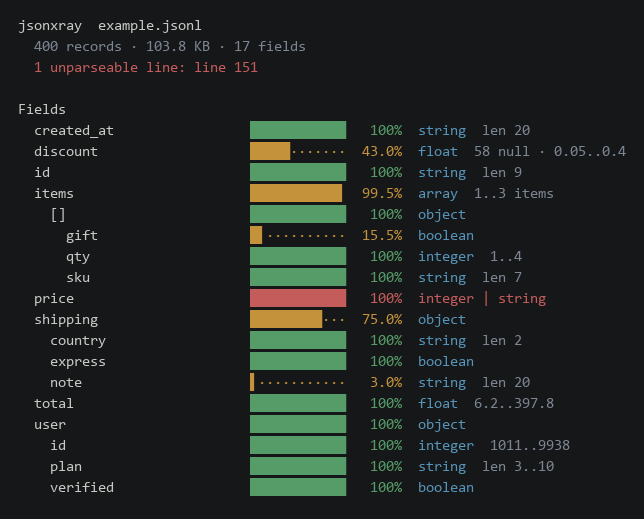
schema renders both as optional. jsonxray counts them separately: the bar is
how often the key was there at all, and 58 null is how many of those times
it was explicitly null.
A percentage needs a denominator. A field inside an optional object is not missing from 60% of your records — it is missing from 60% of the records that had the parent object. A field inside an array is present in some fraction of elements. Quoting either against the record count invents a data quality problem that isn't there. Every row in the tree is a fraction of its own parent.
Averages hide the file's real problem. The record you need to see is the one that doesn't look like the others, and it is by definition rare enough to be invisible in any summary statistic. So the report ranks record shapes by how far they are from the norm, and hands you line numbers.
Type conflicts
  price
      integer    99.2%  line 1, 2, 3
      string      0.8%  line 58, 200, 333

Record shapes
  32.2% of records share one shape (15 paths)
  least typical records, by distance from that shape:
    • 2x  line 13, 242
        missing items, items[], items[].qty, items[].sku, +3 more
        extra   discount
    • 17x  line 29, 49, 57
        missing shipping, shipping.country, shipping.express
        extra   discount, items[].gift
    • 19x  line 5, 45, 101
        missing shipping, shipping.country, shipping.express
        extra   items[].gift
    • 25x  line 1, 25, 37
        missing shipping, shipping.country, shipping.express
        extra   discount
    • 37x  line 9, 17, 21
        missing shipping, shipping.country, shipping.express
Two records out of four hundred are missing items entirely. They are ranked
first, ahead of the seventeen-record group, because being structurally
unusual matters more than being uncommon.
Enums you didn't know you had
Fields whose values form a small closed set are worth knowing about — they are the ones that become a database enum, a validation rule, or a bug when a new value turns up.
Small value sets
  shipping.express
      false                               71.7%  215
      true                                28.3%  85
  user.verified
      true                                84.8%  339
      false                               15.2%  61
  user.plan
      free                                50.5%  202
      pro                                 31.8%  127
      enterprise                          17.8%  71
  items[].qty
      2                                   26.8%  214
      3                                   25.2%  202
      4                                   24.6%  197
      1                                   23.4%  187
  items[].sku
      SKU-909                             22.2%  178
      SKU-100                             21.0%  168
      SKU-347                             20.5%  164
      SKU-512                             18.2%  146
      SKU-220                             18.0%  144
  shipping.country
      DE                                  23.0%  69
      JP                                  21.0%  63
      US                                  20.0%  60
      BR                                  18.7%  56
      GB                                  17.3%  52
  created_at
      2026-07-01T09:00:00Z                 3.8%  15
      2026-07-02T09:00:00Z                 3.8%  15
      2026-07-03T09:00:00Z                 3.8%  15
      2026-07-04T09:00:00Z                 3.8%  15
      2026-07-05T09:00:00Z                 3.8%  15
      2026-07-06T09:00:00Z                 3.8%  15
      +22 more values
  discount
      0.3                                  7.9%  9
      0.39                                 7.9%  9
      0.24                                 6.1%  7
      0.19                                 5.3%  6
      0.29                                 4.4%  5
      0.32                                 4.4%  5
      +30 more values
Once a field exceeds fifty distinct values, the table is discarded rather than truncated. Past that point the tally is no longer a truthful top-N — a value that is common but first appears late was never counted — and a plausible wrong answer is worse than no answer.
Catching drift in CI
Running this once tells you what is in a file. Running it in a pipeline tells you when that stopped being true.
# Once, when you are happy with the data
jsonxray exports/monday.jsonl --save baseline.json

# Every night after that
jsonxray exports/today.jsonl --compare baseline.json
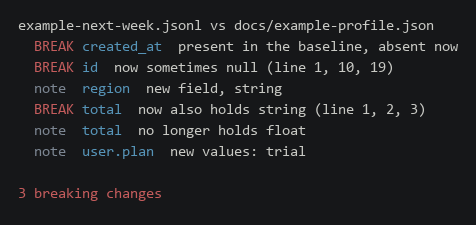
Exit code 2 means a detected data problem: here, a breaking change such as a
field disappearing, a new type appearing, something that was always present
becoming optional, or something that was never null becoming null. The same
code is used for an explicitly requested malformed/record-size policy. Exit
1 is reserved for the tool failing, so a pipeline can tell "the data is not
acceptable" from "the check is broken" and page someone for only one of them.
Additive changes — a new field, a new enum value, a type that stopped
appearing — are printed as notes and exit 0. A check that fires on ordinary
variation gets switched off within a week, at which point it catches nothing.
Working on files that don't fit in memory
One pass, and every aggregate statistic is either O(1) per record or explicitly
bounded. Nothing is retained but the record in hand and small evidence tables.
Profiling a 77 MB, 300,000-record synthetic file peaks at 0.2 MB of Python
heap for aggregate state (measured with tracemalloc); CI also profiles a
roughly 110 MB synthetic file under a hard ulimit -v, which a reader that
accumulated all records could not survive.
That is bounded aggregate memory, not memory independent of the input. A
JSONL reader must hold the current line, so peak memory grows with the largest
record. Top-level array elements are incrementally decoded but capped at 64
MiB; crossing that cap is exit 1 because the array cannot be scanned safely.
Use --max-record-bytes below that cap to test a consumer budget such as 16
MiB before handing the file to that consumer.
That includes the case that usually defeats this: a single top-level JSON
array, pretty-printed across a million lines, which is what most "export to
JSON" buttons produce. json.load on one of those is exactly the
out-of-memory failure people hit. jsonxray detects it and decodes it
incrementally.
jsonxray dump.json          # detected automatically
jsonxray dump.json --format array
A compact array that fits on one line is indistinguishable from a JSONL file
whose one record is itself an array. Auto-detection preserves the JSONL case;
use --format array when the elements of a single-line array are the records.
Where a bound bites, the report says so rather than quietly becoming
approximate — a truncated --limit run states that its percentages describe
only the records it read.
Options
| Flag | What it does |
|---|---|
--limit N |
Stop after N records; the report says it was truncated |
--max-record-bytes SIZE |
Count records above a byte budget and exit 2 after the full scan |
--fail-on-malformed |
Exit 2 after profiling if any line is not valid UTF-8 JSON |
--format jsonl|array|auto |
Input shape (default: detected) |
--only SECTION |
Print one section; repeatable |
--depth N |
How deep to print the field tree |
--json |
The whole profile as JSON |
--save FILE / --compare FILE |
Drift detection |
--ascii |
No block characters, for issue trackers that mangle them |
--color |
auto, truecolor, 256, 16, none. NO_COLOR always wins |
Reads stdin when given -, or when nothing is piped in:
zcat events.jsonl.gz | jsonxray -
Scope and alternatives
JSONXray infers an observed profile; it does not emit or validate a JSON Schema, repair input, or replace a dataframe/database engine. Use GenSON when the deliverable is JSON Schema, quicktype when it is generated application types, DuckDB or Polars when the next step is a local query, and Spark when the data already lives in a distributed pipeline.
The alternatives and gap decision compares current maintenance, licenses, dependency/install weight, malformed-data behavior, platform fit, operating cost, and migration cost. The selected gap is narrow: byte-accurate, full-file evidence that composes with those tools without adding their runtimes to JSONXray.
Limits you should know
- The inferred profile describes observed values; it is not proof that future records follow the same structure.
--limitexamines a prefix and can miss a late field, malformed line, or oversized record. The report marks the result as truncated.- Duplicate object keys are not diagnosed. Python's decoder keeps the last value, so use a strict validator when duplicate-key rejection matters.
- Deep nesting is bounded by the active Python runtime. Input beyond that runtime's safe parsing or profiling depth exits 1 with the affected line; JSONXray does not raise the recursion limit for untrusted data.
- JSONL memory is bounded by the largest line. A top-level array element above 64 MiB is refused rather than letting an unterminated value consume the file.
- Compressed input is not opened directly. Pipe it from
gzip,zstd, or the decompressor already in your workflow. - Library callers that pass a text stream which already replaced invalid bytes cannot recover the originals. File paths and raw stdin are decoded with a reversible strategy by the CLI.
- Reports may contain a few real scalar values. Review them before sharing.
As a library
from jsonxray import Profile, scan

profile = Profile(source="events.jsonl")
with open("events.jsonl", encoding="utf-8") as handle:
    scan(handle, profile)

for node in profile.conflicts():
    print(node.path, node.non_null_types, node.examples)
Development
git clone https://github.com/CAOShurong/jsonxray
cd jsonxray
python -m unittest discover -s tests
The example file is generated from a fixed seed, so the numbers in this README are reproducible:
python docs/make_example.py
python docs/build_docs.py          # regenerate the README and its images
python docs/build_docs.py --check  # what CI runs
CI runs the suite on Ubuntu, Windows, and macOS across Python 3.9–3.13, and fails if this README no longer matches what the tool prints.
See CONTRIBUTING.md for the red-test and packaging workflow, and SECURITY.md for private reporting and the untrusted-input boundary.
License
MIT. See LICENSE.
1 maintainer

Metadata
1 maintainer
Release files for jsonxray 0.2.1
For a detailed explanation of source distributions (sdists) and built distributions (wheels), please see the package formats documentation.
Source distribution (sdist)
| File | Size | Uploaded | Provenance | Actions |
|---|---|---|---|---|
| jsonxray-0.2.1.tar.gz | 138.7 kB | With provenance | Details for jsonxray-0.2.1.tar.gz |
Built distribution (wheel)
| File | Interpreter | ABI | Platform | Actions Reset |
|---|---|---|---|---|
| jsonxray-0.2.1-py3-none-any.whl | Python 3 | none | any | Details for jsonxray-0.2.1-py3-none-any.whl |
Total release size: 171.8 kB
Release files / jsonxray-0.2.1.tar.gz
| Download URL | jsonxray-0.2.1.tar.gz |
|---|---|
| Size | 138.7 kB |
| Tags | Source |
|
SHA-256 checksum How to use checksums |
2aa25cb853ceda8663d7d572102840c6e4eb89aab16f948c8cb632dae51988ba
|
|
BLAKE2b-256 checksum How to use checksums |
ede7cc50fbad38187df7d7e69e6ffe1c0aaf793ee3991e659de87be114149e0d
|
| Upload date | |
|
Uploaded using Trusted Publishing? What is trusted publishing? |
Yes |
| Uploaded via |
twine/7.0.0 CPython/3.13.14
|
Provenance
Provenance describes where a file came from. On PyPI, provenance is shared via attestations, which provide a verifiable record of the build or publishing details. View details, limitations and caveats.


PyPI Publish Attestation
PyPI verified that this artifact, at this checksum, originated from the publisher listed below.
Signed by GitHub Actions, verified by PyPI on Aug 12, 2026.
Transparency logRelease files / jsonxray-0.2.1-py3-none-any.whl
| Download URL | jsonxray-0.2.1-py3-none-any.whl |
|---|---|
| Size | 33.1 kB |
| Tags | Python 3 |
|
SHA-256 checksum How to use checksums |
0cbac7991df445fb32a1f789d9219dc8e5ba0a65b2c9fabc7cf087a5751c35c7
|
|
BLAKE2b-256 checksum How to use checksums |
80000d55091ecac65981fc5fd84b887c3cb87a739e08b718b35248909e0136f6
|
| Upload date | |
|
Uploaded using Trusted Publishing? What is trusted publishing? |
Yes |
| Uploaded via |
twine/7.0.0 CPython/3.13.14
|
Provenance
Provenance describes where a file came from. On PyPI, provenance is shared via attestations, which provide a verifiable record of the build or publishing details. View details, limitations and caveats.
PyPI Publish Attestation
PyPI verified that this artifact, at this checksum, originated from the publisher listed below.
Signed by GitHub Actions, verified by PyPI on Aug 12, 2026.
Transparency logSecurity for jsonxray 0.2.1
Provenance
Provenance describes where a file came from. On PyPI, provenance is shared via attestations, which provide a verifiable record of the build or publishing details. View details, limitations and caveats.
Full provenance
All 2 files in this release have been uploaded with provenance metadata.
Attestation for jsonxray-0.2.1.tar.gz
PyPI Publish Attestation
PyPI verified that this artifact, at this checksum, originated from the publisher listed below.
Signed by GitHub Actions, verified by PyPI on Aug 12, 2026.
Transparency logA note on package security
PyPI is a repository for distributing packages, not a service for auditing them. While third-party security researchers and our staff do their best to detect and remove malicious packages, PyPI cannot guarantee the quality, security or suitability of any given package.
To learn more about protecting yourself from malicious actors, visit our package security documentation.














