
Juffi - JSON Log Viewer
A feature-rich Terminal User Interface (TUI) for viewing and analyzing JSON log files with ease.


Why Juffi?
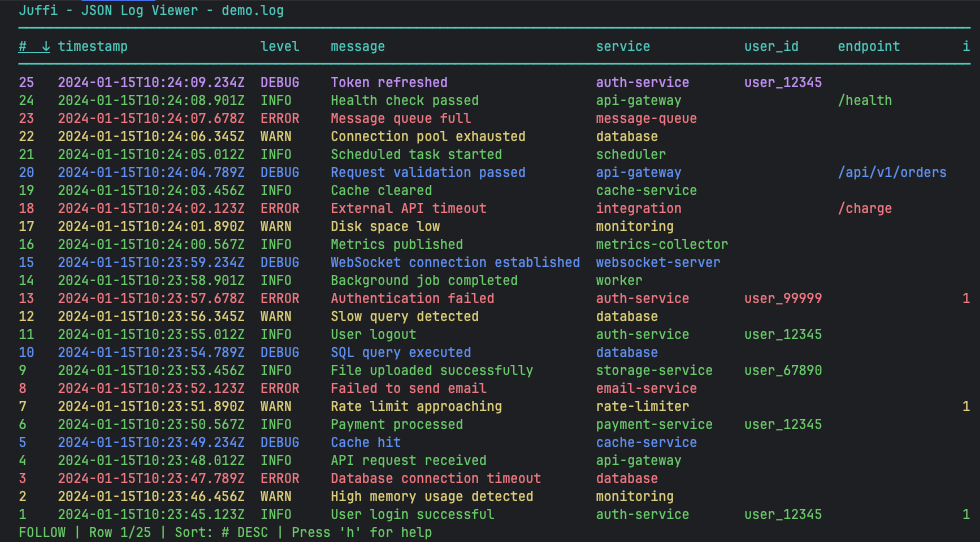
JSON logs are powerful but painful to read in their raw format. Compare these two views of the same log data:
Without Juffi
{"timestamp":"2024-01-15T10:23:45.123Z","level":"INFO","message":"User login successful","user_id":"user_12345","ip":"192.168.1.100","session_id":"abc-def-ghi","service":"auth-service"}
{"timestamp":"2024-01-15T10:23:46.456Z","level":"WARN","message":"High memory usage detected","memory_percent":85.3,"process":"api-server","service":"monitoring"}
{"timestamp":"2024-01-15T10:23:47.789Z","level":"ERROR","message":"Database connection timeout","db_host":"db-primary.example.com","retry_count":3,"error":"connection timeout after 30s","service":"database"}
{"timestamp":"2024-01-15T10:23:48.012Z","level":"INFO","message":"API request received","method":"POST","path":"/api/v1/users","response_time_ms":45,"status_code":200,"service":"api-gateway"}
{"timestamp":"2024-01-15T10:23:49.234Z","level":"DEBUG","message":"Cache hit","cache_key":"user:12345:profile","ttl_seconds":3600,"service":"cache-service"}
{"timestamp":"2024-01-15T10:23:50.567Z","level":"INFO","message":"Payment processed","amount":99.99,"currency":"USD","transaction_id":"txn_abc123","user_id":"user_12345","service":"payment-service"}
{"timestamp":"2024-01-15T10:23:51.890Z","level":"WARN","message":"Rate limit approaching","current_requests":950,"limit":1000,"window_seconds":60,"ip":"192.168.1.100","service":"rate-limiter"}
{"timestamp":"2024-01-15T10:23:52.123Z","level":"ERROR","message":"Failed to send email","recipient":"user@example.com","error":"SMTP connection refused","retry_attempt":2,"service":"email-service"}
{"timestamp":"2024-01-15T10:23:53.456Z","level":"INFO","message":"File uploaded successfully","filename":"document.pdf","size_bytes":1048576,"user_id":"user_67890","service":"storage-service"}
{"timestamp":"2024-01-15T10:23:54.789Z","level":"DEBUG","message":"SQL query executed","query":"SELECT * FROM users WHERE id = ?","duration_ms":12,"rows_affected":1,"service":"database"}
{"timestamp":"2024-01-15T10:23:55.012Z","level":"INFO","message":"User logout","user_id":"user_12345","session_duration_seconds":1800,"service":"auth-service"}
{"timestamp":"2024-01-15T10:23:56.345Z","level":"WARN","message":"Slow query detected","query":"SELECT * FROM orders JOIN users","duration_ms":5000,"threshold_ms":1000,"service":"database"}
{"timestamp":"2024-01-15T10:23:57.678Z","level":"ERROR","message":"Authentication failed","user_id":"user_99999","reason":"invalid_credentials","ip":"10.0.0.50","service":"auth-service"}
{"timestamp":"2024-01-15T10:23:58.901Z","level":"INFO","message":"Background job completed","job_id":"job_456","job_type":"data_export","duration_seconds":120,"service":"worker"}
{"timestamp":"2024-01-15T10:23:59.234Z","level":"DEBUG","message":"WebSocket connection established","client_id":"ws_client_789","protocol":"wss","service":"websocket-server"}
{"timestamp":"2024-01-15T10:24:00.567Z","level":"INFO","message":"Metrics published","metric_count":150,"destination":"prometheus","service":"metrics-collector"}
{"timestamp":"2024-01-15T10:24:01.890Z","level":"WARN","message":"Disk space low","available_gb":5.2,"total_gb":100,"threshold_percent":10,"mount_point":"/data","service":"monitoring"}
{"timestamp":"2024-01-15T10:24:02.123Z","level":"ERROR","message":"External API timeout","api":"payment-gateway","endpoint":"/charge","timeout_seconds":30,"service":"integration"}
{"timestamp":"2024-01-15T10:24:03.456Z","level":"INFO","message":"Cache cleared","cache_type":"redis","keys_deleted":1500,"service":"cache-service"}
{"timestamp":"2024-01-15T10:24:04.789Z","level":"DEBUG","message":"Request validation passed","endpoint":"/api/v1/orders","validation_time_ms":5,"service":"api-gateway"}
{"timestamp":"2024-01-15T10:24:05.012Z","level":"INFO","message":"Scheduled task started","task_name":"daily_backup","schedule":"0 2 * * *","service":"scheduler"}
{"timestamp":"2024-01-15T10:24:06.345Z","level":"WARN","message":"Connection pool exhausted","pool_size":50,"active_connections":50,"waiting_requests":10,"service":"database"}
{"timestamp":"2024-01-15T10:24:07.678Z","level":"ERROR","message":"Message queue full","queue_name":"notifications","current_size":10000,"max_size":10000,"service":"message-queue"}
{"timestamp":"2024-01-15T10:24:08.901Z","level":"INFO","message":"Health check passed","endpoint":"/health","response_time_ms":2,"status":"healthy","service":"api-gateway"}
{"timestamp":"2024-01-15T10:24:09.234Z","level":"DEBUG","message":"Token refreshed","user_id":"user_12345","token_type":"JWT","expires_in_seconds":3600,"service":"auth-service"}
With Juffi
Features
🔍 Smart Log Viewing
- Automatic column detection - Juffi analyzes your JSON logs and creates columns for all fields
- Tabular display - View logs in a clean, organized table format
- Details view - Dive deep into individual log entries with full JSON expansion
📊 Powerful Filtering & Search
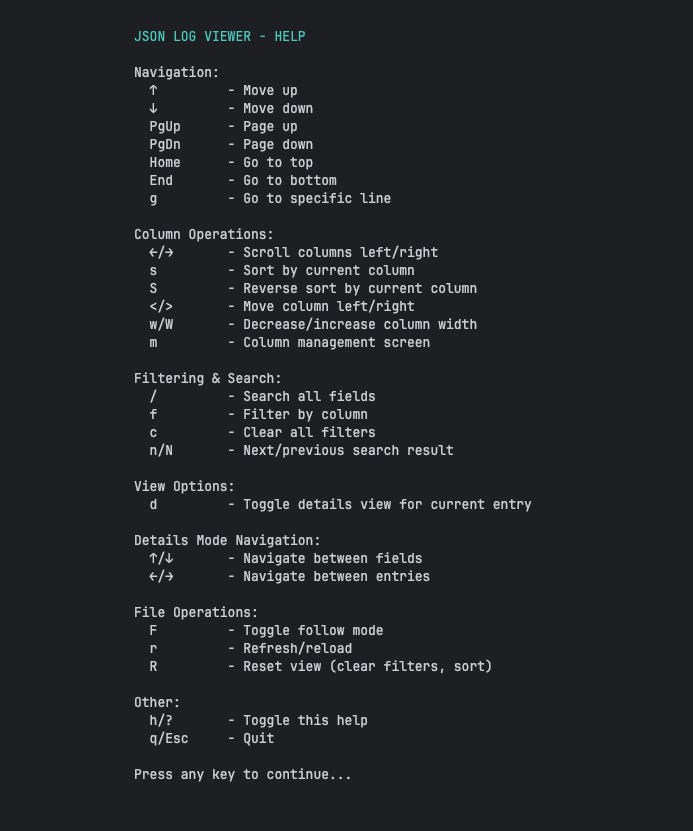
- Column filtering - Filter by any column to focus on relevant entries
- Global search - Search across all fields simultaneously
- Clear filters - Easily reset filters to start fresh
🎯 Column Management
- Sortable columns - Sort by any column (ascending or descending)
- Reorderable columns - Arrange columns in the order that makes sense to you
- Adjustable widths - Resize columns to fit your data
- Column management screen - Hide/show columns as needed
📡 Real-time Monitoring
- Follow mode - Like
tail -f, automatically show new log entries as they're written - Live reload - Refresh the view to pick up new entries
- Responsive updates - Smooth scrolling and navigation even with large files
Installation
From PyPI (Recommended)
pip install juffi
From Source
git clone https://github.com/YotamAlon/juffi.git
cd juffi
pip install -e .
Quick Start
Basic Usage
juffi app.log
Requirements
- Python 3.11 or higher
- Terminal with curses support (most Unix-like systems)
- No external dependencies required
Use Cases
Juffi is perfect for:
- Debugging - Quickly find errors and warnings in application logs
- Monitoring - Watch logs in real-time with follow mode
- Analysis - Sort and filter logs to identify patterns
- Development - Review structured logging output during development
- Operations - Investigate production issues with powerful search and filtering
Technical Details
Architecture
Juffi follows a clean MVVM (Model-View-ViewModel) architecture:
- Models (
juffi/models/) - Data structures and business logic - ViewModels (
juffi/viewmodels/) - Presentation logic and state management - Views (
juffi/views/) - UI rendering using Python's curses library - Input Controller (
juffi/input_controller.py) - Handles file reading and input streaming
Project Structure
juffi/
├── juffi/
│   ├── __main__.py           # Entry point
│   ├── input_controller.py   # File input handling
│   ├── models/               # Data models
│   ├── viewmodels/           # Presentation logic
│   ├── views/                # UI components
│   └── helpers/              # Utility functions
├── tests/                    # Test suite
├── pyproject.toml           # Project configuration
└── README.md
Building from Source
Prerequisites
# Install development dependencies
pip install -e ".[dev]"
Build
# Build wheel and source distribution
make build

# Or building a wheel
make wheel
Testing
# Run tests
make test

# Run tests with coverage
make coverage

# Run linter
make lint
Development Setup
-
Clone the repository
git clone https://github.com/YotamAlon/juffi.git
cd juffi
-
Create virtual environment
python -m venv .venv
source .venv/bin/activate
-
Install in development mode
pip install -e ".[dev]"
-
Install pre-commit hooks
pre-commit install
Code Quality
The project uses:
- Black - Code formatting
- isort - Import sorting
- mypy - Type checking
- pylint - Linting
- pytest - Testing
All checks run automatically via pre-commit hooks.
License
This project is licensed under the GNU General Public License v3.0 - see the LICENSE file for details.
Author
Yotam Alon - yotam.alon@gmail.com
Links
1 maintainer

Metadata
1 maintainer
Release files for juffi 0.6.0
For a detailed explanation of source distributions (sdists) and built distributions (wheels), please see the package formats documentation.
Source distribution (sdist)
| File | Size | Uploaded | Provenance | Actions |
|---|---|---|---|---|
| juffi-0.6.0.tar.gz | 51.1 kB | Without provenance | Details for juffi-0.6.0.tar.gz |
Built distribution (wheel)
| File | Interpreter | ABI | Platform | Actions Reset |
|---|---|---|---|---|
| juffi-0.6.0-py3-none-any.whl | Python 3 | none | any | Details for juffi-0.6.0-py3-none-any.whl |
Total release size: 106.0 kB
Release files / juffi-0.6.0.tar.gz
| Download URL | juffi-0.6.0.tar.gz |
|---|---|
| Size | 51.1 kB |
| Tags | Source |
|
SHA-256 checksum How to use checksums |
e1eeff3a15420257ee0aacfbd791e96904fa5e4fe9a4ffcef220f90c891a67ac
|
|
BLAKE2b-256 checksum How to use checksums |
3c1fb8cb9681fd7a5028db7dcac17af32bc510913e6c1cc1510c3aec4bf038bc
|
| Upload date | |
|
Uploaded using Trusted Publishing? What is trusted publishing? |
No |
| Uploaded via |
twine/6.1.0 CPython/3.13.7
|
Release files / juffi-0.6.0-py3-none-any.whl
| Download URL | juffi-0.6.0-py3-none-any.whl |
|---|---|
| Size | 54.9 kB |
| Tags | Python 3 |
|
SHA-256 checksum How to use checksums |
bc46535d42f0d1757808c073f8fe34a6302b046982cfaf4187aec6af251809de
|
|
BLAKE2b-256 checksum How to use checksums |
852bb22d3c1f8c39ca3f03a17c023fd11c871c19b0bc1023effd87acfeba1880
|
| Upload date | |
|
Uploaded using Trusted Publishing? What is trusted publishing? |
No |
| Uploaded via |
twine/6.1.0 CPython/3.13.7
|
Security for juffi 0.6.0
Provenance
Provenance describes where a file came from. On PyPI, provenance is shared via attestations, which provide a verifiable record of the build or publishing details. View details, limitations and caveats.
No provenance found
None of the files in this release were uploaded with provenance metadata.
A note on package security
PyPI is a repository for distributing packages, not a service for auditing them. While third-party security researchers and our staff do their best to detect and remove malicious packages, PyPI cannot guarantee the quality, security or suitability of any given package.
To learn more about protecting yourself from malicious actors, visit our package security documentation.














