
A Judicious, Unified and extendable framework for multi-paradigm Machine Learning research, powered by jutility and PyTorch.

Project description
JUML
A Judicious, Unified and extendable framework for multi-paradigm Machine Learning research, powered by jutility and PyTorch.
Judicious [adjective]: having or showing reason and good judgment in making decisions

Contents
Installation
JUML is available as a Python package on PyPI, and can be installed using pip with the following commands:
python -m pip install -U pip
python -m pip install -U juml-toolkit
Alternatively, JUML can be installed in "editable mode" from the GitHub repository:
git clone https://github.com/jakelevi1996/juml.git
python -m pip install -U pip
python -m pip install -e ./juml
JUML depends on PyTorch. The installation instructions for PyTorch depend on which (if any) CUDA version is available, so PyTorch won't be automatically installed by pip when installing JUML. Instead, please install PyTorch following the official PyTorch installation instructions.
Overview
The JUML framework defines 6 fundamental classes (and several example subclasses), available in the juml.base namespace module, which are expected to be subclassed in downstream projects:
juml.base.Modeljuml.base.Datasetjuml.base.Lossjuml.base.Trainerjuml.base.Commandjuml.base.Framework
Coming soon: juml.base.Environment for RL
Usage examples
The JUML framework is designed to be extended in downstream research projects, but nontheless contains enough built-in functionality to run some simple ML experiments and visualise the results from the command line (without writing any Python code). The following subsections demonstrate:
- The built-in functionality of JUML
- A simple example demonstrating how to extend JUML with a new model and dataset
JUML can be used with GPUs, however all of the below usage examples run purely on CPUs (using multiple processes for the hyperparameter sweeps) in under a minute (not including downloading datasets). These commands can be run on GPUs by specifying --devices.
Out of the box
Help interface
juml -h
juml train -h
juml sweep -h
juml profile -h
Train a model
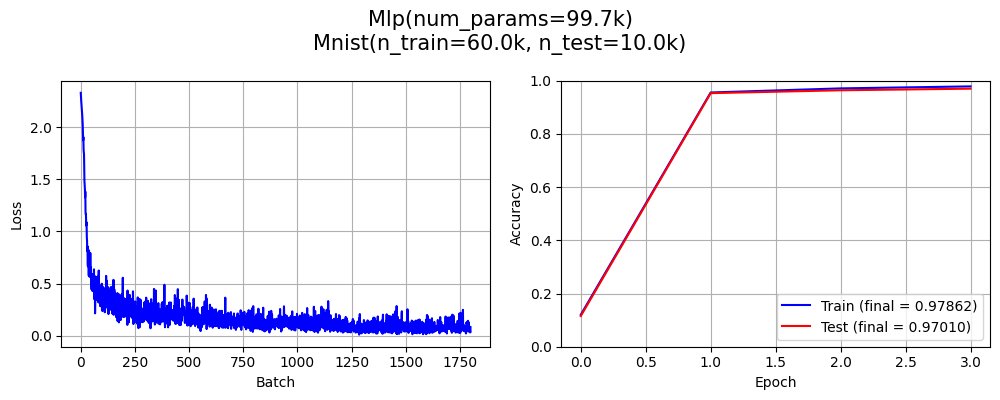
juml train --model Mlp --model.Mlp.embedder Flatten --model.Mlp.embedder.Flatten.n 3 --dataset Mnist --trainer.BpSp.epochs 3
cli: Mnist()
cli: Flatten(n=3)
cli: Identity()
cli: Mlp(depth=3, embedder=Flatten(num_params=0), hidden_dim=100, input_shape=[1, 28, 28], output_shape=[10], pooler=Identity(num_params=0))
cli: CrossEntropy()
cli: Adam(lr=0.001, params=<generator object Module.parameters at 0x750d7f1f2ea0>)
Time        | Epoch      | Batch      | Batch loss | Train metric | Test metric
----------- | ---------- | ---------- | ---------- | ------------ | ------------
0.0002s     |          0 |            |            |      0.12013 |      0.11540
1.7009s     |          0 |          0 |    2.33147 |              |
2.0003s     |          0 |         91 |    0.47548 |              |
3.0021s     |          0 |        398 |    0.24203 |              |
3.6553s     |          0 |        599 |    0.22922 |              |
3.6566s     |          1 |            |            |      0.95568 |      0.95320
5.3384s     |          1 |          0 |    0.21946 |              |
6.0018s     |          1 |        200 |    0.07385 |              |
7.0005s     |          1 |        500 |    0.19840 |              |
7.8268s     |          1 |        599 |    0.13859 |              |
7.8288s     |          2 |            |            |      0.97107 |      0.96400
11.1821s    |          2 |          0 |    0.05180 |              |
12.0019s    |          2 |        244 |    0.07798 |              |
13.0009s    |          2 |        538 |    0.03853 |              |
13.2144s    |          2 |        599 |    0.08072 |              |
13.2156s    |          3 |            |            |      0.97862 |      0.97010
Saving in "results/train/dM_lC_mMd3eFen3h100pI_tBb100e3lCle1E-05oAol0.001_s0/cmd.txt"
Saving in "results/train/dM_lC_mMd3eFen3h100pI_tBb100e3lCle1E-05oAol0.001_s0/args.json"
Saving in "results/train/dM_lC_mMd3eFen3h100pI_tBb100e3lCle1E-05oAol0.001_s0/metrics.json"
Saving in "results/train/dM_lC_mMd3eFen3h100pI_tBb100e3lCle1E-05oAol0.001_s0/metrics.png"
Saving in "results/train/dM_lC_mMd3eFen3h100pI_tBb100e3lCle1E-05oAol0.001_s0/model.pth"
Saving in "results/train/dM_lC_mMd3eFen3h100pI_tBb100e3lCle1E-05oAol0.001_s0/table.pkl"
Model name = `dM_lC_mMd3eFen3h100pI_tBb100e3lCle1E-05oAol0.001_s0`
Final metrics = 0.97862 (train), 0.97010 (test)
Time taken for `train` = 15.2683 seconds
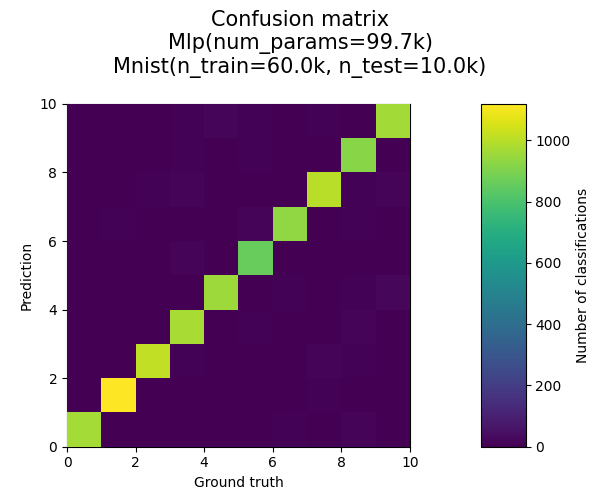
Plot confusion matrix
juml plotconfusionmatrix --model_name dM_lC_mMd3eFen3h100pI_tBb100e3lCle1E-05oAol0.001_s0
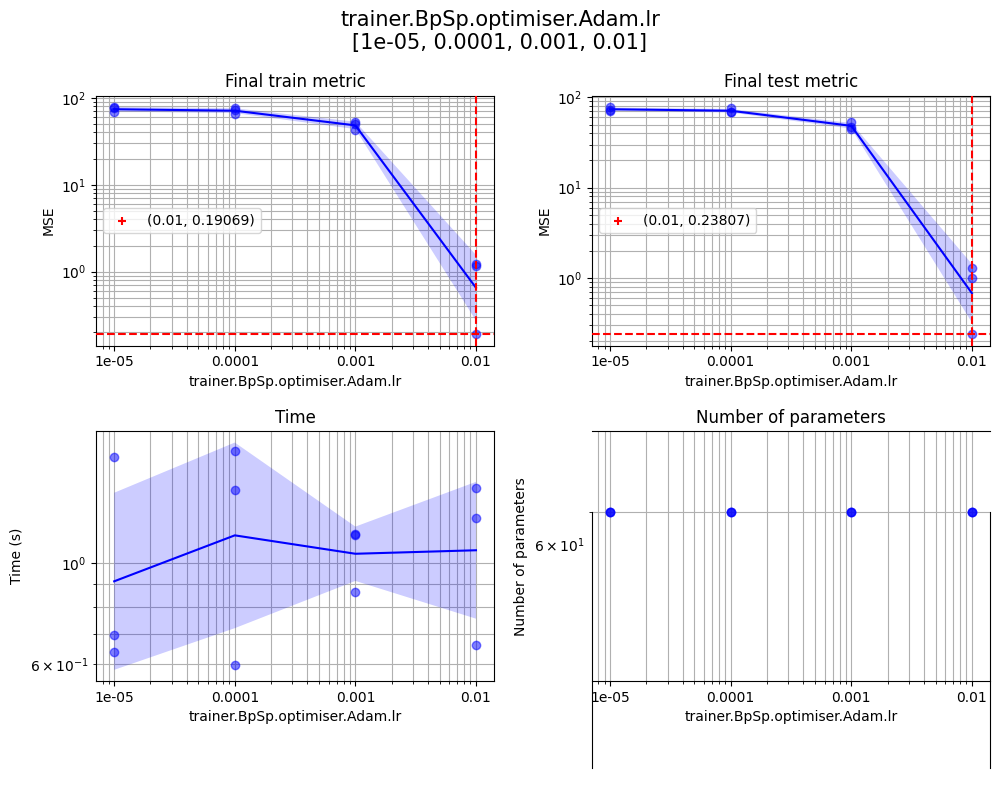
Sweep hyperparameters
juml sweep --model LinearModel --dataset LinearDataset --dataset.LinearDataset.input_dim 5 --dataset.LinearDataset.output_dim 10 --print_level 1 --sweep.seeds 1 2 3 --sweep.params '{"trainer.BpSp.epochs":[100,200,300],"trainer.BpSp.optimiser.Adam.lr":[1e-5,1e-4,1e-3,1e-2]}' --sweep.log_x trainer.BpSp.optimiser.Adam.lr --sweep.devices "[[],[],[],[],[],[]]" --sweep.no_cache

Profile
juml profile --model_name dM_lC_mMd3eFen3h100pI_tBb100e3lCle1E-05oAol0.001_s0 --profile.num_warmup 1000 --profile.num_profile 1000 --profile.batch_size 100
| Key | Value |
|---|---|
| Model | Mlp(num_params=99.7k) |
| Time (total) | 0.45093 s |
| Time (average) | 0.00451 ms/sample |
| Throughput | 221.8k samples/second |
| FLOPS | 199.1KFLOPS/sample |
| Total number of samples | 100.0k |
| Batch size | 100 |
juml train --dataset RandomImage --model Cnn --model.Cnn.pooler Average2d --trainer BpSp --trainer.BpSp.epochs 1
juml profile --model_name dRfFi3,32,32o10te200tr200_lC_mCb2c64eIk5n3pAs2_tBb100e1lCle1E-05oAol0.001_s0
| Key | Value |
|---|---|
| Model | Cnn(num_params=620.3k) |
| Time (total) | 0.22285 s |
| Time (average) | 0.22285 ms/sample |
| Throughput | 4.5k samples/second |
| FLOPS | 7.2MFLOPS/sample |
| Total number of samples | 1.0k |
| Batch size | 100 |
juml train --dataset RandomImage --model RzCnn --model.RzCnn.pooler Average2d --trainer BpSp --trainer.BpSp.epochs 1
juml profile --model_name dRfFi3,32,32o10te200tr200_lC_mRZCb2eIk5m64n3pAs2x2.0_tBb100e1lCle1E-05oAol0.001_s0
| Key | Value |
|---|---|
| Model | RzCnn(num_params=283.4k) |
| Time (total) | 0.22679 s |
| Time (average) | 0.22679 ms/sample |
| Throughput | 4.4k samples/second |
| FLOPS | 7.2MFLOPS/sample |
| Total number of samples | 1.0k |
| Batch size | 100 |
Further examples
See scripts/further_examples.sh for some further examples of juml commands with some explanations.
Extending JUML
The script scripts/demo_extend_juml.py (also shown below) is a simple demonstration of how the JUML framework can be extended with a simple new model and synthetic dataset. Despite being only 58 lines (including whitespace), this script inherits the following capabilities from JUML without any additional code:
- CLI interface
- Training loop
- Hyperparameter sweeps
- Automated model naming/saving/loading
- Visualisation commands
- Profiling (from the CLI)
- Other models to compare against (by calling appropriate CLI arguments)
import torch
from jutility import cli
import juml

class PolynomialRegression1d(juml.base.Model):
    def __init__(
        self,
        n:              int,
        input_shape:    list[int],
        output_shape:   list[int],
    ):
        self._torch_module_init()
        self.p_i    = torch.arange(n)
        self.w_i1   = torch.nn.Parameter(torch.zeros([n, 1]))

    def forward(self, x_n1: torch.Tensor) -> torch.Tensor:
        x_ni = (x_n1 ** self.p_i)
        x_n1 = x_ni @ self.w_i1
        return x_n1

    @classmethod
    def get_cli_options(cls) -> list[cli.Arg]:
        return [cli.Arg("n", type=int, default=5)]

class Step1d(juml.datasets.Synthetic):
    def __init__(self):
        self._init_synthetic(
            input_shape=[1],
            output_shape=[1],
            n_train=200,
            n_test=200,
            x_std=0.1,
            t_std=0.02,
        )

    def _compute_target(self, x: torch.Tensor) -> torch.Tensor:
        return torch.where(x > 0, 1.0, 0.0)

    @classmethod
    def get_default_loss(cls) -> type[juml.base.Loss] | None:
        return juml.loss.Mse

class DemoExtendFramework(juml.base.Framework):
    @classmethod
    def get_models(cls) -> list[type[juml.base.Model]]:
        return [
            *juml.models.get_all(),
            PolynomialRegression1d,
        ]

    @classmethod
    def get_datasets(cls) -> list[type[juml.base.Dataset]]:
        return [
            *juml.datasets.get_all(),
            Step1d,
        ]

if __name__ == "__main__":
    DemoExtendFramework.run()
Example usage:
python scripts/demo_extend_juml.py -h
python scripts/demo_extend_juml.py train -h
python scripts/demo_extend_juml.py train --model PolynomialRegression1d --dataset Step1d --trainer.BpSp.epochs 1000 --print_level 1
python scripts/demo_extend_juml.py plot1dregression --model_name dST_lM_mPn5_tBb100e1000lCle1E-05oAol0.001_s0
python scripts/demo_extend_juml.py sweep --model PolynomialRegression1d --dataset Step1d --trainer.BpSp.epochs 1000 --print_level 1 --sweep.params '{"model.PolynomialRegression1d.n":[3,4,5,6,7,8,9,10]}' --sweep.devices "[[],[],[],[],[],[]]" --sweep.no_cache
python scripts/demo_extend_juml.py plot1dregression --model_name dST_lM_mPn6_tBb100e1000lCle1E-05oAol0.001_s0

python scripts/demo_extend_juml.py train --model RzMlp --dataset Step1d --trainer.BpSp.epochs 1000 --print_level 1
python scripts/demo_extend_juml.py plot1dregression --model_name dST_lM_mRZMd3eIm100pIx2.0_tBb100e1000lCle1E-05oAol0.001_s0
python scripts/demo_extend_juml.py plotsequential --model_name dST_lM_mRZMd3eIm100pIx2.0_tBb100e1000lCle1E-05oAol0.001_s0
Citation
If you find JUML helpful in your research, please cite:
@misc{levi_juml_2025,
    title = {{JUML}: {A} {Judicious}, {Unified} and extendable framework for multi-paradigm {Machine} {Learning} research},
    shorttitle = {{JUML}},
    url = {https://github.com/jakelevi1996/juml},
    abstract = {A Judicious, Unified and extendable framework for multi-paradigm Machine Learning research, powered by jutility and PyTorch.},
    author = {Levi, Jake},
    year = {2025},
}


Download files
Download the file for your platform. If you're not sure which to choose, learn more about installing packages.
Source Distribution
Built Distribution
Filter files by name, interpreter, ABI, and platform.
If you're not sure about the file name format, learn more about wheel file names.
Copy a direct link to the current filters
File details
Details for the file juml_toolkit-0.0.4.tar.gz.
File metadata
- Download URL: juml_toolkit-0.0.4.tar.gz
- Upload date:
- Size: 34.7 kB
- Tags: Source
- Uploaded using Trusted Publishing? No
- Uploaded via: twine/6.0.1 CPython/3.10.12
File hashes
| Algorithm | Hash digest | |
|---|---|---|
| SHA256 |
d15743858b1f2b2d01e4781b449b3bc3dc65442311e6e9e7f3f0e5821752502d
|
|
| MD5 |
5e42e3a8d037a9232b6ab640f29a74b2
|
|
| BLAKE2b-256 |
7f8eca69b23e48ae69d86cb58838d50f2f00a5d11a3f8d51e269276020c948d8
|
File details
Details for the file juml_toolkit-0.0.4-py3-none-any.whl.
File metadata
- Download URL: juml_toolkit-0.0.4-py3-none-any.whl
- Upload date:
- Size: 48.7 kB
- Tags: Python 3
- Uploaded using Trusted Publishing? No
- Uploaded via: twine/6.0.1 CPython/3.10.12
File hashes
| Algorithm | Hash digest | |
|---|---|---|
| SHA256 |
a7e51698877978ef9dc05c17eb7068d4ae284e8e1b9821bed0dbc8391aa4c504
|
|
| MD5 |
b8f08c2ab691280ea4e7d44a52089322
|
|
| BLAKE2b-256 |
1a8b3304434fc0a30a0e46c3004a55d5939fb24d297ff48de3cf35d2e2675611
|






