
jumplane
jumplane picks the tool, model, effort and launch command for a coding task from rules you accepted. When a usage limit is close, it returns another tool or model in the same class instead, for you or your agent to run.


Pre-release v0.1.1, for people who run Claude Code, Codex or Ollama from a terminal. MIT licence.
| Term | Meaning |
|---|---|
| lane | one tool, model and effort, such as Codex with gpt-6.1-terra at medium effort |
| pool | the usage limit that lanes share: a subscription's usage windows, or a local Ollama server |
| effort | the reasoning setting a tool takes with a model, such as low, medium or high |
| class | light, standard or strong; a task's size, risk and complexity give its class |
| hold line | the percent of a window used at which jumplane stops sending work to that pool; 90 by default |
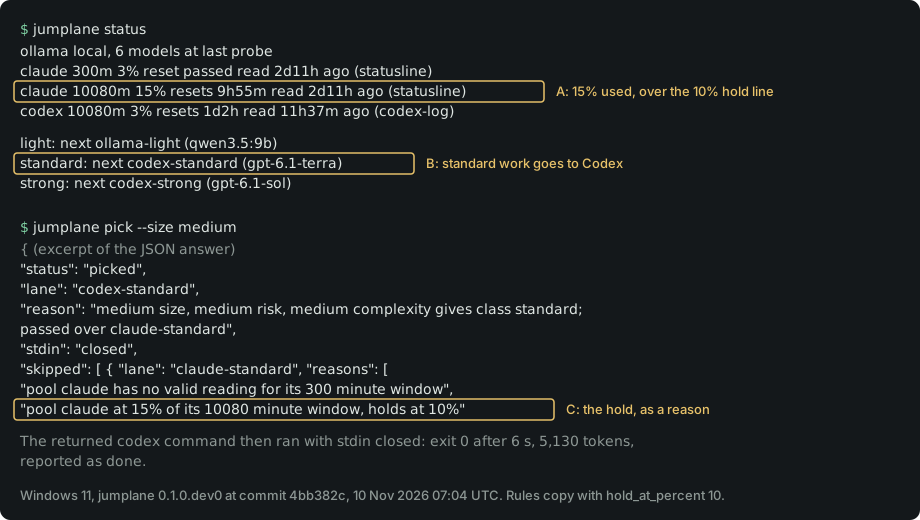
Figure 1. Hold and move, 10 Nov 2026; hold line 10% in a rules copy. Claude's 7-day window read 15%, 2 days 11 hours old (A), so standard work went to Codex (B). The pick gave two reasons (C): over the line, no valid 5-hour reading. Limits: one PC, build 0.1.0.dev0 at 4bb382c; JSON shortened, one line wrapped.
Why
Coding agents on a subscription stop when a usage window fills, and the host does not move you to another one. Claude Code's model configuration page says rate-limit errors "never trigger a switch" to its fallback model.
jumplane is not a proxy and holds no keys. It reads the limit numbers your tools already expose, and returns a command for you or your agent to run.
Features
jumplane statusshows each pool, percent used, reset time, age of the reading, holds, and the lane that runs next per class.jumplane pickmaps size, risk and complexity to one of three classes with a fixed table, then returns the first open lane in your order.- A pool at the hold line on any window with a valid reading is passed over, and the pick moves to the next lane in the same class.
- Every lane passed over is listed under
skippedwith its cause and the command or wait that would open it. An unverified lane is passed over for the next lane in the same class; work never moves to another class. jumplane reportrecords the outcome, tokens and a receipt path. Every decision is one line in a plain event log.- No proxy, no API keys, no telemetry, no prompt reading. The pick code in
engine.pyhas no network or process imports. Onlyprobe.py, used byinitandverify, imports those modules directly, which the testtest_only_probe_may_touch_the_network_or_processeschecks. The code uses the Python standard library only. - Local models: any model a local Ollama server lists can be a lane. Five were launch-verified on one PC; local lanes lists them with their sources.
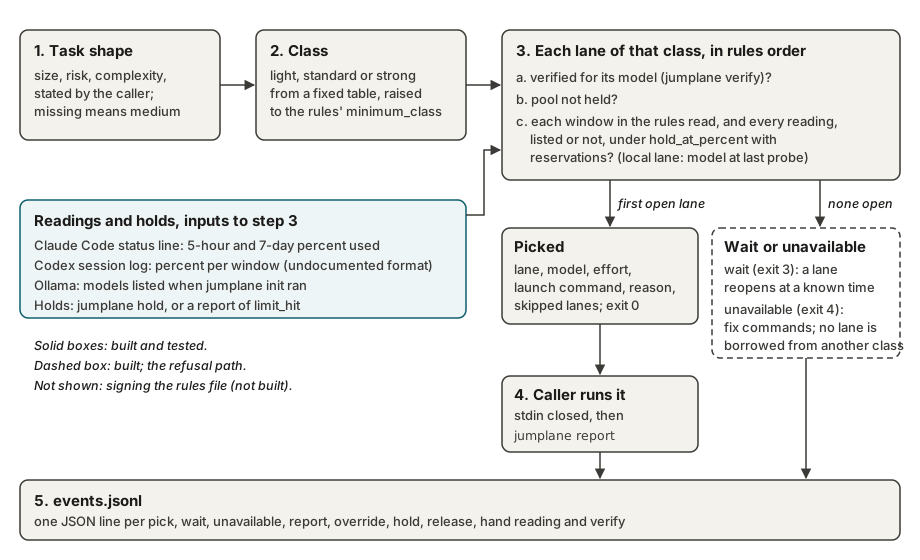
Figure 2. How a pick is made, as built in src/jumplane/engine.py at this commit. Rules and code choose the route; model output never does. The dashed box is the refusal path. Not shown: signing the rules file, which is planned and not built.
Measured on one Windows 11 PC on 10 Nov 2026: 78 tests pass with PYTHONPATH=src python -m unittest discover -s tests -t ., and there are 0 runtime dependencies (dependencies = [], held by a test).
No benchmark has run, so jumplane makes no claim about quality or savings. Status and limits lists what is built, what is not, and what is unmeasured.
Quick start
- Install uv, then jumplane from PyPI:
uv tool install jumplane. Check:jumplane --versionprints a version. - Run
jumplane init. It finds Claude Code, Codex and a local Ollama server and prints proposed rules without writing them. Check: the answer says"status": "proposed". - Read the rules, then run
jumplane init --accept. Check:"status": "accepted". - Verify each hosted lane once, for example
jumplane verify codex-standard. This sends one short prompt and uses a little of that plan. Check:"status": "verified". - Run
jumplane status. Check: each class showsnextand a lane, or afix:command to run. - Run
jumplane pick --size small --risk low --complexity low, launch the returned command with stdin closed, thenjumplane report <pick_id> done. Check:"status": "recorded".
Claude Code shows its limits only through its status line. jumplane init prints the one settings line to add; without it the Claude pool has no reading and stays unavailable.
Docs
- Guide: the full loop for a person or an agent, exit codes,
waitandunavailable. - Install: macOS, Linux and Windows, update and remove.
- Status and limits: built, not built, measured and unmeasured.
- Event log: the audit record and its fields.
- Local lanes: Ollama, open-weight models and their sources.
- Decisions and roadmap.
- Contributing and security.
1 maintainer

Metadata
1 maintainer
Release files for jumplane 0.1.1
For a detailed explanation of source distributions (sdists) and built distributions (wheels), please see the package formats documentation.
Source distribution (sdist)
| File | Size | Uploaded | Provenance | Actions |
|---|---|---|---|---|
| jumplane-0.1.1.tar.gz | 28.6 kB | With provenance | Details for jumplane-0.1.1.tar.gz |
Built distribution (wheel)
| File | Interpreter | ABI | Platform | Actions Reset |
|---|---|---|---|---|
| jumplane-0.1.1-py3-none-any.whl | Python 3 | none | any | Details for jumplane-0.1.1-py3-none-any.whl |
Total release size: 50.5 kB
Release files / jumplane-0.1.1.tar.gz
| Download URL | jumplane-0.1.1.tar.gz |
|---|---|
| Size | 28.6 kB |
| Tags | Source |
|
SHA-256 checksum How to use checksums |
8b490e56f3cd2f0a27963eecf5c1395d5a666216baaa4aacb89cf63992a1b9fe
|
|
BLAKE2b-256 checksum How to use checksums |
20ff7c0e0a27f9d19804e4f667bbd08c77563b022f471d2c5d5c723d5bfaa21d
|
| Upload date | |
|
Uploaded using Trusted Publishing? What is trusted publishing? |
Yes |
| Uploaded via |
twine/7.0.0 CPython/3.13.16
|
Provenance
Provenance describes where a file came from. On PyPI, provenance is shared via attestations, which provide a verifiable record of the build or publishing details. View details, limitations and caveats.


PyPI Publish Attestation
PyPI verified that this artifact, at this checksum, originated from the publisher listed below.
Signed by GitHub Actions, verified by PyPI on Nov 11, 2026.
Transparency logRelease files / jumplane-0.1.1-py3-none-any.whl
| Download URL | jumplane-0.1.1-py3-none-any.whl |
|---|---|
| Size | 21.9 kB |
| Tags | Python 3 |
|
SHA-256 checksum How to use checksums |
98ffded92012511b48857daf064f8cdee35eae3029c52d30115ddade78301aef
|
|
BLAKE2b-256 checksum How to use checksums |
9f3fe0b2f0c3e65d0bcfd060bc0083e2d5dbc17c90e94262b3853325ed01bba5
|
| Upload date | |
|
Uploaded using Trusted Publishing? What is trusted publishing? |
Yes |
| Uploaded via |
twine/7.0.0 CPython/3.13.16
|
Provenance
Provenance describes where a file came from. On PyPI, provenance is shared via attestations, which provide a verifiable record of the build or publishing details. View details, limitations and caveats.
PyPI Publish Attestation
PyPI verified that this artifact, at this checksum, originated from the publisher listed below.
Signed by GitHub Actions, verified by PyPI on Nov 11, 2026.
Transparency logSecurity for jumplane 0.1.1
Provenance
Provenance describes where a file came from. On PyPI, provenance is shared via attestations, which provide a verifiable record of the build or publishing details. View details, limitations and caveats.
Full provenance
Both files in this release have been uploaded with provenance metadata.
Attestation for jumplane-0.1.1.tar.gz
PyPI Publish Attestation
PyPI verified that this artifact, at this checksum, originated from the publisher listed below.
Signed by GitHub Actions, verified by PyPI on Nov 11, 2026.
Transparency logA note on package security
PyPI is a repository for distributing packages, not a service for auditing them. While third-party security researchers and our staff do their best to detect and remove malicious packages, PyPI cannot guarantee the quality, security or suitability of any given package.
To learn more about protecting yourself from malicious actors, visit our package security documentation.













