
jupedsim-scenarios






Python toolkit for running, sweeping, and analyzing JuPedSim scenarios authored in the Web-Based JuPedSim editor.
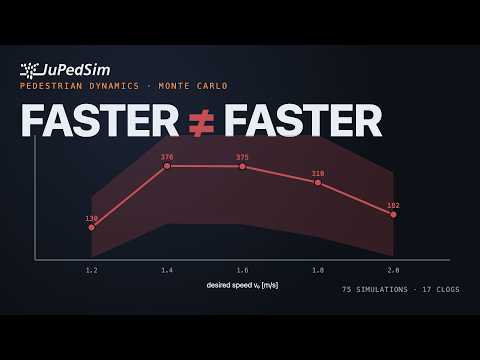
Intro video (3 min):
Install
pip install jupedsim-scenarios
For development from a clone:
pip install -e ".[dev]"
Single-run usage
from jupedsim_scenarios import load_scenario, run_scenario

scenario = load_scenario("my_scenario.zip")
result = run_scenario(scenario, seed=42)
print(result.evacuation_time)
df = result.trajectory_dataframe()
result.cleanup()
load_scenario accepts a ZIP archive, a directory containing
<name>.json + <name>.wkt, or a single self-contained JSON file
(geometry embedded as walkable_area_wkt).
To build a Scenario in pure Python — without going through a
web-app export — see
examples/howtos/09_build_from_scratch.ipynb.
Already writing vanilla jupedsim code by hand? See
examples/howtos/12_from_vanilla_jupedsim.ipynb:
the same bottleneck study in ~45 lines of vanilla JuPedSim vs. ~10
lines here, plus a parameters × seeds sweep in one call.
Quick CLI: run a ZIP and bundle the trajectory
examples/run_zip.py loads a scenario ZIP,
runs it, prints summary metrics (evacuation time, wall-clock time,
agent counts), and writes <name>_run.zip containing the original
config.json + geometry.wkt plus trajectory.sqlite — ready to
drop back into the web app for visualization.
python examples/run_zip.py my_scenario.zip [seed]
Mutating a scenario — copy first, then assign
Scenario is a mutable object. Direct assignments and add_* /
remove_* / set_* calls all change the instance in place:
base = load_scenario(...)
base.seed = 99            # this mutates `base` — every later use sees seed=99
That's fine when you only want one variant. For sweeps or any time
you want to keep the original intact, call .copy() first and edit
the clone:
trial = base.copy()
trial.seed = 99
trial.max_simulation_time = 60
# base is untouched
run_sweep does this for you per trial. The pattern only matters
when you build variants manually (see
examples/howtos/11_sweep_via_copy.ipynb).
Monte Carlo sweep
from jupedsim_scenarios import load_scenario, run_sweep

base = load_scenario("faster_is_slower.zip")

sweep = run_sweep(
    base,
    axes={"v0": [0.8, 1.2, 1.6, 1.8]},
    apply={"v0": lambda s, v: s.set_agent_params(0, desired_speed=v)},
    seeds=range(40, 50),
    workers=4,
)

df = sweep.to_dataframe()
print(df.groupby("v0")["evacuation_time"].agg(["mean", "std"]))
sweep.cleanup()
run_sweep walks the cartesian product of axes, applies each axis's
mutator to an isolated .copy() of the base, and runs the trials.
workers=0 uses one worker per CPU. For sweeps that need a different
scenario shape per trial — geometry that depends on the parameters,
journeys that vary — use run_sweep_from_factory instead.
For deeper coverage see the how-to notebooks:
05_sweep_basics— axes / apply / paired conditions10_sweep_save_load—SweepResult.save/load11_sweep_via_copy— factory sweeps andScenario.copy()
Visualisation
Visualisation needs the optional viz extra (matplotlib + plotly):
pip install "jupedsim-scenarios[viz]"
Two entry points cover the common cases:
scenario = load_scenario("my_scenario.zip")
scenario.plot()                      # static geometry: distributions, exits, zones, checkpoints

result = run_scenario(scenario, seed=42)
result.visualise()                   # interactive plotly playback of the trajectory
result.visualise(save_path="run.html")  # write a self-contained interactive page
Scenario.plot() returns a matplotlib Axes; pass ax= to draw into an
existing figure, or show_journeys=False / show_trajectories= to control
overlays. ScenarioResult.visualise() returns a plotly.graph_objects.Figure
that renders inline in Jupyter — just make it the last line of a cell. Frames
are subsampled automatically for long runs; override with every_nth_frame.
See 02_visualisation for a full
walkthrough.
Command line
jps-scenarios run scenario.json --seed 42 --out trajectory.sqlite
Runs a single scenario and prints a one-line JSON summary
(evacuation_time, agent counts, sqlite_file) to stdout. Useful in CI
or scripted pipelines; notebook workflows should stay on the Python API.
Documentation
API reference, bottleneck tutorial, and how-tos are built with Sphinx
and deployed on every push to main via GitHub Pages.
To build locally:
pip install -e .
pip install -r docs/requirements.txt
sphinx-build -b html docs/source docs/build/html
Roadmap
Shipped: see CHANGELOG.md. Current release: 0.7.0.
On the table for future releases:
- Greenfield
Scenario()constructor — a builder shape that doesn't require pre-loading a JSON template (R3.7 indocs/dev/api-design-cleanup.md). - Typed
Zone/Stageview classes with property setters, replacing theset_zone_speed_factor/set_checkpoint_waiting_timewrappers (R3.10). - Removal of the
v0/v0_std/v0_distributiondeprecated kwargs (currently still accepted withDeprecationWarning).
Concrete proposals are tracked under issues.
Citation
If jupedsim-scenarios supports work you publish, please cite the
upstream JuPedSim
project and link to this repository. A dedicated DOI for this
toolkit will be added once a Zenodo deposit is in place.
Contributing
See CONTRIBUTING.md for the dev install, local checks, and PR conventions.
License
MIT. See LICENSE.
1 maintainer

Metadata
1 maintainer
Release files for jupedsim-scenarios 0.7.0
For a detailed explanation of source distributions (sdists) and built distributions (wheels), please see the package formats documentation.
Source distribution (sdist)
| File | Size | Uploaded | |
|---|---|---|---|
| jupedsim_scenarios-0.7.0.tar.gz | 103.2 kB | Details |
Built distribution (wheel)
| File | Interpreter | ABI | Platform | Reset |
|---|---|---|---|---|
| jupedsim_scenarios-0.7.0-py3-none-any.whl | Python 3 | none | any | Details |
Total release size: 176.9 kB
Release files / jupedsim_scenarios-0.7.0.tar.gz
| Download URL | jupedsim_scenarios-0.7.0.tar.gz |
|---|---|
| Size | 103.2 kB |
| Tags | Source |
|
SHA-256 checksum How to use checksums |
ccc3d72f5eada1e5425d52e16bcc14fec452458564d2d76fbca8e1e2e8b54db0
|
|
BLAKE2b-256 checksum How to use checksums |
5b1a64aca94575919bd3be232544ea41a633cf266b166b7765f9f7374dc5f909
|
| Upload date | |
|
Uploaded using Trusted Publishing? What is trusted publishing? |
Yes |
| Uploaded via |
twine/7.0.0 CPython/3.13.14
|
Provenance
Provenance describes where a file came from. On PyPI, provenance is shared via attestations, which provide a verifiable record of the build or publishing details. View details, limitations and caveats.


PyPI Publish Attestation
PyPI verified that this artifact, at this checksum, originated from the publisher listed below.
Signed by GitHub Actions, verified by PyPI on Sep 4, 2026.
Transparency logRelease files / jupedsim_scenarios-0.7.0-py3-none-any.whl
| Download URL | jupedsim_scenarios-0.7.0-py3-none-any.whl |
|---|---|
| Size | 73.7 kB |
| Tags | Python 3 |
|
SHA-256 checksum How to use checksums |
78cb084889eead32509754ec0dc5c34f5d0c92f9dd29c6ce967687304bf078e1
|
|
BLAKE2b-256 checksum How to use checksums |
7cf0114809b6d00f8e9bf7739be6c5f29315083a596020fb1c9c5156ec06dc07
|
| Upload date | |
|
Uploaded using Trusted Publishing? What is trusted publishing? |
Yes |
| Uploaded via |
twine/7.0.0 CPython/3.13.14
|
Provenance
Provenance describes where a file came from. On PyPI, provenance is shared via attestations, which provide a verifiable record of the build or publishing details. View details, limitations and caveats.
PyPI Publish Attestation
PyPI verified that this artifact, at this checksum, originated from the publisher listed below.
Signed by GitHub Actions, verified by PyPI on Sep 4, 2026.
Transparency log













