
jupyter-agent
调用LLM实现Jupyter代码的自动生成、执行、调试等功能
特性
- 提供
%%bot指令,在juyter环境中,通过调用LLM实现代码生成、执行、调试等能力 - 支持调用OpenAI兼容API,实现LLM相关的功能
安装
# 激活目标环境(视情况选择)
source /path/to/target_env/bin/activate

pip install jupyter-agent
源码打包安全(Build)
# 下载代码
git clone https://github.com/yourusername/jupyter-agent.git
cd jupyter-agent

# 安装打包环境
virtualenv .venv
source .venv/bin/activate
pip install build

# 编译打包
python -m build

# 退出打包环境
deactivate

# 激活目标环境
source /path/to/target_env/bin/activate

# 安装编译好的wheel包
pip install /path/to/jupyter-agent/dist/jupyter_agent-xxxx-py3-none-any.whl
安装Vscode插件(可选)
使用方法
安装完成后,启动Jupyter环境(兼容Vscode的Notebook编译器)
全局配置
基础配置
# 加载扩展的Magic命令
%load_ext jupyter_agent.bot_magics

# 设置模型调用的API地址,不同的Agent可以调用不同的模型,这里以调用lmstudio本地部署的模型为例
%config BotMagics.default_api_url = 'http://127.0.0.1:1234/v1'
%config BotMagics.default_api_key = 'API_KEY'
%config BotMagics.default_model_name = 'qwen3-30b-a3b'
%config BotMagics.coding_model_name = 'devstral-small-2505-mlx'
扩展配置
# 设置当前Notebook的路径,当无法自动获取时需要手工指定,以Vscode中的Notebook为例
%config BotMagics.notebook_path = globals()["__vsc_ipynb_file__"]

# 是否默认开启单步模式,每执行一个步骤都退出执行循环,需要用户手动执行下一个步骤,默认为False
%config BotMagics.default_step_mode = False
# 是否默认开启自动确认,若关闭自动确认,每执行一个步骤都需要用户手动确认,默认为True
%config BotMagics.default_auto_confirm = True

# 设置运行环境是否保存任务数据到Metadata,默认为False,仅在Vscode中安装jupyter-agent-extension后或在评估模式下支持
%config BotMagics.support_save_meta = True
# 设置运行环境是否设置单元格内容,默认为False,权在Vscode中安装jupyter-agent-extension后或在评估模式下支持
%config BotMagics.support_set_cell_content = True

# 设置日志级别,可选值为DEBUG、INFO、WARN、ERROR、FATAL,默认为INFO
%config BotMagics.logging_level = 'DEBUG'

# 开启自动评估功能,默认为False,调用LLM对当前结果进行打分,目前仅实现了对子任务的整体打分
%config BotMagics.enable_evaluating = True
# 开启模拟用户补充信息功能,默认为False,调用LLM模拟对Agent的提问进行补充,用于自动评估
%config BotMagics.enable_supply_mocking = True

# 设置是否显示思考过程,默认为True
%config BotMagics.display_think = True
# 设置是否显示发送给出LLM的消息和LLM的回答,默认为False
%config BotMagics.display_message = True
%config BotMagics.display_response = True
全局任务规划
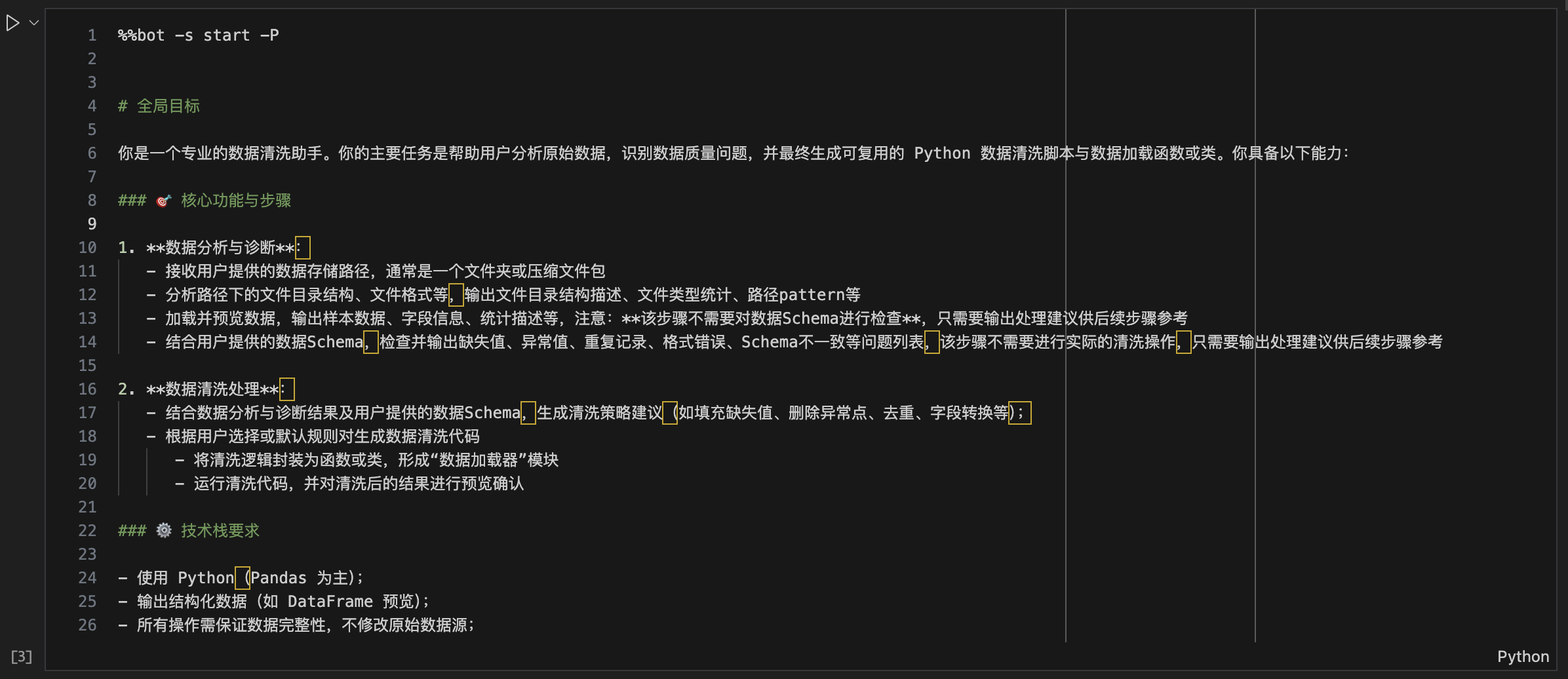
%%bot -P

# 全局目标
...
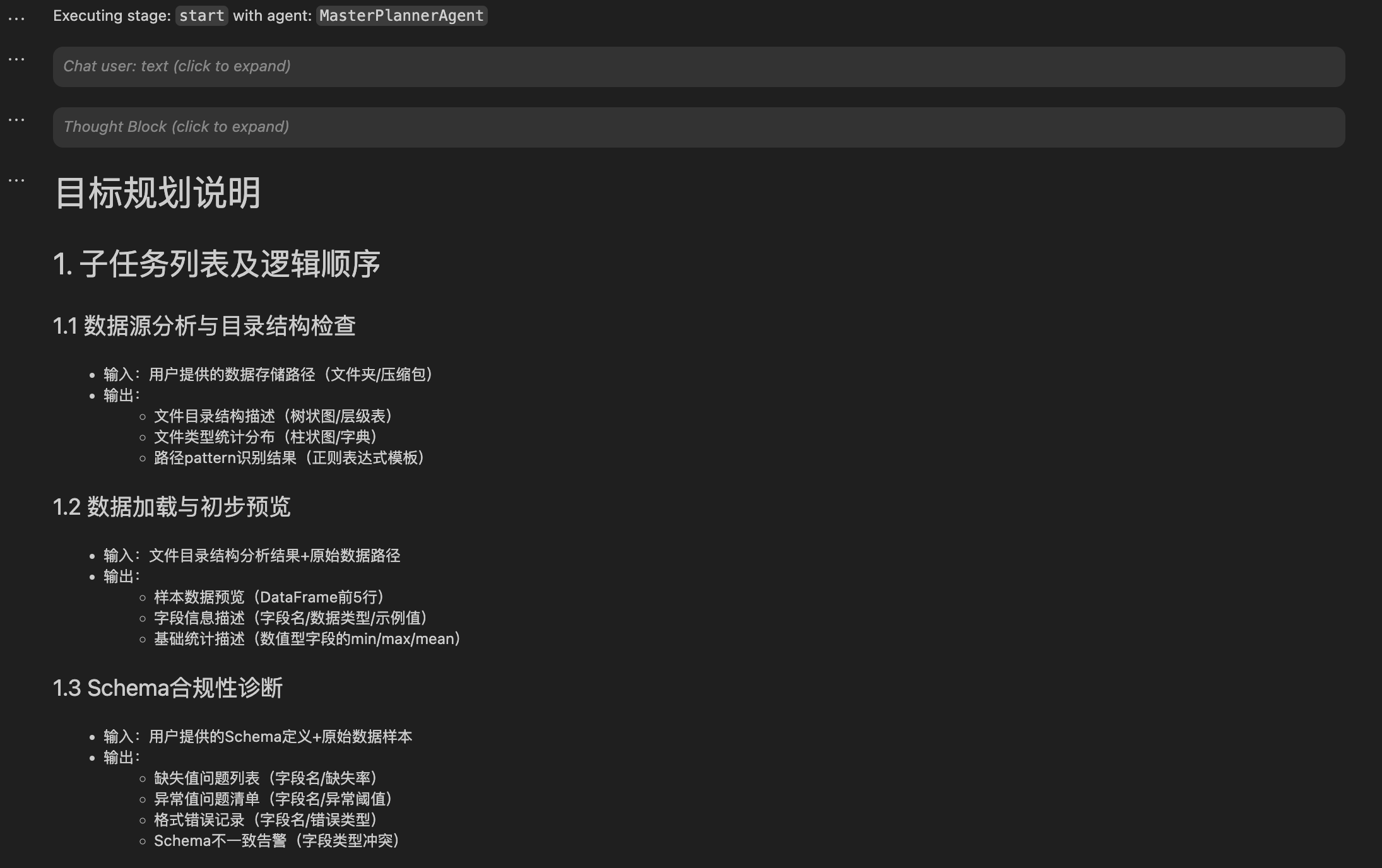
全局任务规划会解析用户输入的prompt,生成具体的执行计划,后续的%%bot指令会以该计划为蓝本自动生成每个步骤(子任务)的代码。
生成并执行子任务代码
%% bot [-s stage]

# generated code ...
在完成全局任务规划后,开始执行子任务时,只需要新建一个cell,输入并执行%%bot命令,如下图:
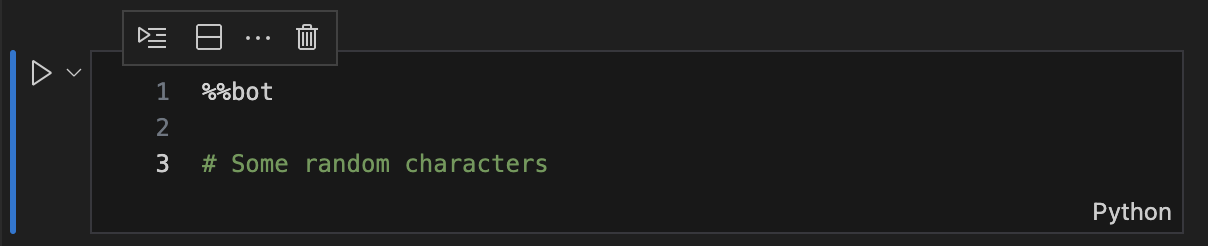
**注:**由于cell magic命令无法直接定位当前cell,需要通过cell的内容进行匹配,因此首次执行%%bot命令时,需要在cell中额外添加一些随机字符
接下来工具会调用相应的agent自动生成并执行相应步骤的代码,如下图:
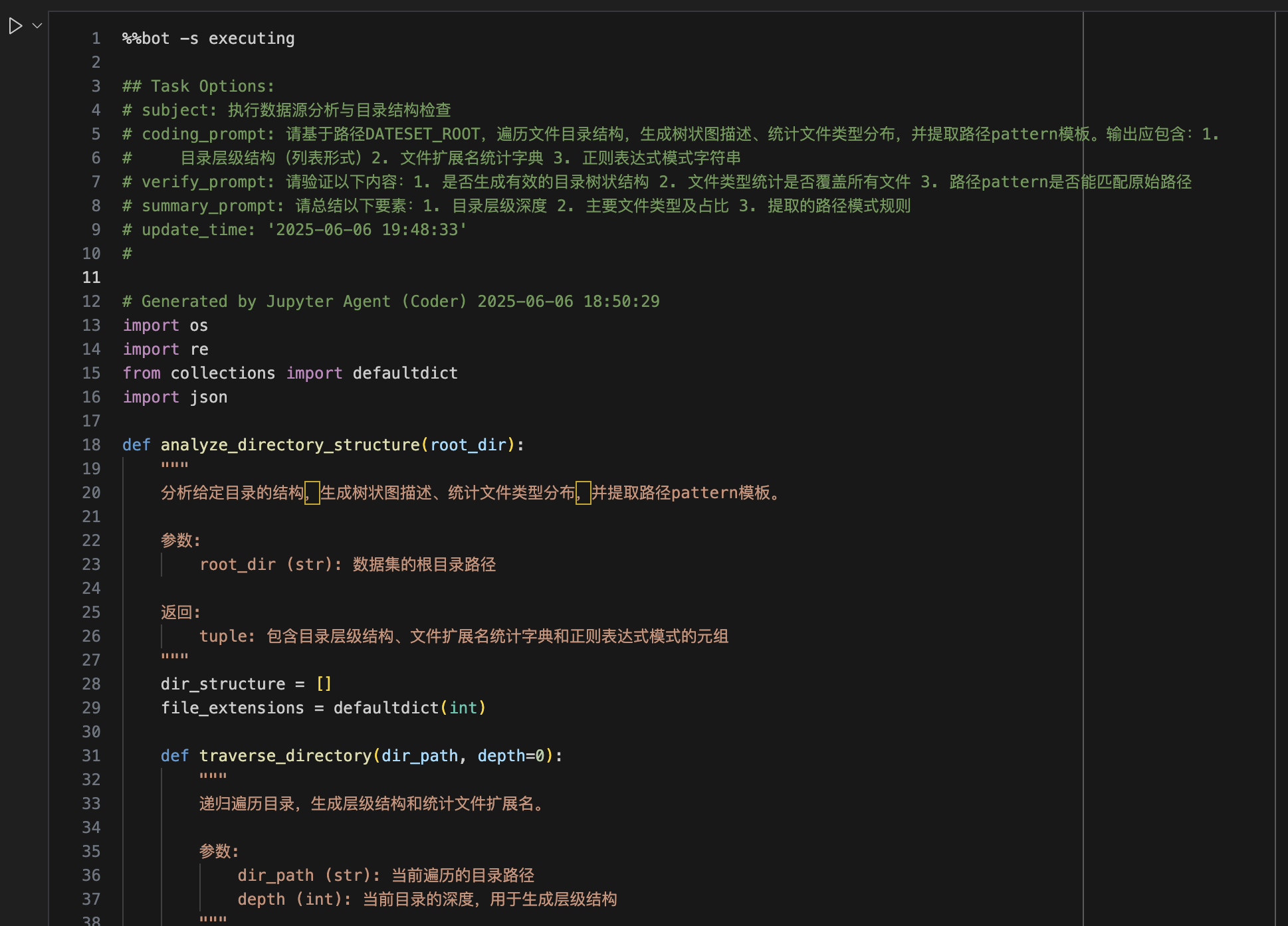
一个cell中只会执行全局计划中的一个步骤,当前步骤执行完成后,需要手工新建一个cell并重复上述过程,直到完成全局目标完成(此时工具不会再生成新代码)
在子任务执行的过程中,默认情况下每一个环节工具都会给出如下图的确认提示,可跟据实际情况输入相应的选项,或直接回车确认继续执行下一环节。

**注:**在执行
%%bot命令前,必须确保当前Notebook已保存,否则Agent无法读取到完整的Notebook上下文。建议开启Notebook编辑器自动保存功能。
更详细用法可参考示例Notebook
评估模式
工具提供了bot_eval命令用于在评估模式下执行notebook。在评估模式下,工具会顺序执行所有有单元格,直到例全局目标完成。
bot_eval [-o output_eval.ipynb] [-e output_eval.jsonl] input.ipynb
例如
bot_eval examples/data_loader_eval.ipynb
当前版本的评估结果见:docs/evaluation.md
设计思路

贡献
欢迎提交 issue 或 pull request 参与贡献。
许可证
本项目基于 MIT License 开源。
Copyright (c) 2025 viewstar000
EN
Implementing jupyter code planning, generation and execution for tasks using LLMs.
Features
- Support
%%botmagic command, you can use it to work on task planning, code generation, execution and debugging. - Support OpenAI Compatible API to call LLMs.
Installation
# Activate the virtual environment
source /path/to/target_env/bin/activate

pip install jupyter-agent
Build from Source
# Clone the repository
git clone https://github.com/viewstar000/jupyter-agent.git
cd jupyter-agent

# Install the build environment
virtualenv .venv
source .venv/bin/activate
pip install build

# Build the package
python -m build

# Deactivate the virtual environment
deactivate

# Activate the Target virtual environment
source /path/to/target_env/bin/activate

# Install the package
pip install /path/to/jupyter-agent/dist/jupyter_agent-xxxx-py3-none-any.whl
Install Vscode Extension
Usage
After installing jupyter-agent and jupyter-agent-extension, you can use %%bot magic command to work on task planning, code generation and execution.
Configuration
Basic Configuration:
First create or open a notebook in Vscode, create a new cell, enter and execute the following commands:
# Load the Magic commands of the extension
%load_ext jupyter_agent.bot_magics

# Set the API address of the model to be called, different Agents can call different models, here we call the model deployed locally in lmstudio
%config BotMagics.default_api_url = 'http://127.0.0.1:1234/v1'
%config BotMagics.default_api_key = 'API_KEY'
%config BotMagics.default_model_name = 'qwen3-30b-a3b'
%config BotMagics.coding_model_name = 'devstral-small-2505-mlx'
Advanced Configuration:
# Set the current notebook path, when it is not automatically obtained, it needs to be manually specified, for example, in Vscode Notebook
%config BotMagics.notebook_path = globals()["__vsc_ipynb_file__"]

# Whether to enable single step mode, each step will exit the execution loop, you need to manually execute the next step, the default is False
%config BotMagics.default_step_mode = False
# Whether to enable automatic confirmation, if automatic confirmation is closed, each step needs to be confirmed by the user, the default is True
%config BotMagics.default_auto_confirm = True

# Set whether to save task data to Metadata, only Vscode installed with jupyter-agent-extension or evaluation mode supports this.
%config BotMagics.support_save_meta = True
# Set whether to set cell content, only Vscode installed with jupyter-agent-extension or evaluation mode supports this.
%config BotMagics.support_set_cell_content = True

# Set the log level, available values are DEBUG、INFO、WARN、ERROR、FATAL, default is INFO
%config BotMagics.logging_level = 'DEBUG'

# Enable automatic evaluation, default is False, call LLM to evaluate the overall result of the subtask
%config BotMagics.enable_evaluating = True
# Enable the simulation of user filling in information, default is False, call LLM to simulate the question of the agent to fill in
%config BotMagics.enable_supply_mocking = True

# Set whether to display thinking process, default is True
%config BotMagics.display_think = True

# Set whether to display messages sent to LLM and LLM responses, default is False
%config BotMagics.display_message = True
%config BotMagics.display_response = True
Now, you can use the %%bot command to work on task rules and code generation.
Perform global task planning
%%bot -P

# Global Goal

...
Global task planning will analyze the user input prompt and generate a detailed execution plan, subsequent %%bot commands will generate code for each step (subtask) automatically.
Generate and execute subtask code
%%bot [-s stage]

# generated code ...
After global task planning, the tool will generate code for each subtask, and you can use the %%bot command to invoke the corresponding agent to generate the code and execute it.
Note: The
%%botcell magic can not locate the empty cell, you must enter the%%botcommand with some random text in the cell to trigger the magic command.
After generating code for a subtask, the tool will call the corresponding agent to generate the code, and then execute it.
Note: Before using the
%%botcommand, you must ensure that the current notebook has been saved, otherwise the agent will not be able to read the full context of the notebook. Suggested to enable the notebook editor's automatic save function.
For more details, please refer to example notebook
Evaluation mode
Use bot_eval command to evaluate the code generated by the agent in evaluation mode. The evaluation mode will execute all cells in order and stop when the global goal is completed.
bot_eval [-o output_eval.ipynb] [-e output_eval.jsonl] input.ipynb
For example
bot_eval examples/data_loader_eval.ipynb
The current evaluation results can be found in docs/evaluation.md
Design
Contributing
Welcome to submit issues or pull requests to participate in contributions.
License
This project is based on the MIT License open source.
Copyright (c) 2025 viewstar000
1 maintainer

Metadata
1 maintainer
Release files for jupyter-agent 2025.7.105
For a detailed explanation of source distributions (sdists) and built distributions (wheels), please see the package formats documentation.
Source distribution (sdist)
| File | Size | Uploaded | Provenance | |
|---|---|---|---|---|
| jupyter_agent-2025.7.105.tar.gz | 62.7 kB | With provenance | Details |
Built distribution (wheel)
| File | Interpreter | ABI | Platform | Reset |
|---|---|---|---|---|
| jupyter_agent-2025.7.105-py3-none-any.whl | Python 3 | none | any | Details |
Total release size: 127.6 kB
Release files / jupyter_agent-2025.7.105.tar.gz
| Download URL | jupyter_agent-2025.7.105.tar.gz |
|---|---|
| Size | 62.7 kB |
| Tags | Source |
|
SHA-256 checksum How to use checksums |
b658d29b4ab749adac734da3ea759c2ffe8d9a1dad16db3ec65ea2b745bf7c0c
|
|
BLAKE2b-256 checksum How to use checksums |
56d148a0a95bbe875fdceb4fe93582d4b61215ddabc6b865448e24caef92a7c5
|
| Upload date | |
|
Uploaded using Trusted Publishing? What is trusted publishing? |
Yes |
| Uploaded via |
twine/6.1.0 CPython/3.12.9
|
Provenance
Provenance describes where a file came from. On PyPI, provenance is shared via attestations, which provide a verifiable record of the build or publishing details. View details, limitations and caveats.


PyPI Publish Attestation
PyPI verified that this artifact, at this checksum, originated from the publisher listed below.
Signed by GitHub Actions, verified by PyPI on Jul 15, 2025.
Transparency logRelease files / jupyter_agent-2025.7.105-py3-none-any.whl
| Download URL | jupyter_agent-2025.7.105-py3-none-any.whl |
|---|---|
| Size | 64.9 kB |
| Tags | Python 3 |
|
SHA-256 checksum How to use checksums |
060fbe7a48bdf9ef0cd2e729ade00b946f980d4acfbbd1cfb5e55f2e1779bade
|
|
BLAKE2b-256 checksum How to use checksums |
a9bf4cec09501037d58ccc532daf982296b4093a493cbeaf461b21864019e96c
|
| Upload date | |
|
Uploaded using Trusted Publishing? What is trusted publishing? |
Yes |
| Uploaded via |
twine/6.1.0 CPython/3.12.9
|
Provenance
Provenance describes where a file came from. On PyPI, provenance is shared via attestations, which provide a verifiable record of the build or publishing details. View details, limitations and caveats.
PyPI Publish Attestation
PyPI verified that this artifact, at this checksum, originated from the publisher listed below.
Signed by GitHub Actions, verified by PyPI on Jul 15, 2025.
Transparency logSecurity for jupyter-agent 2025.7.105
Provenance
Provenance describes where a file came from. On PyPI, provenance is shared via attestations, which provide a verifiable record of the build or publishing details. View details, limitations and caveats.
Full provenance
All 2 files in this release have been uploaded with provenance metadata.
Attestation for jupyter_agent-2025.7.105.tar.gz
PyPI Publish Attestation
PyPI verified that this artifact, at this checksum, originated from the publisher listed below.
Signed by GitHub Actions, verified by PyPI on Jul 15, 2025.
Transparency logA note on package security
PyPI is a repository for distributing packages, not a service for auditing them. While third-party security researchers and our staff do their best to detect and remove malicious packages, PyPI cannot guarantee the quality, security or suitability of any given package.
To learn more about protecting yourself from malicious actors, visit our package security documentation.














