




🪐 🤖 Jupyter AI Agent
Use Jupyter AI Agent, an AI Agent equipped with tools like 'execute', 'insert_cell', and more, to transform your Jupyter Notebooks into an intelligent, interactive workspace!
Jupyter AI Agent <---> JupyterLab
    |            (RTC)
 JNC+JKC

- JNC https://github.com/datalayer/jupyter-nbmodel-client
- JKC https://github.com/datalayer/jupyter-kernel-client
- RTC Real Time Collaboration
Jupyter AI Agent empowers AI models to interact with and modify Jupyter Notebooks. The model is equipped with tools such as adding code cells, inserting markdown cells, executing code, enabling it to modify the notebook comprehensively based on user instructions. This agent is innovative as it is designed to operate on the entire notebook, not just at the cell level, enabling more comprehensive and seamless modifications.
This powerful functionality is made possible through jupyter-nbmodel-client and jupyter-kernel-client, enabling interaction with Jupyter notebooks and kernels.
[!WARNING] jupyter-nbmodel-client and jupyter-kernel-client are experimental and under active development. Unexepected behavior such as "Panic Exception" may occur.
LangChain agent framework is used to manage the interactions between the AI model and the tools.
[!IMPORTANT] Jupyter AI Agent currently only supports models from Azure OpenAI.
Install
To install Jupyter AI Agent, execute:
pip install jupyter_ai_agent
Usage
Example 1: JupyterLab
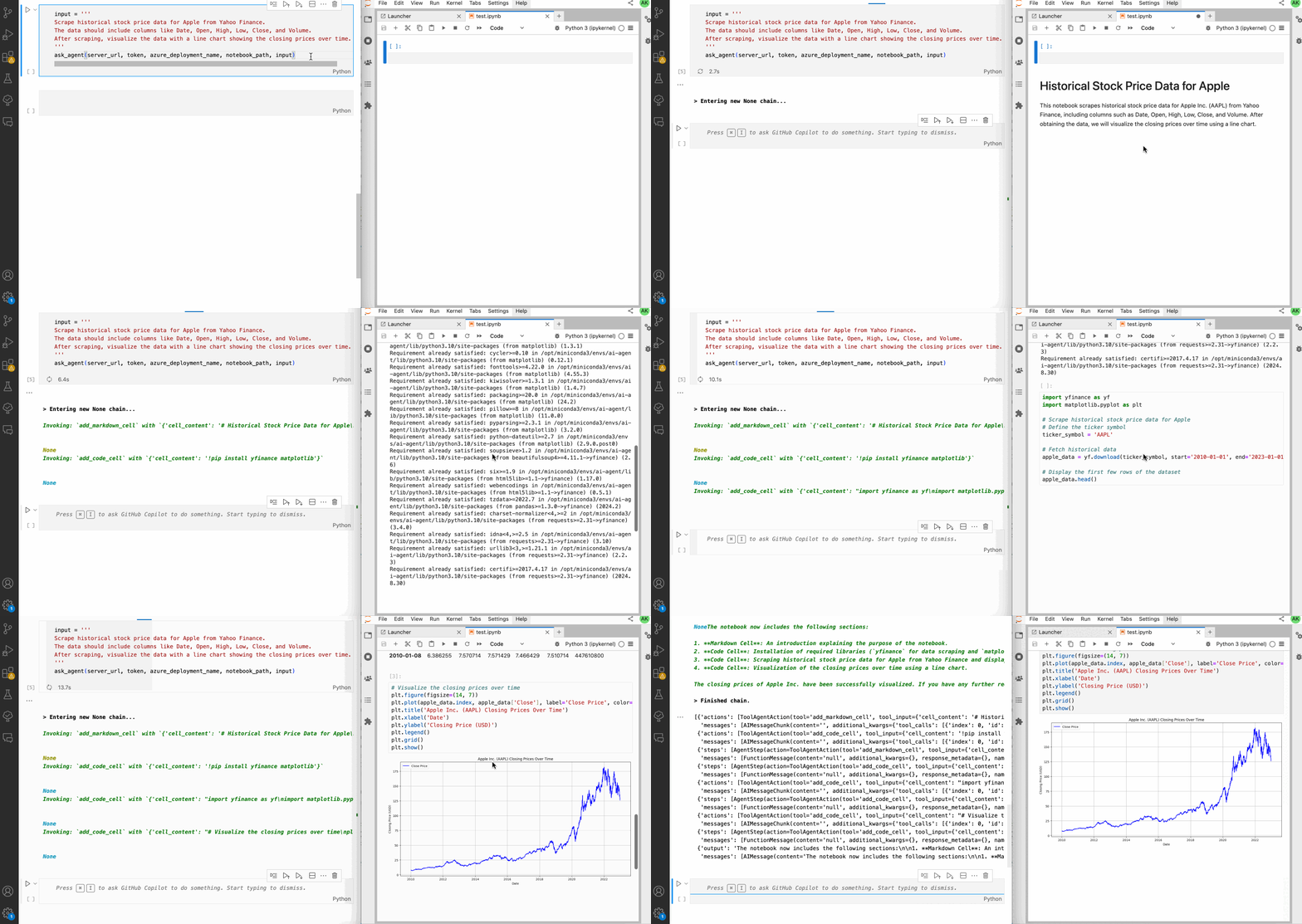
The Jupyter AI Agent can directly interact with JupyterLab and the modifications made by the Jupyter AI Agent can be seen in real-time thanks to Jupyter real time collaboration.
Jupyter AI Agent <---> JupyterLab
    |            (RTC)
JNC+JKC

- JNC https://github.com/datalayer/jupyter-nbmodel-client
- JKC https://github.com/datalayer/jupyter-kernel-client
- RTC Real Time Collaboration
First, make sure you have JupyterLab installed:
pip install jupyterlab
Then, start JupyterLab:
jupyter lab
Then, make sure you have a .env file with the following content:
OPENAI_API_VERSION = ...
AZURE_OPENAI_ENDPOINT = ...
AZURE_OPENAI_API_KEY = ...
To use the Jupyter AI Agent, execute the following:
azure_deployment_name = "gpt-4o-mini" # for example
server_url = "http://localhost:8888" # for example, typical when using JupyterLab
token = "..." # your JupyterLab token
notebook_path = "..." # the path to the notebook you want the Jupyter AI Agent to modify

input = '''
Scrape historical stock price data for Apple from Yahoo Finance.
The data should include columns like Date, Open, High, Low, Close, and Volume.
After scraping, visualize the data with a line chart showing the closing prices over time.
''' # the input to the Jupyter AI Agent

ask_agent(server_url, token, azure_deployment_name, notebook_path, input)
Uninstall
To uninstall the agent, execute:
pip uninstall jupyter_ai_agent
Contributing
Development install
# Clone the repo to your local environment
# Change directory to the jupyter_ai_agent directory
# Install package in development mode - will automatically enable
# The server extension.
pip install -e ".[test,lint,typing]"
Running Tests
Install dependencies:
pip install -e ".[test]"
To run the python tests, use:
pytest
Development uninstall
pip uninstall jupyter_ai_agent
Packaging the extension
See RELEASE
1 maintainer

Release files for jupyter-ai-agent 0.2.0
For a detailed explanation of source distributions (sdists) and built distributions (wheels), please see the package formats documentation.
Built distribution (wheel)
| File | Interpreter | ABI | Platform | Reset |
|---|---|---|---|---|
| jupyter_ai_agent-0.2.0-py3-none-any.whl | Python 3 | none | any | Details |
Release files / jupyter_ai_agent-0.2.0-py3-none-any.whl
| Download URL | jupyter_ai_agent-0.2.0-py3-none-any.whl |
|---|---|
| Size | 6.9 kB |
| Tags | Python 3 |
|
SHA-256 checksum How to use checksums |
7692e2884c441f68ce0ebffd1f374cb155c14ef8627ec57d71a16964dbe905b8
|
|
BLAKE2b-256 checksum How to use checksums |
11295571114819007a8c892a5ee6f1b051044790c879902928d48969941086f9
|
| Upload date | |
|
Uploaded using Trusted Publishing? What is trusted publishing? |
No |
| Uploaded via |
twine/5.1.1 CPython/3.11.10
|














