
Jupyter AI Agents.

Project description


🪐 ✨ Jupyter AI Agents


The Jupyter AI Agents are equipped with tools like 'execute', 'insert_cell', and more, to transform your Jupyter Notebooks into an intelligent, interactive workspace!

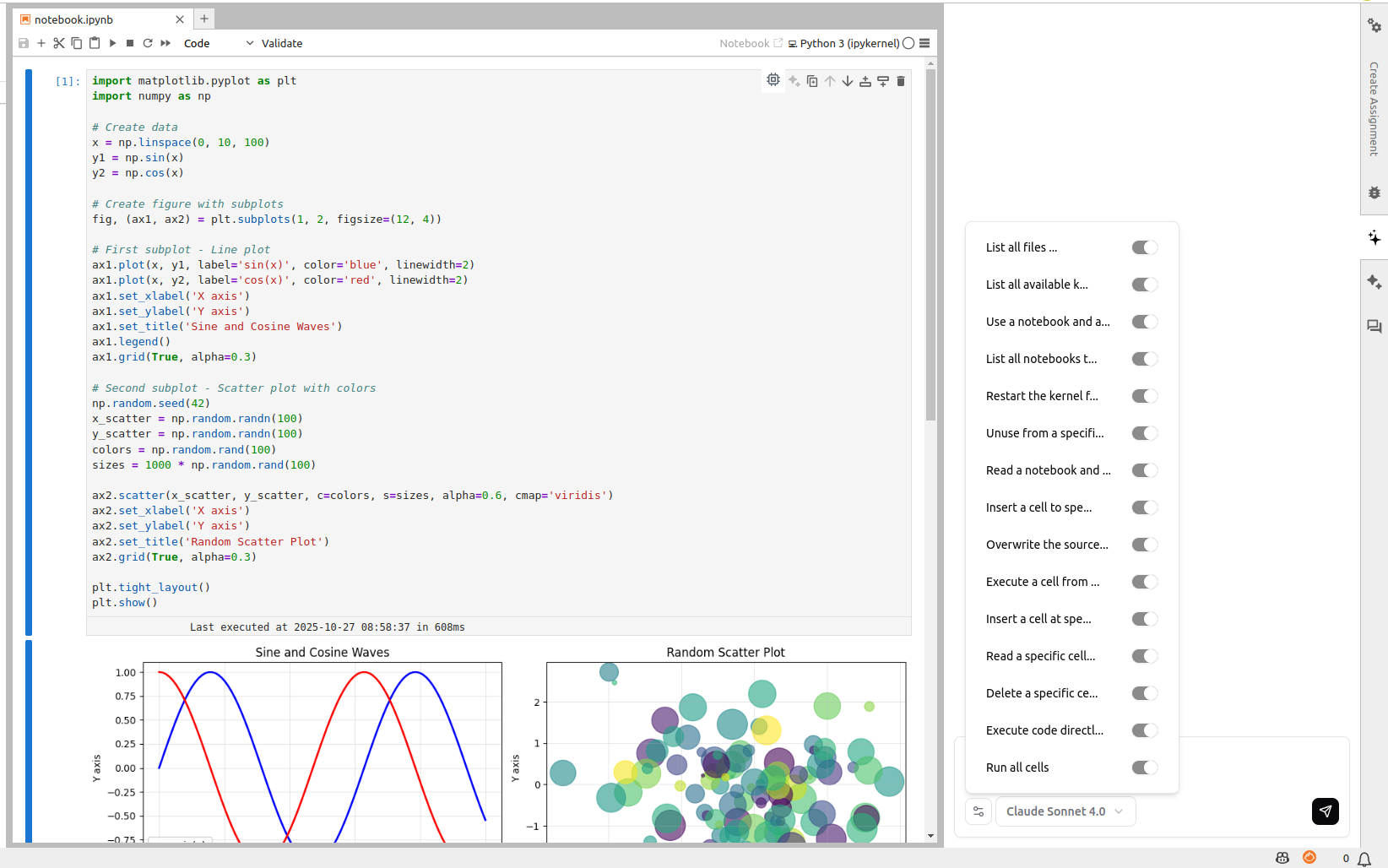

Jupyter AI Agents empowers AI models to interact with and modify Jupyter Notebooks. The agent is equipped with tools such as adding code cells, inserting markdown cells, executing code, enabling it to modify the notebook comprehensively based on user instructions or by reacting to the Jupyter notebook events.
This Agent is innovative as it is designed to operate on the entire Notebook, not just at the cell level, enabling more comprehensive and seamless modifications.
The Agent can also run separetely from the Jupyter server as the communication is achieved through RTC via the Jupyter NbModel Client and the Jupyter Kernel Client.
Jupyter AI Agents <---> JupyterLab
       |
       | RTC (Real Time Collaboration)
       |
Jupyter Clients
This library is documented on https://jupyter-ai-agents.datalayer.tech.
Install
To install Jupyter AI Agents, run the following command.
pip install jupyter_ai_agents
Or clone this repository and install it from source.
git clone https://github.com/datalayer/jupyter-ai-agents
cd jupyter-ai-agents
pip install -e .
The Jupyter AI Agents can directly interact with JupyterLab. The modifications made by the Jupyter AI Agents can be seen in real-time thanks to Jupyter Real Time Collaboration. Make sure you have JupyterLab installed with the Collaboration extension.
pip install jupyterlab==4.4.1 jupyter-collaboration==4.0.2
We ask you to take additional actions to overcome limitations and bugs of the pycrdt library. Ensure you create a new shell after running the following commands.
pip uninstall -y pycrdt datalayer_pycrdt
pip install datalayer_pycrdt==0.12.17
Use from the CLI
We put here a quick example for a Out-Kernel Stateless Agent via CLI helping your JupyterLab session.
Start JupyterLab, setting a port and a token to be reused by the agent, and create a notebook notebook.ipynb.
# make jupyterlab
jupyter lab --port 8888 --IdentityProvider.token MY_TOKEN
Jupyter AI Agents supports multiple AI model providers (more information can be found on this documentation page).
The following takes you through an example with the Azure OpenAI provider. Read the Azure Documentation to get the needed credentials and make sure you define them in the following .env file.
cat << EOF >>.env
OPENAI_API_VERSION="..."
AZURE_OPENAI_ENDPOINT="..."
AZURE_OPENAI_API_KEY="..."
EOF
Prompt Agent
To use the Jupyter AI Agents, an easy way is to launch a CLI (update the Azure deployment name based on your setup).
# Prompt agent example.
# make jupyter-ai-agents-prompt
jupyter-ai-agents prompt \
  --url http://localhost:8888 \
  --token MY_TOKEN \
  --model-provider azure-openai \
  --model-name gpt-4o-mini \
  --path notebook.ipynb \
  --input "Create a matplotlib example"
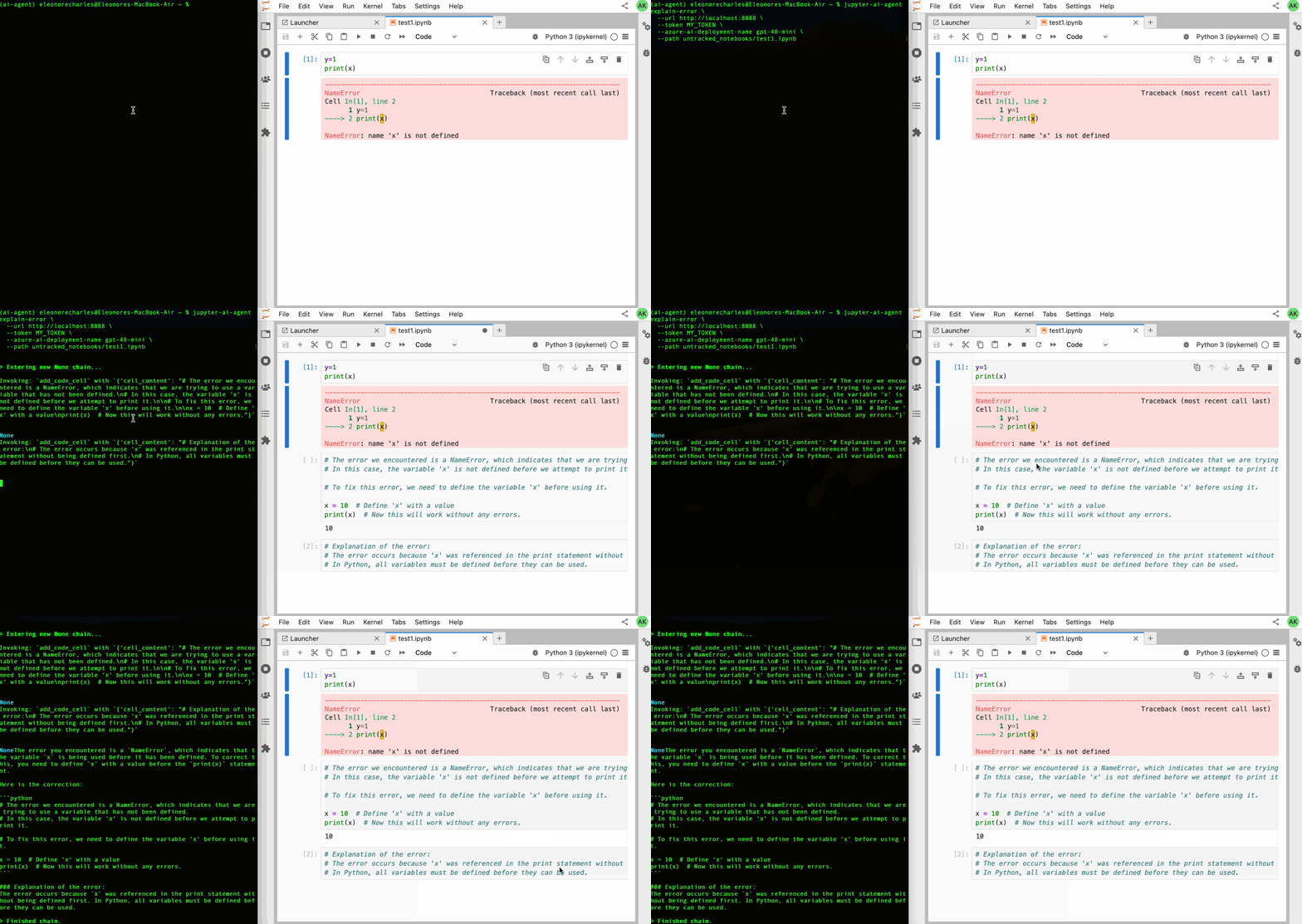
Explain Error Agent
# Explain Error agent example.
# make jupyter-ai-agents-explain-error
jupyter-ai-agents explain-error \
  --url http://localhost:8888 \
  --token MY_TOKEN \
  --model-provider azure-openai \
  --model-name gpt-4o-mini \
  --path notebook.ipynb
Uninstall
To uninstall the agent, execute.
pip uninstall jupyter_ai_agents
Deploy in a Server
You can start a Jupyter AI Agents server to be used in combination with the Datalayer online services.
make server
Contributing
Development install
# Clone the repo to your local environment
# Change directory to the jupyter_ai_agents directory
# Install package in development mode - will automatically enable
# The server extension.
pip install -e ".[test,lint,typing]"
Running Tests
Install dependencies:
pip install -e ".[test]"
To run the python tests, use:
pytest
Development uninstall
pip uninstall jupyter_ai_agents
Packaging the library
See RELEASE.
Release history Release notifications | RSS feed


Download files
Download the file for your platform. If you're not sure which to choose, learn more about installing packages.
Source Distributions
Built Distribution
Filter files by name, interpreter, ABI, and platform.
If you're not sure about the file name format, learn more about wheel file names.
Copy a direct link to the current filters
File details
Details for the file jupyter_ai_agents-0.16.0-py3-none-any.whl.
File metadata
- Download URL: jupyter_ai_agents-0.16.0-py3-none-any.whl
- Upload date:
- Size: 4.9 MB
- Tags: Python 3
- Uploaded using Trusted Publishing? No
- Uploaded via: twine/6.2.0 CPython/3.11.12
File hashes
| Algorithm | Hash digest | |
|---|---|---|
| SHA256 |
d0bc2a9189a72837490071521745596d4bf2f83bb5536f13286ca4e289136c88
|
|
| MD5 |
859421655ed9202178ee1dd9b469c1ce
|
|
| BLAKE2b-256 |
cf111d9ac566d9f3668d1c2a52e9ea08d9c5d1b31be32e21c1d133cb1f0be571
|






