
jupyter-archive






A Jupyter extension to make, download and extract archive files.
Features:
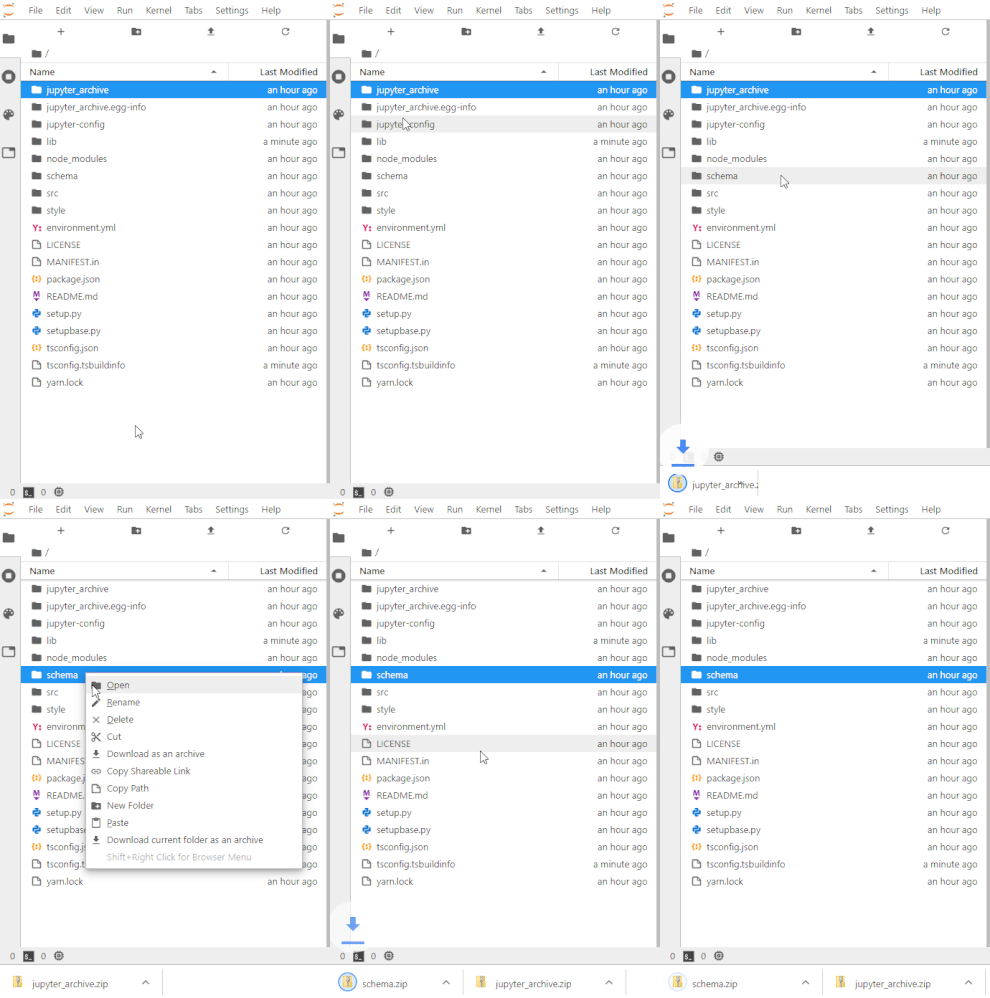
- Download selected or current folder as an archive.
- Supported formats: 'zip', 'tar.gz', 'tar.bz2' and 'tar.xz'.
- Archiving and downloading are non-blocking for Jupyter. UI can still be used.
- Archive format can be set in the JLab settings.
- Alternatively, you can choose the format in the file browser menu (the format setting needs to be set to
null). - Decompress an archive directly in file browser.
- Notebok client extension not available. Contributions are welcome.
Configuration
The server extension has some configuration settings -- the values below are the default one:
{
  JupyterArchive: {
    stream_max_buffer_size: 104857600, // The max size of tornado IOStream buffer
    handler_max_buffer_length: 10240, // The max length of chunks in tornado RequestHandler
    archive_download_flush_delay: 100 // The delay in ms at which we send the chunk of data to the client.
  }
}
You can also set new values with the following environment variables:
JA_IOSTREAM_MAX_BUFFER_SIZEJA_HANDLER_MAX_BUFFER_LENGTHJA_ARCHIVE_DOWNLOAD_FLUSH_DELAY
Requirements
- JupyterLab >= 3.0 or Notebook >= 7.0
For JupyterLab 2.x, have look there.
Install
To install the extension, execute:
pip install jupyter-archive
Or
conda install -c conda-forge jupyter-archive
Uninstall
To remove the extension, execute:
pip uninstall jupyter-archive
Or
conda remove jupyter-archive
Troubleshoot
If you are seeing the frontend extension, but it is not working, check that the server extension is enabled:
jupyter server extension list
If the server extension is installed and enabled, but you are not seeing the frontend extension, check the frontend extension is installed:
jupyter labextension list
Contributing
If you would like to contribute to this extension, please refer to the Contributing Guide.
License
Under BSD license. See LICENSE.
Authors
- Hadrien Mary: @hadim
- Frédéric Collonval: @fcollonval
1 maintainer

Download files
Download the file for your platform. If you're not sure which to choose, learn more about installing packages.
Source Distribution
Built Distribution
Filter files by name, interpreter, ABI, and platform.
If you're not sure about the file name format, learn more about wheel file names.
Copy a direct link to the current filters
File details
Details for the file jupyter_archive-3.5.0.tar.gz.
File metadata
- Download URL: jupyter_archive-3.5.0.tar.gz
- Upload date:
- Size: 414.8 kB
- Tags: Source
- Uploaded using Trusted Publishing? Yes
- Uploaded via: twine/7.0.0 CPython/3.12.13
File hashes
| Algorithm | Hash digest | |
|---|---|---|
| SHA256 |
46881588b6100bd7ab4c71ada66054930b5e1e3ea2e60a582ed0469b8664288d
|
|
| MD5 |
bbe6805e19792d9ffa92d3155f1784a4
|
|
| BLAKE2b-256 |
8b5227d4cb2df2f3b5880477a54959f302733f65b14e2b2061c460b6646e91a9
|
File details
Details for the file jupyter_archive-3.5.0-py3-none-any.whl.
File metadata
- Download URL: jupyter_archive-3.5.0-py3-none-any.whl
- Upload date:
- Size: 57.7 kB
- Tags: Python 3
- Uploaded using Trusted Publishing? Yes
- Uploaded via: twine/7.0.0 CPython/3.12.13
File hashes
| Algorithm | Hash digest | |
|---|---|---|
| SHA256 |
ad3c3b9abb3245a86471500075fdb5e1200cb75b8493f95f5afd1024b5cbb3ef
|
|
| MD5 |
9ed3ae9576995856b767bdff979c7bc4
|
|
| BLAKE2b-256 |
dd572e03b37294660b6136f237b6e2b487994616c883cdd4595f0565020f4a81
|







