
JupyterHub Classroom Manager


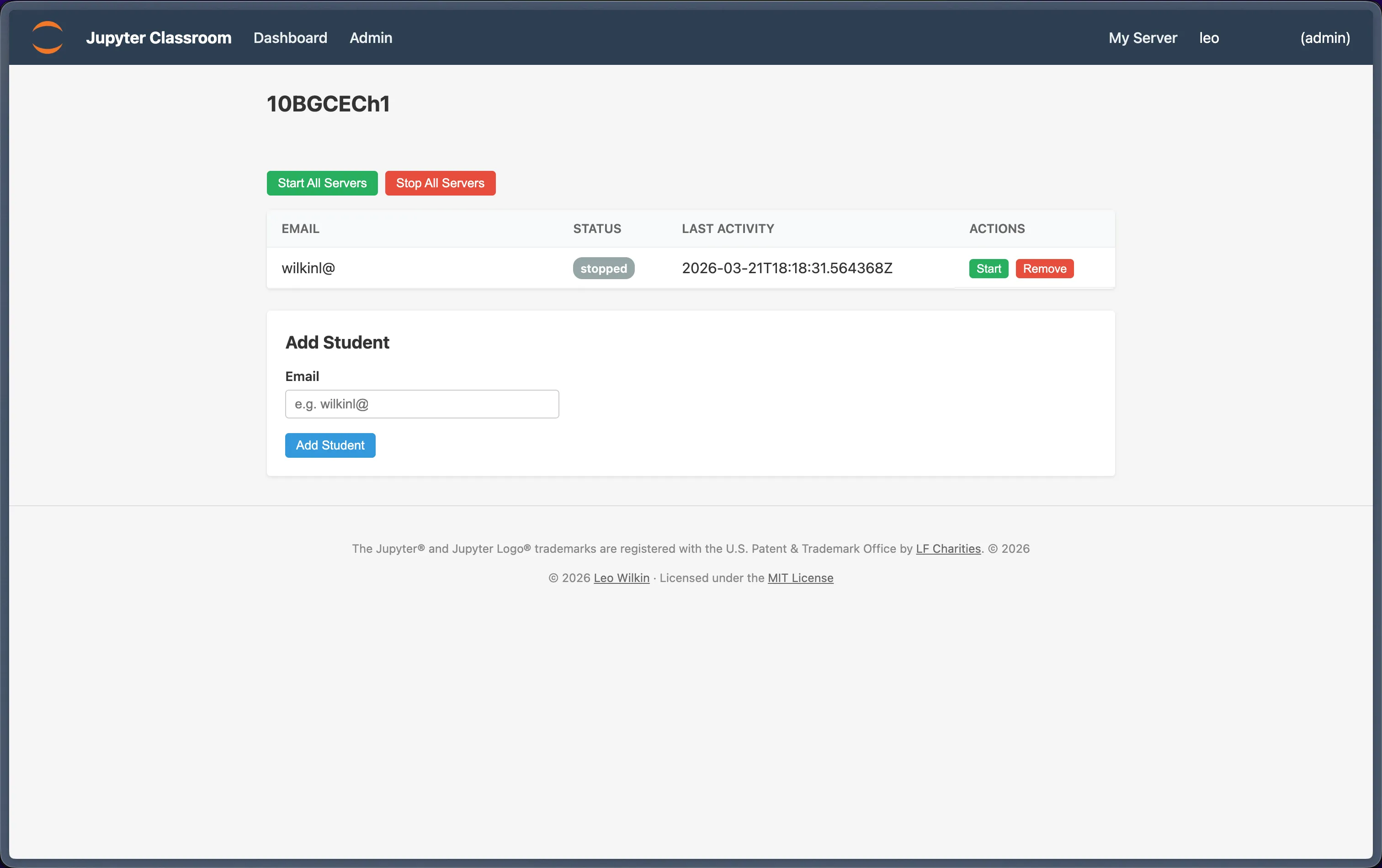
Classroom Manager is a FastAPI web dashboard, built as a JupyterHub service for classroom management for teachers. It provides an intuitive dashboard for non-technical staff to manage a cohort ot students on Jupyter notebooks.
Classroom Manager allows staff to add students, manage their server statuses, and assign students to classrooms.
Deployability
This doesn't need a database, so there's no extra infrastructure overhead - JupyterHub manages the deployment.
Authentication is managed by JupyterHub itself, so if you want to use something like Microsoft Azure authentication, or Google OAuth, configure this with JupyterHub as you'd usually do.
Requirements
- JupyterHub 5.x+
- Python 3.10+
jupyter-collaboration(for real-time collaboration features)
Installation
sudo /opt/tljh/hub/bin/pip install jupyter-classroom
For a full quick-start guide, see the documentation.
JupyterHub Configuration
Add this to your jupyterhub_config.py:
c.JupyterHub.services = [
    {
        "name": "classroom-manager",
        "url": "http://127.0.0.1:10101",
        "command": ["jupyter-classroom"],
        "oauth_client_allowed_scopes": ["identify"],
    },
]

c.JupyterHub.load_roles = [
    {
        "name": "classroom-manager-role",
        "services": ["classroom-manager"],
        "scopes": [
            "list:users",
            "read:users",
            "admin:users",
            "admin:servers",
            "admin:groups",
            "read:groups",
            "list:groups",
        ],
    },
    {
        "name": "user",
        "scopes": [
            "self",
            "access:services!service=classroom-manager",
        ],
    },
]
Real-Time Collaboration
Teachers can join any student's notebook session in real-time for live collaboration. This requires jupyter-collaboration installed in the singleuser environment:
sudo /opt/tljh/user/bin/pip install jupyter-collaboration
Then add this to your jupyterhub_config.py to enable collaborative mode on all servers:
c.Spawner.args = ["--LabApp.collaborative=True"]
Alternatively, to enable it selectively (e.g. only for specific groups), use a pre_spawn_hook:
def pre_spawn_hook(spawner):
    # Enable RTC for all users
    spawner.args.append("--LabApp.collaborative=True")

c.Spawner.pre_spawn_hook = pre_spawn_hook
With RTC enabled, teachers can click "Join" on any running student server in the Classroom Manager dashboard to open the student's JupyterLab and collaborate in real-time.
nbgitpuller
We use nbgitpuller on our instance to make it easier to pull from our Jupyter notebook Git source! It's a fantastic tool for one-click setup, through links configured on nbgitpuller's documentation.
1 maintainer

Metadata
1 maintainer
Release files for jupyter-classroom 1.2.3
For a detailed explanation of source distributions (sdists) and built distributions (wheels), please see the package formats documentation.
Source distribution (sdist)
| File | Size | Uploaded | |
|---|---|---|---|
| jupyter_classroom-1.2.3.tar.gz | 14.6 kB | Details |
Built distribution (wheel)
| File | Interpreter | ABI | Platform | Reset |
|---|---|---|---|---|
| jupyter_classroom-1.2.3-py3-none-any.whl | Python 3 | none | any | Details |
Total release size: 34.1 kB
Release files / jupyter_classroom-1.2.3.tar.gz
| Download URL | jupyter_classroom-1.2.3.tar.gz |
|---|---|
| Size | 14.6 kB |
| Tags | Source |
|
SHA-256 checksum How to use checksums |
4c2492c10812d5dac744bb45913d5ec338e7af11a4f65dc330c20db7a229d438
|
|
BLAKE2b-256 checksum How to use checksums |
a1b031d6ffef1c1d1787a5b5b72de6cefc749557e326627b6a39163cc3768503
|
| Upload date | |
|
Uploaded using Trusted Publishing? What is trusted publishing? |
Yes |
| Uploaded via |
twine/6.1.0 CPython/3.13.7
|
Provenance
Provenance describes where a file came from. On PyPI, provenance is shared via attestations, which provide a verifiable record of the build or publishing details. View details, limitations and caveats.


PyPI Publish Attestation
PyPI verified that this artifact, at this checksum, originated from the publisher listed below.
Signed by GitHub Actions, verified by PyPI on Mar 23, 2026.
Transparency logRelease files / jupyter_classroom-1.2.3-py3-none-any.whl
| Download URL | jupyter_classroom-1.2.3-py3-none-any.whl |
|---|---|
| Size | 19.5 kB |
| Tags | Python 3 |
|
SHA-256 checksum How to use checksums |
c5e9d6cc244659809a0a3b319423ec9803c51405ddc67bd17df752d1772f2c46
|
|
BLAKE2b-256 checksum How to use checksums |
b2b392555c507220d2d94fd511f9e0529760f541bb54248080f1a7a9f3ae8edf
|
| Upload date | |
|
Uploaded using Trusted Publishing? What is trusted publishing? |
Yes |
| Uploaded via |
twine/6.1.0 CPython/3.13.7
|
Provenance
Provenance describes where a file came from. On PyPI, provenance is shared via attestations, which provide a verifiable record of the build or publishing details. View details, limitations and caveats.
PyPI Publish Attestation
PyPI verified that this artifact, at this checksum, originated from the publisher listed below.
Signed by GitHub Actions, verified by PyPI on Mar 23, 2026.
Transparency log













