


🪐 ✍️ Jupyter Lexical
A literate Jupyter for accessible and reproducible data analysis.
Extensions
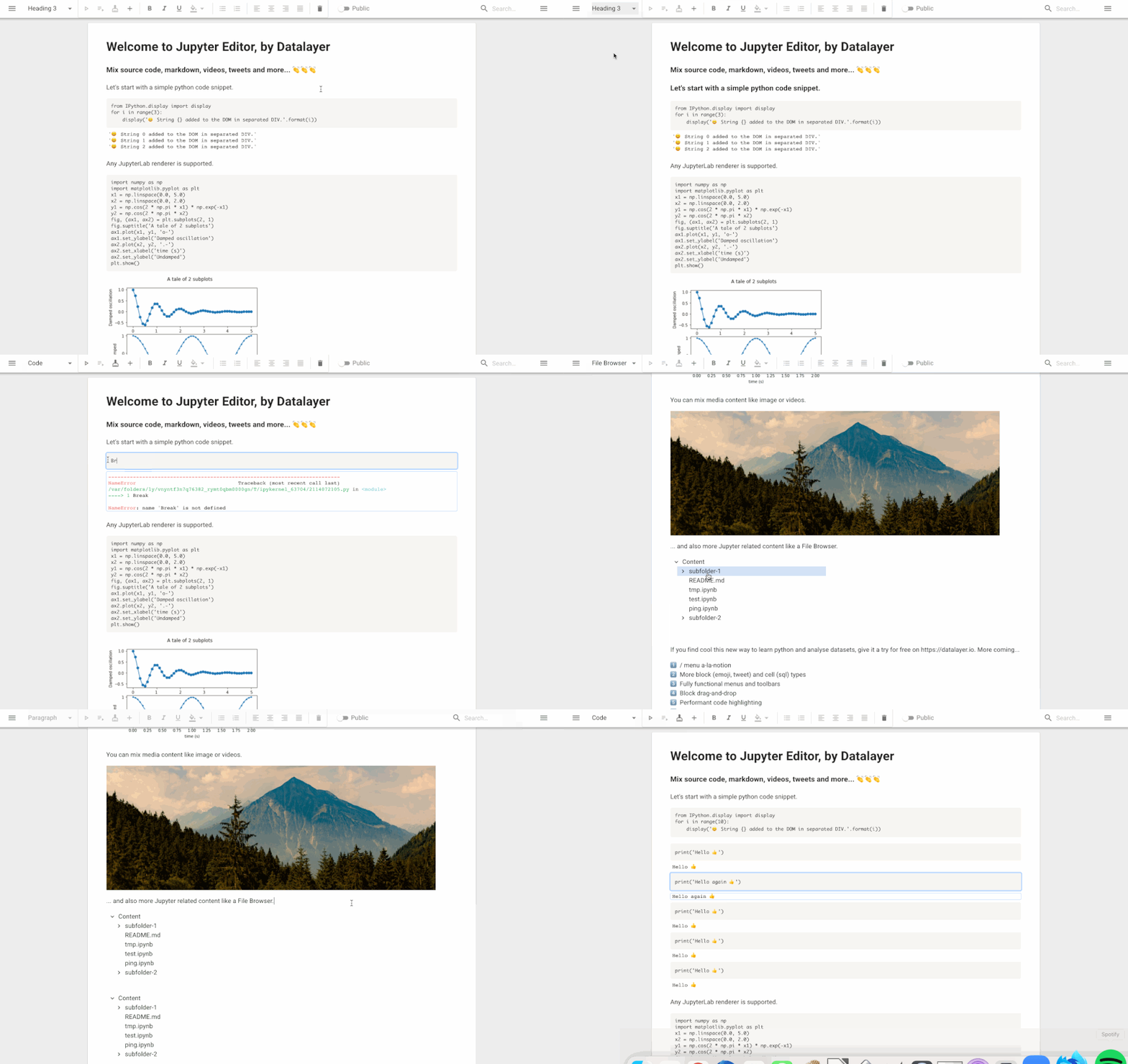
The editor is built with Lexical extensions:
every behaviour of this package is an extension in src/extensions, and
JupyterLexicalExtension bundles them all. A host depends on the bundle from
its own root extension, adds what is its own — namespace, theme, initial
state, focus on mount — and renders the content editable where it wants it:
import { AutoFocusExtension } from '@lexical/extension';
import { LexicalExtensionComposer } from '@lexical/react/LexicalExtensionComposer';
import { ContentEditable } from '@lexical/react/LexicalContentEditable';
import {
  JupyterLexicalExtension,
  commentTheme,
} from '@datalayer/jupyter-lexical';
import { defineExtension } from 'lexical';

// Module scope: the composer rebuilds the editor whenever this reference changes.
const extension = defineExtension({
  name: 'my-app/Document',
  namespace: 'my-document',
  theme: commentTheme,
  dependencies: [JupyterLexicalExtension, AutoFocusExtension],
});

export const Document = () => (
  <LexicalExtensionComposer extension={extension} contentEditable={null}>
    <ContentEditable className="editor-input" />
  </LexicalExtensionComposer>
);
Bundled behaviours are reconfigured from the root with configExtension, for
instance configExtension(HistoryExtension, { disabled: true }) for a
collaborative document, or configExtension(ListMaxIndentLevelExtension, { maxDepth: 3 }).
Some of them expose signals in their output so a live editor can be
reconfigured without being rebuilt — the list ceiling, or the lexicalId and
serviceManager of LexicalStateExtension that register the editor in the
shared store for agent tools.
Two kinds of behaviour need the host: what only the host has (a kernel,
completion providers) and what hangs off the host's DOM (floating menus).
The first are output components — JupyterInputOutputExtension,
ComponentPickerMenuExtension and InlineCompletionExtension — placed with
useExtensionComponent or <ExtensionComponent lexical:extension={…} />;
the second stay React plug-ins rendered as children of the composer, as do
the toolbar, the comments panel and the collaboration provider.
Every extension keeps a React plug-in of the same name in src/plugins for an
editor still built with LexicalComposer; the plug-in is a thin wrapper over
the extension's register… function, so both paths share one implementation.
Video, Loom and deck blocks
Three block types come with the bundle, and with / in the editor:
- Video (
VideoExtension,VideoNode): records the screen or the camera with the browser's ownMediaRecorder— no account, no key, no upload. The file stays in the page's memory: it is lost when the page reloads, and nobody else editing the document sees it. Download keeps a copy. After a reload the block says its video is gone rather than pretending it never was. - Loom Video (
LoomExtension,LoomNode): an empty block that records a Loom video — the author signs in to their Loom account, where the video is saved — or takes the address of one, and then shows it. Pasting a Loom address offers to embed it. - Deck Slide (
DeckExtension,DeckNode): a deck drawn by@datalayer/decksfrom itsDeckSpec, one title slide to begin with. Double-click it to edit the specification as JSON; Save checks it withvalidateDeckSpecand keeps it only when it has no errors.
Recording with Loom needs a Loom public app id. This package keeps none; the host gives it from its own configuration:
configExtension(LoomExtension, { publicAppId: process.env.LOOM_PUBLIC_APP_ID });
(<Editor extensions={[…]} /> takes that list, and <LoomPlugin publicAppId={…} />
does the same for an editor built with LexicalComposer.) Without one, Loom
blocks still show and embed videos; only Record is off. The examples read
LOOM_PUBLIC_APP_ID from the shell, or from .env.local in this package,
which git ignores (a bare .env it does not — keep the id out of that one):
npm run install:react18                           # once, see below
echo 'LOOM_PUBLIC_APP_ID=…' >> .env.local         # once
npm run start:vite                                # or start:webpack
The Loom recorder, @loomhq/record-sdk, runs on React 18: it imports React
from the page and mounts with ReactDOM.render, which React 19 removed. Under
JupyterLab, which shares React 18, nothing is needed. A React 19 page must give
the recorder a React 18 of its own — the SDK is imported only when somebody
presses Record, so without one it is only Record that fails, and the block
says so. This package's dev servers show both ways, with the pair
npm run install:react18 puts in vendor/react18:
- webpack (
webpack.config.js): the SDK and all it imports join a module layer,loom18, in whichreactandreact-domresolve to that pair; - Vite (
vite.config.ts): a plugin bundles the SDK apart with esbuild, everyreactimport pointed at that pair, and serves the result wherever the source imports the SDK.
Formats
A document goes in and out of other formats through src/convert:
-
Markdown —
$convertToMarkdownString/$convertFromMarkdownStringwith the package's transformers (tables, images, equations, rules, and fenced code as executable Jupyter inputs). -
nbformat —
lexicalToNbformat(nodes)writes a code cell per Jupyter input with its outputs and one Markdown cell per run of anything else;nbformatToLexical(notebook, editor)reads a notebook back (the input/output plug-in must be mounted for the code cells). -
LaTeX —
$convertToLatexString(transformers?, { document, documentClass, classOptions, title, author, date })and$convertFromLatexString(latex, transformers?), built on transformers shaped after@lexical/markdown's (LATEX_TRANSFORMERS): the title block (\title,\author,\date,\maketitle), headings from\partto\subparagraph, paragraphs and text formats, quotes and abstracts, theorem environments and proofs, lists, check lists and description lists, listings (lstlisting,minted,verbatim), algorithms, tables (tabularand friends,\multicolumnas spanning cells), figures, rules, inline and display math (AMS environments included), links, YouTube embeds, footnotes, citations andthebibliography, TeX dashes and quotes.\newcommandmacros from the preamble are expanded. Columns are read into layout nodes:multicols(at\columnbreak, or evenly), beamercolumns, side-by-sideminipages, and thetwocolumnclass option; they are written back asmulticols. Beamer frames become sections and theirblocks collapsible boxes;moderncventries and theletterclass (\opening,\closing,\signature,\ps) read as prose. A host adds a node by adding a transformer.$importLatexalso returns what the preamble said (LatexDocumentInfo). -
LaTeX templates —
LATEX_TEMPLATESholds one document per Overleaf template category (journal article, bibliography, book, calendar, CV, letter, assignment, newsletter, poster, presentation, thesis), each in the idiom of the category's best-known template. -
PDF — four routes, one extension each, all in the browser and all TypeScript (
PdfExportExtensionbundles them; commands and functions insrc/extensions/PdfExportExtension.ts):PdfPrintExtension/PRINT_PDF_COMMAND— the rendered document, cloned into a hidden iframe with the page's stylesheets and a print stylesheet, printed by the browser (what JupyterLab does). Highest fidelity; the reader saves as PDF from the dialog.PdfDocumentExtension/EXPORT_PDF_DOCUMENT_COMMAND— a vector PDF laid out from the document model (src/convert/pdf: a small PDF writer over the standard 14 fonts, a layout engine for headings, paragraphs, lists, code, tables, columns, quotes, boxes). Text stays text; pictures — equations through KaTeX, images, drawings, rich outputs — are drawn by the browser and placed as JPEGs. Runs headless withpictures: false.PdfSnapshotExtension/EXPORT_PDF_SNAPSHOT_COMMAND— the editor drawn to a canvas with html2canvas and cut into page images at the whitest row near each cut. Everything as shown, nothing selectable.PdfTypesetExtension/EXPORT_PDF_TYPESET_COMMAND— the document as Typst markup (src/convert/typst), compiled by the Typst engine in WebAssembly, fetched from a CDN on first use (loadTypstEngine; both URLs configurable). Real typesetting; LaTeX math through themitexpackage from Typst's registry.
The LexicalFormats example shows all of them on one document: Markdown
and LaTeX sources you can edit and apply, a live notebook, the nbformat
JSON, and the LaTeX rendered by reading it back into a read-only editor.
The LexicalLatex example ("LaTeX Templates") reads each template into an
editable editor beside its source, each written to the other on leaving.
The LexicalPdf example ("PDF Export") runs the four PDF routes on the
sample document side by side, with a preview of each result; both other
examples carry an "Export PDF" menu.
1 maintainer

Release files for jupyter-lexical 0.0.4
For a detailed explanation of source distributions (sdists) and built distributions (wheels), please see the package formats documentation.
Source distribution (sdist)
| File | Size | Uploaded | |
|---|---|---|---|
| jupyter_lexical-0.0.4.tar.gz | 37.8 MB | Details |
Built distribution (wheel)
| File | Interpreter | ABI | Platform | Reset |
|---|---|---|---|---|
| jupyter_lexical-0.0.4-py3-none-any.whl | Python 3 | none | any | Details |
Total release size: 76.6 MB
Release files / jupyter_lexical-0.0.4.tar.gz
| Download URL | jupyter_lexical-0.0.4.tar.gz |
|---|---|
| Size | 37.8 MB |
| Tags | Source |
|
SHA-256 checksum How to use checksums |
4ba18ba81f378c6a3012587c8d30140d4dd159b6c23c00b53731ef242a0c40d4
|
|
BLAKE2b-256 checksum How to use checksums |
583d05a96c49fc1ca472ebb29d360935d1d6ed87c8e805bf60c6bb8d39e2c83c
|
| Upload date | |
|
Uploaded using Trusted Publishing? What is trusted publishing? |
Yes |
| Uploaded via |
twine/7.0.0 CPython/3.13.14
|
Provenance
Provenance describes where a file came from. On PyPI, provenance is shared via attestations, which provide a verifiable record of the build or publishing details. View details, limitations and caveats.


PyPI Publish Attestation
PyPI verified that this artifact, at this checksum, originated from the publisher listed below.
Signed by GitHub Actions, verified by PyPI on Sep 25, 2026.
Transparency logRelease files / jupyter_lexical-0.0.4-py3-none-any.whl
| Download URL | jupyter_lexical-0.0.4-py3-none-any.whl |
|---|---|
| Size | 38.8 MB |
| Tags | Python 3 |
|
SHA-256 checksum How to use checksums |
5ac5c32417984cc3f2757619c9c1a29f45a43a64d9d255537b7f00a4119e12e1
|
|
BLAKE2b-256 checksum How to use checksums |
5923bf0915dd86f0e4606e1cf6511ae243bb96a8ac500d8d735aefce512b5465
|
| Upload date | |
|
Uploaded using Trusted Publishing? What is trusted publishing? |
Yes |
| Uploaded via |
twine/7.0.0 CPython/3.13.14
|
Provenance
Provenance describes where a file came from. On PyPI, provenance is shared via attestations, which provide a verifiable record of the build or publishing details. View details, limitations and caveats.
PyPI Publish Attestation
PyPI verified that this artifact, at this checksum, originated from the publisher listed below.
Signed by GitHub Actions, verified by PyPI on Sep 25, 2026.
Transparency log













