
jupyter-nbrequirements 


Dependency management and optimization in Jupyter Notebooks.
About
This extension provides control over the notebook dependencies.
The main goals of the project are the following:
- manage notebook requirements without leaving the notebook
- provide a unique and optimized* environment for each notebook
*The requirements are optimized using the Thoth resolution engine
Installation
pip install jupyter-nbrequirements
And enable the required extensions (might not be needed with the latest version, but to be sure..)
jupyter nbextension install --user --py jupyter_nbrequirements
Usage
NBRequirements UI
Since v0.4.0, we've introduced a new UI! Check it out, interact with it and see what it can offer you!
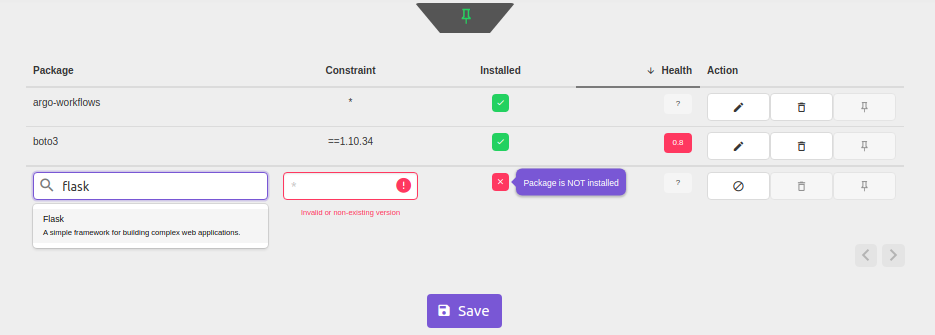
Our development efforts will from now on focus primarily on improving the UI.
The old-school approach
The Jupyter magic is in sync with the UI, so don't worry old schoolers, you can still run the commands manually and the existing notebooks will work!
Create the environment for the notebook to run in
Say we want to do an EDA, we will probably need pandas, a visualization library like plotly and some additional libraries to make our lives easier, like sklearn and pandas-profiling.
In a Jupyter notebook cell:
%dep add pandas --version ">=0.24.0"
%dep add plotly
%dep add sklearn
%dep add pandas-profiling
And perhaps our code would need some refactoring and linter checks later on, so let's add a dev dependency.
%dep add --dev black
You can now check the requirements that your notebook has by issuing %requirements (or %dep, which is just an alias for it) command:
%requirements
[packages]
pandas = ">=0.24.0"
plotly = "*"
sklearn = "*"
pandas-profiling = "*"

[dev-packages]
black = "*"

[[source]]
url = "https://pypi.org/simple"
verify_ssl = true
name = "pypi"

[requires]
python_version = "3.6"
Up to this point, we've been working only with the metadata. In order to create the environment and actually install the dependencies, you run the %dep ensure command (insipired by the golang's dep, for those familiar with Golang).
%dep ensure
Since this project is still under development and it uses the Thoth resolution engine to optimize the notebook dependencies (which is also still under development as well), in case something goes wrong,
ensureaccepts theengineparameter, which can be set topipenv
%dep ensure --engine pipenv
Check out the examples for more info.
Future plans:
See the Project Board.
Author: Marek Cermak macermak@redhat.com, @AICoE - Project Thoth


Release files for jupyter-nbrequirements 0.7.3
For a detailed explanation of source distributions (sdists) and built distributions (wheels), please see the package formats documentation.
Source distribution (sdist)
| File | Size | Uploaded | |
|---|---|---|---|
| jupyter-nbrequirements-0.7.3.tar.gz | 336.5 kB | Details |
Built distribution (wheel)
| File | Interpreter | ABI | Platform | Reset |
|---|---|---|---|---|
| jupyter_nbrequirements-0.7.3-py3-none-any.whl | Python 3 | none | any | Details |
Total release size: 1.0 MB
Release files / jupyter-nbrequirements-0.7.3.tar.gz
| Download URL | jupyter-nbrequirements-0.7.3.tar.gz |
|---|---|
| Size | 336.5 kB |
| Tags | Source |
|
SHA-256 checksum How to use checksums |
4b78a25ce771ac4ba5593861b3081d55194005a07f116d1786d6ae02fd2cad89
|
|
BLAKE2b-256 checksum How to use checksums |
8553907110db3918f5c06bbb2bcfd7c968209c76ef1d2fba96fc467bf547952c
|
| Upload date | |
|
Uploaded using Trusted Publishing? What is trusted publishing? |
No |
| Uploaded via |
twine/3.1.1 pkginfo/1.5.0.1 requests/2.23.0 setuptools/46.1.3 requests-toolbelt/0.9.1 tqdm/4.45.0 CPython/3.6.10
|
Release files / jupyter_nbrequirements-0.7.3-py3-none-any.whl
| Download URL | jupyter_nbrequirements-0.7.3-py3-none-any.whl |
|---|---|
| Size | 669.4 kB |
| Tags | Python 3 |
|
SHA-256 checksum How to use checksums |
ce4264fa032485c61eb8915950910e031c647e54994fa9e8d022e8e3e9678bc8
|
|
BLAKE2b-256 checksum How to use checksums |
bfab0a84b5d2c274e662e2f17f8735d0a85e8a81a288b104e41bd3dbc2d609d2
|
| Upload date | |
|
Uploaded using Trusted Publishing? What is trusted publishing? |
No |
| Uploaded via |
twine/3.1.1 pkginfo/1.5.0.1 requests/2.23.0 setuptools/46.1.3 requests-toolbelt/0.9.1 tqdm/4.45.0 CPython/3.6.10
|














