
Jupyter Server Proxy for Panel
| Downloads |  |
| Build Status |  |
| Latest dev release |  |
| Latest release |     |
| Support |  
|
jupyter-panel-proxy integrates HoloViz Panel seamlessly with Jupyter environments (Notebook, JupyterLab, and JupyterHub).
When installed, it launches a Panel server automatically at the /panel endpoint of your running Jupyter server.
Visiting /panel will display an index of all available applications, and each application can be accessed at /panel/<name_of_file>.
When to use this project
Use jupyter-panel-proxy when you want to:
- Serve Panel apps alongside Jupyter notebooks or JupyterHub — without managing a separate web server.
- Reuse existing authentication from JupyterHub and optionally integrate OAuth2 for finer-grained control.
- Automatically discover and serve multiple Panel apps in a directory structure (no manual
panel serverequired). - Deploy lightweight dashboards and interactive apps close to your notebooks or lab environment.
- Run Panel behind a reverse proxy with clean URL prefixing (
/panel), and modern server features.
Installation
You can install jupyter-panel-proxy from PyPI:
pip install jupyter-panel-proxy
or from conda:
conda install conda-forge::jupyter-panel-proxy
Once installed, a Panel server will be available at:
https://<your-jupyter-server>/panel
Configuration
You can configure the behavior of the proxy server by creating a jupyter-panel-proxy.yml file in the directory from which your Jupyter server is launched.
Available configuration keys
| Key | Type | Description |
|---|---|---|
apps |
list |
List of apps or glob patterns to serve. If not set, apps are discovered automatically by file type. |
file_types |
list(str) |
File extensions to auto-discover apps (default: ipynb, py). |
exclude_patterns |
list(str) |
Glob/fnmatch patterns to exclude apps. |
launcher_entry |
dict |
A jupyter-server-proxy launcher entry. |
index |
str |
Path to a custom Bokeh index template. |
autoreload |
bool |
Automatically reload sessions when code changes. It is recommended to use dev instead. |
dev |
bool |
Automatically reload sessions when code changes. |
admin |
bool |
Enable Panel's admin module. |
warm |
bool |
Execute apps on startup to warm up the server. |
num_procs |
int |
Number of worker processes (0 = auto). |
num_threads |
int |
Number of threads in the thread pool. |
static_dirs |
list |
Key=value routes for serving static files. |
reuse_sessions |
bool |
Reuse existing sessions (recommended for JupyterHub). |
keep_alive |
int (ms) |
Interval for keep-alive pings to clients. |
check_unused_sessions |
int (ms) |
How often to check for unused sessions. |
unused_session_lifetime |
int (ms) |
How long unused sessions last. |
websocket_max_message_size |
int |
Max message size for WebSocket in bytes. |
root_path |
str |
Root path can be used to handle cases where Panel is served behind a proxy. |
cookie_path |
str |
Path to apply cookies to. |
log_level |
str |
Log level (info, debug, etc.). |
liveness |
bool |
Enable a liveness endpoint. |
liveness_endpoint |
str |
Path of the liveness endpoint (default: /liveness). |
profiler |
str |
Profiler to use (e.g. pyinstrument). |
global_loading_spinner |
bool |
Add a global loading spinner to the UI. |
oauth_provider |
str |
OAuth2 provider name. |
oauth_key |
str |
OAuth2 key. |
oauth_secret |
str |
OAuth2 secret. |
oauth_redirect_uri |
str |
OAuth2 redirect URI. |
oauth_extra_params |
dict |
Additional parameters for the OAuth provider. |
oauth_jwt_user |
str |
JWT key to identify the user. |
oauth_optional |
bool |
Allow guest access to all endpoints. |
oauth_guest_endpoints |
list(str) |
List of endpoints accessible without authentication. |
cookie_secret |
str |
Secret key for secure cookies (can also be set via PANEL_COOKIE_SECRET). |
oauth_encryption_key |
str |
Encryption key for OAuth user info (can also be set via OAUTH_ENCRYPTION_KEY). |
Launcher
When you install jupyter-panel-proxy, it automatically adds a Panel Launcher card to the JupyterLab and Notebook launcher interface:
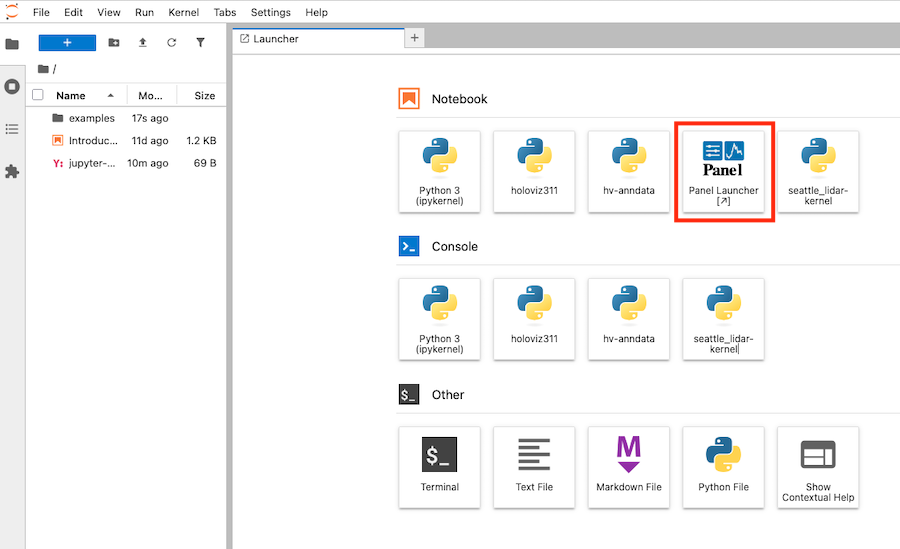
Clicking this Panel tile opens a new browser tab at /panel where your Panel apps are served. This behavior is controlled by the launcher_entry field in the configuration.
Application discovery
By default, jupyter-panel-proxy automatically discovers Panel applications in the current working directory (or in an examples/ subdirectory if present).
The discovery logic works like this:
-
If
appsis defined injupyter-panel-proxy.yml:- Each entry is interpreted as a file path or glob pattern.
- All matching files are included.
-
If
appsis not defined:- The proxy scans the base directory (or
./examplesif it exists) recursively. - It includes files that match any extension listed in
file_types(default:ipynb,py). - It excludes any paths that match
exclude_patterns(by default, this includes common patterns like*setup.pyor*.ipynb_checkpoints*).
- The proxy scans the base directory (or
-
The discovered list of applications is then passed to
panel serve.
Example YAML configuration
# jupyter-panel-proxy.yml

log_level: info
liveness: true
liveness_endpoint: /health
global_loading_spinner: true
How it works
- When the Jupyter server starts, this proxy registers
/panelas a route. - When a user navigates to
/panel, the proxy launchespanel serveinternally with the configured options. - Apps are discovered automatically or defined explicitly.
- The Panel server runs under the same authentication/session as Jupyter, and can optionally integrate OAuth for additional controls.
Further reading
License
BSD-3-Clause
1 maintainer

Metadata
1 maintainer
Release files for jupyter-panel-proxy 0.2.0
For a detailed explanation of source distributions (sdists) and built distributions (wheels), please see the package formats documentation.
Source distribution (sdist)
| File | Size | Uploaded | |
|---|---|---|---|
| jupyter_panel_proxy-0.2.0.tar.gz | 12.3 kB | Details |
Built distribution (wheel)
| File | Interpreter | ABI | Platform | Reset |
|---|---|---|---|---|
| jupyter_panel_proxy-0.2.0-py3-none-any.whl | Python 3 | none | any | Details |
Total release size: 26.0 kB
Release files / jupyter_panel_proxy-0.2.0.tar.gz
| Download URL | jupyter_panel_proxy-0.2.0.tar.gz |
|---|---|
| Size | 12.3 kB |
| Tags | Source |
|
SHA-256 checksum How to use checksums |
c7b7bed3f09d51325f74498bf231a34739ffea3d0f9f2356ea5c9e2050a1755f
|
|
BLAKE2b-256 checksum How to use checksums |
88e67b07864b7f617013120218aedfcdf5c02e2b0c078d7e23317f8b18f0d779
|
| Upload date | |
|
Uploaded using Trusted Publishing? What is trusted publishing? |
No |
| Uploaded via |
twine/6.1.0 CPython/3.13.7
|
Release files / jupyter_panel_proxy-0.2.0-py3-none-any.whl
| Download URL | jupyter_panel_proxy-0.2.0-py3-none-any.whl |
|---|---|
| Size | 13.6 kB |
| Tags | Python 3 |
|
SHA-256 checksum How to use checksums |
9c9afd4ae98490dfc9f6be2f042d977a8662f04d946844c2eddc635aa0154f7a
|
|
BLAKE2b-256 checksum How to use checksums |
ff86377fa6959441a4d8a42502b141b0b1a9f50437157d7ecf5218f09e48cff9
|
| Upload date | |
|
Uploaded using Trusted Publishing? What is trusted publishing? |
No |
| Uploaded via |
twine/6.1.0 CPython/3.13.7
|














