


🪐 Jupyter Server NbModel

Stop losing your outputs due to session timeouts or network loss.
A Jupyter Server extension to execute code from the server-side NbModel to keep your sessions and outputs active.
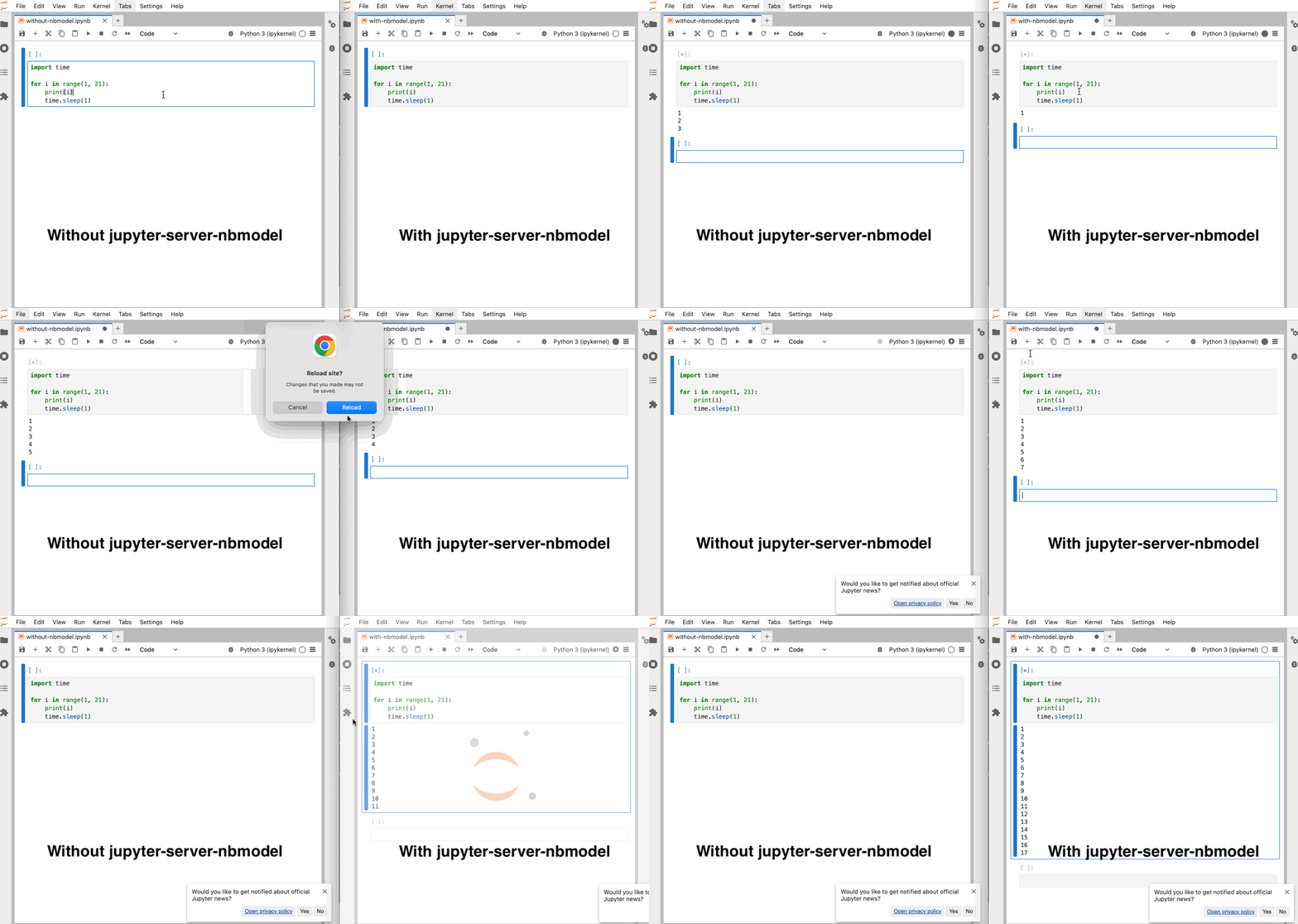
Side-by-side comparison: Without jupyter_server_nbmodel (left), notebook execution stops when reloading the page; with jupyter_server_nbmodel (right), execution continues uninterrupted even after reload.
This extension is composed of a Python package named jupyter_server_nbmodel
for the server extension and a NPM package named @datalayer/jupyter-server-nbmodel
for the frontend extension. After installing the extension, run the snippet below in JupyterLab to try it.
import time

for i in range(1, 1000):
    print(i)
    time.sleep(1)
Requirements
- Jupyter Server
>=2.0.1,<3. - JupyterLab or Jupyter Notebook 7.
- Optional but recommended for full live output sync in the document UI: real-time collaboration in JupyterLab/Notebook.
Install
To install the extension for use in JupyterLab or Notebook 7, execute:
pip install "jupyter_server_nbmodel[lab]"
For API-only use:
pip install jupyter_server_nbmodel
Uninstall
To remove the extension, execute:
pip uninstall jupyter_server_nbmodel
Troubleshoot
If you are seeing the frontend extension, but it is not working, check that the server extension is enabled:
jupyter server extension list
If the server extension is installed and enabled, but you are not seeing the frontend extension, check the frontend extension is installed:
jupyter labextension list
Existing notebooks stop receiving live outputs
This issue was initially difficult to distinguish from a kernel message-routing problem. On the same server and kernel, a newly created notebook could stream normally while an existing notebook executed without displaying anything. A server restart alone did not consistently cause or resolve the problem, so the important difference was the notebook's persisted collaborative history rather than the lifetime of the kernel or server process.
The debugging sessions produced the following evidence:
- The server received the kernel IOPub messages and its output hook processed
them. After execution, the expected stream output was present in the
persisted
.ipynbfile. This ruled out a missing kernel message, an incorrect kernel client ID, and a future rejecting messages from another parent ID. - Affected browser models emitted no shared-cell change events—not even the prompt updates normally observed during execution—although execution continued on the server.
- Resolving the active YDoc by notebook path, instead of relying on a possibly stale room ID retained across a restart, fixed one failure mode but did not fix notebooks carrying the problematic history.
- Removing
jupyter_server_nbmodelrestored JupyterLab's standard kernel-future execution and displayed outputs. Disabling collaboration alone did not restore the server-side execution path, confirming that the failure was in the document/output synchronization used by this extension rather than in the kernel itself. - Backing up and removing
.jupyter_ystore.dbrestored output updates for the same notebooks. This was the strongest indication that the failure followed persisted YStore state rather than notebook source, kernel state, or a server restart. - In the failing state, the browser's Yjs document retained incoming updates in
Y.Doc.store.pendingStructs. Those updates referenced CRDT dependencies that the browser could not resolve, so they never became observable shared-model changes even though the server could persist the resulting notebook.
There were ultimately three related but distinct failures:
- Some historical YStore documents contained an unresolved CRDT dependency
chain. The browser retained later updates in
Y.Doc.store.pendingStructs, so the server could save the output while the browser never observed it. The operation that originally created every affected historical chain has not been isolated. - The HTTP recovery made the browser and server concurrent writers to the
cell's shared output array. If the browser inserted the accumulated stream
1234and the server then blindly appended its view of the same stream, the persisted result could become12341234. The server now compares the current shared text with its kernel-side accumulator and treats an already applied snapshot as a no-op. - An attempted fix used an array-wide authoritative synchronizer that deleted
and replaced integrated output entries. A nested
Map/Textreplacement could temporarily expose{output_type: "stream"}withouttextto the JavaScript model. JupyterLab then failed inOutputAreaModel._addwhile callingvalue.text.join(""); code-cell construction aborted and the notebook appeared completely empty. That synchronizer was removed. The current hook never replaces or deletes integrated output-array entries.
Concrete pycrdt checks used during debugging
The following command reproduces the supported stream representation and the
append operation used by the server. The nested Text is first placed in a
shared Map, the Map is integrated into a shared Array, and Text.__iadd__
owns its transaction. It is intentionally not wrapped in
with outputs.doc.transaction().
python - <<'PY'
from pycrdt import Array, Doc, Map, Text

server = Doc()
server_outputs = server.get("outputs", type=Array)
with server.transaction():
    server_outputs.append(
        Map({
            "output_type": "stream",
            "name": "stdout",
            "text": Text("1\n"),
        })
    )

browser = Doc()
browser_outputs = browser.get("outputs", type=Array)
browser.apply_update(server.get_update())
server_state = server.get_state()

text = browser_outputs[0]["text"]
assert isinstance(text, Text)
text += "2\n"
server.apply_update(browser.get_update(server_state))

print(repr(str(browser_outputs[0]["text"])))
print(repr(str(server_outputs[0]["text"])))
PY
The observed result was:
'1\n2\n'
'1\n2\n'
We also reconstructed the real SQLite YStore during the investigation instead
of assuming that the .ipynb file described the browser's CRDT state. The
important detail is to create typed roots before applying updates:
python - <<'PY'
import sqlite3
from pycrdt import Array, Doc, Map

database = "/home/echarles/Desktop/notebooks/.jupyter_ystore.db"
connection = sqlite3.connect(f"file:{database}?mode=ro", uri=True)

for (room,) in connection.execute("SELECT DISTINCT path FROM yupdates"):
    document = Doc()
    cells = document.get("cells", type=Array)
    metadata = document.get("meta", type=Map)
    state = document.get("state", type=Map)

    updates = connection.execute(
        "SELECT yupdate FROM yupdates WHERE path = ? ORDER BY timestamp",
        (room,),
    )
    for (update,) in updates:
        document.apply_update(update)

    print(room, state.to_py().get("path"), len(cells))
    for index, cell in enumerate(cells):
        outputs = cell.get("outputs", [])
        print(index, [output.to_py() for output in outputs])
PY
This confirmed that the inspected .ipynb files still contained their cells
and that the final reconstructed YStore values had valid stream text. The
empty-notebook crash came from an invalid transient nested update delivered to
the live JavaScript model, not from cells being deleted from the notebook file.
Stopping the server and resetting an already-polluted YStore may still be
required; correcting the writer prevents creating that state again but cannot
remove historical updates already stored in the database.
To remain functional with an affected history, execution now uses a primary output path plus two recovery layers:
- Collaborative YDoc updates remain the primary, immediate streaming path.
- Every pending
GET /api/kernels/<id>/requests/<uid>response also contains the outputs accumulated by the server so far. The frontend normalizes consecutive stream chunks and compares the snapshot with the current shared cell. Older or initially empty snapshots are ignored, while a newer stream snapshot appends only its missing text suffix through JupyterLab's output model. It does not replace and recreate the complete rendered output on every poll. Polling backs off to a maximum interval of one second. - The final
200response reconciles outputs, execution count, and idle state once more. This explains why an earlier version of the recovery displayed output only when execution completed: it only implemented this final step, not the pending snapshots.
The existing execution endpoints also return the request ID, kernel ID, cell
ID, notebook path, and request state (queued, running, input, or
complete). While an execution is active, its request ID and URL are stored in
the code cell metadata under jupyter_server_nbmodel. After a page refresh, a
separate restoration plugin reads that metadata and resumes the same
GET /api/kernels/<id>/requests/<uid> poller; no additional discovery endpoint
is needed. The resumed request also restores the stock JupyterLab kernel
connection to busy until the final response changes it to idle. A kernel
connection created after a refresh intentionally starts as unknown and
cannot replay the busy IOPub message emitted before it existed, so the
frontend feeds the richer REST request state through JupyterLab's normal
kernel-status update path. This works without the Datalayer UI extension.
If transient cell metadata has not reached the refreshed browser yet, the
frontend queries the existing GET /api/kernels/<id>/execute route for active
requests and restores the matching cell poller from the returned request ID,
URL, notebook path, and cell ID.
Polling reconciliation and the server output hook are both writers to the
shared document. Before appending a stream chunk, the server therefore compares
the current shared text with its accumulated kernel output. If the browser has
already inserted 1234 from a pending response, integrating the corresponding
server update is a no-op rather than appending the same snapshot and persisting
12341234. This check does not replace or delete integrated output-array
entries, because restructuring nested Yjs values can expose a transient stream
without a text field while JupyterLab is constructing the cell widget.
Useful browser diagnostics are:
[jupyter-server-nbmodel] Received shared cell updateindicates that normal collaborative updates are reaching the cell.[jupyter-server-nbmodel] Applying pending output snapshotindicates that the polling fallback found outputs missing from the browser model.[jupyter-server-nbmodel] Execution completedreports the number of shared updates and whether final output or execution-count reconciliation was needed.
The Network panel can also be used to inspect the pending 202 responses. Once
the kernel has emitted output, their JSON bodies should contain a serialized
outputs snapshot. If the server response and persisted .ipynb contain the
output while the browser reports no shared updates, the problem is in document
synchronization rather than kernel execution.
Removing .jupyter_ystore.db resets the stored collaborative history, but it
also discards that history for every document recorded in the database. Its
location depends on the Jupyter Server configuration and content root. Stop the
server and make a backup before using this as a last-resort recovery action.
How does it works
Generic case
Execution of a Python code snippet: print("hello")
sequenceDiagram
    actor Frontend; participant Shared Document; actor Server; participant ExecutionStack; actor Kernel
    Frontend->>Shared Document: [*] busy
    Frontend->>+Server: POST /api/kernels/<id>/execute
    Server->>+ExecutionStack: put() request into queue
    ExecutionStack->>Kernel: Execute request msg
    activate Kernel
    ExecutionStack-->>Server: Task uid
    Server-->>-Frontend: Returns task uid
    loop Running
        Kernel->>Server: stream / display_data / execute_result / error msg
        Server->>Shared Document: Add output
        Shared Document->>Frontend: Document update
    end
    loop While status is 202
        Frontend->>+Server: GET /api/kernels/<id>/requests/<uid>
        Server->>ExecutionStack: get() task result
        ExecutionStack-->>Server: outputs accumulated so far
        Server-->>-Frontend: Request status 202 & outputs snapshot
        Frontend->>Shared Document: Reconcile missing output updates
    end
    Kernel-->>Server: Execution reply
    Server->>Shared Document: [𝒏] idle
    Server-->>ExecutionStack: execution_count, status, outputs
    Shared Document->>Frontend: [𝒏] idle
    deactivate Kernel
    Frontend->>+Server: GET /api/kernels/<id>/requests/<uid>
    Server->>ExecutionStack: get() task result
    ExecutionStack-->>Server: execution_count, status, outputs
    Server-->>-Frontend: Status 200 & { execution_count, status, outputs }
With input case
Execution of a Python code snippet: input("Age:")
sequenceDiagram
    actor Frontend; participant Shared Document; actor Server; participant ExecutionStack; actor Kernel
    Frontend->>Shared Document: [*] busy
    Frontend->>+Server: POST /api/kernels/<id>/execute
    Server->>+ExecutionStack: put() request into queue
    ExecutionStack->>Kernel: Execute request msg
    activate Kernel
    ExecutionStack-->>Server: Task uid
    Server-->>-Frontend: Returns task uid
    loop Running
        Kernel->>Server: stream / display_data / execute_result / error msg
        Server->>Shared Document: Add output
        Shared Document->>Frontend: Document update
    end
    loop While status is 202
        Frontend->>+Server: GET /api/kernels/<id>/requests/<uid>
        Server->>ExecutionStack: get() task result
        ExecutionStack-->>Server: null
        Server-->>-Frontend: Request status 202
    end
    Kernel->>ExecutionStack: Set pending input
    Frontend->>+Server: GET /api/kernels/<id>/requests/<uid>
    Server->>ExecutionStack: get() task result
    ExecutionStack-->>Server: Pending input
    Server-->>-Frontend: Status 300 & Pending input
    Frontend->>+Server: POST /api/kernels/<id>/input
    Server->>Kernel: Send input msg
    Server-->>-Frontend: Returns
    loop While status is 202
        Frontend->>+Server: GET /api/kernels/<id>/requests/<uid>
        Server->>ExecutionStack: get() task result
        ExecutionStack-->>Server: null
        Server-->>-Frontend: Request status 202
    end
    Kernel-->>Server: Execution reply
    Server->>Shared Document: [𝒏] idle
    Server-->>ExecutionStack: execution_count, status, outputs
    Shared Document->>Frontend: [𝒏] idle
    deactivate Kernel
    Frontend->>+Server: GET /api/kernels/<id>/requests/<uid>
    Server->>ExecutionStack: get() task result
    ExecutionStack-->>Server: execution_count, status, outputs
    Server-->>-Frontend: Status 200 & { execution_count, status, outputs }
[!NOTE] The code snippet is always send in the body of the POST
/api/kernels/<id>/executerequest to avoid document model discrepancy; the document on the backend is only eventually identical with the frontends (document updates are not instantaneous).The
ExecutionStackmaintains an execution queue per kernels to ensure execution order.
Contributing
Development install
Note: You will need NodeJS to build the extension package.
The jlpm command is JupyterLab's pinned version of
yarn that is installed with JupyterLab. You may use
yarn or npm in lieu of jlpm below.
# Clone the repo to your local environment
# Change directory to the jupyter_server_nbmodel directory
# Install package in development mode
pip install -e ".[test]"
# Link your development version of the extension with JupyterLab
jupyter labextension develop . --overwrite
# Server extension must be manually installed in develop mode
jupyter server extension enable jupyter_server_nbmodel
# Rebuild extension Typescript source after making changes
jlpm build
You can watch the source directory and run JupyterLab at the same time in different terminals to watch for changes in the extension's source and automatically rebuild the extension.
# Watch the source directory in one terminal, automatically rebuilding when needed
jlpm watch
# Run JupyterLab in another terminal
jupyter lab --autoreload
With the watch command running, every saved change will immediately be built locally and available in your running JupyterLab. Refresh JupyterLab to load the change in your browser (you may need to wait several seconds for the extension to be rebuilt).
By default, the jlpm build command generates the source maps for this extension to make it easier to debug using the browser dev tools. To also generate source maps for the JupyterLab core extensions, you can run the following command:
jupyter lab build --minimize=False
Development uninstall
# Server extension must be manually disabled in develop mode
jupyter server extension disable jupyter_server_nbmodel
pip uninstall jupyter_server_nbmodel
In development mode, you will also need to remove the symlink created by jupyter labextension develop
command. To find its location, you can run jupyter labextension list to figure out where the labextensions
folder is located. Then you can remove the symlink named jupyter-server-nbmodel within that folder.
Testing the extension
Server tests
This extension is using Pytest for Python code testing.
Install test dependencies (needed only once):
pip install -e ".[test]"
# Each time you install the Python package, you need to restore the front-end extension link
jupyter labextension develop . --overwrite
To execute them, run:
pytest
Frontend tests
This extension is using Jest for JavaScript code testing.
To execute them, execute:
jlpm
jlpm test
Integration tests
This extension uses Playwright for the integration tests (aka user level tests). More precisely, the JupyterLab helper Galata is used to handle testing the extension in JupyterLab.
More information are provided within the ui-tests README.
Manual testing
# Terminal 1.
# You can also invoke `make jupyter-server`
jupyter server --port 8888 --autoreload --ServerApp.disable_check_xsrf=True --IdentityProvider.token= --ServerApp.port_retries=0
# Terminal 2.
KERNEL=$(curl -X POST http://localhost:8888/api/kernels)
echo $KERNEL

KERNEL_ID=$(echo $KERNEL | jq --raw-output '.id')
echo $KERNEL_ID

RESPONSE=$(curl --include http://localhost:8888/api/kernels/$KERNEL_ID/execute -d "{ \"code\": \"print('1+1')\" }")
echo $RESPONSE

RESULT_PATH=$(echo $RESPONSE | grep -oP 'Location:\s*\K[^ ]+' | tr -d '\r\n')
echo $RESULT_PATH

URL="http://localhost:8888${RESULT_PATH}"
echo $URL

curl "$URL"
# {"status": "ok", "execution_count": 1, "outputs": "[{\"output_type\": \"stream\", \"name\": \"stdout\", \"text\": \"1+1\\n\"}]"}
Running Tests
Install dependencies:
pip install -e ".[test]"
To run the python tests, use:
pytest

# To test a specific file
pytest jupyter_server_nbmodel/tests/test_handlers.py

# To run a specific test
pytest jupyter_server_nbmodel/tests/test_handlers.py -k "test_post_execute"
Development uninstall
pip uninstall jupyter_server_nbmodel
Packaging the extension
See RELEASE
2 maintainers


Download files
Download the file for your platform. If you're not sure which to choose, learn more about installing packages.
Source Distribution
Built Distribution
Filter files by name, interpreter, ABI, and platform.
If you're not sure about the file name format, learn more about wheel file names.
Copy a direct link to the current filters
File details
Details for the file jupyter_server_nbmodel-0.2.0.tar.gz.
File metadata
- Download URL: jupyter_server_nbmodel-0.2.0.tar.gz
- Upload date:
- Size: 252.2 kB
- Tags: Source
- Uploaded using Trusted Publishing? Yes
- Uploaded via:
twine/7.0.0 CPython/3.12.13
File hashes
| Algorithm | Hash digest | |
|---|---|---|
| SHA256 |
cd9d6ed175248b1b25df9fd0d392cf3532e473c8b337f3332ff93e41bf2c9e22
|
|
| MD5 |
9d72651d2599f1b4953763a38ef72527
|
|
| BLAKE2b-256 |
61c84b7bc99628ab5312f0530948db8888ada8f01ccc4749def047179eca53a2
|
File details
Details for the file jupyter_server_nbmodel-0.2.0-py3-none-any.whl.
File metadata
- Download URL: jupyter_server_nbmodel-0.2.0-py3-none-any.whl
- Upload date:
- Size: 79.4 kB
- Tags: Python 3
- Uploaded using Trusted Publishing? Yes
- Uploaded via:
twine/7.0.0 CPython/3.12.13
File hashes
| Algorithm | Hash digest | |
|---|---|---|
| SHA256 |
a435b43a7b87f4ac0c4e75e57776015cbeca2fd57006fb936c5a8c160cda4edb
|
|
| MD5 |
13528c9b08abe7788a0ee013511672ce
|
|
| BLAKE2b-256 |
c9b29f7f0faef9f1d1aa3f197a1dbb8a0a9a5191a75401c0da86920772771af3
|







