
Jupyter Storage Explorer launcher

Adds Storage Explorer to JupyterLab's launcher (section Other) and command palette. It opens Jupyter Storage Explorer in its own tab, with a kernel of its own that stops when the tab is closed.
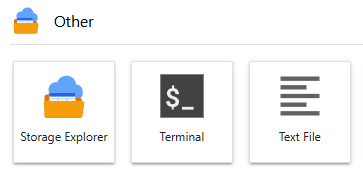
The tab opens on the launcher's folder: the one JupyterLab's file browser showed when the launcher was opened (like the launcher's Notebook and Console items; open a new launcher after changing folder). From the command palette, it opens on the folder the file browser shows. The tab reopens on the storage and folders it showed (kept with JupyterLab's workspace) when the page is reloaded, and when the Jupyter server or the tab's kernel restarts, with a new kernel.
It also lets you drag files from any Storage Explorer, in its tab or in a notebook, onto JupyterLab's file browser: after asking, the explorer's kernel downloads them into the folder dropped on, or the one the file browser shows. This needs the kernel to run where the Jupyter server does, as it does by default.
pip install jupyter-storage-explorer-launcher
Install it in the environment of JupyterLab and of the default kernel (on JupyterHub, usually the single-user image),
then restart JupyterLab. It installs jupyter-storage-explorer too. Requires JupyterLab 4.
Configuration
What the tab shows is set by files storage-explorer/launcher.py in Jupyter's configuration directories
(jupyter --paths, config section). All the files found are used, as layers, in the reverse of that order: first
the system's (/etc/jupyter/storage-explorer/launcher.py), usually last the user's
(~/.jupyter/storage-explorer/launcher.py; in a virtual environment, Jupyter searches the environment's
<environment>/etc/jupyter first, so that file is applied after the user's). Each layer adds to or changes the
settings of those before. Without any file, the tab shows an explorer of the folder it opens on.
A file has some of these functions, all optional:
| Function | Returns | Merged with earlier layers |
|---|---|---|
filesystems() |
{name: URL or fsspec filesystem} |
By name: added or replaced; None removes one |
formats() |
Formats of your own (DataFormat), tried before the defaults |
Later layers' first |
format_options() |
Options for the default formats (see the main README) | By option name |
operations() |
File operations of your own (FileSystemOperations) |
Later layers' first, all before the defaults |
parameters() |
Other StorageExplorer arguments, e.g. {"height": "fill"} |
By name |
style() |
CSS for the page while the tab is open | Joined, the user's last |
final() |
Settings later layers cannot change, e.g. ["filesystems"] |
Function names (except parameters) and parameter names |
"." is the folder the tab opens on, and height is "fill" (as tall as the tab) unless set. The tabs keep their
bookmarks and the data browser's settings in ~/.jupyter/storage-explorer/states.json (in JUPYTER_CONFIG_DIR if
set) unless states is set: another path, or None to keep them in each tab's memory. A change to a final
setting is ignored, with a warning shown in the tab. Final settings help administrators set defaults; they are not a
security boundary, as users can still create explorers of their own in notebooks.
For example, for everyone, /etc/jupyter/storage-explorer/launcher.py:
def filesystems():
    return {
        "Here": ".",
        "Data lake": "abfs://lake@myaccount.dfs.core.windows.net",
    }


def final():
    return ["filesystems"]  # users cannot change the storages offered
And for one user, ~/.jupyter/storage-explorer/launcher.py, with icons of their own (see
Customizing icons):
def parameters():
    return {"max_browser_items": 50_000}


def style():
    # The folders in the top folder as 🗃️ instead of 📁: hide the icon, show another
    return """
    .jse-browser [data-depth="1"] .jse-icon { font-size: 0; }
    .jse-browser [data-depth="1"] .jse-icon::before { font-size: 14px; content: "🗃️"; }
    """
A transfer policy is a parameter too, e.g. in the system's file:
def parameters():
    # No downloads from the lake to users' computers or to the Jupyter server.
    return {
        "transfer_policy": [
            {"rule": "deny", "src": r"abfs://lake@.*", "dest": "browser:///.*"},
            {"rule": "deny", "src": r"abfs://lake@.*", "dest": "jupyterlab://.*"},
        ]
    }


def final():
    return ["transfer_policy"]
An error in a file (a function that fails, an unknown parameter) is shown in the tab, with the file's path.
1 maintainer

Metadata
1 maintainer
Release files for jupyter-storage-explorer-launcher 0.7.0
For a detailed explanation of source distributions (sdists) and built distributions (wheels), please see the package formats documentation.
Source distribution (sdist)
| File | Size | Uploaded | |
|---|---|---|---|
| jupyter_storage_explorer_launcher-0.7.0.tar.gz | 66.4 kB | Details |
Built distribution (wheel)
| File | Interpreter | ABI | Platform | Reset |
|---|---|---|---|---|
| jupyter_storage_explorer_launcher-0.7.0-py3-none-any.whl | Python 3 | none | any | Details |
Total release size: 103.3 kB
Release files / jupyter_storage_explorer_launcher-0.7.0.tar.gz
| Download URL | jupyter_storage_explorer_launcher-0.7.0.tar.gz |
|---|---|
| Size | 66.4 kB |
| Tags | Source |
|
SHA-256 checksum How to use checksums |
bfb616c059e1bc2340f8cbfacfb6802083d797b03d9b536b762f45122bfef4da
|
|
BLAKE2b-256 checksum How to use checksums |
2653202b29c1a94723fbd2d0dea756d92890c3c7bfe4e96f89e3d50bdb6ca747
|
| Upload date | |
|
Uploaded using Trusted Publishing? What is trusted publishing? |
Yes |
| Uploaded via |
twine/7.0.0 CPython/3.13.14
|
Provenance
Provenance describes where a file came from. On PyPI, provenance is shared via attestations, which provide a verifiable record of the build or publishing details. View details, limitations and caveats.


PyPI Publish Attestation
PyPI verified that this artifact, at this checksum, originated from the publisher listed below.
Signed by GitHub Actions, verified by PyPI on Oct 13, 2026.
Transparency logRelease files / jupyter_storage_explorer_launcher-0.7.0-py3-none-any.whl
| Download URL | jupyter_storage_explorer_launcher-0.7.0-py3-none-any.whl |
|---|---|
| Size | 36.9 kB |
| Tags | Python 3 |
|
SHA-256 checksum How to use checksums |
9985d75655fea7a72f80c5f16f81c768214d081bb20ee84d7420371fd8e95421
|
|
BLAKE2b-256 checksum How to use checksums |
2c3789b7998d78bed414ab136f60c038b8733f6e7e9ad7700444d680a6710d3e
|
| Upload date | |
|
Uploaded using Trusted Publishing? What is trusted publishing? |
Yes |
| Uploaded via |
twine/7.0.0 CPython/3.13.14
|
Provenance
Provenance describes where a file came from. On PyPI, provenance is shared via attestations, which provide a verifiable record of the build or publishing details. View details, limitations and caveats.
PyPI Publish Attestation
PyPI verified that this artifact, at this checksum, originated from the publisher listed below.
Signed by GitHub Actions, verified by PyPI on Oct 13, 2026.
Transparency log













