
A JupyterLab extension for generating code and interacting with JupyterLab via voice commands.

Project description
jupyter_voicepilot

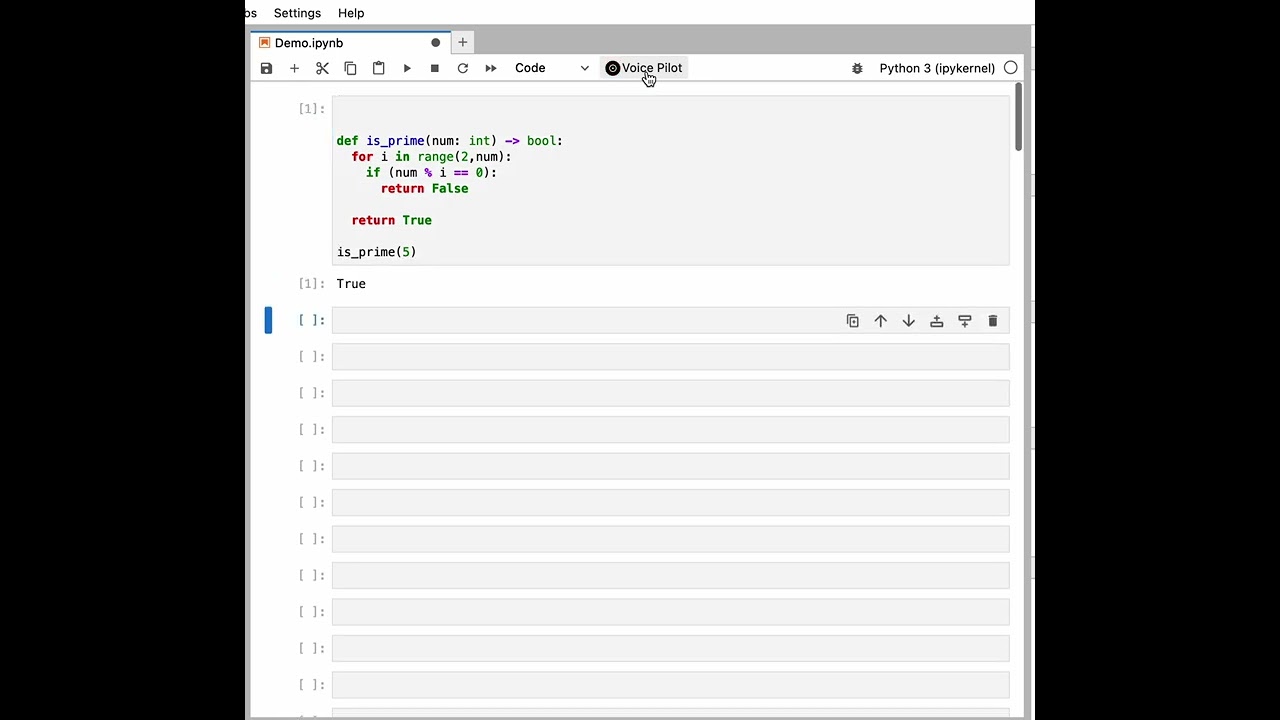
A JupyterLab extension for generating code and interacting with JupyterLab via voice commands. This extension can also be used for some basic nagivation around in JupyterLab Notebook. It is built around OpenAI's Whisper-1 and GPT-3 APIs. You will need to have an OpenAI API key to use this extension.
Click on the image below to see a demo of the extension:
Requirements
- JupyterLab >= 3.0
Install
To install the extension, execute:
pip install jupyter_voicepilot
Uninstall
To remove the extension, execute:
pip uninstall jupyter_voicepilot
Usage
Click the Voice Pilot button in the JupyterLab to start recording your instruction. When done, click the button again to stop the recording. The extension will then process your instruction and execute the appropriate action.
Generating code
If a cell is of type code, the extension will generate code based on the input you provided.
The generated code will be inserted in the cell. An exception to this is when you provide a set phrase which is mapped to a specific Notebook navigation action. See below for more details.
Dictation
If a cell is of type markdown, the extension will insert the text you provided in the cell.
An exception to this is when you provide a set phrase which is mapped to a specific Notebook navigation action. See below for more details.
ChatGPT interaction
If you start your voice message with "hey", the message will be sent to the ChatGPT model.
If the current cell is empty, it will be converted to a markdown cell and the response will be added there. If the current cell is not empty, a new markdown cell will be inserted below the current cell, containing the response from ChatGPT.
Notebook navigation
The extension can also be used for some basic nagivation around in JupyterLab Notebook. The following table shows the Notebook actions that a supported, and the corresponding phrases that you can use to trigger them.
| Action | Phrase |
|---|---|
run |
"run", "run cell", "run the cell", "execute" |
runAll |
"run all", "run all cells", "execute all", "execute all cells" |
runAndAdvance |
"run and advance", "run cell and advance", "execute and advance" |
runAndInsert |
"run and insert", "run cell and insert", "execute and insert" |
runAllAbove |
"run all above", "run all cells above", "execute all above", "execute all cells above" |
runAllBelow |
"run all below", "run all cells below", "execute all below", "execute all cells below" |
deleteCells |
"delete", "delete cell", "delete cells", "delete the cell", "delete the cells" |
clearAllOutputs |
"clear all outputs", "clear all the outputs", "clear outputs" |
selectLastRunCell |
"select last run cell", "select the last run cell" |
undo |
"undo" |
redo |
"redo" |
cut |
"cut" |
copy |
"copy" |
paste |
"paste" |
changeCellTypeToMarkdown |
"markdown", "to markdown", "markdown cell", "convert to markdown", "cast to markdown" |
changeCellTypeToCode |
"code", "to code", "code cell", "convert to code", "cast to code" |
insertMarkdownCellBelow |
"insert markdown cell below", "add markdown below" |
insertMarkdownCellAbove |
"insert markdown cell above", "add markdown above" |
insertCodeCellBelow |
"insert code cell below", "add code below" |
insertCodeCellAbove |
"insert code cell above", "add code above" |
Configuration
In the advanced settings editor, you can set the following configuration options:
- Open API Key (required): Your OpenAI API key. You can get one here.
Contributing
Development install
Note: You will need NodeJS to build the extension package.
The jlpm command is JupyterLab's pinned version of
yarn that is installed with JupyterLab. You may use
yarn or npm in lieu of jlpm below.
# Clone the repo to your local environment
# Change directory to the jupyter_voicepilot directory
# Install package in development mode
pip install -e "."
# Link your development version of the extension with JupyterLab
jupyter labextension develop . --overwrite
# Rebuild extension Typescript source after making changes
jlpm build
You can watch the source directory and run JupyterLab at the same time in different terminals to watch for changes in the extension's source and automatically rebuild the extension.
# Watch the source directory in one terminal, automatically rebuilding when needed
jlpm watch
# Run JupyterLab in another terminal
jupyter lab
With the watch command running, every saved change will immediately be built locally and available in your running JupyterLab. Refresh JupyterLab to load the change in your browser (you may need to wait several seconds for the extension to be rebuilt).
By default, the jlpm build command generates the source maps for this extension to make it easier to debug using the browser dev tools. To also generate source maps for the JupyterLab core extensions, you can run the following command:
jupyter lab build --minimize=False
Development uninstall
pip uninstall jupyter_voicepilot
In development mode, you will also need to remove the symlink created by jupyter labextension develop
command. To find its location, you can run jupyter labextension list to figure out where the labextensions
folder is located. Then you can remove the symlink named voicepilot within that folder.
Release history Release notifications | RSS feed

Download files
Download the file for your platform. If you're not sure which to choose, learn more about installing packages.
Source Distribution
Built Distribution
Filter files by name, interpreter, ABI, and platform.
If you're not sure about the file name format, learn more about wheel file names.
Copy a direct link to the current filters
File details
Details for the file jupyter_voicepilot-0.1.2.tar.gz.
File metadata
- Download URL: jupyter_voicepilot-0.1.2.tar.gz
- Upload date:
- Size: 317.9 kB
- Tags: Source
- Uploaded using Trusted Publishing? No
- Uploaded via: twine/4.0.2 CPython/3.10.10
File hashes
| Algorithm | Hash digest | |
|---|---|---|
| SHA256 |
c057d7a41b429b14a9cc8103f581f5e2f562da832b4fe8c75207bf3fe6970f2a
|
|
| MD5 |
cccf4243f9875b5e547926f8617b5e74
|
|
| BLAKE2b-256 |
3fc10ba15ab5efbf910bec7e6a3a27b29c54e84724fea25c712a5953848d6871
|
File details
Details for the file jupyter_voicepilot-0.1.2-py3-none-any.whl.
File metadata
- Download URL: jupyter_voicepilot-0.1.2-py3-none-any.whl
- Upload date:
- Size: 32.8 kB
- Tags: Python 3
- Uploaded using Trusted Publishing? No
- Uploaded via: twine/4.0.2 CPython/3.10.10
File hashes
| Algorithm | Hash digest | |
|---|---|---|
| SHA256 |
c217ac6d5e3939583cc221baeb63ac515121ccae3b0d74e0c29b5beb299fc672
|
|
| MD5 |
2675db2a3ef675f18aed385f41eac827
|
|
| BLAKE2b-256 |
99541a311c26bceb795fb19114d617d5de782fd56a97e9ef9c72a1a7f3ceb0fe
|






