
Collaborative GIS extension for JupyterLab
Verified details
These details have been verified by PyPIProject links
GitHub Statistics
Maintainers


Project description

JupyterGIS - A JupyterLab extension for collaborative GIS



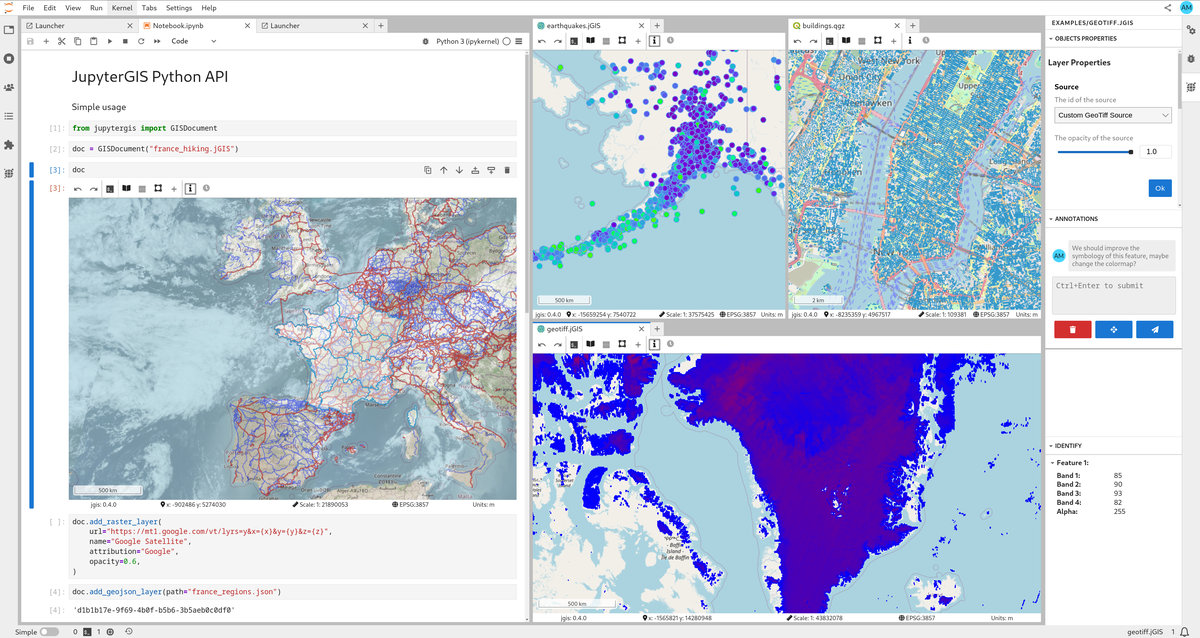
Features
- Collaborative GIS Environment: Work together on geographic data projects in real-time.
- QGIS File Support: Load, visualize, and manipulate QGIS project files (
.qgs,.qgz), and other GIS data formats. - Interactive Maps: Render interactive maps and geospatial visualizations within Jupyter notebooks using the JupyterGIS Python API.
🪄 Try JupyterGIS now in Notebook.link! ✨
This demo runs a JupyterLite instance entirely in your browser with WebAssembly! 🤯
Powered by Notebook.link and JupyterLite. Please note that JupyterGIS' real-time collaboration features are not yet supported in JupyterLite.
Installation
Prerequisites
- JupyterLab (version 3.0 or higher)
- (OPTIONAL) QGIS installed on your system and its Python modules available in the PATH. e.g.
mamba install --channel conda-forge qgis
Installing JupyterGIS
From PyPI
python -m pip install jupytergis
From conda-forge
JupyterGIS is also packaged and distributed on conda-forge.
To install and add JupyterGIS to a project with pixi, from the project directory run
pixi add jupytergis
and to install into a particular conda environment with mamba, in the activated environment run
mamba install --channel conda-forge jupytergis
With Docker
docker run -p 8888:8888 ghcr.io/geojupyter/jupytergis:latest
Replace latest with a specific version number if you prefer.
Docker build source is at https://github.com/geojupyter/jupytergis-docker.
Deploying JupyterGIS with JupyterLite
You can run JupyterGIS entirely in the browser using JupyterLite.
- Create a repository using the xeus-lite-demo template.
- In your fork, edit
environment.ymland add:- jupytergis-lite
- Add your data and jGIS files under the
content/directory of your repository. These files will be available directly inside your Lite deployment. - Enable GitHub Pages under Settings → Pages for your repository.
- Once the build completes, your Lite deployment will be live at:
https://<username>.github.io/<repo-name>/
This provides a lightweight, fully browser-based JupyterGIS environment — no server required.
[!IMPORTANT] Collaboration is not yet supported in JupyterLite static deployments.
Documentation
https://jupytergis.readthedocs.io
Contributing
We welcome contributions from the community! To contribute:
- Fork the repository
- Make a dev install of JupyterGIS
- Create a new branch
- Make your changes
- Submit a pull request
For more details, check out our CONTRIBUTING.md.
License
JupyterGIS is licensed under the BSD 3-Clause License. See LICENSE for more information.
Project details
Verified details
These details have been verified by PyPIProject links
GitHub Statistics
Maintainers
Release history Release notifications | RSS feed


Download files
Download the file for your platform. If you're not sure which to choose, learn more about installing packages.
Source Distribution
Built Distribution
Filter files by name, interpreter, ABI, and platform.
If you're not sure about the file name format, learn more about wheel file names.
Copy a direct link to the current filters
File details
Details for the file jupytergis-0.12.1.tar.gz.
File metadata
- Download URL: jupytergis-0.12.1.tar.gz
- Upload date:
- Size: 6.2 kB
- Tags: Source
- Uploaded using Trusted Publishing? Yes
- Uploaded via: twine/6.2.0 CPython/3.12.12
File hashes
| Algorithm | Hash digest | |
|---|---|---|
| SHA256 |
8262fcb3fced9c19b0b76e978a0946fa3c5b24d4b9e7b7364dee70e0d518266f
|
|
| MD5 |
50022ed8b9a601a46313581c1b01f9e2
|
|
| BLAKE2b-256 |
108708b1ac2e7a6009c3aa3b326c45d579624091c6a30333c2db032550f4182f
|
File details
Details for the file jupytergis-0.12.1-py3-none-any.whl.
File metadata
- Download URL: jupytergis-0.12.1-py3-none-any.whl
- Upload date:
- Size: 5.0 kB
- Tags: Python 3
- Uploaded using Trusted Publishing? Yes
- Uploaded via: twine/6.2.0 CPython/3.12.12
File hashes
| Algorithm | Hash digest | |
|---|---|---|
| SHA256 |
2dccacd9e574f51ca41cb559750da1a870d19d935cf0107bcc3e7ef44fce1bf3
|
|
| MD5 |
a2abcbdeced7c5be4abfb09f76354abd
|
|
| BLAKE2b-256 |
cff3209f25c41e97505df1d10295f2a2b068eca2ca409be5564dcdb06cb63da9
|






