
jupyterhub_moss: JupyterHub MOdular Slurm Spawner
jupyterhub_moss is a Python package that provides:
- A JupyterHub
Slurm Spawner that can be configured by
setting the available partitions. It is an extension of
batchspawner.SlurmSpawner. - An associated spawn page that changes according to the partitions set in the Spawner and allows the user to select Slurm resources to use.
Installation
pip install jupyterhub_moss
Usage
To use jupyterhub_moss, you first need a working
JupyterHub instance, see
JupyterHub and
Jupyterhub's Spawner
documentation.
jupyterhub_moss needs then to be imported in
your JupyterHub configuration file
(usually named jupyterhub_conf.py):
import batchspawner
import jupyterhub_moss

c = get_config()

# ...your config

# Init JupyterHub configuration to use this spawner
jupyterhub_moss.set_config(c)
Partition settings
Once jupyterhub_moss is set up, you can define the partitions available on
Slurm by setting c.MOSlurmSpawner.partitions in the same file:
# ...

# Partition descriptions
c.MOSlurmSpawner.partitions = {
    "partition_1": {  # Partition name     # (See description of fields below for more info)
        "architecture": "x86_86",          # Nodes architecture
        "description": "Partition 1",      # Displayed description
        "gpu": None,                       # --gres= template to use for requesting GPUs
        "max_ngpus": 0,                    # Maximum number of GPUs per node
        "max_nprocs": 28,                  # Maximum number of CPUs per node
        "max_runtime": 12*3600,            # Maximum time limit in seconds (Must be at least 1hour)
        "simple": True,                    # True to show in Simple tab
        "jupyter_environments": {
            "default": {                   # Jupyter environment identifier, at least "path" or "modules" is mandatory
                "description": "Default",  # Text displayed for this environment select option
                "path": "/env/path/bin/",  # Path to Python environment bin/ used to start Jupyter server on the Slurm nodes
                "modules": "",             # Space separated list of environment modules to load before starting Jupyter server
                "add_to_path": True,       # Toggle adding the environment to shell PATH (optional, default: True)
                "prologue": "",            # Shell commands to execute before starting the Jupyter server (optional, default: "")
            },
        },
    },
    "partition_2": {
        "architecture": "ppc64le",
        "description": "Partition 2",
        "gpu": "gpu:V100-SXM2-32GB:{}",
        "max_ngpus": 2,
        "max_nprocs": 128,
        "max_runtime": 1*3600,
        "simple": True,
        "jupyter_environments": {
            "default": {
                "description": "Default",
                "path": "",
                "modules": "JupyterLab/3.6.0",
                "add_to_path": True,
                "prologue": "echo 'Starting default environment'",
            },
        },
    },
    "partition_3": {
        "architecture": "x86_86",
        "description": "Partition 3",
        "gpu": None,
        "max_ngpus": 0,
        "max_nprocs": 28,
        "max_runtime": 12*3600,
        "simple": False,
        "jupyter_environments": {
            "default": {
                "description": "Partition 3 default",
                "path": "/path/to/jupyter/env/for/partition_3/bin/",
                "modules": "JupyterLab/3.6.0",
                "add_to_path": True,
                "prologue": "echo 'Starting default environment'",
        },
    },
}
For a minimalistic working demo, check the
demo/jupyterhub_conf.py config file.
Field descriptions
architecture: The architecture of the partition. This is only cosmetic and will be used to generate subtitles in the spawn page.description: The description of the partition. This is only cosmetic and will be used to generate subtitles in the spawn page.gpu: [Optional] A template string that will be used to request GPU resources through--gres. The template should therefore include a{}that will be replaced by the number of requested GPU and follow the format expected by--gres. If no GPU is available for this partition, set to"". It is retrieved from SLURM if not provided.max_ngpus: [Optional] The maximum number of GPU that can be requested for this partition. The spawn page will use this to generate appropriate bounds for the user inputs. If no GPU is available for this partition, set to0. It is retrieved from SLURM if not provided.max_nprocs: [Optional] The maximum number of processors that can be requested for this partition. The spawn page will use this to generate appropriate bounds for the user inputs. It is retrieved from SLURM if not provided.max_runtime: [Optional] The maximum job runtime for this partition in seconds. It should be of minimum 1 hour as the Simple tab only display buttons for runtimes greater than 1 hour. It is retrieved from SLURM if not provided.simple: Whether the partition should be available in the Simple tab. The spawn page that will be generated is organized in a two tabs: a Simple tab with minimal settings that will be enough for most users and an Advanced tab where almost all Slurm job settings can be set. Some partitions can be hidden from the Simple tab with settingsimpletoFalse.jupyter_environments: Mapping of identifer name to information about Python environment used to run Jupyter on the Slurm nodes. Eitherpathormodules(or both) should be defined. This information is a mapping containing:description: Text used for display in the selection options.path: The path to a Python environment bin/ used to start jupyter on the Slurm nodes. jupyterhub_moss needs that a virtual (or conda) environment is used to start Jupyter. This path can be changed according to the partitions.modules: Space separated list of environment modules to load before starting the Jupyter server. Environment modules will be loaded with themodulecommand.add_to_path: Whether or not to prepend the environmentpathto shellPATH.prologue: Shell commands to execute on the Slurm node before starting the Jupyter single-user server. By default no command is run.
Spawn page
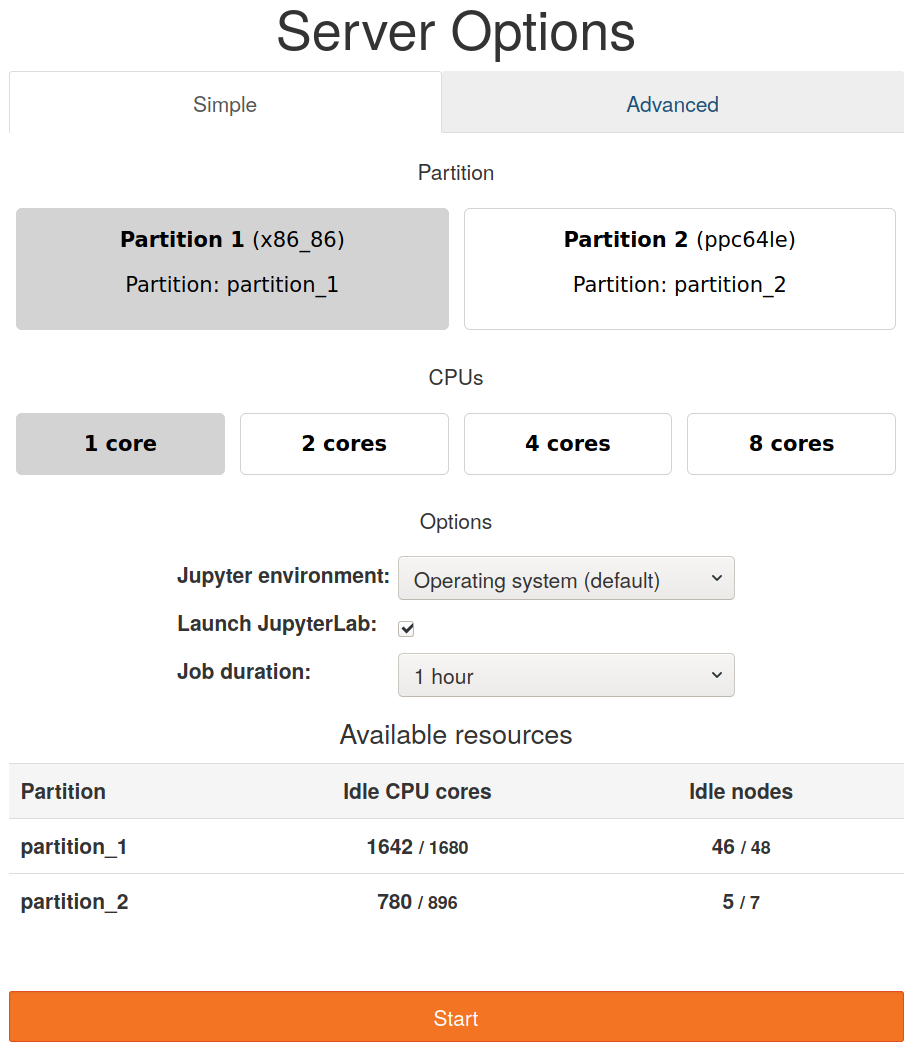
The spawn page (available at /hub/spawn) will be generated according to the
partition settings. For example, this is the spawn page generated for the
partition settings above:
This spawn page is separated in two tabs: a Simple and an Advanced tab. On
the Simple tab, the user can choose between the partitions set though
simple: True (partition_1 and partition_2 in this case), choose to take a
minimum, a half or a maximum number of cores and choose the job duration. The
available resources are checked using sinfo and displayed on the table below.
Clicking on the Start button will request the job.
The spawn page adapts to the chosen partition. This is the page when selecting
the partition_2:
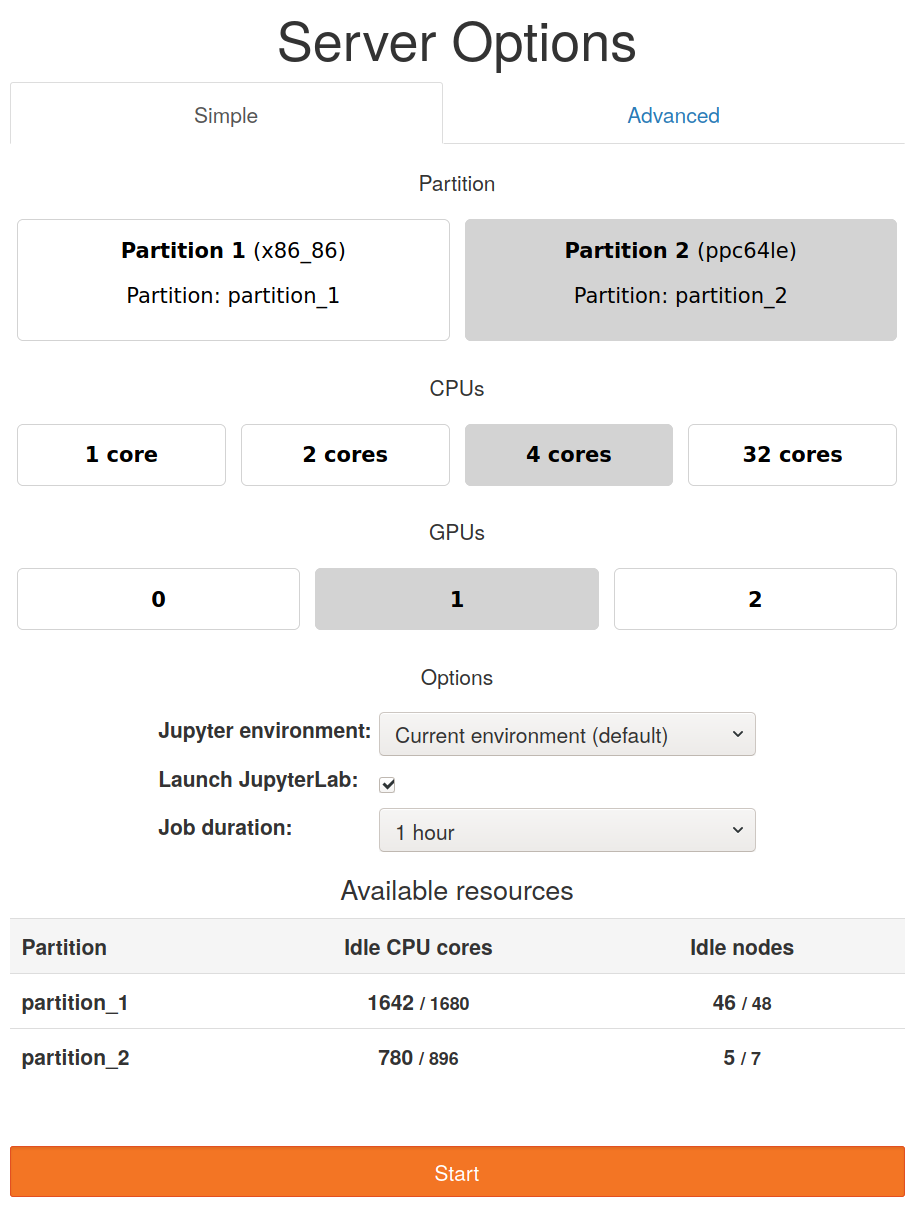
As the maximum number of cores is different, the CPUs row change accordingly.
Also, as gpu was set for partition_2, a new button row appears to enable GPU
requests.
The Advanced tab allows finer control on the requested resources.
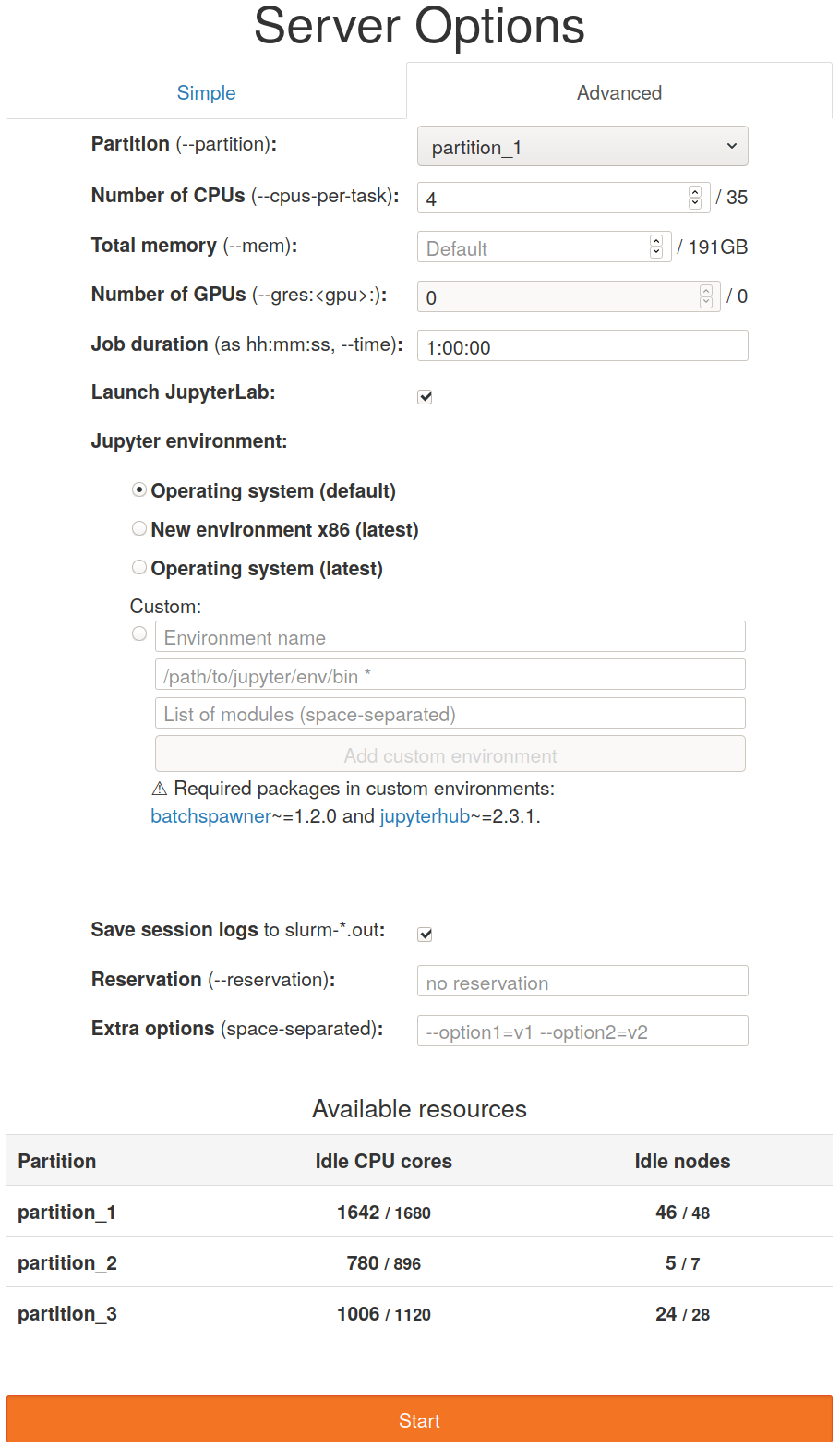
The user can select any partition (partition_3 is added in this case) and the
table of available resources reflects this. The user can also choose any number
of nodes (with the max given by max_nprocs), of GPUs (max: max_gpus) and
have more control on the job duration (max: max_runtime).
Spawn through URL
It is also possible to pass the spawning options as query arguments to the spawn
URL: https://<server:port>/hub/spawn. For example,
https://<server:port>/hub/spawn?partition=partition_1&nprocs=4 will directly
spawn a Jupyter server on partition_1 with 4 cores allocated.
The following query argument is required:
partition: The name of the SLURM partition to use.
The following optional query arguments are available:
-
SLURM configuration:
memory: Total amount of memory per node (--mem)ngpus: Number of GPUs (--gres:<gpu>:)nprocs: Number of CPUs per task (--cpus-per-task)options: Extra SLURM optionsoutput: Set totrueto save logs toslurm-*.outfiles.reservation: SLURM reservation name (--reservation)runtime: Job duration as hh:mm:ss (--time)
-
Jupyter(Lab) configuration:
default_url: The URL to open the Jupyter environment with: use/labto start JupyterLab or use JupyterLab URLsenvironment_id: Name of the Python environment defined in the configuration used to start Jupyterenvironment_path: Path to the Python environment bin/ used to start Jupyterenvironment_modules: Space-separated list of environment module names to load before starting Jupyterroot_dir: The path of the "root" folder browsable from Jupyter(Lab) (user's home directory if not provided)
To use a Jupyter environment defined in the configuration, only provide its
environment_id, for example:
https://<server:port>/hub/spawn?partition=partition_1&environment_id=default.
To use a custom Jupyter environment, instead provide the corresponding
environment_path and/or environment_modules, for example:
https://<server:port>/hub/spawn?partition=partition_1&environment_path=/path/to/jupyter/bin, orhttps://<server:port>/hub/spawn?partition=partition_1&environment_modules=myjupytermodule.
Development
See CONTRIBUTING.md.
Credits:
We would like acknowledge the following ressources that served as base for this project and thank their authors:
- This gist for the initial spawner implementation.
- The DESY JupyterHub Slurm service for the table of available resources.
- The TUDresden JupyterHub Slurm service for the spawn page design.
Metadata
Release files for jupyterhub-moss 10.1.0
For a detailed explanation of source distributions (sdists) and built distributions (wheels), please see the package formats documentation.
Source distribution (sdist)
| File | Size | Uploaded | |
|---|---|---|---|
| jupyterhub_moss-10.1.0.tar.gz | 29.4 kB | Details |
Built distribution (wheel)
| File | Interpreter | ABI | Platform | Reset |
|---|---|---|---|---|
| jupyterhub_moss-10.1.0-py3-none-any.whl | Python 3 | none | any | Details |
Total release size: 52.4 kB
Release files / jupyterhub_moss-10.1.0.tar.gz
| Download URL | jupyterhub_moss-10.1.0.tar.gz |
|---|---|
| Size | 29.4 kB |
| Tags | Source |
|
SHA-256 checksum How to use checksums |
5206dd0cf5920730eddf1a6a4c9662f9a2545a9c95c70826f8f4504d0a04f6eb
|
|
BLAKE2b-256 checksum How to use checksums |
8fa0841c50a0dad0667287cf313e6a2b80664b651ae9bf274324b9ac6075ec59
|
| Upload date | |
|
Uploaded using Trusted Publishing? What is trusted publishing? |
Yes |
| Uploaded via |
twine/6.1.0 CPython/3.13.7
|
Provenance
Provenance describes where a file came from. On PyPI, provenance is shared via attestations, which provide a verifiable record of the build or publishing details. View details, limitations and caveats.


PyPI Publish Attestation
PyPI verified that this artifact, at this checksum, originated from the publisher listed below.
Signed by GitHub Actions, verified by PyPI on Dec 2, 2025.
Transparency logRelease files / jupyterhub_moss-10.1.0-py3-none-any.whl
| Download URL | jupyterhub_moss-10.1.0-py3-none-any.whl |
|---|---|
| Size | 23.0 kB |
| Tags | Python 3 |
|
SHA-256 checksum How to use checksums |
ebebeaddae38d32c891e2a8c6da335bc515f4e35d151cf1884addaa17cf9835d
|
|
BLAKE2b-256 checksum How to use checksums |
b6dcb0c89f7dca0ff16e21e5512346af33c633eb41675a8004ce2c46fb909c31
|
| Upload date | |
|
Uploaded using Trusted Publishing? What is trusted publishing? |
Yes |
| Uploaded via |
twine/6.1.0 CPython/3.13.7
|
Provenance
Provenance describes where a file came from. On PyPI, provenance is shared via attestations, which provide a verifiable record of the build or publishing details. View details, limitations and caveats.
PyPI Publish Attestation
PyPI verified that this artifact, at this checksum, originated from the publisher listed below.
Signed by GitHub Actions, verified by PyPI on Dec 2, 2025.
Transparency log













