

Acquire and securely store OAuth2/OIDC tokens in JupyterHub.


tessera adds a per-server button in JupyterLab. On click, the user runs an OAuth2/OIDC authorization-code flow (confidential client, PKCE). A JupyterHub Service receives the callback, exchanges the code, and stores the refresh token encrypted at rest. Notebooks then read a fresh access token from the Service on demand. The button is green when a valid refresh token exists, red otherwise. tessera is generic: any OAuth2/OIDC provider is a configuration entry.
tessera is not an Authenticator. It never signs anyone in to JupyterHub: your Hub keeps whatever Authenticator it already uses (PAM, LDAP, OAuth, or any other). tessera runs a separate step after that login, acquiring tokens from external OAuth2/OIDC providers so notebooks can call the APIs those providers protect.
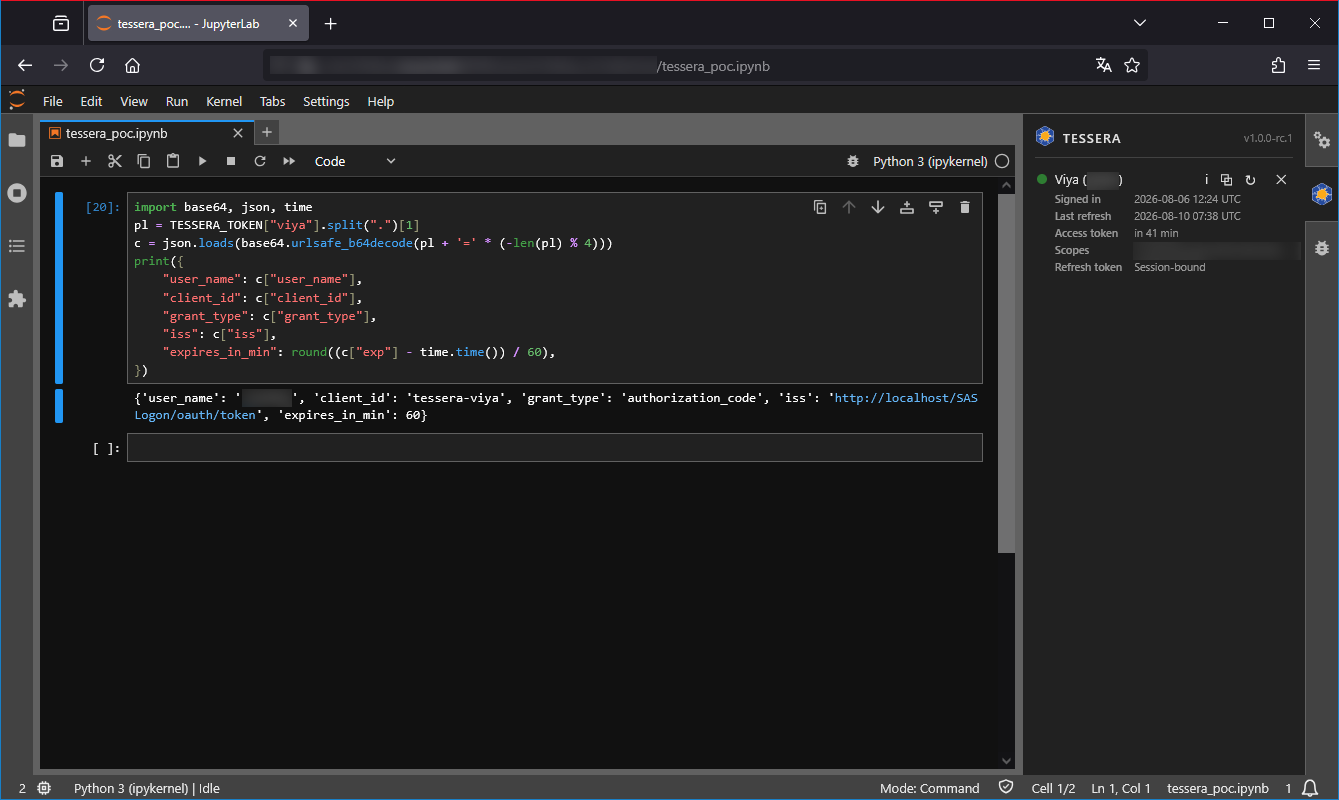
Signed in on 6 August, still green on 10 August: the access token expired several times in between, and each one was renewed from the stored refresh token, on demand.
How it works
- One button per declared server. The panel shows a button for each OAuth server in your configuration, green when a valid refresh token is stored for that user, red otherwise.
- A click starts an authorization-code flow with PKCE. The Service
generates the
stateand the PKCE verifier, sends the browser to the provider with the S256 challenge, and keeps the verifier to itself. - The provider calls back to the Service, which validates the
stateagainst the flow it started and exchanges the code for tokens. The browser never handles a token. - The refresh token is encrypted at rest, with the encryption key held separately from the database file, so the database on its own reveals nothing.
- Notebooks read an access token on demand. The kernel client
(
get_token("my-idp"), orTESSERA_TOKEN["my-idp"]) fetches a fresh token from the Service on each access. Nothing is cached kernel-side and no token ever sits in an environment variable, so a token revoked at the provider is never served from a stale copy.
Architecture (three surfaces)
| Surface | Stack | Role |
|---|---|---|
| Frontend | TypeScript/React | Per-server status button (green/red), shipped as a prebuilt JupyterLab extension. |
| Service | Python 3.10+ | JupyterHub Service exposing /login, /callback, /token; encrypted token store. |
| Admin CLI | Python (Typer) | Deployment and ops helpers: config-snippet, init-config, doctor, install-kernel-config. |
Install
pip install jupyterhub-tessera
Installing the Python package also ships the prebuilt JupyterLab extension; no manual frontend copy is required.
Project layout
| Path | What lives there |
|---|---|
src/tessera/ |
Service, admin CLI, kernel client, and the prebuilt lab extension |
frontend/src/ |
TypeScript/React panel sources, with their tests alongside them |
tests/ |
Python test suite (config, flow, store, service, kernel, end to end) |
docs/ |
Sphinx documentation sources |
Development
Requirements: Python 3.10+, Node.js 20+.
# Python (use a virtual environment created outside any synced folder)
pip install -e ".[dev]"

# Frontend
npm install
npm run build
Security
A refresh token and a client secret are encrypted at rest, with the encryption key held separately from the database. The frontend never reads, stores, or logs a token; it only consumes a boolean status.
License
MIT, Copyright (c) 2026 Michel TRUONG.
1 maintainer

Download files
Download the file for your platform. If you're not sure which to choose, learn more about installing packages.
Source Distribution
Built Distribution
Filter files by name, interpreter, ABI, and platform.
If you're not sure about the file name format, learn more about wheel file names.
Copy a direct link to the current filters
File details
Details for the file jupyterhub_tessera-1.0.0.tar.gz.
File metadata
- Download URL: jupyterhub_tessera-1.0.0.tar.gz
- Upload date:
- Size: 733.0 kB
- Tags: Source
- Uploaded using Trusted Publishing? Yes
- Uploaded via:
twine/7.0.0 CPython/3.13.14
File hashes
| Algorithm | Hash digest | |
|---|---|---|
| SHA256 |
1e8313959d73cdd0820ea9d35b507d12e47b915d146f05c5c142d3da51384604
|
|
| MD5 |
50e7ad9c56910e7f8ce0611a837d2fcd
|
|
| BLAKE2b-256 |
14885297def007826c0d433945b98f12353896848bc1dc23018b51cda6dde03d
|
Provenance
The following attestation bundles were made for jupyterhub_tessera-1.0.0.tar.gz:
Publisher:
ci.yml on KaminoU/jupyterhub-tessera
-
Statement:
-
Statement type:
https://in-toto.io/Statement/v1 -
Predicate type:
https://docs.pypi.org/attestations/publish/v1 -
Subject name:
jupyterhub_tessera-1.0.0.tar.gz -
Subject digest:
1e8313959d73cdd0820ea9d35b507d12e47b915d146f05c5c142d3da51384604 - Sigstore transparency entry: 2407584579
- Sigstore integration time:
-
Permalink:
KaminoU/jupyterhub-tessera@3b142f61048db31ea6712b78f9bfaf9a45513c57 -
Branch / Tag:
refs/tags/v1.0.0 - Owner: https://github.com/KaminoU
-
Access:
public
-
Token Issuer:
https://token.actions.githubusercontent.com -
Runner Environment:
github-hosted -
Publication workflow:
ci.yml@3b142f61048db31ea6712b78f9bfaf9a45513c57 -
Trigger Event:
push
-
Statement type:
File details
Details for the file jupyterhub_tessera-1.0.0-py3-none-any.whl.
File metadata
- Download URL: jupyterhub_tessera-1.0.0-py3-none-any.whl
- Upload date:
- Size: 88.8 kB
- Tags: Python 3
- Uploaded using Trusted Publishing? Yes
- Uploaded via:
twine/7.0.0 CPython/3.13.14
File hashes
| Algorithm | Hash digest | |
|---|---|---|
| SHA256 |
e49deb6959948d6f846414cd409ad46eed02c056fc900b02b74f1b7051bbce29
|
|
| MD5 |
4eff0737c7a2b353d1aa0fb65764779b
|
|
| BLAKE2b-256 |
be49f1bbf078d87dfea04a2e97c0ccec7c3d6aca5b555e34577ca3130881c99a
|
Provenance
The following attestation bundles were made for jupyterhub_tessera-1.0.0-py3-none-any.whl:
Publisher:
ci.yml on KaminoU/jupyterhub-tessera
-
Statement:
-
Statement type:
https://in-toto.io/Statement/v1 -
Predicate type:
https://docs.pypi.org/attestations/publish/v1 -
Subject name:
jupyterhub_tessera-1.0.0-py3-none-any.whl -
Subject digest:
e49deb6959948d6f846414cd409ad46eed02c056fc900b02b74f1b7051bbce29 - Sigstore transparency entry: 2407584918
- Sigstore integration time:
-
Permalink:
KaminoU/jupyterhub-tessera@3b142f61048db31ea6712b78f9bfaf9a45513c57 -
Branch / Tag:
refs/tags/v1.0.0 - Owner: https://github.com/KaminoU
-
Access:
public
-
Token Issuer:
https://token.actions.githubusercontent.com -
Runner Environment:
github-hosted -
Publication workflow:
ci.yml@3b142f61048db31ea6712b78f9bfaf9a45513c57 -
Trigger Event:
push
-
Statement type:














