
jupyterlab-cell-navigation-rail



An opt-in, compact left-margin Cell Navigation Rail for JupyterLab 4 and Jupyter Notebook 7.
Try it online with Binder in JupyterLab or Jupyter Notebook 7.
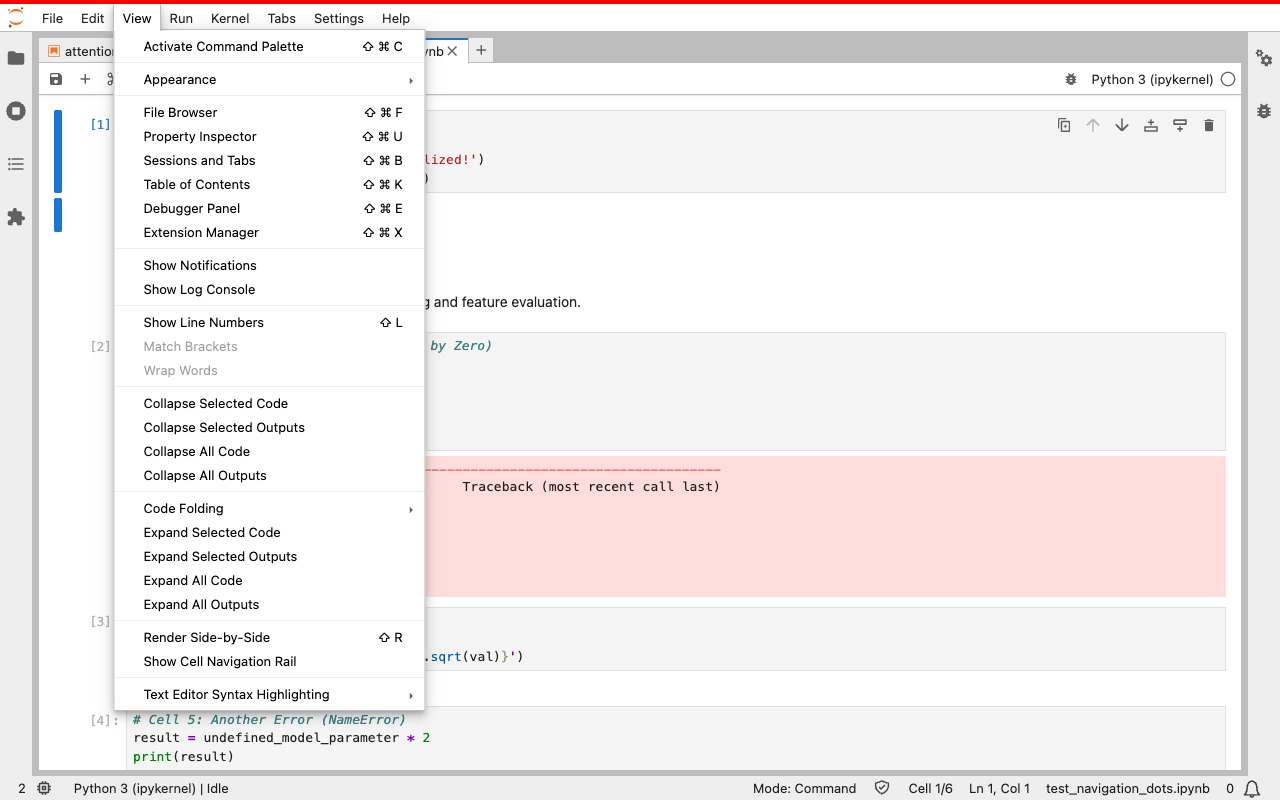
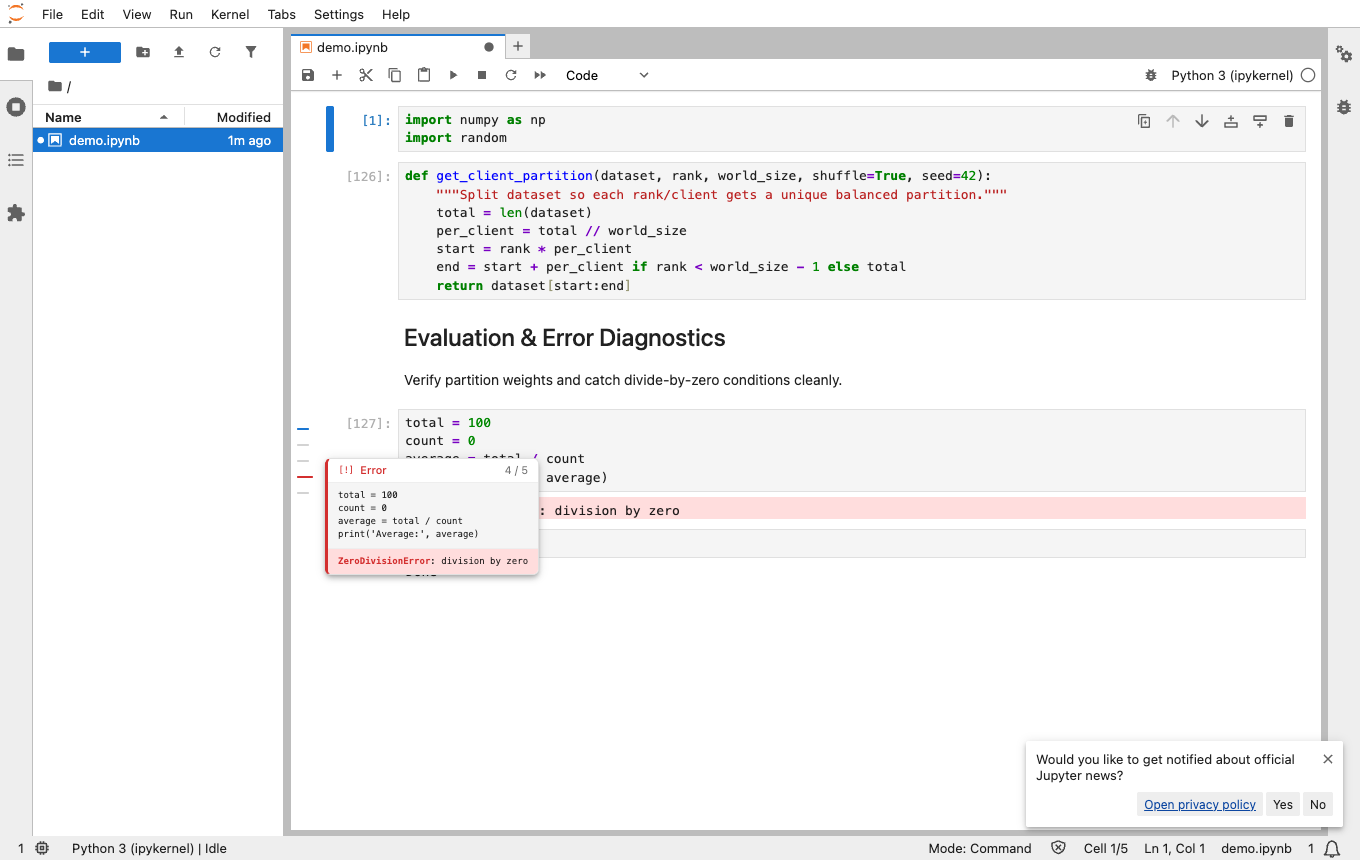
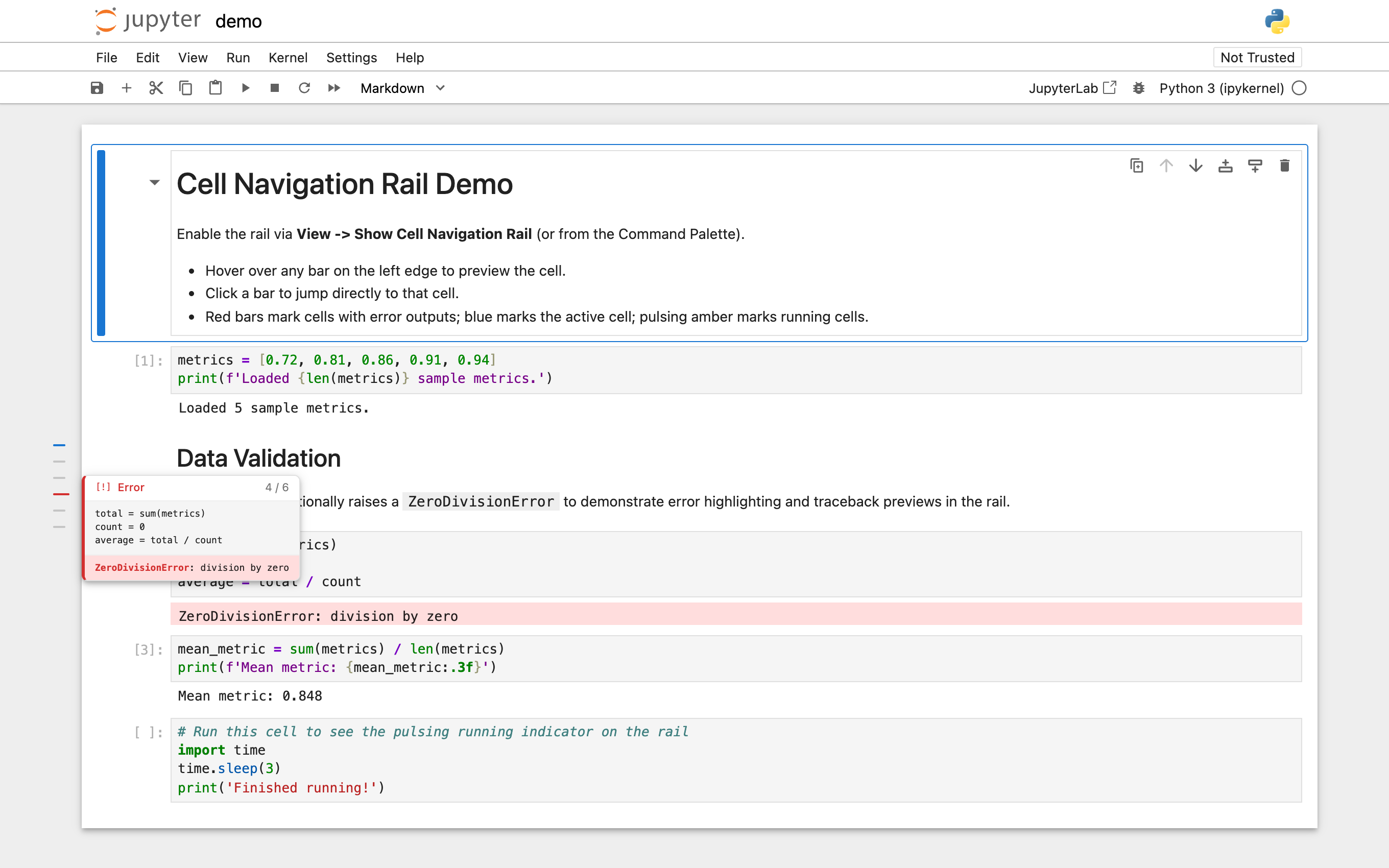
Each cell in the notebook is represented by a uniform horizontal bar in a fixed-height rail on the left edge, inspired by margin bookmark indicators in ePub readers and compact overview rails. Hovering a bar previews the cell (code, Markdown, or error traceback) with native Jupyter typography, and clicking jumps straight to that cell.
Motivation
Navigating long notebooks to revisit a cell or spot failed runs usually means scrolling through the document or opening a side panel. Existing tools solve adjacent problems:
- Table of Contents requires Markdown headings and opens a sidebar.
- Show Minimap (
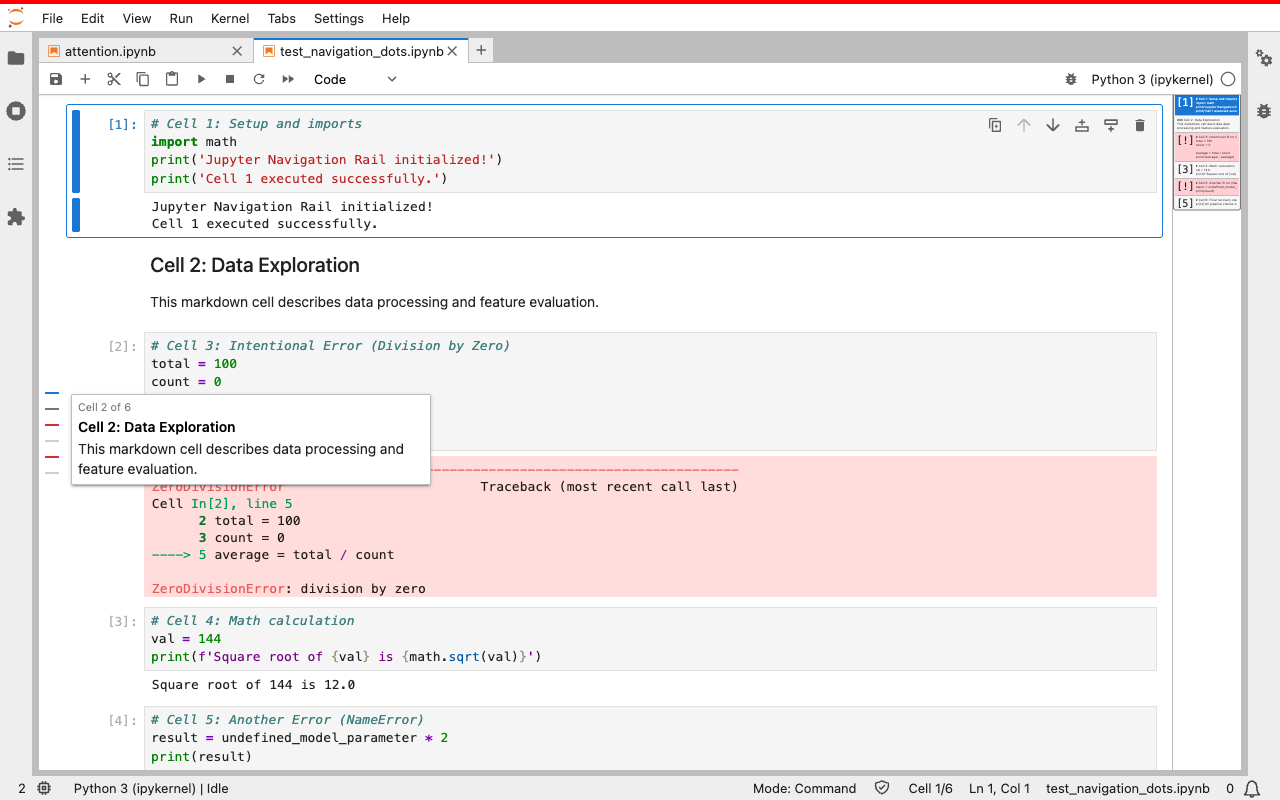
View -> Appearance -> Show Minimap) shows a scrollable strip of scaled cell source previews along the right scrollbar.
Cell Navigation Rail focuses on a minimal, fixed-height glanceable margin rail:
- Opt-in by default (
default: false): Disabled until enabled in the View menu or Settings. - Uniform horizontal bars (
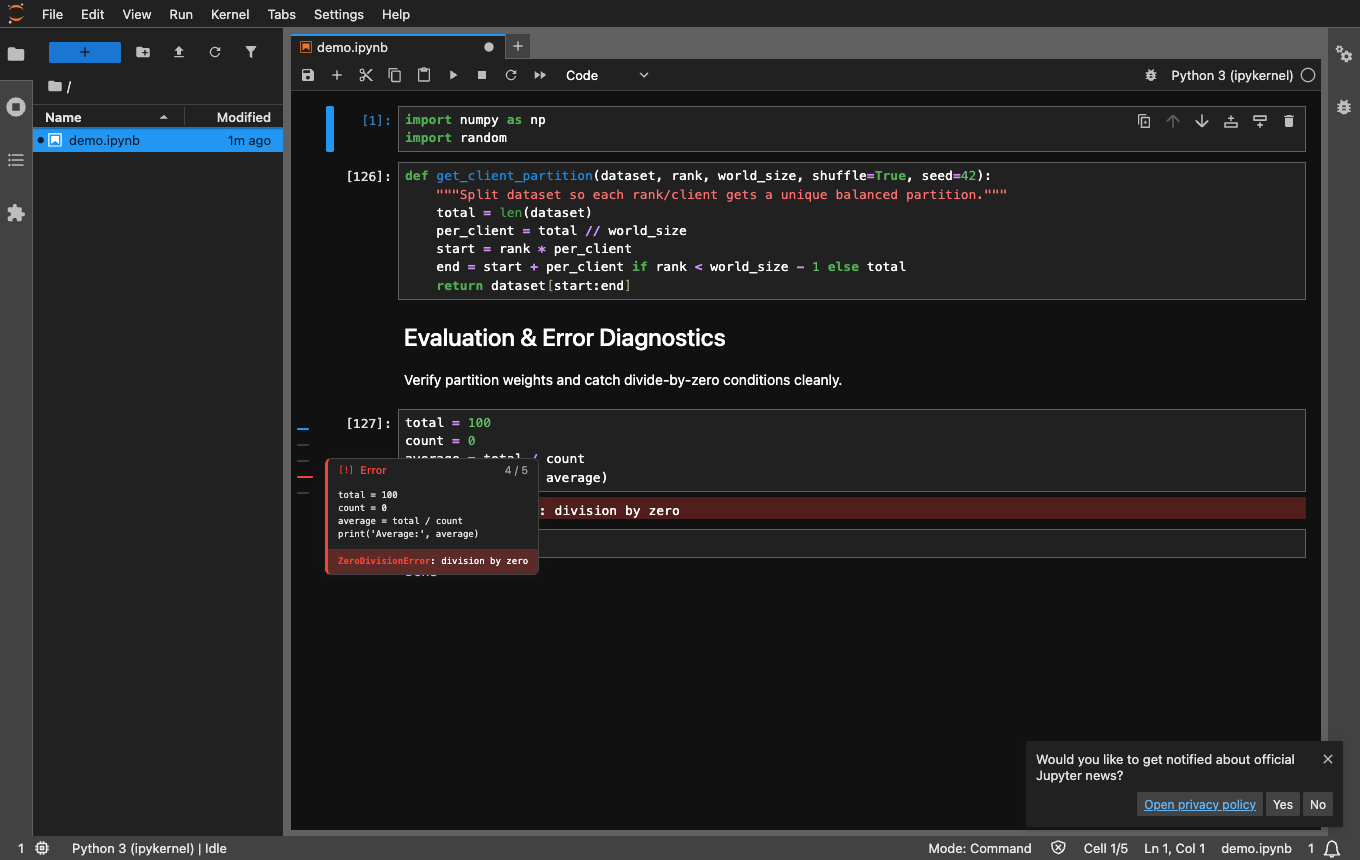
12px x 2px, expanding subtly on hover): Neutral for idle cells, brand blue for the active cell, pulsing warning accent while running, and red when a cell output contains an error. - Hover preview cards: Shows cell prompt, type, position (
2 / 5), truncated code/Markdown lines, remaining line count, and error tracebacks with a status-colored accent border using native--jp-*tokens. - One-click jump: Selecting any bar scrolls to and focuses that cell.
- Works in JupyterLab 4 and Jupyter Notebook 7.
Screenshots
Light Theme — View Menu & Error Preview
Dark Theme & Native Token Adaptation
Comparison with Built-in Minimap
Cell Navigation Rail (compact fixed-height bars + hover preview on the left) alongside JupyterLab's scrollable code Minimap (on the right):
Jupyter Notebook 7
Requirements
- Python >= 3.10
- JupyterLab >= 4.0.0 (or Jupyter Notebook >= 7.0.0)
Install
Install from PyPI:
pip install jupyterlab-cell-navigation-rail
You can also search for jupyterlab-cell-navigation-rail in JupyterLab’s built-in Extension Manager.
Usage
Toggle the rail from:
- View -> Show Cell Navigation Rail
- Command Palette: Show Cell Navigation Rail
- Settings Editor: Cell Navigation Rail -> Show cell navigation rail
Development install
git clone https://github.com/saitejagirada/jupyterlab-cell-navigation-rail.git
cd jupyterlab-cell-navigation-rail

pip install -e .
jupyter labextension develop . --overwrite
Rebuild TypeScript and run checks:
jlpm
jlpm run lint:check
jlpm run test
jlpm build
Uninstall
pip uninstall jupyterlab-cell-navigation-rail
1 maintainer

Metadata
1 maintainer
Release files for jupyterlab-cell-navigation-rail 0.1.4
For a detailed explanation of source distributions (sdists) and built distributions (wheels), please see the package formats documentation.
Source distribution (sdist)
| File | Size | Uploaded | Provenance | Actions |
|---|---|---|---|---|
| jupyterlab_cell_navigation_rail-0.1.4.tar.gz | 147.4 kB | With provenance | Details for jupyterlab_cell_navigation_rail-0.1.4.tar.gz |
Built distribution (wheel)
| File | Interpreter | ABI | Platform | Actions Reset |
|---|---|---|---|---|
| jupyterlab_cell_navigation_rail-0.1.4-py3-none-any.whl | Python 3 | none | any | Details for jupyterlab_cell_navigation_rail-0.1.4-py3-none-any.whl |
Total release size: 172.3 kB
Release files / jupyterlab_cell_navigation_rail-0.1.4.tar.gz
| Download URL | jupyterlab_cell_navigation_rail-0.1.4.tar.gz |
|---|---|
| Size | 147.4 kB |
| Tags | Source |
|
SHA-256 checksum How to use checksums |
432be280d246ab222863a09d287cfa03c468abe68defba4a27b3adc9451acc4a
|
|
BLAKE2b-256 checksum How to use checksums |
fdfac10410cc651c44fe28b3e4c60883cb2914ffca1351567c0cc7e43c2c35cc
|
| Upload date | |
|
Uploaded using Trusted Publishing? What is trusted publishing? |
Yes |
| Uploaded via |
twine/7.0.0 CPython/3.13.16
|
Provenance
Provenance describes where a file came from. On PyPI, provenance is shared via attestations, which provide a verifiable record of the build or publishing details. View details, limitations and caveats.


PyPI Publish Attestation
PyPI verified that this artifact, at this checksum, originated from the publisher listed below.
Signed by GitHub Actions, verified by PyPI on Nov 21, 2026.
Transparency logRelease files / jupyterlab_cell_navigation_rail-0.1.4-py3-none-any.whl
| Download URL | jupyterlab_cell_navigation_rail-0.1.4-py3-none-any.whl |
|---|---|
| Size | 24.9 kB |
| Tags | Python 3 |
|
SHA-256 checksum How to use checksums |
a489bcf4eb8b2fa0e2530a1746afa6f5b7497746a5b3af5550d79bcc7eda77b6
|
|
BLAKE2b-256 checksum How to use checksums |
a645757ceb60c39d4c19f7387f656c890a52db1a9adb6987574b07f51ca62a41
|
| Upload date | |
|
Uploaded using Trusted Publishing? What is trusted publishing? |
Yes |
| Uploaded via |
twine/7.0.0 CPython/3.13.16
|
Provenance
Provenance describes where a file came from. On PyPI, provenance is shared via attestations, which provide a verifiable record of the build or publishing details. View details, limitations and caveats.
PyPI Publish Attestation
PyPI verified that this artifact, at this checksum, originated from the publisher listed below.
Signed by GitHub Actions, verified by PyPI on Nov 21, 2026.
Transparency logSecurity for jupyterlab-cell-navigation-rail 0.1.4
Provenance
Provenance describes where a file came from. On PyPI, provenance is shared via attestations, which provide a verifiable record of the build or publishing details. View details, limitations and caveats.
Full provenance
Both files in this release have been uploaded with provenance metadata.
Attestation for jupyterlab_cell_navigation_rail-0.1.4.tar.gz
PyPI Publish Attestation
PyPI verified that this artifact, at this checksum, originated from the publisher listed below.
Signed by GitHub Actions, verified by PyPI on Nov 21, 2026.
Transparency logA note on package security
PyPI is a repository for distributing packages, not a service for auditing them. While third-party security researchers and our staff do their best to detect and remove malicious packages, PyPI cannot guarantee the quality, security or suitability of any given package.
To learn more about protecting yourself from malicious actors, visit our package security documentation.














