
JupyterLab DataMount Extension



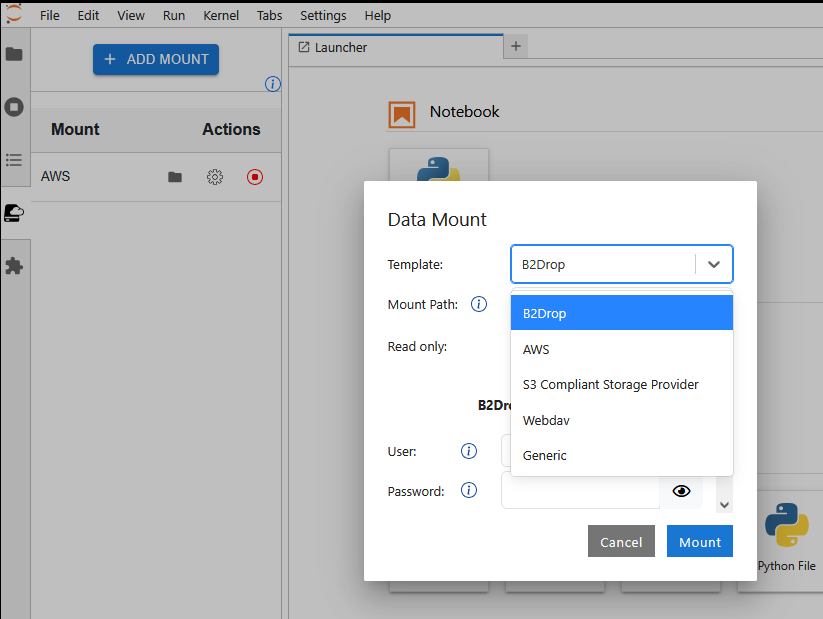
A JupyterLab extension that enables users to securely mount external data storage locations directly into their running JupyterLab environment.
It is designed for JupyterHub deployments that want to provide users with seamless access to external storage systems such as B2DROP, S3-compatible object storage, AWS S3, or other rclone-supported services — without requiring users to manually configure mounts inside their notebooks.
The extension provides:
- A JupyterLab frontend for configuring and managing data mounts
- A server extension that handles secure communication and mount orchestration
- Support for reusable storage templates for common providers
- Integration with JupyterHub deployments for centrally managed and pre-configured mounts
- Secure handling of credentials without requiring elevated privileges inside user environments
This allows users to access external datasets as if they were local files inside JupyterLab, improving reproducibility, reducing manual setup, and simplifying workflows across distributed research infrastructures.
This extension is composed of:
- A Python package named
jupyterlab_data_mountfor the server extension - A NPM package named
jupyterlab-data-mountfor the frontend extension
For detailed deployment options, configuration examples, and JupyterHub integration, see the full documentation:
https://jsc-jupyter.github.io/jupyterlab-data-mount/
Requirements
- JupyterLab >= 4.0.0
Install
This extension must be configured in a JupyterHub Deployment. Please check documentation:
https://jsc-jupyter.github.io/jupyterlab-data-mount/spawner/installation/
Troubleshoot
If you are seeing the frontend extension, but it is not working, check that the server extension is enabled:
jupyter server extension list
If the server extension is installed and enabled, but you are not seeing the frontend extension, check the frontend extension is installed:
jupyter labextension list
Contributing
Development install
Note: You will need NodeJS to build the extension package.
The jlpm command is JupyterLab's pinned version of
yarn that is installed with JupyterLab. You may use
yarn or npm in lieu of jlpm below.
# Clone the repo to your local environment
# Change directory to the jupyterlab_data_mount directory
# Install package in development mode
pip install -e ".[test]"
# Link your development version of the extension with JupyterLab
jupyter labextension develop . --overwrite
# Server extension must be manually installed in develop mode
jupyter server extension enable jupyterlab_data_mount
# Rebuild extension Typescript source after making changes
jlpm build
You can watch the source directory and run JupyterLab at the same time in different terminals to watch for changes in the extension's source and automatically rebuild the extension.
# Watch the source directory in one terminal, automatically rebuilding when needed
jlpm watch
# Run JupyterLab in another terminal
jupyter lab
With the watch command running, every saved change will immediately be built locally and available in your running JupyterLab. Refresh JupyterLab to load the change in your browser (you may need to wait several seconds for the extension to be rebuilt).
By default, the jlpm build command generates the source maps for this extension to make it easier to debug using the browser dev tools. To also generate source maps for the JupyterLab core extensions, you can run the following command:
jupyter lab build --minimize=False
Development uninstall
# Server extension must be manually disabled in develop mode
jupyter server extension disable jupyterlab_data_mount
pip uninstall jupyterlab_data_mount
In development mode, you will also need to remove the symlink created by jupyter labextension develop
command. To find its location, you can run jupyter labextension list to figure out where the labextensions
folder is located. Then you can remove the symlink named jupyterlab-data-mount within that folder.
Packaging the extension
See RELEASE
1 maintainer

Metadata
1 maintainer
Release files for jupyterlab-data-mount 1.1.1
For a detailed explanation of source distributions (sdists) and built distributions (wheels), please see the package formats documentation.
Source distribution (sdist)
| File | Size | Uploaded | Provenance | Actions |
|---|---|---|---|---|
| jupyterlab_data_mount-1.1.1.tar.gz | 317.3 kB | Without provenance | Details for jupyterlab_data_mount-1.1.1.tar.gz |
Built distribution (wheel)
| File | Interpreter | ABI | Platform | Actions Reset |
|---|---|---|---|---|
| jupyterlab_data_mount-1.1.1-py3-none-any.whl | Python 3 | none | any | Details for jupyterlab_data_mount-1.1.1-py3-none-any.whl |
Total release size: 496.6 kB
Release files / jupyterlab_data_mount-1.1.1.tar.gz
| Download URL | jupyterlab_data_mount-1.1.1.tar.gz |
|---|---|
| Size | 317.3 kB |
| Tags | Source |
|
SHA-256 checksum How to use checksums |
0d10f21dd8c97486c23ea81cdf0eabfbef61c7e86d2e9a9d37b9f6169bb52c66
|
|
BLAKE2b-256 checksum How to use checksums |
6a1bfb1154968ebee50b6e7b1fa548d91c03db4ded5a64f8af16bad7b8a0cae0
|
| Upload date | |
|
Uploaded using Trusted Publishing? What is trusted publishing? |
Yes |
| Uploaded via |
twine/7.0.0 CPython/3.12.15
|
Release files / jupyterlab_data_mount-1.1.1-py3-none-any.whl
| Download URL | jupyterlab_data_mount-1.1.1-py3-none-any.whl |
|---|---|
| Size | 179.3 kB |
| Tags | Python 3 |
|
SHA-256 checksum How to use checksums |
7ebb09b6be9b0134d12a0a3fcaa7ebb879ed13b9579ab30fa7ba0b563b68219d
|
|
BLAKE2b-256 checksum How to use checksums |
16d124e60b696acfda8b1e5913acc816d4f6220057f2a8a1c4a95d8e1e64aa6a
|
| Upload date | |
|
Uploaded using Trusted Publishing? What is trusted publishing? |
Yes |
| Uploaded via |
twine/7.0.0 CPython/3.12.15
|
Security for jupyterlab-data-mount 1.1.1
Provenance
Provenance describes where a file came from. On PyPI, provenance is shared via attestations, which provide a verifiable record of the build or publishing details. View details, limitations and caveats.
No provenance found
None of the files in this release were uploaded with provenance metadata.
A note on package security
PyPI is a repository for distributing packages, not a service for auditing them. While third-party security researchers and our staff do their best to detect and remove malicious packages, PyPI cannot guarantee the quality, security or suitability of any given package.
To learn more about protecting yourself from malicious actors, visit our package security documentation.














