
A JupyterLab launcher extension to view the molecular orbitals.

Project description
jupyterlab-mol-visualizer: A JupyterLab Extension to Visualize Molecular Orbitals

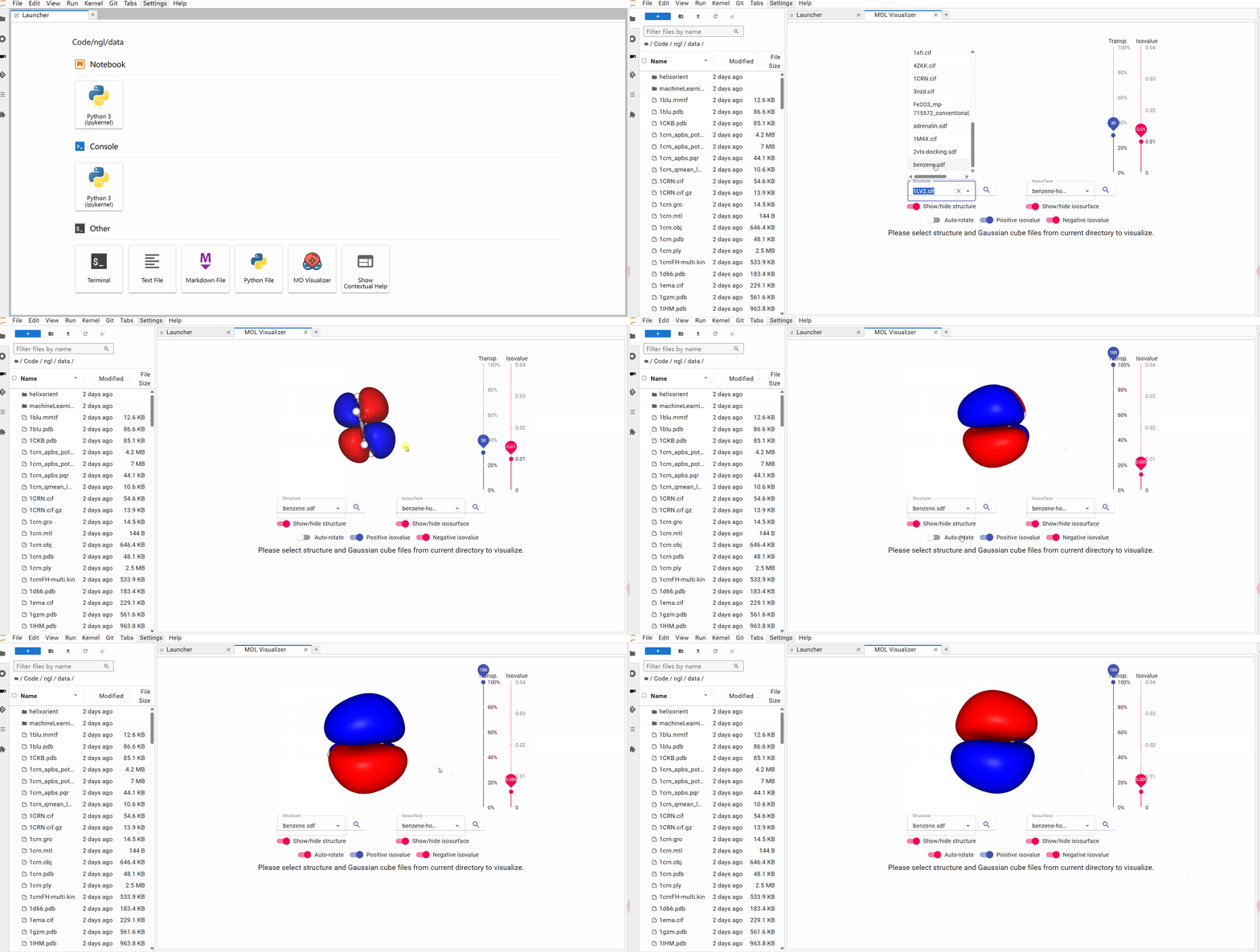
A JupyterLab launcher extension to view the molecular orbitals (MOs). NGL JavaScript package was employed to visualize the MOs. The icon of the extension is from SVG Repo.
Features
- Large interactive viewer — the molecular visualization fills the available screen space with a sidebar control panel
- Structure & isosurface loading — load
.sdf,.cif(structure) and.cube(Gaussian cube) files from the current JupyterLab directory - Auto-rotate, visibility toggles — toggle spin, show/hide structure and positive/negative isosurfaces
- Opacity & isovalue sliders — fine-tune the display with real-time sliders
- Viewer background color picker — choose from 8 preset background colors
- Auto Centre — re-centre the camera on the molecule with a smooth animation
- Save PNG — export the current view as a high-resolution PNG image
- Dark & light theme — adapts to JupyterLab's theme automatically
Try it with Binder

Requirements
- JupyterLab >= 4.0.0
Install
To install the extension, execute:
pip install jupyterlab_mol_visualizer
Uninstall
To remove the extension, execute:
pip uninstall jupyterlab_mol_visualizer
Contributing
Development install
Note: You will need NodeJS to build the extension package.
The jlpm command is JupyterLab's pinned version of
yarn that is installed with JupyterLab. You may use
yarn or npm in lieu of jlpm below. For a faster editable install, npm
is recommended.
# Clone the repo to your local environment
# Change directory to the jupyterlab_mol_visualizer directory
# Install npm dependencies (only needed first time)
npm install
# Install package in development mode
pip install -e "."
After the first install, subsequent pip install -e . runs are near-instant
(the build step is skipped once the labextension exists). To rebuild the
extension after making TypeScript changes:
npm run build
You can watch the source directory and run JupyterLab at the same time in different terminals to watch for changes in the extension's source and automatically rebuild the extension.
# Watch the source directory in one terminal, automatically rebuilding when needed
npm run watch
# Run JupyterLab in another terminal
jupyter lab
With the watch command running, every saved change will immediately be built locally and available in your running JupyterLab. Refresh JupyterLab to load the change in your browser (you may need to wait several seconds for the extension to be rebuilt).
By default, the build generates the source maps for this extension to make it easier to debug using the browser dev tools. To also generate source maps for the JupyterLab core extensions, you can run the following command:
jupyter lab build --minimize=False
Development uninstall
pip uninstall jupyterlab_mol_visualizer
In development mode, you will also need to remove the symlink created by jupyter labextension develop
command. To find its location, you can run jupyter labextension list to figure out where the labextensions
folder is located. Then you can remove the symlink named jupyterlab_mol_visualizer within that folder.
Testing the extension
Frontend tests
This extension is using Jest for JavaScript code testing.
To execute them, execute:
npm install
npm test
Integration tests
This extension uses Playwright for the integration tests (aka user level tests). More precisely, the JupyterLab helper Galata is used to handle testing the extension in JupyterLab.
More information are provided within the ui-tests README.
Packaging the extension
See RELEASE
How to cite
When using the content of this repository, please cite the following two articles:
-
D. Du, T. J. Baird, S. Bonella and G. Pizzi, OSSCAR, an open platform for collaborative development of computational tools for education in science, Computer Physics Communications, 282, 108546 (2023). https://doi.org/10.1016/j.cpc.2022.108546
-
D. Du, T. J. Baird, K. Eimre, S. Bonella, G. Pizzi, Jupyter widgets and extensions for education and research in computational physics and chemistry, Computer Physics Communications, 305, 109353 (2024). https://doi.org/10.1016/j.cpc.2024.109353
Acknowledgements
We acknowledge support from the EPFL Open Science Fund via the OSSCAR project.

Release history Release notifications | RSS feed


Download files
Download the file for your platform. If you're not sure which to choose, learn more about installing packages.
Source Distribution
Built Distribution
Filter files by name, interpreter, ABI, and platform.
If you're not sure about the file name format, learn more about wheel file names.
Copy a direct link to the current filters
File details
Details for the file jupyterlab_mol_visualizer-1.0.1.tar.gz.
File metadata
- Download URL: jupyterlab_mol_visualizer-1.0.1.tar.gz
- Upload date:
- Size: 2.3 MB
- Tags: Source
- Uploaded using Trusted Publishing? No
- Uploaded via: twine/6.2.0 CPython/3.12.13
File hashes
| Algorithm | Hash digest | |
|---|---|---|
| SHA256 |
e4f407abdf54e34cfb473578a59c1f9bf20485464ce56ea3595586516b5a9a10
|
|
| MD5 |
1a25556a6f7e3512f546edfd741dda4e
|
|
| BLAKE2b-256 |
1b4084e84acbea99ab8805708a191da1dd1e6d7cf024203641ea6c6f7a2623f6
|
File details
Details for the file jupyterlab_mol_visualizer-1.0.1-py3-none-any.whl.
File metadata
- Download URL: jupyterlab_mol_visualizer-1.0.1-py3-none-any.whl
- Upload date:
- Size: 2.1 MB
- Tags: Python 3
- Uploaded using Trusted Publishing? No
- Uploaded via: twine/6.2.0 CPython/3.12.13
File hashes
| Algorithm | Hash digest | |
|---|---|---|
| SHA256 |
6d42bd0c882d984d21e819bcfb0616a60593c097121d1ff3499f470ff50f3091
|
|
| MD5 |
63e83157ca9c66b365f6c4120ba8238e
|
|
| BLAKE2b-256 |
1dde39ee7b15c35c1cd1ca82b514c2dcdce762162807be1858e787b2c255e4b4
|






