
jupyterlab-myst-revealjs

Live reveal.js slideshow for MyST Markdown notebooks in JupyterLab.
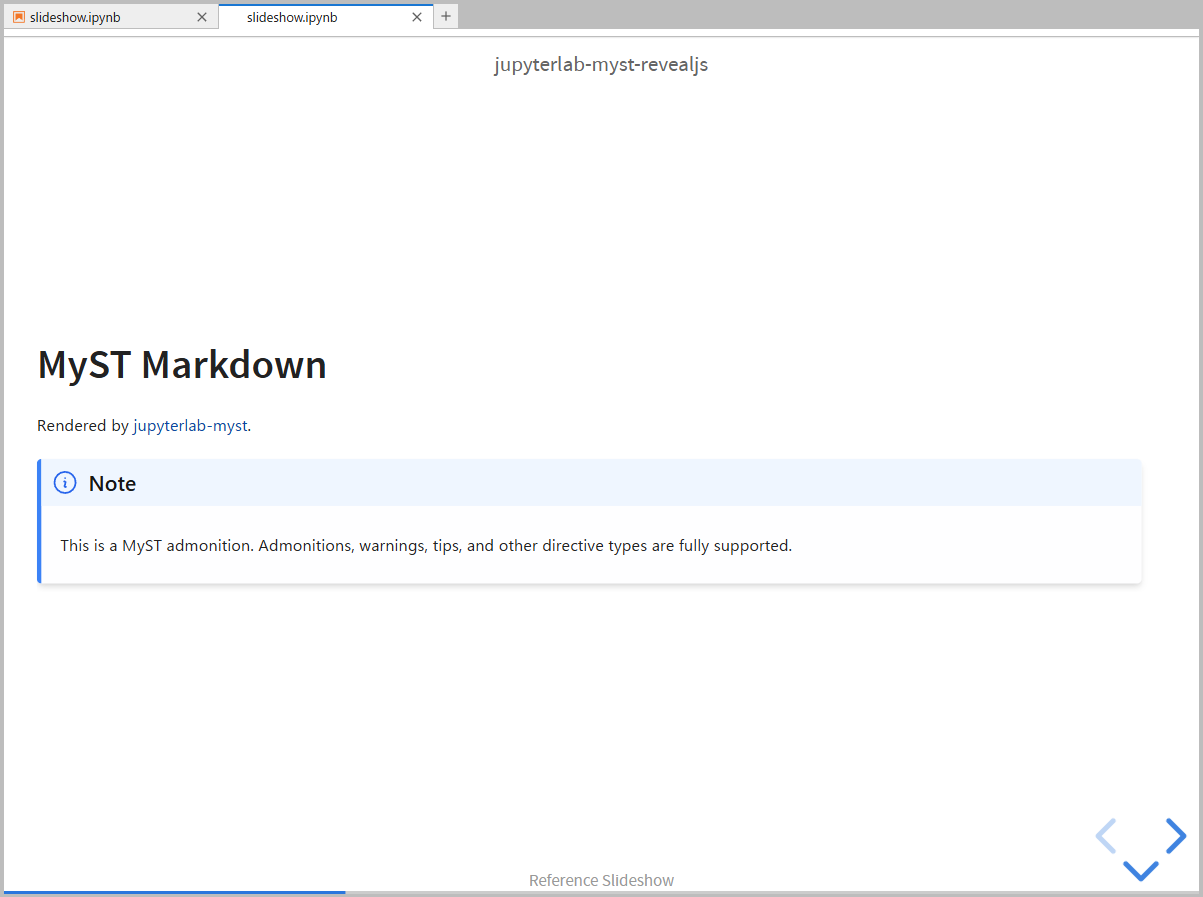
Open any notebook as a slideshow panel beside the notebook editor. Markdown cells are rendered via jupyterlab-myst, code cells use JupyterLab's native CodeCell widget — execute code and see results on slides in real time.
Features
- reveal.js slideshow — present notebooks as reveal.js slides directly in JupyterLab
- Slide structure —
slide,subslide,fragment,skipvia cell metadata - MyST Markdown — admonitions, math, cross-references, and all MyST directives
- Live code execution — Shift+Enter runs code cells on slides (shared kernel with notebook)
- Cell tags
- Jupyter Book compatible —
hide-input,hide-output,hide-cell,remove-input,remove-output,remove-cell - Grid layout —
gridwidth-*tags for multi-column layouts
- Jupyter Book compatible —
- Customization
- Slide backgrounds — per-slide background color/image via cell metadata
- Themes — 6 bundled reveal.js themes (black, white, dracula, serif, and more)
- Custom CSS — drop a
myst-revealjs.cssnext to your notebook for custom styling - Header / Footer — CSS-based overlays customizable via
myst-revealjs.css
- Keyboard controls
- Code visibility toggle —
i/okeys to toggle input/output on focused code cells during the slideshow - Fullscreen / Overview —
ffor fullscreen,ofor slide overview
- Code visibility toggle —
Requirements
- JupyterLab >= 4.0.0
- jupyterlab-myst
- jupyterlab-gridwidth (optional — for
gridwidth-*tag preview in notebook view)
Install
pip install jupyterlab-myst-revealjs
No Node.js required — this is a prebuilt extension.
Uninstall
pip uninstall jupyterlab-myst-revealjs
Quick Start
- Open a notebook in JupyterLab.
- Click the slideshow button in the toolbar, or run
slideshow:openfrom the Command Palette. - Set slide types via the Property Inspector (right sidebar).
- Press Shift+Enter on code cells to execute them on slides.
Configuration
Add a myst-revealjs key to your notebook metadata to configure reveal.js options:
{
  "myst-revealjs": {
    "theme": "white",
    "transition": "fade",
    "slideNumber": true
  }
}
See the documentation for full configuration options, cell metadata reference, and migration guide from RISE.
Development
Building
uv venv && uv pip install -e ".[dev]"
jlpm install && jlpm build
jupyter labextension develop . --overwrite
Run jlpm watch in one terminal and jupyter lab in another for live development.
Testing
jlpm test                    # Unit tests (Jest)
cd ui-tests && jlpm test     # E2E tests (Playwright + Galata)
See CONTRIBUTING for details.
License
MIT
1 maintainer

Metadata
1 maintainer
Release files for jupyterlab-myst-revealjs 1.5.1
For a detailed explanation of source distributions (sdists) and built distributions (wheels), please see the package formats documentation.
Source distribution (sdist)
| File | Size | Uploaded | |
|---|---|---|---|
| jupyterlab_myst_revealjs-1.5.1.tar.gz | 4.2 MB | Details |
Built distribution (wheel)
| File | Interpreter | ABI | Platform | Reset |
|---|---|---|---|---|
| jupyterlab_myst_revealjs-1.5.1-py3-none-any.whl | Python 3 | none | any | Details |
Total release size: 8.7 MB
Release files / jupyterlab_myst_revealjs-1.5.1.tar.gz
| Download URL | jupyterlab_myst_revealjs-1.5.1.tar.gz |
|---|---|
| Size | 4.2 MB |
| Tags | Source |
|
SHA-256 checksum How to use checksums |
c28edc7205c4c49675057978be2b376ac33970825fe1c0cea240996679d3cb3f
|
|
BLAKE2b-256 checksum How to use checksums |
069063740fc836580e667fedb559bddc3be8a9af8e092978406f792527db0d6c
|
| Upload date | |
|
Uploaded using Trusted Publishing? What is trusted publishing? |
Yes |
| Uploaded via |
twine/7.0.0 CPython/3.13.14
|
Provenance
Provenance describes where a file came from. On PyPI, provenance is shared via attestations, which provide a verifiable record of the build or publishing details. View details, limitations and caveats.


PyPI Publish Attestation
PyPI verified that this artifact, at this checksum, originated from the publisher listed below.
Signed by GitHub Actions, verified by PyPI on Aug 15, 2026.
Transparency logRelease files / jupyterlab_myst_revealjs-1.5.1-py3-none-any.whl
| Download URL | jupyterlab_myst_revealjs-1.5.1-py3-none-any.whl |
|---|---|
| Size | 4.5 MB |
| Tags | Python 3 |
|
SHA-256 checksum How to use checksums |
2f15bd7263124817fcb8110ee9cc99569a13359919f9f8d1a7537722338497d0
|
|
BLAKE2b-256 checksum How to use checksums |
2d5aa961966d46e0025d2e24c8eaa86550570adb8bfc4c45d15001ae7a0ebb19
|
| Upload date | |
|
Uploaded using Trusted Publishing? What is trusted publishing? |
Yes |
| Uploaded via |
twine/7.0.0 CPython/3.13.14
|
Provenance
Provenance describes where a file came from. On PyPI, provenance is shared via attestations, which provide a verifiable record of the build or publishing details. View details, limitations and caveats.
PyPI Publish Attestation
PyPI verified that this artifact, at this checksum, originated from the publisher listed below.
Signed by GitHub Actions, verified by PyPI on Aug 15, 2026.
Transparency log













