
A JupyterLab extension for viewing NIfTI files with Niivue

Project description
JupyterLab NiiVue
WebGL 2.0 medical image viewer for JupyterLab
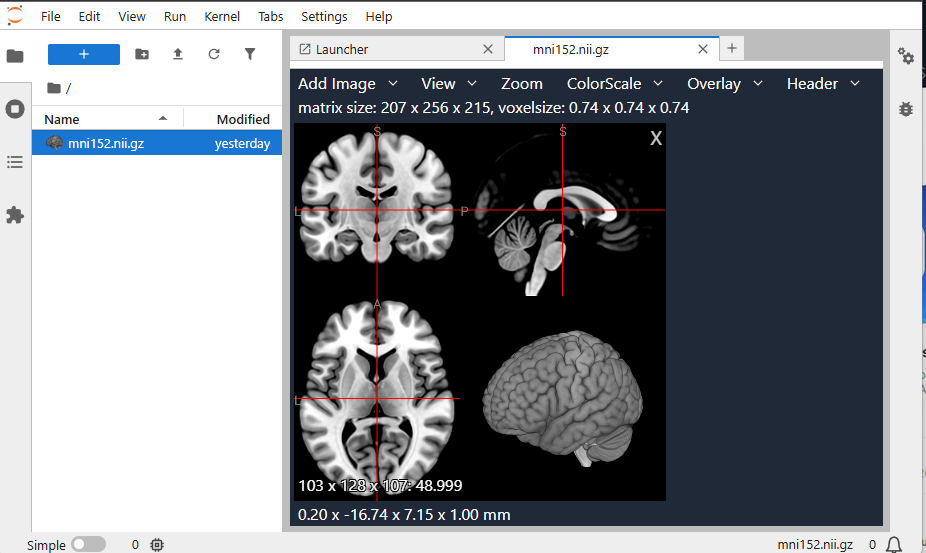
A JupyterLab extension that uses NiiVue to display neuroimaging files directly in JupyterLab. View NIfTI files, meshes, tractography, and DICOM images with an interactive, hardware-accelerated viewer integrated into your JupyterLab environment.
Installation
Install the extension using pip:
pip install jupyterlab-niivue
Usage
Opening Files
- File Browser: Simply double-click any supported neuroimaging file in the JupyterLab file browser
- Right-click Menu: Right-click on a file and select "Open With" → "NiiVue Viewer"
- Compare Multiple Files: Select multiple files (2 or more), right-click, and choose "Compare in NiiVue" to view them side-by-side in a multi-panel layout
Screenshots

Keyboard Shortcuts
Mouse Controls
- Right Mouse: Drag to adjust contrast/brightness (windowing); when Zoom button is pressed, drag to zoom
- Middle Mouse: Drag to pan
- Mouse Scroll: Change slice in currently hovered image
- Shift + Mouse: 2D dragging and 3D viewplane rotation
Navigation
- ← →: Change volume in 4D image
- V: Cycle through view modes
- C: Cycle through clip plane orientations in 3D render
Crosshair Movement
- H: Move crosshair to R (Right)
- L: Move crosshair to L (Left)
- J: Move crosshair to P (Posterior)
- K: Move crosshair to A (Anterior)
- Ctrl+U: Move crosshair to S (Superior)
- Ctrl+D: Move crosshair to I (Inferior)
Supported Formats
NiiVue can open several formats popular with brain imaging:
- Voxel-based: NIfTI (.nii, .nii.gz), NRRD (.nrrd, .nhdr), MRtrix MIF (.mif), AFNI HEAD/BRIK, MGH/MGZ, ITK MHD (.mhd, .mha), ECAT7 (.v), DICOM (.dcm), NumPy (.npy, .npz)
- Mesh-based: GIfTI (.gii), FreeSurfer (pial, white, inflated), MZ3 (.mz3), STL (.stl), Wavefront OBJ (.obj), PLY (.ply), BrainSuite DFS (.dfs), Legacy VTK (.vtk), X3D (.x3d), and others (ASC, BYU, GEO, ICO, TRI, OFF, SRF, NV)
- Mesh Overlays: GIfTI (.gii), CIfTI-2 (.nii), MZ3 (.mz3), FreeSurfer (CURV, ANNOT), SMP, STC
- Tractography: TCK (.tck), TRK (.trk), TRX (.trx), VTK (.vtk), AFNI (.niml.tract)
Requirements
- JupyterLab >= 4.0.0
- A modern web browser with WebGL 2.0 support (Chrome, Firefox, Edge, Safari)
Troubleshooting
Extension not appearing
If the extension doesn't appear after installation, try:
jupyter labextension list
You should see jupyterlab-niivue in the list. If not, try rebuilding JupyterLab:
jupyter lab build
Files not opening
If files don't open when double-clicked:
- Check that the file format is supported (see list above)
- Try right-clicking the file and selecting "Open With" → "NiiVue Viewer"
- Check the browser console for any error messages
Development
This extension is part of the NiiVue monorepo. Contributions are welcome!
If you encounter issues or have feature requests, please open an issue on GitHub.
Support This Project
If you find this extension useful, please consider supporting its development through a financial contribution:

License
BSD-2-Clause
Credits
- Built with NiiVue
- Part of Neurodesk, a flexible and scalable data analysis environment for reproducible neuroimaging
- Part of the NiiVue ecosystem for neuroimaging visualization
Related Projects
- NiiVue VS Code Extension - NiiVue for Visual Studio Code
- NiiVue - The core NiiVue library
- NiiVue Web App - Online NiiVue viewer
Release history Release notifications | RSS feed


Download files
Download the file for your platform. If you're not sure which to choose, learn more about installing packages.
Source Distribution
Built Distribution
Filter files by name, interpreter, ABI, and platform.
If you're not sure about the file name format, learn more about wheel file names.
Copy a direct link to the current filters
File details
Details for the file jupyterlab_niivue-0.2.8.dev55.tar.gz.
File metadata
- Download URL: jupyterlab_niivue-0.2.8.dev55.tar.gz
- Upload date:
- Size: 3.7 MB
- Tags: Source
- Uploaded using Trusted Publishing? No
- Uploaded via: twine/6.2.0 CPython/3.11.15
File hashes
| Algorithm | Hash digest | |
|---|---|---|
| SHA256 |
60c0ad8cdd864431279629c44e89ef40a1dd847193bded0f75b07c9ee8c564d4
|
|
| MD5 |
07d23352719dccc72495574826c84498
|
|
| BLAKE2b-256 |
72e37b5b7d5dcff4df5e8c0301ffb34e3852cbbfed7cc524e931cec2a244f309
|
File details
Details for the file jupyterlab_niivue-0.2.8.dev55-py3-none-any.whl.
File metadata
- Download URL: jupyterlab_niivue-0.2.8.dev55-py3-none-any.whl
- Upload date:
- Size: 6.7 MB
- Tags: Python 3
- Uploaded using Trusted Publishing? No
- Uploaded via: twine/6.2.0 CPython/3.11.15
File hashes
| Algorithm | Hash digest | |
|---|---|---|
| SHA256 |
94c7a8386e1fba1554338b3e4bd3e9f39474a779ac02c03fadeb706feed44544
|
|
| MD5 |
cae24eed0f673a04032b1a67d16bdc46
|
|
| BLAKE2b-256 |
2d11bf96b561b3d71481fbe33d57200026841738e33b3a4094274fe39acd14c2
|






