
Omnisci integration with JupyterLab


Project description
jupyterlab-omnisci
Connect to OmniSci, query their databases, and render the OmniSci-flavored Vega specification, all within JupyterLab.


Installation
First, install JupyterLab and pymapd as well the jupyterlab-omnisci Python package and
jupyterlab-omnisci JupyterLab extension:
conda install -c conda-forge jupyterlab pymapd

pip install jupyterlab-omnisci git+https://github.com/ibis-project/ibis.git@5672feb8516d56c7c9d9faacc083c6e6f9b953fa
jupyter labextension install jupyterlab-omnisci
Then launch Jupyter Lab:
jupyter lab
Executing SQL Querries
You can open an OmiSci SQL editor by going to File > New > OmniSci SQL Editor or clicking the icon on the launcher.
Input your database credentials by clicking on the blue icon on the right:
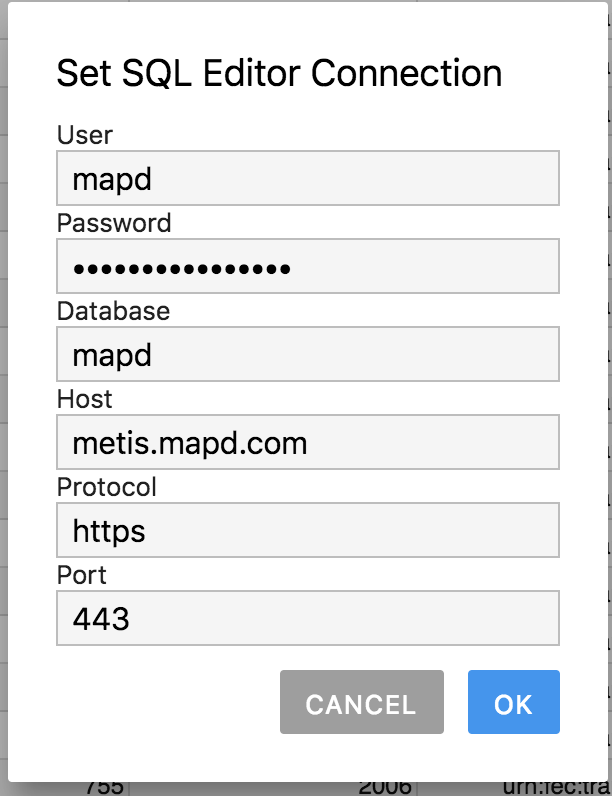
Then you can input an SQL query and hit the triangle to see the results:

To set a default connection that will be saved and used for new editors, go to Settings > Set Default Omnisci Connection....
Creating Visualizations
Check out the introduction notebook to see how to use OmniSci within your notebooks 
FAQ
- Something isn't working right. What should I do? Open an issue! It's likely not your fault, many of these integrations are new and we need your feedback to understand what use cases are important.
Installing from source
To install from source, run the following in a terminal:
git clone https://github.com/Quansight/jupyterlab-omnisci
cd jupyterlab-omnisci
conda create -f environment.yml
conda activate jupyterlab-omnisci
jlpm install
jlpm run build
jupyter labextension install .
pip install -e .
Releasing
Follow the setuptools docs on how to release a package:
pip install --upgrade setuptools wheel twine
python setup.py sdist bdist_wheel
twine upload --repository-url https://test.pypi.org/legacy/ dist/*
# try installing
pip install --index-url https://test.pypi.org/simple/ --extra-index-url https://pypi.org/simple jupyterlab_omnisci
# upload for real
twine upload dist/*
Release history Release notifications | RSS feed


Download files
Download the file for your platform. If you're not sure which to choose, learn more about installing packages.
Source Distribution
Built Distribution
Filter files by name, interpreter, ABI, and platform.
If you're not sure about the file name format, learn more about wheel file names.
Copy a direct link to the current filters
File details
Details for the file jupyterlab-omnisci-0.0.8.tar.gz.
File metadata
- Download URL: jupyterlab-omnisci-0.0.8.tar.gz
- Upload date:
- Size: 6.4 kB
- Tags: Source
- Uploaded using Trusted Publishing? No
- Uploaded via: twine/1.12.1 pkginfo/1.4.2 requests/2.21.0 setuptools/40.6.3 requests-toolbelt/0.8.0 tqdm/4.28.1 CPython/3.6.6
File hashes
| Algorithm | Hash digest | |
|---|---|---|
| SHA256 |
5bfaffbadcdcb7f519abafb8df3b0d5d18c9d2d46e795cbef46dea06a6a158e0
|
|
| MD5 |
decbbe9764fd0d2923803766489ed099
|
|
| BLAKE2b-256 |
58decf3024fc5d4e885ce8ad40faf8f1c1d3c4cf874b2260b2767804d2d7cf59
|
File details
Details for the file jupyterlab_omnisci-0.0.8-py3-none-any.whl.
File metadata
- Download URL: jupyterlab_omnisci-0.0.8-py3-none-any.whl
- Upload date:
- Size: 11.2 kB
- Tags: Python 3
- Uploaded using Trusted Publishing? No
- Uploaded via: twine/1.12.1 pkginfo/1.4.2 requests/2.21.0 setuptools/40.6.3 requests-toolbelt/0.8.0 tqdm/4.28.1 CPython/3.6.6
File hashes
| Algorithm | Hash digest | |
|---|---|---|
| SHA256 |
99ee238145c46912773f16be9f3b200c6121391684d84ad43fab17ef372c97f4
|
|
| MD5 |
df1c3360f4684a27e4b18804522be91b
|
|
| BLAKE2b-256 |
00dd93ed4175422ec9c3f93f882f23b2ccaee271accd33baea8435cafe21f9ef
|






