
Quickly open a file in JupyterLab by part of its name
Project description
jupyterlab-quickopen

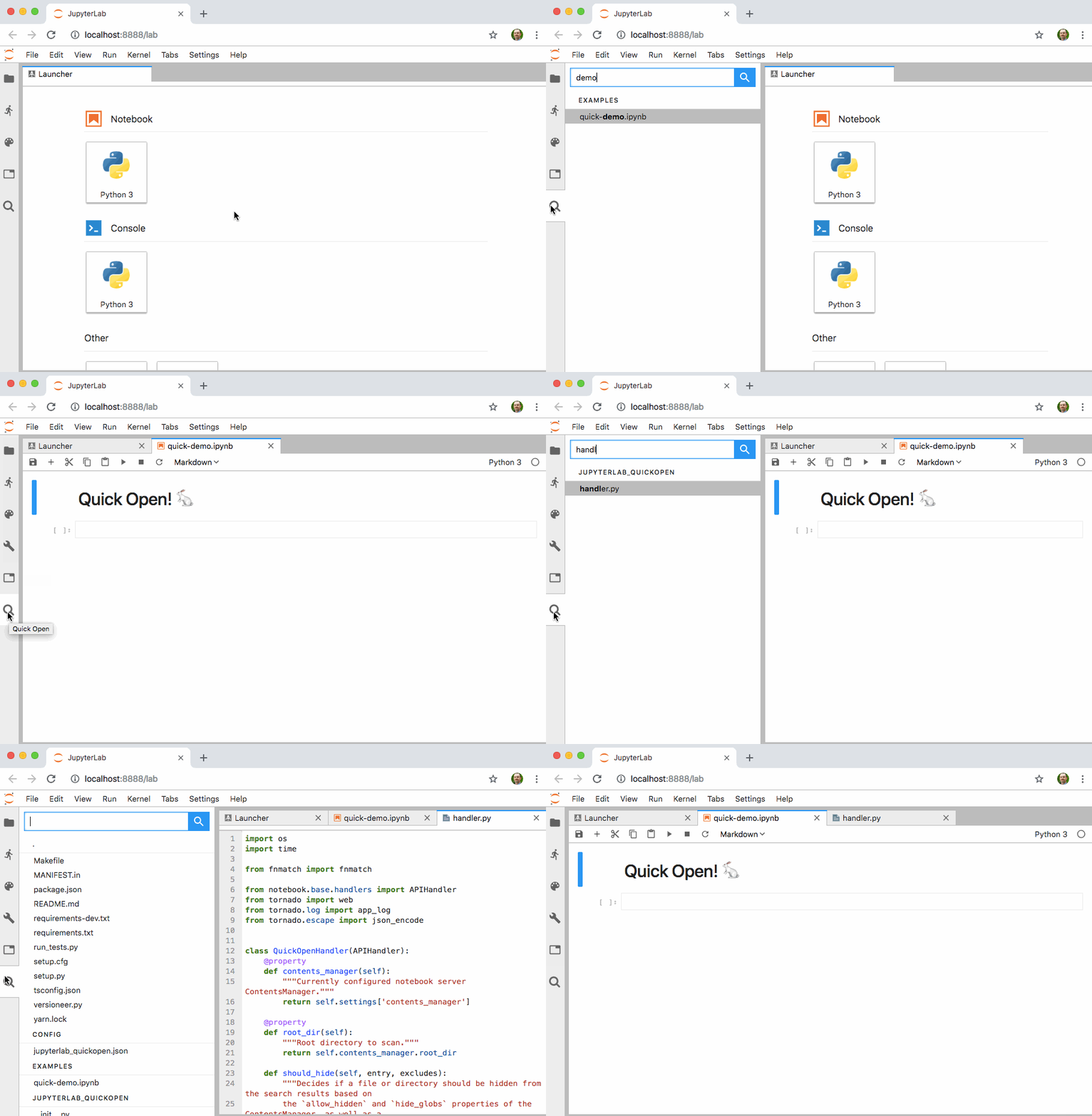
Quickly open a file in JupyterLab by typing part of its name
Compatibility
- Python >=3.7.x
- JupyterLab >=3.2,<4.0
- Jupyter Server >=1.6,<2.0
- Configurations where notebook documents and other files reside on a filesystem local to the Jupyter Server (which is the the default), not remote storage (e.g., S3)
Install
Starting in version 1.0 of this extension, the frontend portion of this extension is pre-compiled
and included in the pip installed package thanks to changes in the JupyterLab 3.0 packaging
system.
To install the Jupyter Notebook server extension under PREFIX (e.g., the active virtualenv or conda
env), run the following:
pip install jupyterlab-quickopen
Configure
A Keyboard Shortcut
You can assign a keyboard shortcut to show the quickopen panel at any time. Open the keyboard editor
by clicking Settings → Advanced Settings Editor → Keyboard Shortcuts. Then enter JSON in
the User Overrides text area like the following, adjusting the keys value to assign the shortcut
of your choosing:
{
  "shortcuts": [
    {
      "command": "quickopen:activate",
      "keys": ["Accel Ctrl P"],
      "selector": "body",
      "title": "Activate Quick Open",
      "category": "Main Area"
    }
  ]
}
Patterns to Exclude
You can control which files to exclude from the quick open list using Notebook server settings, JupyterLab settings, or both.
On the server side, use the ContentsManager.allow_hidden and/or ContentsManager.hide_globs
settings. See the
documentation about Jupyter Notebook options
for details.
In the JupyterLab web app, open the Settings menu, click the Advanced Settings Editor option, select the Quick Open item in the Raw View sidebar, and enter JSON in the User Overrides text area to override the default values.

Develop
The project includes a Makefile to aid setting up a development environment using python3, venv,
and pip. You must also install the latest Node LTS release as a prerequisite.
# Create a dev environment
make venv

# Activate the dev environment
`make shell`

# In one terminal, watch the frontend source for changes and rebuild the extension
make watch

# In a second terminal, run JupyterLab.
`make shell`
make lab
Keep an eye on the terminal running make watch for TypeScript build errors. Quit and re-run the
make lab command any time you make changes to the server extension.
Release
Make a commit with version number bumps in package.json. Then do the following.
# Tag the release commit
git tag -a -m "0.4.0" 0.4.0

# Activate the dev environment
`make shell`

# Build, sign, and push release to test.pypi.org
make release

# Build, sign and push releases to pypi.org
make release PYPI_URI=pypi
FAQ
Does this belong in JupyterLab?
Maybe. To start, I wanted to do some hacking and it's easiest to do that in a small, independent
repo. Putting this feature into JupyterLab-proper requires making the server-side portion work with
ContentManagers that are not based on the local filesystem. That change might require a new
ContentManager API since walking the file hierarchy via HTTP calls is pretty heavyweight.
Python/TypeScript tests are also required.
Will this extension work with JupyterLab 2.x?
Not since [version 0.5.0(https://github.com/parente/jupyterlab-quickopen/tree/0.5.0).
Project details
Release history Release notifications | RSS feed


Download files
Download the file for your platform. If you're not sure which to choose, learn more about installing packages.
Source Distribution
Built Distribution
Filter files by name, interpreter, ABI, and platform.
If you're not sure about the file name format, learn more about wheel file names.
Copy a direct link to the current filters
File details
Details for the file jupyterlab_quickopen-1.2.0.tar.gz.
File metadata
- Download URL: jupyterlab_quickopen-1.2.0.tar.gz
- Upload date:
- Size: 21.5 kB
- Tags: Source
- Uploaded using Trusted Publishing? No
- Uploaded via: twine/3.7.1 importlib_metadata/4.8.2 pkginfo/1.8.2 requests/2.26.0 requests-toolbelt/0.9.1 tqdm/4.62.3 CPython/3.10.0
File hashes
| Algorithm | Hash digest | |
|---|---|---|
| SHA256 |
de4a380901d95921016e8a52ccb3b9d124843331e93b7283abb12ef8520db613
|
|
| MD5 |
722410fd92ad6f0ba9c27fc3f96fc06d
|
|
| BLAKE2b-256 |
cb90ccd153c2a9e03c0f9c88d044ae476f20f571f6d3fbca9369ab98ce80d2d9
|
File details
Details for the file jupyterlab_quickopen-1.2.0-py3-none-any.whl.
File metadata
- Download URL: jupyterlab_quickopen-1.2.0-py3-none-any.whl
- Upload date:
- Size: 31.0 kB
- Tags: Python 3
- Uploaded using Trusted Publishing? No
- Uploaded via: twine/3.7.1 importlib_metadata/4.8.2 pkginfo/1.8.2 requests/2.26.0 requests-toolbelt/0.9.1 tqdm/4.62.3 CPython/3.10.0
File hashes
| Algorithm | Hash digest | |
|---|---|---|
| SHA256 |
33f2d1d07a7545c246de95cb0a6b6112611bc3cdb90e4e8ffa0ce720bf2e05fe
|
|
| MD5 |
aa7b49bb8a72d8f2b7ebfe3186d423b0
|
|
| BLAKE2b-256 |
c93fb99df5e77130847b80f5504454b9d0607eb981cb1356fbf1cd25ef1d0769
|






