
 Ripple
Reactive notebook execution in Jupyter



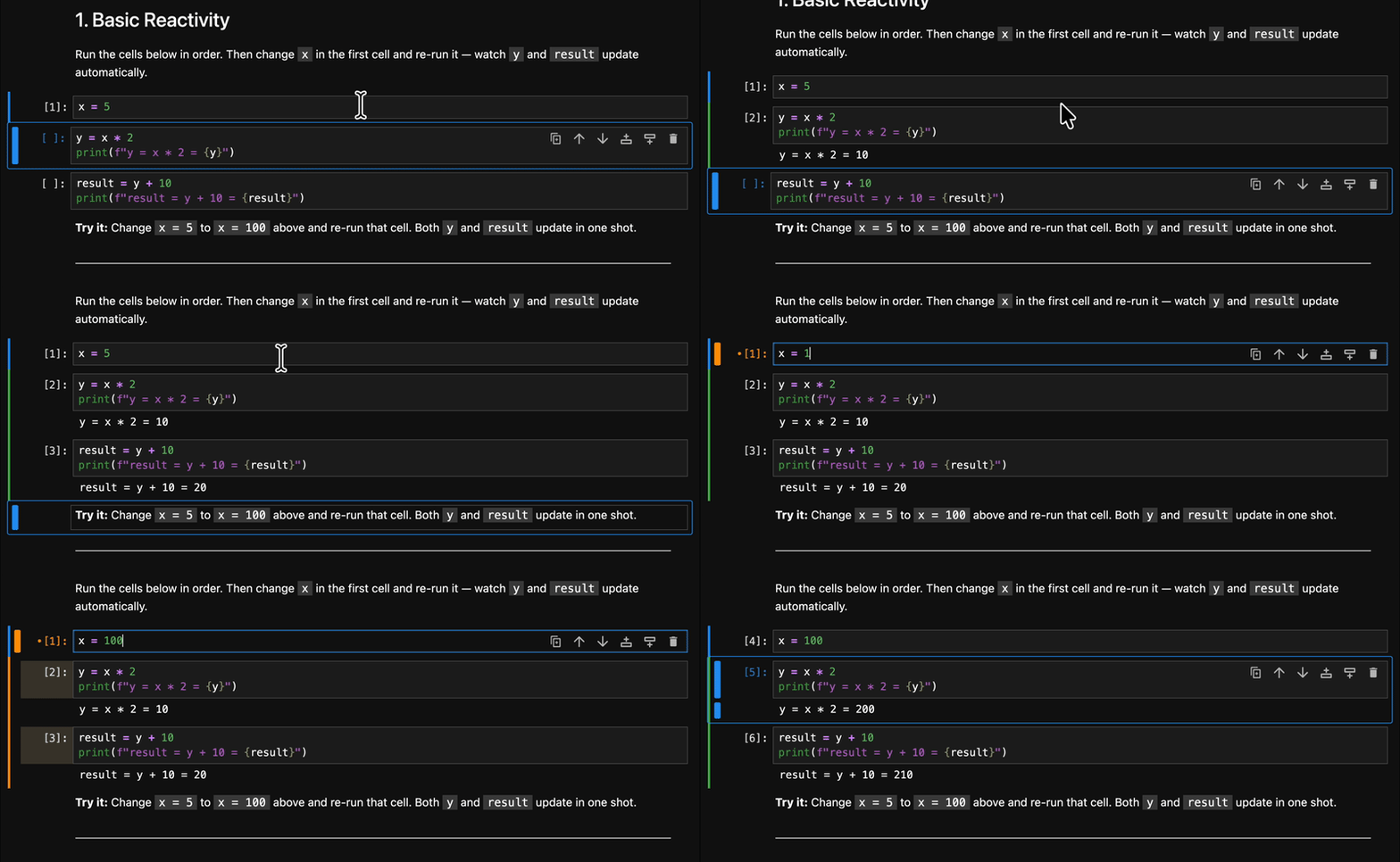
Run a cell, and Ripple automatically re-runs every cell that depends on it. No more hunting for stale outputs or manually replaying half the notebook. Install it, and reactivity is on from the start.
Highlights
- Always in sync — change a variable, downstream cells re-run automatically
- Visual dependency map — colored borders show upstream (blue), downstream (green), stale (amber), and conflict/cycle (red) cells at a glance
- Zero migration —
pip install, and it just works. Standardipykernel, your existing.ipynbfiles, no custom kernel or new notebook format. Reactive by default. - Cycle-safe — circular dependencies are detected and flagged, never silently looped
- Per-notebook control — toggle reactive mode independently for each notebook
Why Ripple
Notebooks give you the freedom to run cells in any order, but that flexibility comes with a cost: forget to re-run a downstream cell and your outputs go stale. The longer the notebook, the easier it is to lose track. Ripple takes care of that for you.
Imagine three cells:
# Cell 1
x = 1
# Cell 2
y = x * 2
# Cell 3
print(f"Result: {y}")
Change x = 1 to x = 10 and run Cell 1. Ripple re-executes Cell 2 and
Cell 3 in dependency order — no manual re-running, no stale outputs.
Install
Requires JupyterLab >= 4.0.0.
pip install jupyterlab_ripple
Or try it online without installing anything.
Getting Started
After installing, Ripple is active by default. Just work as you normally would:
- Edit and run a cell
- Watch every downstream cell update automatically
To disable reactivity for a notebook, click the Ripple button in the toolbar.
Configuration
Ripple exposes three settings in Settings → Ripple (or schema/plugin.json):
| Setting | Default | Description |
|---|---|---|
enabled |
true |
Whether reactive mode is on by default for new notebooks |
debounceInterval |
500 ms |
Time to wait after the last keystroke before re-analyzing a cell |
stopOnError |
true |
Whether to stop executing downstream cells when a cell errors |
Limitations
- Side effects not tracked —
list.append(x)orobj.attr = valwon't trigger downstream re-runs - Magic commands —
%and!lines are stripped before AST analysis - Dynamic code —
exec(),eval(), and metaprogramming may confuse the analyzer
How it works under the hood
Ripple sends each cell's source to the kernel for static analysis using Python's
ast.parse(), extracting variable definitions and references. From these it
builds a dependency graph across all cells in the notebook. When you execute a
cell, Ripple walks the graph to find every transitive downstream dependent and
re-runs them in topological order — all through JupyterLab's standard execution
machinery, no custom kernel needed.
See CONTRIBUTING.md for the full architecture, algorithms, and data-flow details.
Contributing
Contributions are welcome. See CONTRIBUTING.md for development setup, architecture overview, code style, testing, and linting instructions.
Uninstall
pip uninstall jupyterlab_ripple
License
MIT
1 maintainer

Release files for jupyterlab-ripple 0.1.1
For a detailed explanation of source distributions (sdists) and built distributions (wheels), please see the package formats documentation.
Source distribution (sdist)
| File | Size | Uploaded | |
|---|---|---|---|
| jupyterlab_ripple-0.1.1.tar.gz | 288.5 kB | Details |
Built distribution (wheel)
| File | Interpreter | ABI | Platform | Reset |
|---|---|---|---|---|
| jupyterlab_ripple-0.1.1-py3-none-any.whl | Python 3 | none | any | Details |
Total release size: 427.5 kB
Release files / jupyterlab_ripple-0.1.1.tar.gz
| Download URL | jupyterlab_ripple-0.1.1.tar.gz |
|---|---|
| Size | 288.5 kB |
| Tags | Source |
|
SHA-256 checksum How to use checksums |
828db2e61866d2430a69adc26e159cdc16c03af786c1943ef6a98633df5c63c4
|
|
BLAKE2b-256 checksum How to use checksums |
e9fff9eb316267acc38d1c4cda89c114262cf5b38bb30d7d96e559aa821d59c3
|
| Upload date | |
|
Uploaded using Trusted Publishing? What is trusted publishing? |
No |
| Uploaded via |
twine/6.2.0 CPython/3.14.3
|
Release files / jupyterlab_ripple-0.1.1-py3-none-any.whl
| Download URL | jupyterlab_ripple-0.1.1-py3-none-any.whl |
|---|---|
| Size | 139.0 kB |
| Tags | Python 3 |
|
SHA-256 checksum How to use checksums |
2dcbf2ff8ad75611e669d587367ece3bf2c66c2911473e543da79067f8b52f6f
|
|
BLAKE2b-256 checksum How to use checksums |
b82b0d5a8773e46f413fa09be7f2287db42a8381fafe7e94f94bff5a70cd902a
|
| Upload date | |
|
Uploaded using Trusted Publishing? What is trusted publishing? |
No |
| Uploaded via |
twine/6.2.0 CPython/3.14.3
|














