
Spark Monitor - An extension for Jupyter Lab
This project was originally written by krishnan-r as a Google Summer of Code project for Jupyter Notebook. Check his website out here.
As a part of my internship as a Software Engineer at Yelp, I created this fork to update the extension to be compatible with JupyterLab - Yelp's choice for sharing and collaborating on notebooks.
About
 |
+ |  |
= |  |
Requirements
- At least JupyterLab 3
- pyspark 3.X.X or newer (For compatibility with older pyspark versions, use jupyterlab-sparkmonitor 3.X)
Features
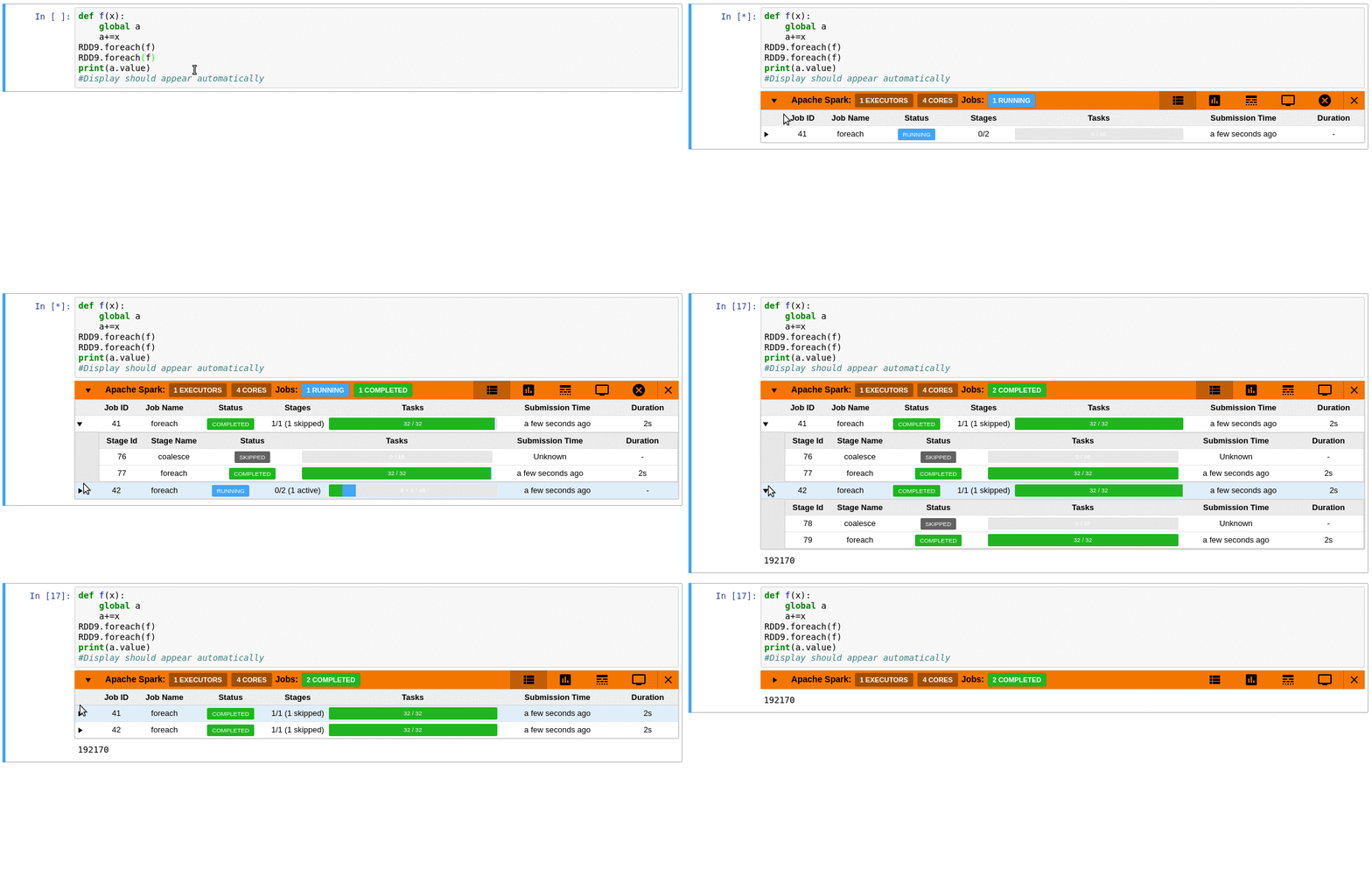
- Automatically displays a live monitoring tool below cells that run Spark jobs in a Jupyter notebook
- A table of jobs and stages with progressbars
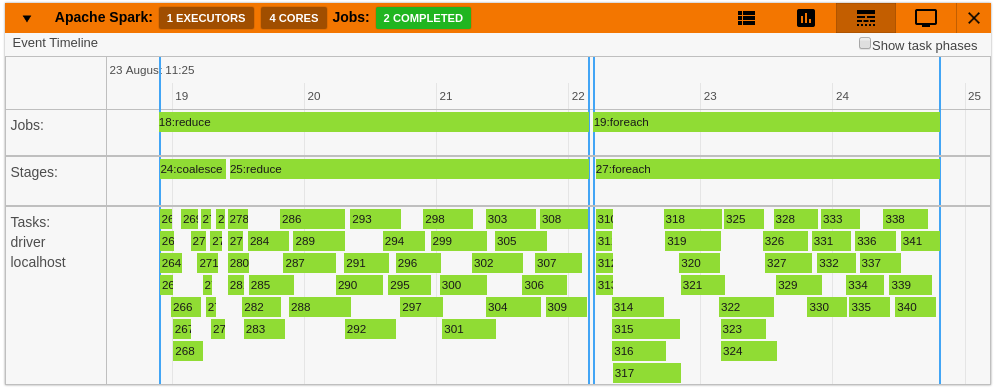
- A timeline which shows jobs, stages, and tasks
- A graph showing number of active tasks & executor cores vs time
- A notebook server extension that proxies the Spark UI and displays it in an iframe popup for more details
- For a detailed list of features see the use case notebooks
- Support for multiple SparkSessions (default port is 4040)
- How it Works
 |
 |
 |
 |
 |
 |
Quick Start
To do a quick test of the extension
This docker image has pyspark and several other related packages installed alongside the sparkmonitor extension.
docker run -it -p 8888:8888 itsjafer/sparkmonitor
Setting up the extension
pip install jupyterlab-sparkmonitor # install the extension

# set up ipython profile and add our kernel extension to it
ipython profile create --ipython-dir=.ipython
echo "c.InteractiveShellApp.extensions.append('sparkmonitor.kernelextension')" >>  .ipython/profile_default/ipython_config.py

# run jupyter lab
IPYTHONDIR=.ipython jupyter lab --watch
With the extension installed, a SparkConf object called conf will be usable from your notebooks. You can use it as follows:
from pyspark import SparkContext

# start the spark context using the SparkConf the extension inserted
sc=SparkContext.getOrCreate(conf=conf) #Start the spark context

# Monitor should spawn under the cell with 4 jobs
sc.parallelize(range(0,100)).count()
sc.parallelize(range(0,100)).count()
sc.parallelize(range(0,100)).count()
sc.parallelize(range(0,100)).count()
If you already have your own spark configuration, you will need to set spark.extraListeners to sparkmonitor.listener.JupyterSparkMonitorListener and spark.driver.extraClassPath to the path to the sparkmonitor python package path/to/package/sparkmonitor/listener.jar
from pyspark.sql import SparkSession
spark = SparkSession.builder\
        .config('spark.extraListeners', 'sparkmonitor.listener.JupyterSparkMonitorListener')\
        .config('spark.driver.extraClassPath', 'venv/lib/python3.7/site-packages/sparkmonitor/listener.jar')\
        .getOrCreate()

# should spawn 4 jobs in a monitor bnelow the cell
spark.sparkContext.parallelize(range(0,100)).count()
spark.sparkContext.parallelize(range(0,100)).count()
spark.sparkContext.parallelize(range(0,100)).count()
spark.sparkContext.parallelize(range(0,100)).count()
Changelog
- 1.0 - Initial Release
- 2.0 - Migration to JupyterLab 2, Multiple Spark Sessions, and displaying monitors beneath the correct cell more accurately
- 3.0 - Migrate to JupyterLab 3 as prebuilt extension
- 4.0 - pyspark 3.X Compatibility; no longer compatible with PySpark 2.X or under
Development
If you'd like to develop the extension:
make all # Clean the directory, build the extension, and run it locally
1 maintainer

Release files for jupyterlab-sparkmonitor 4.1.0
For a detailed explanation of source distributions (sdists) and built distributions (wheels), please see the package formats documentation.
Built distribution (wheel)
| File | Interpreter | ABI | Platform | Reset |
|---|---|---|---|---|
| jupyterlab_sparkmonitor-4.1.0-py3-none-any.whl | Python 3 | none | any | Details |
Release files / jupyterlab_sparkmonitor-4.1.0-py3-none-any.whl
| Download URL | jupyterlab_sparkmonitor-4.1.0-py3-none-any.whl |
|---|---|
| Size | 1.4 MB |
| Tags | Python 3 |
|
SHA-256 checksum How to use checksums |
8124f20c4f7031bcedbd5a76c28ed1ff53f6fc3307d4c1e7a1c2296885dcef94
|
|
BLAKE2b-256 checksum How to use checksums |
5b95c9cd73cdccd264ded056261b3c21f67dedd8d2f4b39cfaec32592ef0f320
|
| Upload date | |
|
Uploaded using Trusted Publishing? What is trusted publishing? |
No |
| Uploaded via |
twine/3.4.1 importlib_metadata/4.6.1 pkginfo/1.7.0 requests/2.25.1 requests-toolbelt/0.9.1 tqdm/4.61.2 CPython/3.8.11
|














