
A spell checker for JupyterLab.


Project description
jupyterlab-spellchecker





A JupyterLab extension highlighting misspelled words in markdown cells within notebooks and in the text files.
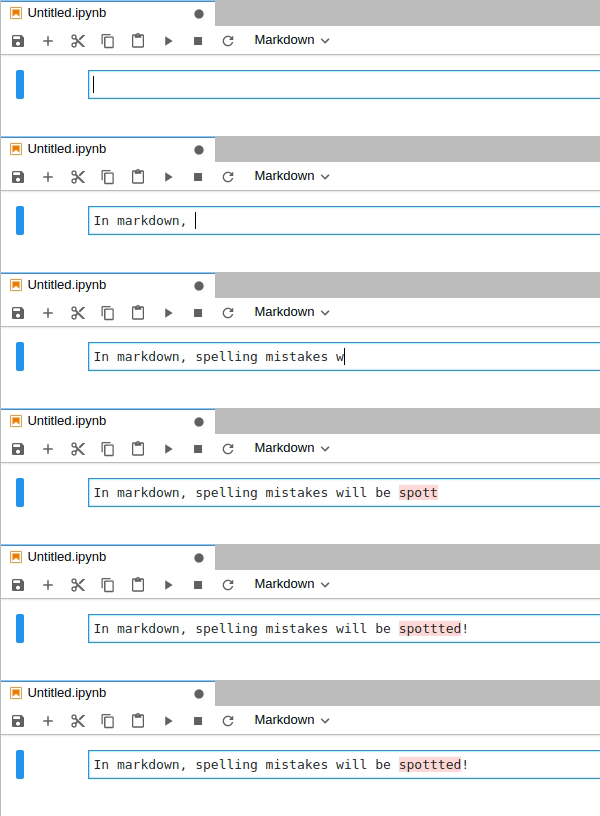
The JupyterLab extension is based on the spellchecker Jupyter Notebook extension and relies on Typo.js for the actual spell checking. Spellchecker suggestions are available from the context menu. The style of the highlights can be customized in the Advanced Settings Editor.
You can click on the status bar item to:
- change language
- enable spelling in the current document
Spellchecking in comments and strings in code can be configured in settings.
The extension provides (Hunspell) SCOWL dictionaries for:
- American, British, Canadian, and Australian English
- French,
- German (Germany, Austria, Switzerland)
- Portuguese,
- Spanish
and will also use the Hunspell dictionaries installed in known paths which vary by operating systems. If you use JupyterLab in a browser running on a different computer than the jupyter server, please note that the dictionaries need to be installed on the server machine.
You can add custom dictionary by placing Hunspell files it in dictionaries folder in one of the data locations as returned by:
jupyter --paths
You should place two files with extensions .aff and .dic, and name following BCP 47 standards.
For more details, please see the example below.
JupyterLab Version
The extension has been tested up to JupyterLab version 4.0.
Installation
For JupyterLab 3.x and 4.x:
pip install jupyterlab-spellchecker
or
conda install -c conda-forge jupyterlab-spellchecker
For JupyterLab 2.x:
jupyter labextension install @ijmbarr/jupyterlab_spellchecker
Adding dictionaries - example
If jupyter --paths looks like:
config:
    /home/your_name/.jupyter
    /usr/local/etc/jupyter
    /etc/jupyter
data:
    /home/your_name/.local/share/jupyter
    /usr/local/share/jupyter
    /usr/share/jupyter
runtime:
    /home/your_name/.local/share/jupyter/runtime
and you want to add Polish language, you would put pl_PL.aff and pl_PL.dic in /home/your_name/.local/share/jupyter/dictionaries (you will need to create this folder), so that the final structure looks similar to:
/home/your_name/.local/share/jupyter
├── dictionaries
│   ├── pl_PL.aff
│   └── pl_PL.dic
├── kernels
│   └── julia-1.5
│       ├── kernel.json
│       ├── logo-32x32.png
│       └── logo-64x64.png
├── nbconvert
│   └── templates
│       ├── html
│       └── latex
├── nbsignatures.db
├── notebook_secret
└── runtime
Where to get the dictionaries from?
Some good sources of dictionaries include:
- LibreOffice/dictionaries GitHub repository
- Chromium repository
- (if you know of any other quality resources please send a PR to add them here)
Using online dictionaries
An alternative to saving the dictionary on your own disk (or more accurately on the disk where jupyter-server is set up) is fetching the dictionaries from a remote URL. This requires an Internet connection to load the dictionary (each time when you open JupyterLab or change the dictionary), and might be useful if you are not able to save dictionaries on disk (e.g. when using JupyterLab on JupyterHub configured by someone else).
To configure the online dictionaries go to Advanced Settings Editor → Spellchecker
and set onlineDictionaries to an array of JSON objects like in the example below:
[
  {
    "id": "en_US-online",
    "aff": "https://cdn.jsdelivr.net/codemirror.spell-checker/latest/en_US.aff",
    "dic": "https://cdn.jsdelivr.net/codemirror.spell-checker/latest/en_US.dic",
    "name": "My favorite variant of English"
  }
]
Contributing
Development install
Note: You will need NodeJS to build the extension package.
The jlpm command is JupyterLab's pinned version of
yarn that is installed with JupyterLab. You may use
yarn or npm in lieu of jlpm below.
# Clone the repo to your local environment
# Change directory to the jupyterlab_spellchecker directory
# Install package in development mode
pip install -e .
# Link your development version of the extension with JupyterLab
jupyter labextension develop . --overwrite
# Rebuild extension Typescript source after making changes
jlpm run build
pip install pytest
You can watch the source directory and run JupyterLab at the same time in different terminals to watch for changes in the extension's source and automatically rebuild the extension.
# Watch the source directory in one terminal, automatically rebuilding when needed
jlpm run watch
# Run JupyterLab in another terminal
jupyter lab
Before commit
Make sure that eslint passes:
jlpm run eslint:check
If there are any issues it might be possible to autofix them with:
jlpm run eslint
Run tests:
python -m pytest
Project details
Release history Release notifications | RSS feed


Download files
Download the file for your platform. If you're not sure which to choose, learn more about installing packages.
Source Distribution
Built Distribution
Filter files by name, interpreter, ABI, and platform.
If you're not sure about the file name format, learn more about wheel file names.
Copy a direct link to the current filters
File details
Details for the file jupyterlab_spellchecker-0.9.0.tar.gz.
File metadata
- Download URL: jupyterlab_spellchecker-0.9.0.tar.gz
- Upload date:
- Size: 5.4 MB
- Tags: Source
- Uploaded using Trusted Publishing? No
- Uploaded via: twine/6.2.0 CPython/3.11.15
File hashes
| Algorithm | Hash digest | |
|---|---|---|
| SHA256 |
5f1da744eb1e39c9819f61129393101d50cd853fa1dd8e2941c3cf3169fbaaea
|
|
| MD5 |
810006464410ca6a9981c17190f2f80f
|
|
| BLAKE2b-256 |
f30f3881b2b4361e0c627225f1a908748f619c244376d489862ba0f95cf38086
|
File details
Details for the file jupyterlab_spellchecker-0.9.0-py3-none-any.whl.
File metadata
- Download URL: jupyterlab_spellchecker-0.9.0-py3-none-any.whl
- Upload date:
- Size: 5.3 MB
- Tags: Python 3
- Uploaded using Trusted Publishing? No
- Uploaded via: twine/6.2.0 CPython/3.11.15
File hashes
| Algorithm | Hash digest | |
|---|---|---|
| SHA256 |
3da840a61e216b45dce2bc01311e8a302c79fd4717cfc3cbf14692c548842142
|
|
| MD5 |
6855def485f96ffee7498f55fce885cd
|
|
| BLAKE2b-256 |
c08defe0146aafaa53c897efd6325137fc17b0ca9abd3bbc744195a00aacc163
|






