
StickyLand






Break the linear presentation of Jupyter Notebooks with sticky cells!
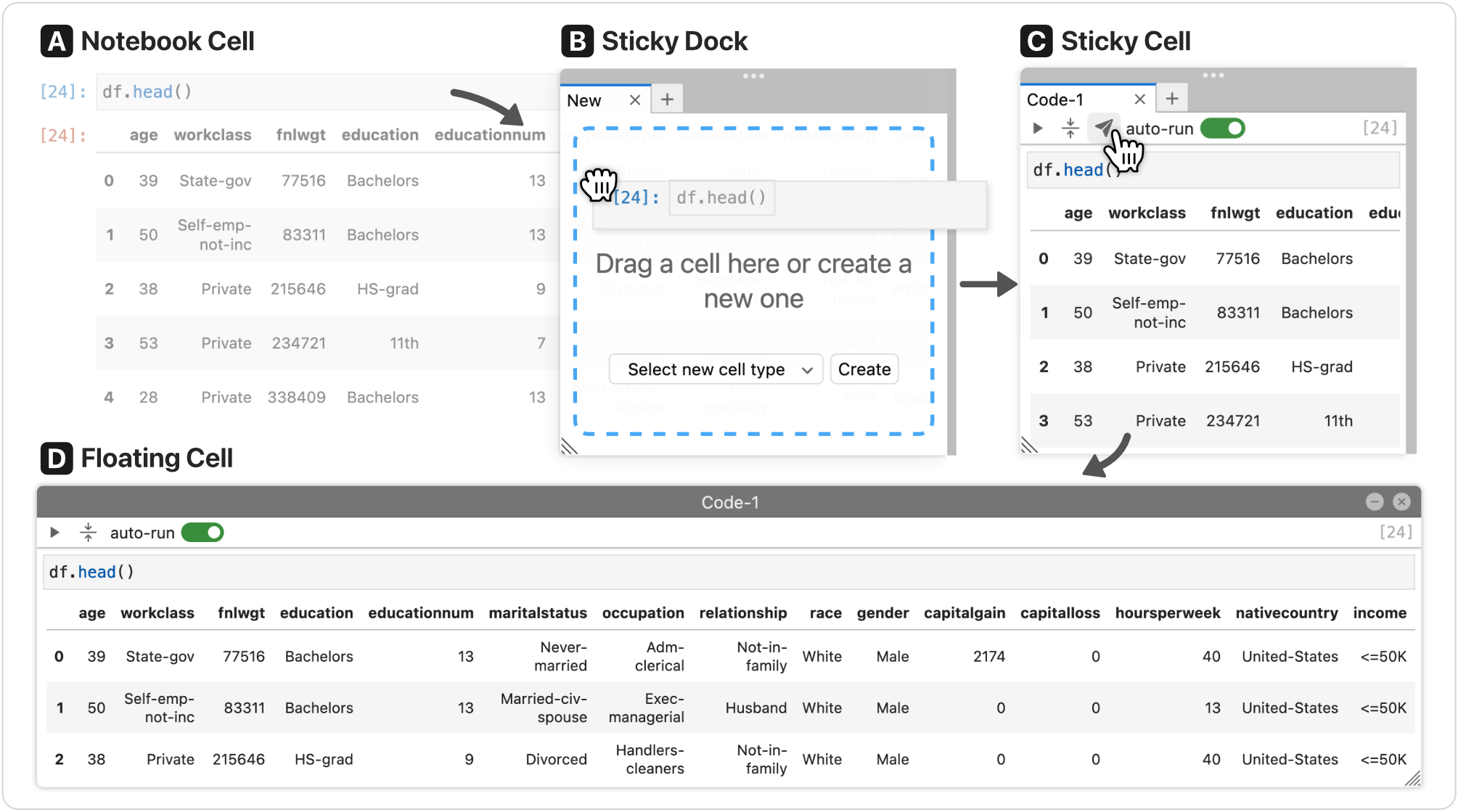 |
||
| 👨🏻🏫 Talk | 📺 Video | 📖 "StickyLand: breaking the linear presentation of computational Notebooks" |
Live Demo
You can try StickyLand directly in your browser without installing anything:
| Fast loading | Full functionality |
|---|---|
|
|
Install
First, you need to install JupyterLab. Then you can install StickyLand with pip:
pip install stickyland
Note StickyLand only supports
JupyterLab < 4. In June 2023,JupyterLab 4.0was released with a lot of breaking changes. I will update StickyLand to supportJupyterLab 4.0when the official extension documentation is more polished. Any contribution to thelab4branch is greatly appreciated!
Features
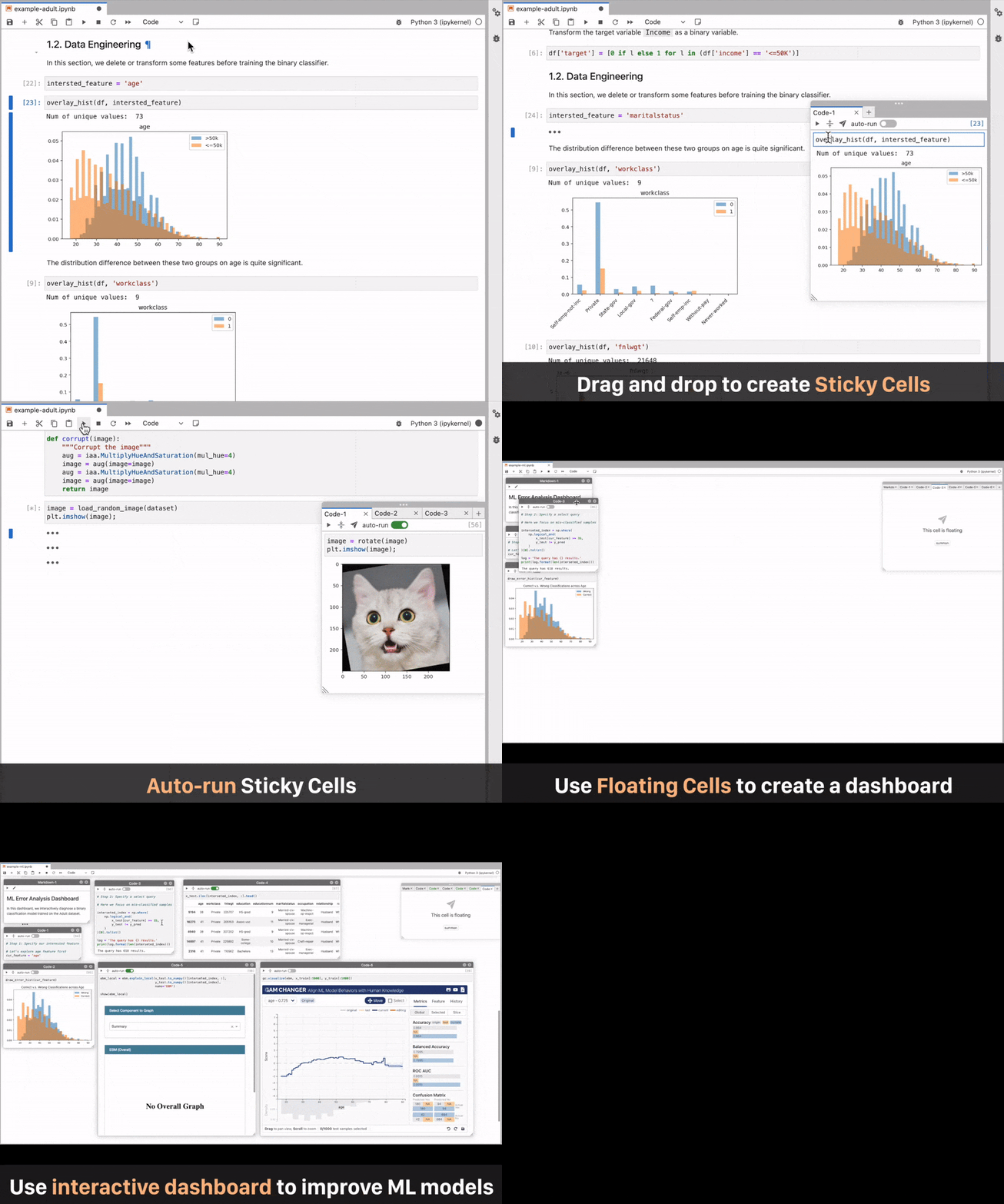
Show details
| Drag and drop to create sticky cells | Create sticky code and markdown from scratch |
| Automatically execute sticky cells | Use floating cells to create interactive dashboards |
With multiple floating cells, users can create a full-fledged interactive dashboard. For example, a machine learning engineer can build an ML Error Analysis Dashboard (shown below) through simple drag-and-drop.
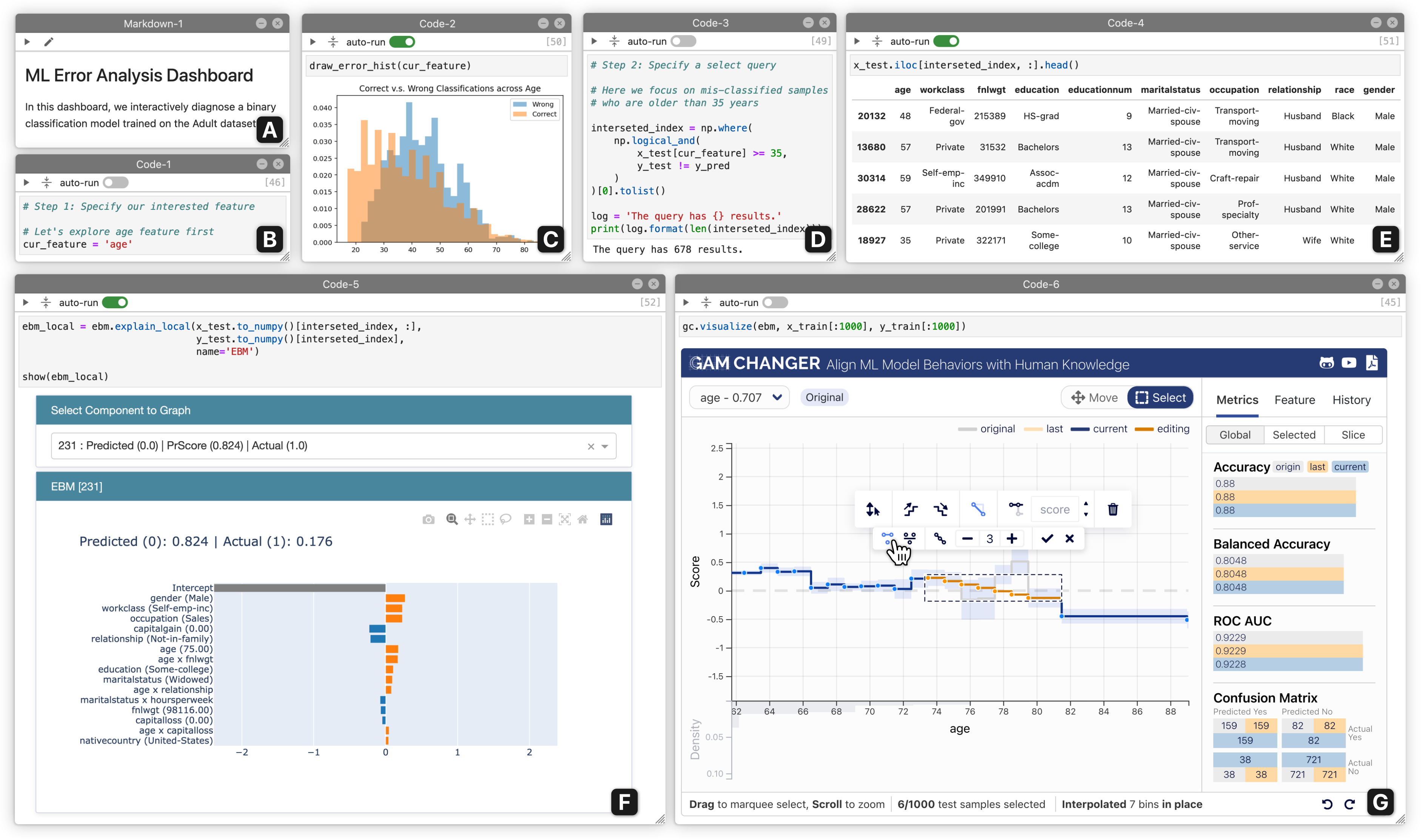 |
| The ML Error Analysis Dashboard consists of: (A) markdown text describing the dashboard, (B) input field to specify a feature to diagnose, (C) auto-run chart showing the distribution of the specified feature, (D) second input field to further specify the range within the feature to diagnose, (E) auto-run table displaying all samples that meet the criteria, (F) auto-run visualization explaining how the ML model makes decision on these samples, (G) interactive tool allowing the ML engineer to fix the ML model by editing its parameters based on their error analysis. |
Development
You will need NodeJS to build the extension package.
The jlpm command is JupyterLab's pinned version of
yarn that is installed with JupyterLab. You may use
yarn or npm in lieu of jlpm below.
# Clone the repo to your local environment
# Change directory to the jupyterlab_stickyland directory
# Install package in development mode
pip install -e .
# Link your development version of the extension with JupyterLab
jupyter labextension develop . --overwrite
# Rebuild extension Typescript source after making changes
jlpm run build
You can watch the source directory and run JupyterLab at the same time in different terminals to watch for changes in the extension's source and automatically rebuild the extension.
# Watch the source directory in one terminal, automatically rebuilding when needed
jlpm run watch
# Run JupyterLab in another terminal
jupyter lab
With the watch command running, every saved change will immediately be built locally and available in your running JupyterLab. Refresh JupyterLab to load the change in your browser (you may need to wait several seconds for the extension to be rebuilt).
By default, the jlpm run build command generates the source maps for this extension to make it easier to debug using the browser dev tools. To also generate source maps for the JupyterLab core extensions, you can run the following command:
jupyter lab build --minimize=False
Citation
@inproceedings{wangStickyLandBreakingLinear2022,
  title = {{{StickyLand}}: {{Breaking}} the {{Linear Presentation}} of {{Computational Notebooks}}},
  shorttitle = {{{StickyLand}}},
  booktitle = {Extended {{Abstracts}} of the 2022 {{CHI Conference}} on {{Human Factors}} in {{Computing Systems}}},
  author = {Wang, Zijie J. and Dai, Katie and Edwards, W. Keith},
  year = {2022},
  publisher = {{ACM}}
}
License
The software is available under the BSD-3-Clause License.
Contact
If you have any questions, feel free to open an issue or contact Jay Wang.
1 maintainer

Metadata
1 maintainer
Release files for jupyterlab-stickyland 0.2.4
For a detailed explanation of source distributions (sdists) and built distributions (wheels), please see the package formats documentation.
Source distribution (sdist)
| File | Size | Uploaded | |
|---|---|---|---|
| jupyterlab_stickyland-0.2.4.tar.gz | 166.3 kB | Details |
Built distribution (wheel)
| File | Interpreter | ABI | Platform | Reset |
|---|---|---|---|---|
| jupyterlab_stickyland-0.2.4-py3-none-any.whl | Python 3 | none | any | Details |
Total release size: 334.8 kB
Release files / jupyterlab_stickyland-0.2.4.tar.gz
| Download URL | jupyterlab_stickyland-0.2.4.tar.gz |
|---|---|
| Size | 166.3 kB |
| Tags | Source |
|
SHA-256 checksum How to use checksums |
a6f5a0cb65d3705b793e6c11b36c26e643208c2cbf6a68e325980b58661fa556
|
|
BLAKE2b-256 checksum How to use checksums |
16427ea58235a1dcb0536f8827051f2f24d7d919992dd2350426ce84d9900ead
|
| Upload date | |
|
Uploaded using Trusted Publishing? What is trusted publishing? |
No |
| Uploaded via |
twine/4.0.1 CPython/3.9.12
|
Release files / jupyterlab_stickyland-0.2.4-py3-none-any.whl
| Download URL | jupyterlab_stickyland-0.2.4-py3-none-any.whl |
|---|---|
| Size | 168.5 kB |
| Tags | Python 3 |
|
SHA-256 checksum How to use checksums |
46543c2d50d2e85cff25ed9917fee8ff50aafa687c37bf4f1e2d4710d6b630f5
|
|
BLAKE2b-256 checksum How to use checksums |
be90048d9ad282bec3013ab50ecac357c256c19c3c921dc7c615f09ce0521cc6
|
| Upload date | |
|
Uploaded using Trusted Publishing? What is trusted publishing? |
No |
| Uploaded via |
twine/4.0.1 CPython/3.9.12
|














