
jupyterlab-topbar-text
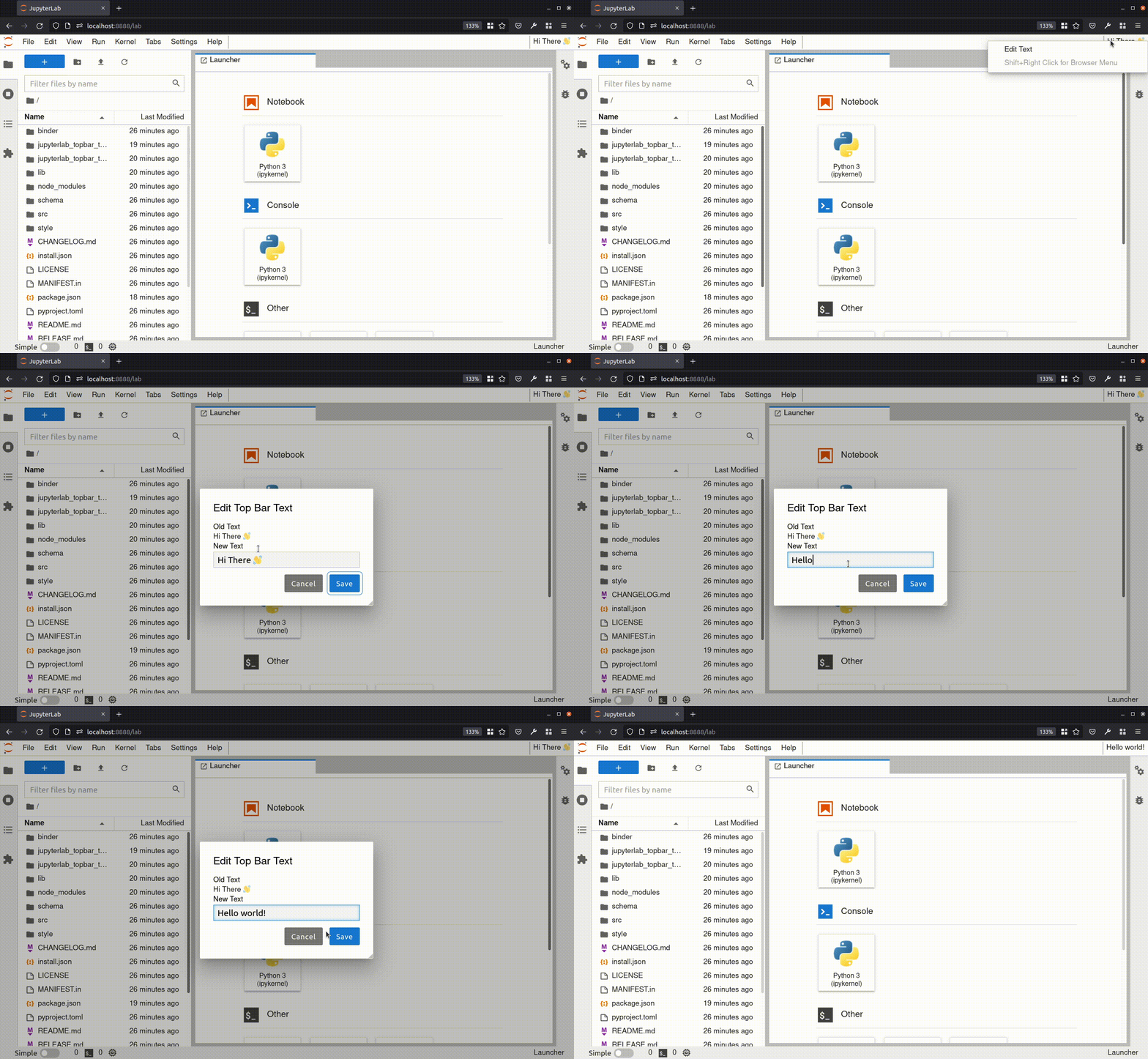
JupyterLab extension to display arbitrary text in the top bar.
Requirements
- JupyterLab >= 4.0
Install
JupyterLab 4.x
Install the version 1.0.0 or above:
pip install jupyterlab-topbar-text>=1.0.0
JupyterLab 3.x
Install the version 0.6.2:
pip install jupyterlab-topbar-text==0.6.2
Uninstall
To remove the extension, execute:
pip uninstall jupyterlab-topbar-text
Contributing
Development install
Note: You will need NodeJS to build the extension package.
The jlpm command is JupyterLab's pinned version of
yarn that is installed with JupyterLab. You may use
yarn or npm in lieu of jlpm below.
# Clone the repo to your local environment
# Change directory to the jupyterlab_topbar_text directory
# Install package in development mode
pip install -e .
# Link your development version of the extension with JupyterLab
jupyter labextension develop . --overwrite
# Rebuild extension Typescript source after making changes
jlpm run build
You can watch the source directory and run JupyterLab at the same time in different terminals to watch for changes in the extension's source and automatically rebuild the extension.
# Watch the source directory in one terminal, automatically rebuilding when needed
jlpm run watch
# Run JupyterLab in another terminal
jupyter lab
With the watch command running, every saved change will immediately be built locally and available in your running JupyterLab. Refresh JupyterLab to load the change in your browser (you may need to wait several seconds for the extension to be rebuilt).
By default, the jlpm run build command generates the source maps for this extension to make it easier to debug using the browser dev tools. To also generate source maps for the JupyterLab core extensions, you can run the following command:
jupyter lab build --minimize=False
Development uninstall
pip uninstall jupyterlab-topbar-text
In development mode, you will also need to remove the symlink created by jupyter labextension develop
command. To find its location, you can run jupyter labextension list to figure out where the labextensions
folder is located. Then you can remove the symlink named jupyterlab-topbar-text within that folder.
Packaging the extension
See RELEASE
2 maintainers


Metadata
2 maintainers
Release files for jupyterlab-topbar-text 1.1.2
For a detailed explanation of source distributions (sdists) and built distributions (wheels), please see the package formats documentation.
Source distribution (sdist)
| File | Size | Uploaded | Provenance | Actions |
|---|---|---|---|---|
| jupyterlab_topbar_text-1.1.2.tar.gz | 15.0 kB | With provenance | Details for jupyterlab_topbar_text-1.1.2.tar.gz |
Built distribution (wheel)
| File | Interpreter | ABI | Platform | Actions Reset |
|---|---|---|---|---|
| jupyterlab_topbar_text-1.1.2-py3-none-any.whl | Python 3 | none | any | Details for jupyterlab_topbar_text-1.1.2-py3-none-any.whl |
Total release size: 33.0 kB
Release files / jupyterlab_topbar_text-1.1.2.tar.gz
| Download URL | jupyterlab_topbar_text-1.1.2.tar.gz |
|---|---|
| Size | 15.0 kB |
| Tags | Source |
|
SHA-256 checksum How to use checksums |
dfb402adc52710583a39e693762d4e385aa2d5f4575d9b8f900a151de5847b03
|
|
BLAKE2b-256 checksum How to use checksums |
8590551be48faf79a801c4844c418cc4c2344ee58d89e873b69cc2e03ce4d1e7
|
| Upload date | |
|
Uploaded using Trusted Publishing? What is trusted publishing? |
Yes |
| Uploaded via |
twine/7.0.0 CPython/3.12.16
|
Provenance
Provenance describes where a file came from. On PyPI, provenance is shared via attestations, which provide a verifiable record of the build or publishing details. View details, limitations and caveats.


PyPI Publish Attestation
PyPI verified that this artifact, at this checksum, originated from the publisher listed below.
Signed by GitHub Actions, verified by PyPI on Nov 9, 2026.
Transparency logRelease files / jupyterlab_topbar_text-1.1.2-py3-none-any.whl
| Download URL | jupyterlab_topbar_text-1.1.2-py3-none-any.whl |
|---|---|
| Size | 18.0 kB |
| Tags | Python 3 |
|
SHA-256 checksum How to use checksums |
b89ce5ffb01b2fa44fb2737eaeaa5d2a041392cea22e1598404a1585490ca72a
|
|
BLAKE2b-256 checksum How to use checksums |
092ca9d4c5723e8b119256d4f4a60bb0343af1fd312a0d6944610ae8af65bae3
|
| Upload date | |
|
Uploaded using Trusted Publishing? What is trusted publishing? |
Yes |
| Uploaded via |
twine/7.0.0 CPython/3.12.16
|
Provenance
Provenance describes where a file came from. On PyPI, provenance is shared via attestations, which provide a verifiable record of the build or publishing details. View details, limitations and caveats.
PyPI Publish Attestation
PyPI verified that this artifact, at this checksum, originated from the publisher listed below.
Signed by GitHub Actions, verified by PyPI on Nov 9, 2026.
Transparency logSecurity for jupyterlab-topbar-text 1.1.2
Provenance
Provenance describes where a file came from. On PyPI, provenance is shared via attestations, which provide a verifiable record of the build or publishing details. View details, limitations and caveats.
Full provenance
Both files in this release have been uploaded with provenance metadata.
Attestation for jupyterlab_topbar_text-1.1.2.tar.gz
PyPI Publish Attestation
PyPI verified that this artifact, at this checksum, originated from the publisher listed below.
Signed by GitHub Actions, verified by PyPI on Nov 9, 2026.
Transparency logA note on package security
PyPI is a repository for distributing packages, not a service for auditing them. While third-party security researchers and our staff do their best to detect and remove malicious packages, PyPI cannot guarantee the quality, security or suitability of any given package.
To learn more about protecting yourself from malicious actors, visit our package security documentation.














