
This release is a pre-release and may not be stable for production use.
jupyterlite-javascript-kernel


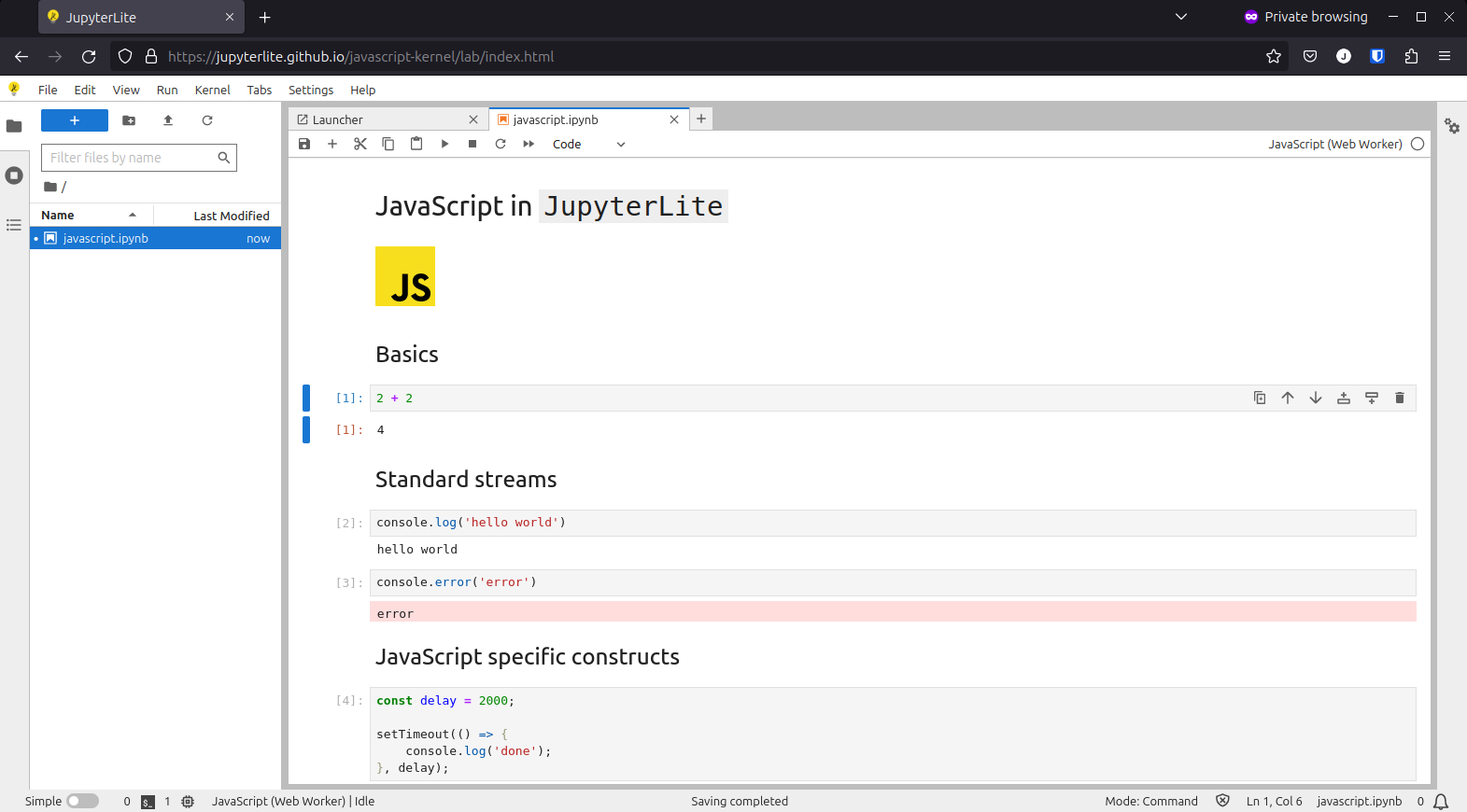
A JavaScript kernel for JupyterLite.
Requirements
- JupyterLite >=0.3.0
This kernel was originally maintained as part of the main JupyterLite repository, and was moved to its own repository for the JupyterLite 0.3.0 release.
Install
To install the extension, execute:
pip install jupyterlite-javascript-kernel
Uninstall
To remove the extension, execute:
pip uninstall jupyterlite-javascript-kernel
Runtime modes
The extension currently registers two JavaScript kernelspecs:
JavaScript (IFrame): Runs code in a hidden runtimeiframeon the main page thread. Use this when your code needs browser DOM APIs likedocument,window, or canvas access through the page context.JavaScript (Web Worker): Runs code in a dedicated Web Worker. Use this for stronger isolation and to avoid blocking the main UI thread.
Pick either kernel from the notebook kernel selector in JupyterLite.
Kernel startup extensions
Frontend extensions can register startup work that runs before user code in
both runtime modes. Use this to preload runtime modules and register comm
targets without sending bootstrap code through requestExecute.
import type { JupyterFrontEndPlugin } from '@jupyterlab/application';
import { IJavaScriptKernelStartupRegistry } from '@jupyterlite/javascript-kernel';

const plugin: JupyterFrontEndPlugin<void> = {
  id: 'my-extension:javascript-startup',
  autoStart: true,
  requires: [IJavaScriptKernelStartupRegistry],
  activate: (app, startup) => {
    const runtimeBootstrap = new URL(
      './runtime-bootstrap.js',
      import.meta.url
    ).toString();
    const lspCommTarget = new URL(
      './lsp-comm-target.js',
      import.meta.url
    ).toString();

    startup.registerStartupExtension({
      id: 'my-extension:lsp',
      activate: async context => {
        await context.preloadModule(runtimeBootstrap);
        await context.registerCommTarget({
          targetName: 'my-extension:lsp',
          module: lspCommTarget,
          exportName: 'registerLspTarget'
        });
      },
      deactivate: async context => {
        await context.unregisterCommTarget('my-extension:lsp');
      }
    });
  }
};
context.registerCommTarget() imports the module in the kernel runtime and
passes the exported handler to Jupyter.comm.registerTarget(targetName, handler). The default export is used when exportName is omitted. Disposing
a startup registration calls its optional deactivate callback for active
kernels.
Worker mode limitations
Web Workers do not expose DOM APIs. In JavaScript (Web Worker), APIs such as document, direct element access, and other main-thread-only browser APIs are unavailable.
Import side effects in iframe mode
In JavaScript (IFrame), user code and imports execute in the runtime iframe scope.
By default, module-level side effects stay in the runtime iframe. To intentionally affect the main page (window.parent), access it directly.
Cell declarations like var, let, const, function, and class remain in the runtime scope. Host-page mutations happen when your code (or imported code) explicitly reaches window.parent.
Example: canvas-confetti
import confetti from 'canvas-confetti';

const canvas = window.parent.document.createElement('canvas');
Object.assign(canvas.style, {
  position: 'fixed',
  inset: '0',
  width: '100%',
  height: '100%',
  pointerEvents: 'none',
  zIndex: '2147483647'
});
window.parent.document.body.appendChild(canvas);

const fire = confetti.create(canvas, { resize: true, useWorker: true });

fire({ particleCount: 20, spread: 70 });
Example: p5.js
import p5 from 'p5';

const mount = window.parent.document.createElement('div');
Object.assign(mount.style, {
  position: 'fixed',
  right: '16px',
  bottom: '16px',
  zIndex: '1000'
});
window.parent.document.body.appendChild(mount);

const sketch = new p5(p => {
  p.setup = () => {
    p.createCanvas(120, 80);
    p.noLoop();
  };
}, mount);
Can side effects be auto-detected and cleaned up?
Partially, yes, but not perfectly. This project currently does not provide automatic side-effect cleanup for host-page mutations.
Limits of automatic cleanup:
- It will not reliably undo monkey-patched globals.
- It will not automatically remove all event listeners or timers.
- It cannot safely revert all stateful third-party module internals.
Jupyter Widgets
The kernel provides built-in support for Jupyter Widgets (ipywidgets-compatible). Widget classes and helpers are available under Jupyter.widgets; destructure the ones you need before using them:
const { IntSlider, IntProgress, jslink } = Jupyter.widgets;

const slider = new IntSlider({
  value: 50,
  min: 0,
  max: 100,
  description: 'My Slider'
});
const progress = new IntProgress({
  value: 50,
  min: 0,
  max: 100,
  description: 'Mirror'
});
display(slider);
display(progress);

slider.observe(({ new: value }) => {
  console.log('Slider value:', value);
}, 'value');

jslink([slider, 'value'], [progress, 'value']);
Widgets auto-display when they are the last expression in a cell. Use the global display() function to display a widget explicitly, for example when assigning to a variable.
Available widgets
- Numeric:
IntSlider,FloatSlider,FloatLogSlider,IntRangeSlider,FloatRangeSlider,Play,IntProgress,FloatProgress,IntText,FloatText,BoundedIntText,BoundedFloatText - Boolean:
Checkbox,ToggleButton,Valid - Selection:
Dropdown,RadioButtons,Select,SelectMultiple,ToggleButtons,SelectionSlider,SelectionRangeSlider - String:
Text,Textarea,Password,Combobox - Display:
Label,HTML,HTMLMath,Output - Button:
Button(with.onClick()handler) - Color:
ColorPicker - Layout / Style:
Layout,DescriptionStyle,SliderStyle,ProgressStyle,ButtonStyle,CheckboxStyle,ToggleButtonStyle,ToggleButtonsStyle,TextStyle,HTMLStyle,HTMLMathStyle,LabelStyle - Containers:
Box,HBox,VBox,GridBox,Accordion,Tab,Stack - Helpers:
jslink,jsdlink
Ported widget modules
The widget runtime is split into files that roughly follow the upstream ipywidgets package structure so it is easier to track what has been ported.
Upstream ipywidgets file |
Local file | Status | Notes |
|---|---|---|---|
packages/base/src/widget.ts |
packages/javascript-kernel/src/widgets/widget.ts |
Ported | Kernel-side Widget and DOMWidget equivalents |
packages/base/src/widget_layout.ts |
packages/javascript-kernel/src/widgets/widget_layout.ts |
Ported | Layout models |
packages/base/src/widget_style.ts |
packages/javascript-kernel/src/widgets/widget_style.ts |
Ported | Shared style models, plus control-specific styles gathered here |
packages/controls/src/widget_int.ts |
packages/javascript-kernel/src/widgets/widget_int.ts |
Ported | Integer widgets, play, progress, and text inputs |
packages/controls/src/widget_float.ts |
packages/javascript-kernel/src/widgets/widget_float.ts |
Ported | Float widgets |
packages/controls/src/widget_bool.ts |
packages/javascript-kernel/src/widgets/widget_bool.ts |
Ported | Boolean widgets; related styles live in widget_style.ts |
packages/controls/src/widget_selection.ts |
packages/javascript-kernel/src/widgets/widget_selection.ts |
Partial | Selection semantics still differ from ipywidgets in some cases |
packages/controls/src/widget_string.ts |
packages/javascript-kernel/src/widgets/widget_string.ts |
Ported | String and display widgets; related styles live in widget_style.ts |
packages/output/src/output.ts |
packages/javascript-kernel/src/widgets/widget_output.ts |
Partial | Output capture is supported but not feature-complete |
packages/controls/src/widget_button.ts |
packages/javascript-kernel/src/widgets/widget_button.ts |
Partial | Button widget is present, but callback behavior differs slightly |
packages/controls/src/widget_color.ts |
packages/javascript-kernel/src/widgets/widget_color.ts |
Ported | Color picker |
packages/controls/src/widget_box.ts |
packages/javascript-kernel/src/widgets/widget_box.ts |
Ported | Box, HBox, VBox, GridBox |
packages/controls/src/widget_selectioncontainer.ts |
packages/javascript-kernel/src/widgets/widget_selectioncontainer.ts |
Ported | Accordion, Tab, Stack |
packages/controls/src/widget_link.ts |
packages/javascript-kernel/src/widgets/widget_link.ts |
Ported | jslink, jsdlink, Link, and DirectionalLink |
Note:
jupyterlab-widgets,@jupyter-widgets/controls, and@jupyter-widgets/outputmust be available in the JupyterLite deployment for the full widget set to render.
See the example notebook for more usage examples.
Enable or disable specific modes
The two runtime modes are registered by separate plugins:
@jupyterlite/javascript-kernel-extension:kernel-iframe@jupyterlite/javascript-kernel-extension:kernel-worker
You can disable either one using disabledExtensions in jupyter-config-data.
Disable worker mode:
{
  "jupyter-config-data": {
    "disabledExtensions": [
      "@jupyterlite/javascript-kernel-extension:kernel-worker"
    ]
  }
}
Disable iframe mode:
{
  "jupyter-config-data": {
    "disabledExtensions": [
      "@jupyterlite/javascript-kernel-extension:kernel-iframe"
    ]
  }
}
Contributing
Development install
Note: You will need NodeJS to build the extension package.
The jlpm command is JupyterLab's pinned version of
yarn that is installed with JupyterLab. You may use
yarn or npm in lieu of jlpm below.
# Clone the repo to your local environment
# Change directory to the jupyterlite-javascript-kernel directory
# Install package in development mode
pip install -e "."
# Link your development version of the extension with JupyterLab
jupyter labextension develop . --overwrite
# Rebuild extension Typescript source after making changes
jlpm build
You can watch the source directory and run JupyterLab at the same time in different terminals to watch for changes in the extension's source and automatically rebuild the extension.
# Watch the source directory in one terminal, automatically rebuilding when needed
jlpm watch
# Run JupyterLab in another terminal
jupyter lab
With the watch command running, every saved change will immediately be built locally and available in your running JupyterLab. Refresh JupyterLab to load the change in your browser (you may need to wait several seconds for the extension to be rebuilt).
By default, the jlpm build command generates the source maps for this extension to make it easier to debug using the browser dev tools. To also generate source maps for the JupyterLab core extensions, you can run the following command:
jupyter lab build --minimize=False
Development uninstall
pip uninstall jupyterlite-javascript-kernel
In development mode, you will also need to remove the symlink created by jupyter labextension develop
command. To find its location, you can run jupyter labextension list to figure out where the labextensions
folder is located. Then you can remove the symlink named @jupyterlite/javascript-kernel within that folder.
Packaging the extension
See RELEASE
1 maintainer

Download files
Download the file for your platform. If you're not sure which to choose, learn more about installing packages.
Source Distribution
Built Distribution
Filter files by name, interpreter, ABI, and platform.
If you're not sure about the file name format, learn more about wheel file names.
Copy a direct link to the current filters
File details
Details for the file jupyterlite_javascript_kernel-0.4.0a5.tar.gz.
File metadata
- Download URL: jupyterlite_javascript_kernel-0.4.0a5.tar.gz
- Upload date:
- Size: 386.6 kB
- Tags: Source
- Uploaded using Trusted Publishing? Yes
- Uploaded via:
twine/6.2.0 CPython/3.12.13
File hashes
| Algorithm | Hash digest | |
|---|---|---|
| SHA256 |
8a0907d73616a17bc88940c0b2c413647c44d88fee184d20c66ed3dea45dca0b
|
|
| MD5 |
2726e7c4ed55fb919746e4a38f1cfec5
|
|
| BLAKE2b-256 |
a2ff8f793c33bac7c354215678c9fb00cba837891395d88070766c01751919c5
|
File details
Details for the file jupyterlite_javascript_kernel-0.4.0a5-py3-none-any.whl.
File metadata
- Download URL: jupyterlite_javascript_kernel-0.4.0a5-py3-none-any.whl
- Upload date:
- Size: 155.1 kB
- Tags: Python 3
- Uploaded using Trusted Publishing? Yes
- Uploaded via:
twine/6.2.0 CPython/3.12.13
File hashes
| Algorithm | Hash digest | |
|---|---|---|
| SHA256 |
fd98dab8fd84cea88f3c558e19357a8d78a6308561ae05095145ae44f1237dd6
|
|
| MD5 |
23e087bc88161a5c3542dcf87aa724be
|
|
| BLAKE2b-256 |
b009d4f1c76a01c708e00b1f7222dbc5b1b3a53ec4397f55a1ddccc25d78980a
|







