
jupyterlite-p5-kernel


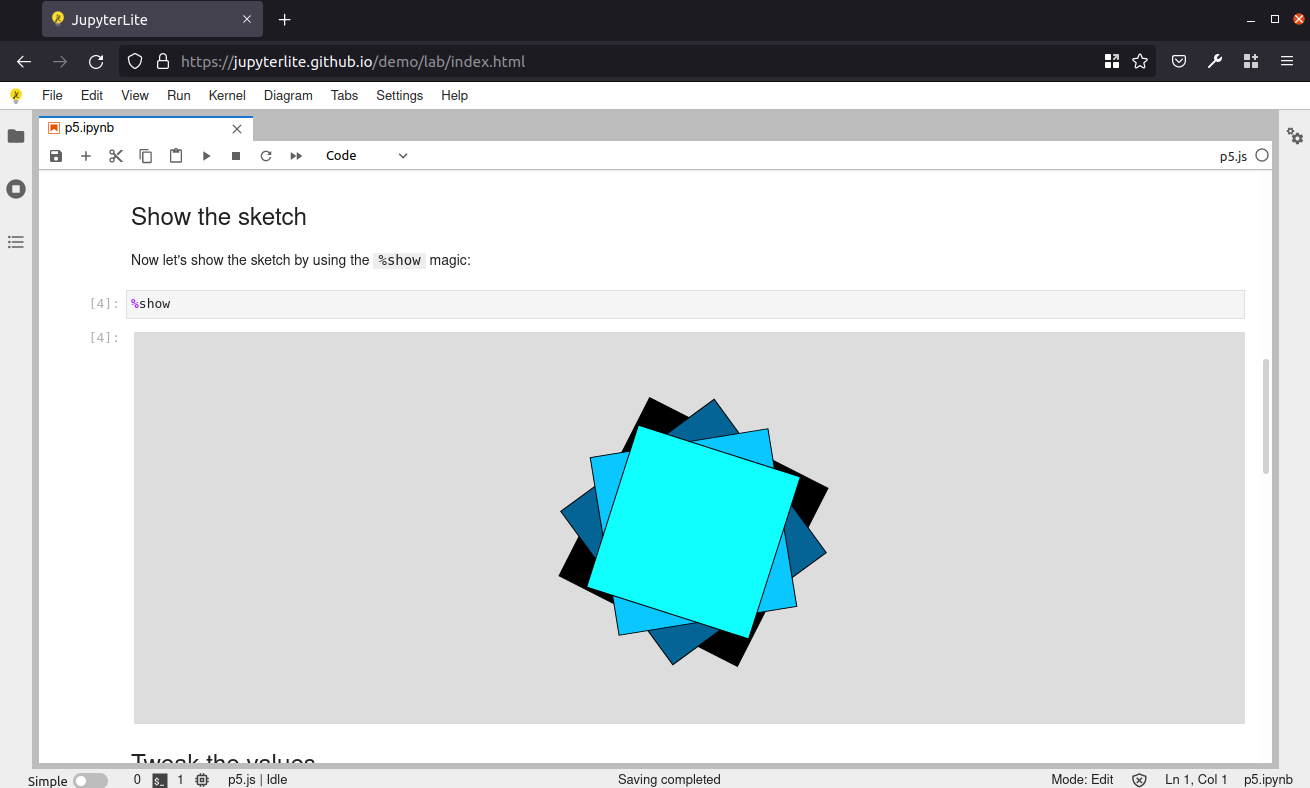
A p5.js kernel for JupyterLite.
Requirements
- JupyterLite
0.1.0b18+
Install
This JupyterLite kernel can be installed as a federated server extension.
# Install the kernel
pip install jupyterlite-p5-kernel

# Build a new JupyterLite site
jupyter lite build
Uninstall
pip uninstall jupyterlite-p5-kernel
Contributing
Development install
# Clone the repo to your local environment
# Change directory to the fork directory

# create a new enviroment
mamba create --name jupyterlite-p5-kernel -c conda-forge python=3.9 yarn jupyterlab
mamba activate jupyterlite-p5-kernel

# Install package in development mode
python -m pip install -e .

# Link your development version of the extension with JupyterLab
jlpm run install:extension

# Rebuild the extension Typescript source after making changes
jlpm run build
The extension should be linked to PREFIX/share/jupyter/labextensions and can be picked up by jupyterlite:
# Install jupyterlite
python -m pip install jupyterlite

# Build a new JupyterLite site
jupyter lite build

# Serve the site
jupyter lite serve

# Launch a browser to the Jupyterlite server url
python -m webbrowser http://localhost:8000/
References
p5.js
- Processing > ProcessingJS > p5.js https://en.wikipedia.org/wiki/Processing#p5.js
- https://github.com/processing/p5.js
- https://p5js.org/tutorials/
- https://p5js.org/reference/ API docs
- https://p5js.org/examples/
- https://p5js.org/examples/classes-and-objects-snowflakes/
- https://github.com/processing/p5.js/wiki/Beyond-the-canvas#creating-html-images
- https://github.com/processing/p5.js/wiki/Getting-started-with-WebGL-in-p5#introducing-webgl-in-p5js
- Summer of Code https://github.com/processing/p5.js/wiki#google-summer-of-code-and-processing-fellowships
- Season of Docs https://github.com/processing/p5.js/wiki#season-of-docs
p5.js Learning Resources
- https://github.com/processing/p5.js/wiki/Educational-Resources
- https://www.khanacademy.org/computing/computer-programming/pjs-documentation
- Khan Academy > Computer Programming > "Intro to JS: Drawing & Animation" https://www.khanacademy.org/computing/computer-programming/programming
- Khan Academy > Computing > Pixar in a Box https://www.khanacademy.org/computing/pixar
Metadata
Release files for jupyterlite-p5-kernel 0.3.0
For a detailed explanation of source distributions (sdists) and built distributions (wheels), please see the package formats documentation.
Source distribution (sdist)
| File | Size | Uploaded | |
|---|---|---|---|
| jupyterlite_p5_kernel-0.3.0.tar.gz | 224.9 kB | Details |
Built distribution (wheel)
| File | Interpreter | ABI | Platform | Reset |
|---|---|---|---|---|
| jupyterlite_p5_kernel-0.3.0-py3-none-any.whl | Python 3 | none | any | Details |
Total release size: 246.9 kB
Release files / jupyterlite_p5_kernel-0.3.0.tar.gz
| Download URL | jupyterlite_p5_kernel-0.3.0.tar.gz |
|---|---|
| Size | 224.9 kB |
| Tags | Source |
|
SHA-256 checksum How to use checksums |
293974231974eef8d08eed6083a9ab6f3f2a9f18bd35cf98d9262d2ab8570fc6
|
|
BLAKE2b-256 checksum How to use checksums |
6ec5e2d6f97f73cc368a802492a1e037950e56be11050e60ad62252669ec7343
|
| Upload date | |
|
Uploaded using Trusted Publishing? What is trusted publishing? |
Yes |
| Uploaded via |
twine/6.2.0 CPython/3.12.12
|
Release files / jupyterlite_p5_kernel-0.3.0-py3-none-any.whl
| Download URL | jupyterlite_p5_kernel-0.3.0-py3-none-any.whl |
|---|---|
| Size | 22.0 kB |
| Tags | Python 3 |
|
SHA-256 checksum How to use checksums |
8b3083bfcfecb6f0786ca5607603e094623a487c37f8ffa5825a1c1eda5686b0
|
|
BLAKE2b-256 checksum How to use checksums |
fd99643dd0b8d55d978685777567ff331af944e2a2c2d648a4f399b52f9fde99
|
| Upload date | |
|
Uploaded using Trusted Publishing? What is trusted publishing? |
Yes |
| Uploaded via |
twine/6.2.0 CPython/3.12.12
|














