
Jupyter SCAD: SCAD in Jupyter
Jupyter SCAD provides rendering and interactive visualization for 3D objects described in SolidPython2 within a Jupyter notebook. Additionally, it provides interactive visualization for STLs.
This program is focused on the use case of generating stl files with Python (aka SolidPython2) interactively within a Jupyter notebook.
Status: MATURE
This project has reached it's goal, a basic Jupyter notebook viewer for SolidPython2. Any further improvements are best served by just using the OpenSCAD GUI (see Alternatives below).
At this time, the only work that is planned for this project is bugfixes. If you are interested in continuing to add functionality, make an issue expressing your interest and we can discuss passing the baton.
Documentation
Documentation is hosted at https://jreiberkyle.github.io/jupyterscad/.
Quick Start
Jupyter SCAD can be installed with pip:
pip install jupyterscad
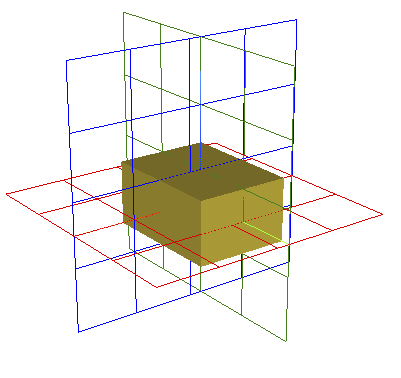
An OpenSCAD object can be defined using SolidPython2, viewed in a Jupyter
notebook, and saved to an stl file with:
from jupyterscad import view
from solid2 import cube

view(cube([1.5,2,1],center=True), outfile='cube.stl')
Alternatives
As an alternative to Jupyter SCAD, one could use a Jupyter notebook as an external editor, using SolidPython2 to update the SCAD file and OpenSCAD to visualize and render the SCAD file. The benefit to this approach is that one can visualize the preview. The drawback is that the two-program workflow can feel distracting. See more on using external editors for OpenSCAD here.
Or, one can use ViewSCAD, which was the motivation for this project. However the last time ViewSCAD was updated was 2019 (checked on 9/21/2023). It only supports SolidPython, not SolidPython2.
Transitioning from ViewSCAD
This package was inspired by ViewSCAD and therefore maintains a very similar interface.
To transition from ViewSCAD, replace
import viewscad

r = viewscad.Renderer()
r.render(obj)
with
from jupyterscad import view

view(obj)
Visualization Backend
This package uses pythreejs for visualization.
Alternatives considered, ordered from closest fit to farthest:
- pyvolume: provides mesh visualization and interaction but (as of 2023.09.24) the latest release is alpha and documentation is sparse.
- matplotlib mplot3d: provides mesh visualization and interaction but is slow.
- pyvista: provides stl loading and visualization but visualization does not work in docker image.
Acknowledgements
Thanks to nickc92 for creating ViewSCAD, which is the inspiration for this project.
1 maintainer

Metadata
1 maintainer
Release files for jupyterscad 1.0
For a detailed explanation of source distributions (sdists) and built distributions (wheels), please see the package formats documentation.
Source distribution (sdist)
| File | Size | Uploaded | |
|---|---|---|---|
| jupyterscad-1.0.tar.gz | 20.8 kB | Details |
Built distribution (wheel)
| File | Interpreter | ABI | Platform | Reset |
|---|---|---|---|---|
| jupyterscad-1.0-py3-none-any.whl | Python 3 | none | any | Details |
Total release size: 41.2 kB
Release files / jupyterscad-1.0.tar.gz
| Download URL | jupyterscad-1.0.tar.gz |
|---|---|
| Size | 20.8 kB |
| Tags | Source |
|
SHA-256 checksum How to use checksums |
01a916d3fc5cacab4797b7b80819c92ef30d70363f6a1b6d9fd6f378213ae2b3
|
|
BLAKE2b-256 checksum How to use checksums |
7e0a641a66c17e2161e799123a92ccf30e0fee6fb9a52ead43fb05e96e11f6e9
|
| Upload date | |
|
Uploaded using Trusted Publishing? What is trusted publishing? |
Yes |
| Uploaded via |
twine/5.0.0 CPython/3.12.3
|
Release files / jupyterscad-1.0-py3-none-any.whl
| Download URL | jupyterscad-1.0-py3-none-any.whl |
|---|---|
| Size | 20.4 kB |
| Tags | Python 3 |
|
SHA-256 checksum How to use checksums |
3e8dbeb376e48231dd5e8704a63c4ef858446d316aa4680beb8924810e94b47d
|
|
BLAKE2b-256 checksum How to use checksums |
4b838f7378d180d98e5d29772d93b29300d02ba8ee6859f3d182eda0e1d90b7d
|
| Upload date | |
|
Uploaded using Trusted Publishing? What is trusted publishing? |
Yes |
| Uploaded via |
twine/5.0.0 CPython/3.12.3
|














