
Edit and run Jupyter Notebooks with plain text editors like Neovim while live viewing them with Vivify

Project description
Jupyviv
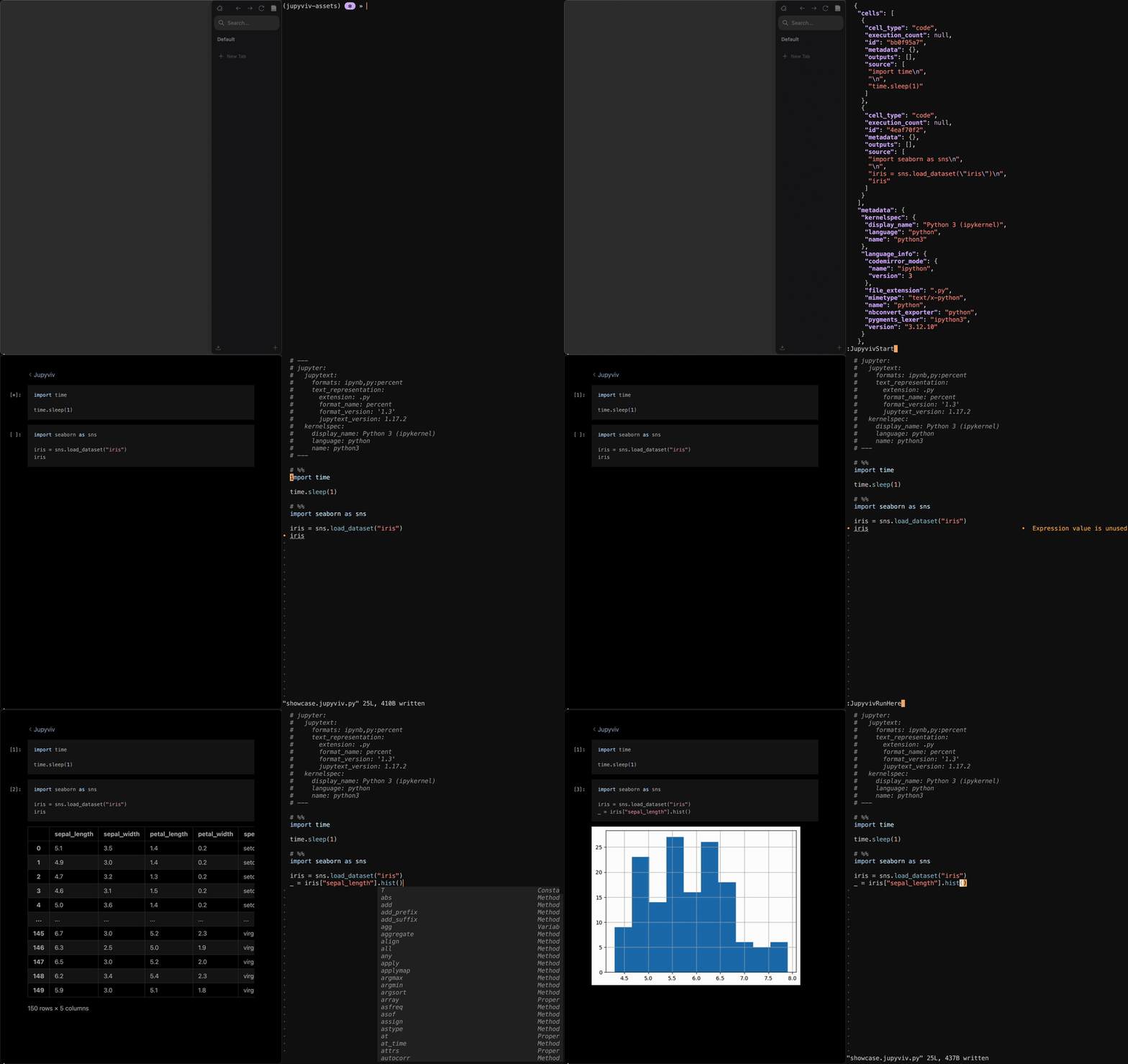
Jupyviv is a solution for working with and running Jupyter Notebooks from plain text editors such as Neovim while using Vivify as a live viewer of the full Notebook in the browser.
[!NOTE] Jupyviv is very new. I have been using it myself in my daily workflow for a few months now but there may be bugs that make it hard for you to use it. If this happens, don't hesitate to open an issue, we'll find a solution and fix it!
Features
Aside from allowing you to use your favorite editor with Jupyter Notebooks, the main benefit of Jupyviv comes from the fact that computation is fully decoupled from file handling and your editor:
- Edit and render your Notebooks locally and optionally run computation on a different machine through an SSH tunnel
- Disconnect and keep running: No need to keep the your local machine connected or even running to have the remote keep computing and saving all outputs. This is something Jupyter Notebooks can't do
- Almost no setup on remote: Just install Jupyviv and the Kernel you need, open the SSH tunnel and you are good to go. No need to even clone your repository there or configure anything
Install
pip install git+https://github.com/jannis-baum/Jupyviv.git
Usage
Using Jupyviv requires Vivify and a plugin for integration with your editor. See below for a list of existing editor integration.
Jupyviv itself is made up of two components:
- Agent, responsible for computation
- Handler, responsible for handling files locally, and communication between the Agent, your editor, and Vivify
The Handler is always run locally where your editor and Vivify are as well, and should be taken care of by your editor plugin. The Agent can be automatically launched and managed by the Handler, or run separately (optionally on a different machine).
To run the Agent either way, you need the Jupyter Kernel for the respective
language installed, e.g. pip install ipykernel for Python. If you want to run
the agent separately, use jupyviv agent --help for more information.
Existing editor integration
- for Neovim: jupyviv.nvim
Release history Release notifications | RSS feed


Download files
Download the file for your platform. If you're not sure which to choose, learn more about installing packages.
Source Distribution
Built Distribution
Filter files by name, interpreter, ABI, and platform.
If you're not sure about the file name format, learn more about wheel file names.
Copy a direct link to the current filters
File details
Details for the file jupyviv-0.1.1.tar.gz.
File metadata
- Download URL: jupyviv-0.1.1.tar.gz
- Upload date:
- Size: 111.6 kB
- Tags: Source
- Uploaded using Trusted Publishing? No
- Uploaded via: twine/6.1.0 CPython/3.10.17
File hashes
| Algorithm | Hash digest | |
|---|---|---|
| SHA256 |
baf46a3e56f2b715eb015bd29f941da808242a9f2174e98eefc49ad1426c182c
|
|
| MD5 |
27c9044fcf392b2c0bce43184c3eefe4
|
|
| BLAKE2b-256 |
67fc8b5bfb2059490489834b85e16f7c8ea8245dc32d48793e84ffd1e4926749
|
File details
Details for the file jupyviv-0.1.1-py3-none-any.whl.
File metadata
- Download URL: jupyviv-0.1.1-py3-none-any.whl
- Upload date:
- Size: 31.3 kB
- Tags: Python 3
- Uploaded using Trusted Publishing? No
- Uploaded via: twine/6.1.0 CPython/3.10.17
File hashes
| Algorithm | Hash digest | |
|---|---|---|
| SHA256 |
1c2ebf908a6fc725d57da4efb5f1330619e0a48e62cdedfce0f7efef215bc159
|
|
| MD5 |
d060b8f8e17254381a959d8bef2b5a24
|
|
| BLAKE2b-256 |
9d165e2f2645395f79e9d569ea22cc02faeea225dd59d281569bc20c07bbd15e
|






