
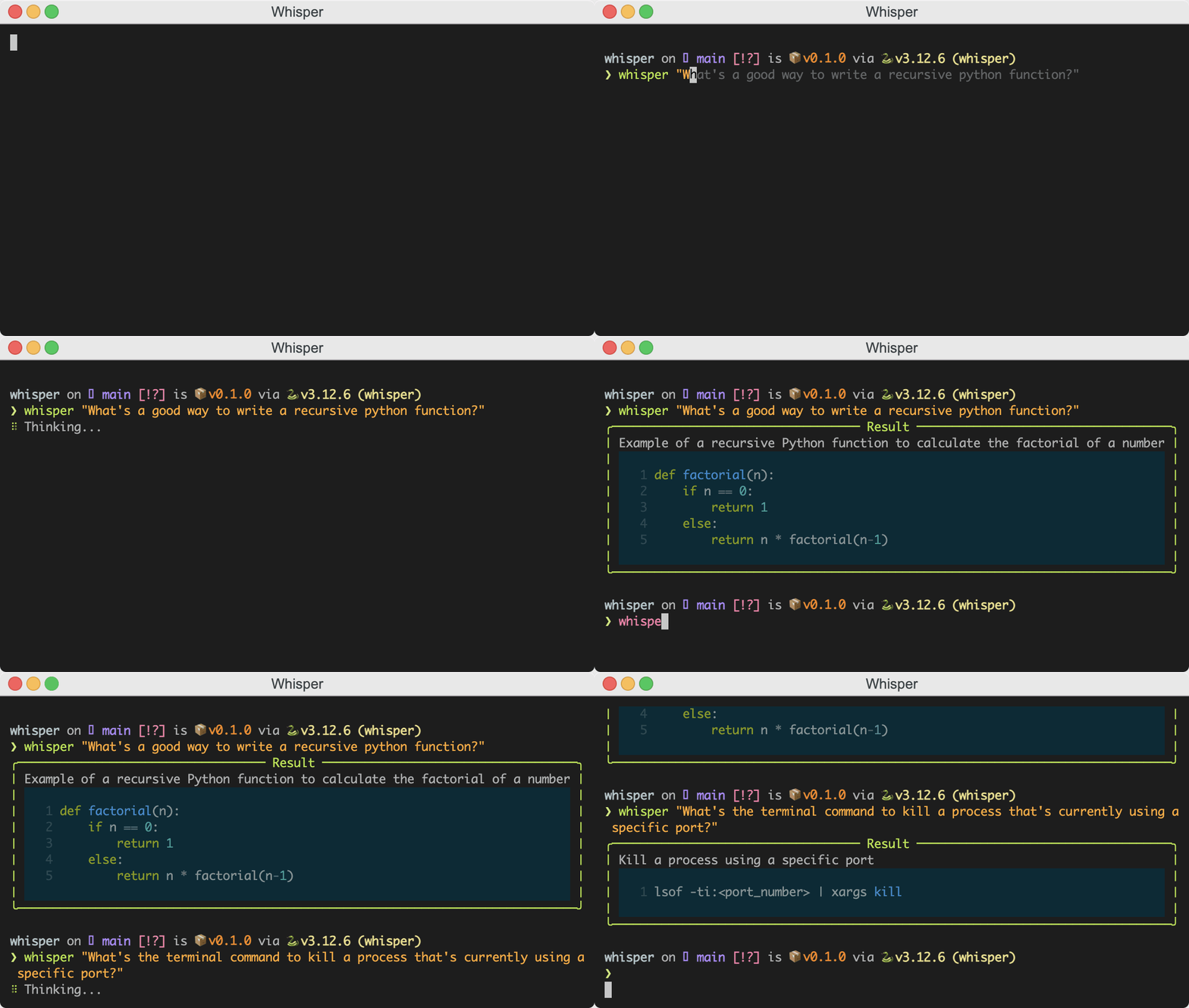
whisper 🤫






Supported Models
| Provider Name | Supported by Whisper | Config Key |
|---|---|---|
| GPT4All | ✅ | gpt4all |
| ChatAnthropic | ✅ | anthropic |
| ChatMistralAI | ✅ | mistral |
| ChatFireworks | ✅ | fireworks |
| AzureChatOpenAI | ✅ | azureopenai |
| ChatOpenAI | ✅ | openai |
| ChatTogether | ❌ | |
| ChatVertexAI | ❌ | |
| ChatGoogleGenerativeAI | ❌ | |
| ChatGroq | ❌ | |
| ChatCohere | ❌ | |
| ChatBedrock | ❌ | |
| ChatHuggingFace | ❌ | |
| ChatNVIDIA | ❌ | |
| ChatOllama | ❌ | |
| ChatLlamaCpp | ❌ | |
| ChatAI21 | ❌ | |
| ChatUpstage | ❌ | |
| ChatDatabricks | ❌ |
Install
To install Whisper, you can use pip:
pip install just-whisper
Setup
After installing Whisper, you need to initialize the configuration for Whisper. This involves setting up API keys for the services you intend to use, such as OpenAI or Anthropic.
To initialize the configuration, run:
$ whisper init
This will create a basic configuration file in your home directory (~/.whisper/whisper.toml). You should update this file with your API keys.
Setup with keys
If you have keys for OpenAI or Anthropic handy, you can initialize the configuration with:
$ whisper init --openai-key <your-openai-key> --anthropic-key <your-anthropic-key>
Config
The whisper config file is located at ~/.whisper/whisper.toml. It looks like this:
# ~/.whisper/whisper.toml

default = "openai"

[openai]
api_key = "sk-proj-..."
model = "gpt-3.5-turbo"

[anthropic]
api_key = "sk-ant-..."
model = "claude-3-opus-20240229"
Config Management
You can manage your config files using the whisper config command. For example...
Show Config
❯ whisper config show
UserConfig(
│   default='openai',
│   openai=OpenAIConfig(api_key='replace-me', model='gpt-3.5-turbo'),
│   anthropic=AnthropicConfig(api_key='replace-me', model='claude-3-5-sonnet-20240620')
)
Get A Config Value
❯ whisper config get openai.model
gpt-3.5-turbo
Set A Config Value
❯ whisper config set openai.api_key "sk-proj-..."
UserConfig(
│   default='openai',
│   openai=OpenAIConfig(api_key='sk-proj-...', model='gpt-3.5-turbo'),
│   anthropic=AnthropicConfig(api_key='replace-me', model='claude-3-5-sonnet-20240620')
)
Support Me :)
If you found this project helpful, please consider supporting me by buying me a coffee.
ETH: 0x329941cDc2D84ddDf3c0b9dB9791bc787e64AE4E
BTC: 3AVY6ySYGVJJHFo3ebrNYx9oSmqShLYrz8
1 maintainer

Metadata
1 maintainer
Release files for just-whisper 0.1.6
For a detailed explanation of source distributions (sdists) and built distributions (wheels), please see the package formats documentation.
Source distribution (sdist)
| File | Size | Uploaded | |
|---|---|---|---|
| just_whisper-0.1.6.tar.gz | 1.4 MB | Details |
Built distribution (wheel)
| File | Interpreter | ABI | Platform | Reset |
|---|---|---|---|---|
| just_whisper-0.1.6-py3-none-any.whl | Python 3 | none | any | Details |
Total release size: 1.4 MB
Release files / just_whisper-0.1.6.tar.gz
| Download URL | just_whisper-0.1.6.tar.gz |
|---|---|
| Size | 1.4 MB |
| Tags | Source |
|
SHA-256 checksum How to use checksums |
5fa8ab763f8b51eddcf3f6334a8ad45b3f4f731e592ec01ff951ddcdf30a4144
|
|
BLAKE2b-256 checksum How to use checksums |
0453c6432530fe97f1481195f25048a3dfc89d15f37499552f6c500631cbf52e
|
| Upload date | |
|
Uploaded using Trusted Publishing? What is trusted publishing? |
No |
| Uploaded via |
uv/0.4.25
|
Release files / just_whisper-0.1.6-py3-none-any.whl
| Download URL | just_whisper-0.1.6-py3-none-any.whl |
|---|---|
| Size | 11.0 kB |
| Tags | Python 3 |
|
SHA-256 checksum How to use checksums |
6b3d4ff5539b787ce4d706ef4c775c9d5b1695801be0f0e51a3142fd8a729b09
|
|
BLAKE2b-256 checksum How to use checksums |
c8effea82b6eb57f2afedd2a740cffec74a167c6737181e30dc4592fb5d5e2ee
|
| Upload date | |
|
Uploaded using Trusted Publishing? What is trusted publishing? |
No |
| Uploaded via |
uv/0.4.25
|














