
justplotme
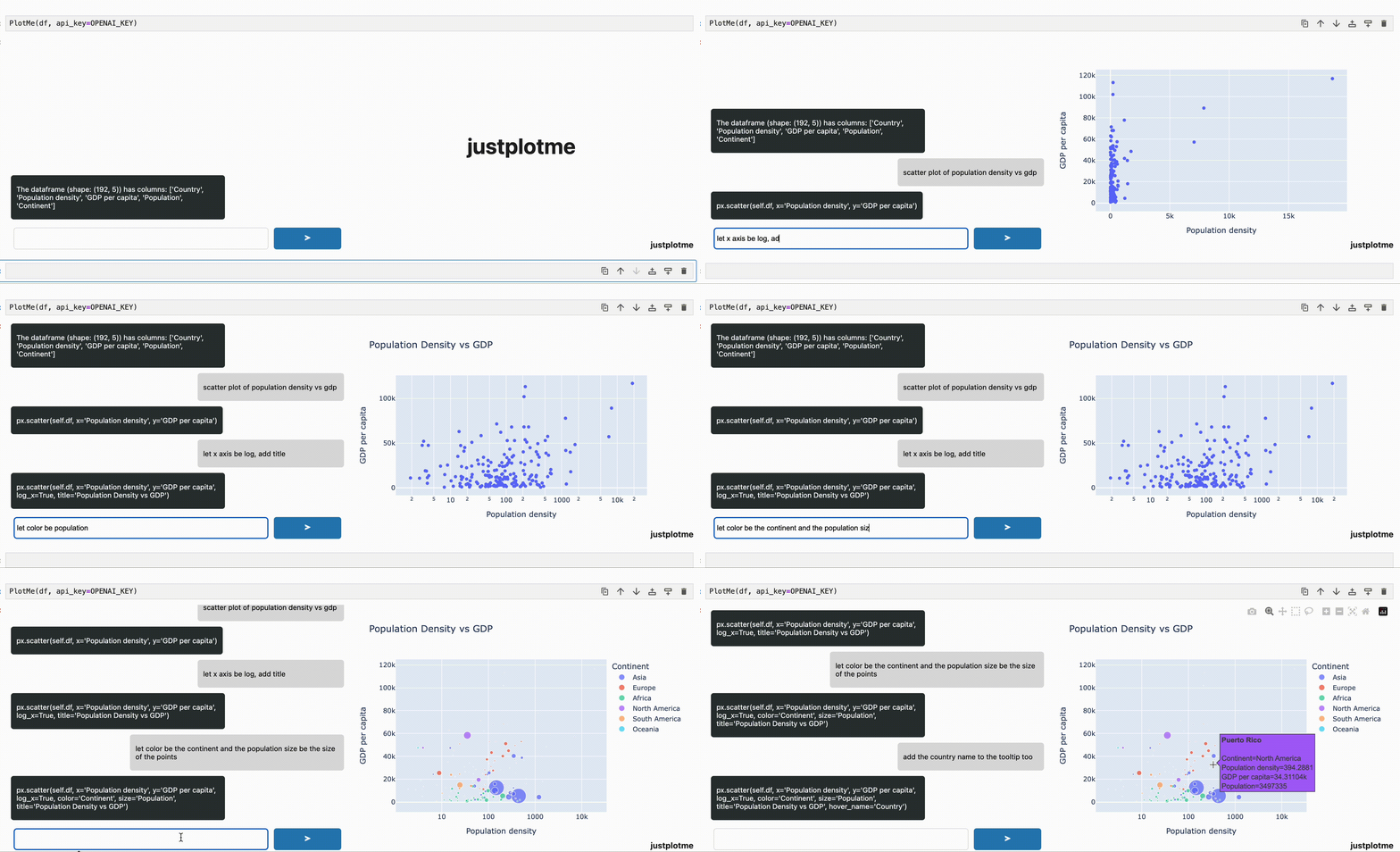
justplotme is a library that uses LLMs to perform the AGI level task of creating plots.
Installation
pip install justplotme
Usage
Open example.ipynb in JupyterLab / Notebook. You'll need an openai api key (only llm currently supported) to use the widget. Export it to an env variable called OPENAI_API_KEY. DO NOT actually put the key in the notebook, you might end up leaking it. In the notebook, you can use justplotme as follows:
import os
from justplotme import PlotMe

OPENAI_KEY = os.getenv("OPENAI_API_KEY")

# df is a pandas DataFrame
PlotMe(df, api_key=OPENAI_KEY)
Development installation
Create a virtual environment and and install justplotme in editable mode with the optional development dependencies:
python3 -m venv .venv
source .venv/bin/activate
pip install -e ".[dev]"
Changes made in src/justplotme/static/ will be reflected
in the notebook.
To Do
- V0 that works on the browser
- Release on pypi
- Make logging work, less painful
- Make justplotme work in VSCode jupyter notebooks
- Support more LLMs
- Support multiline statements, not just expressions
- Add support to different plotting backends
- More data exploration modalities? Maps maybe?
1 maintainer

Metadata
1 maintainer
Release files for justplotme 0.0.1
For a detailed explanation of source distributions (sdists) and built distributions (wheels), please see the package formats documentation.
Source distribution (sdist)
| File | Size | Uploaded | Provenance | Actions |
|---|---|---|---|---|
| justplotme-0.0.1.tar.gz | 1.7 MB | Without provenance | Details for justplotme-0.0.1.tar.gz |
Built distribution (wheel)
| File | Interpreter | ABI | Platform | Actions Reset |
|---|---|---|---|---|
| justplotme-0.0.1-py2.py3-none-any.whl | Python 3, Python 2 | none | any | Details for justplotme-0.0.1-py2.py3-none-any.whl |
Total release size: 1.7 MB
Release files / justplotme-0.0.1.tar.gz
| Download URL | justplotme-0.0.1.tar.gz |
|---|---|
| Size | 1.7 MB |
| Tags | Source |
|
SHA-256 checksum How to use checksums |
9ebe2bf03f0a0837bc25a8202ca78def30e33a024405c60df1ac21f3a3444395
|
|
BLAKE2b-256 checksum How to use checksums |
b67ce63923aa08b779ceedebad26d3409a8ede2cecc0c6a6164642cef2b0b96f
|
| Upload date | |
|
Uploaded using Trusted Publishing? What is trusted publishing? |
No |
| Uploaded via |
python-httpx/0.27.0
|
Release files / justplotme-0.0.1-py2.py3-none-any.whl
| Download URL | justplotme-0.0.1-py2.py3-none-any.whl |
|---|---|
| Size | 6.5 kB |
| Tags | Python 2 Python 3 |
|
SHA-256 checksum How to use checksums |
e7084c4305f8c1a79274433a5b33a6950da71f2fdfb64d41435e07ad622b39fb
|
|
BLAKE2b-256 checksum How to use checksums |
39d596ae89d30268cb900d22ab9f3e1066d5e7a2fb3bc37e84ec12acea7ccfe2
|
| Upload date | |
|
Uploaded using Trusted Publishing? What is trusted publishing? |
No |
| Uploaded via |
python-httpx/0.27.0
|
Security for justplotme 0.0.1
Provenance
Provenance describes where a file came from. On PyPI, provenance is shared via attestations, which provide a verifiable record of the build or publishing details. View details, limitations and caveats.
No provenance found
None of the files in this release were uploaded with provenance metadata.
A note on package security
PyPI is a repository for distributing packages, not a service for auditing them. While third-party security researchers and our staff do their best to detect and remove malicious packages, PyPI cannot guarantee the quality, security or suitability of any given package.
To learn more about protecting yourself from malicious actors, visit our package security documentation.














