
jwtlint


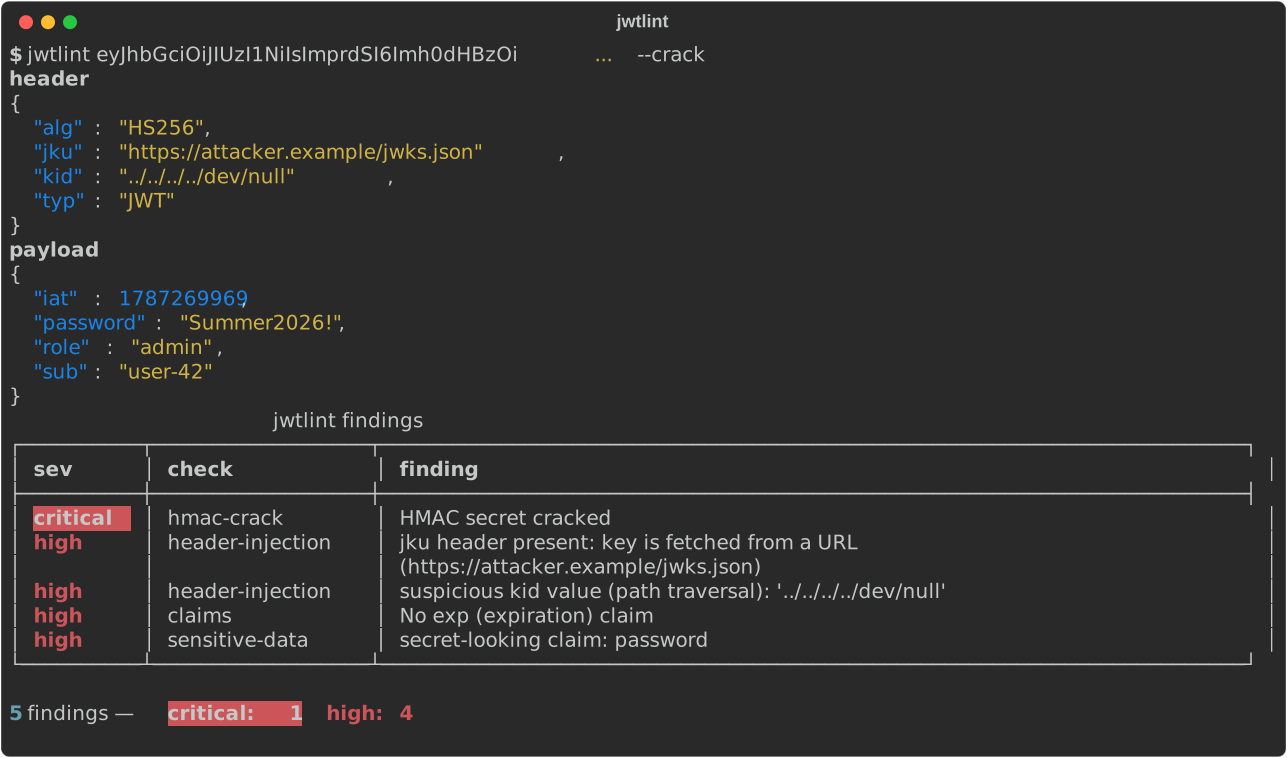
Offline static security analysis for JWTs (RFC 7519 / RFC 7515). Paste a
token from Burp, a log line or an Authorization header and get a list of
what's wrong with it. Parses the three base64url segments itself, no JWT
library in the analysis path, no network calls.
Install
pip install jwtlint
or from source:
git clone https://github.com/ReazGan/jwtlint
cd jwtlint
pip install -e .
Usage
$ jwtlint eyJhbGciOiJIUzI1NiIsInR5cCI6IkpXVCJ9.eyJzdWIiOiJ1c2VyLTQyIiwiaWF0IjoxNzg3MjY5OTY5LCJleHAiOjE3ODcyNzM1Njl9.0RVnIJ29GLfYPK3YfZNbLuhf_19F4nI71aeg0ZvZSr4
header
{
  "alg": "HS256",
  "typ": "JWT"
}
payload
{
  "exp": 1787273569,
  "iat": 1787269969,
  "sub": "user-42"
}
       jwtlint findings
┏━━━━━━━━━━┳━━━━━━━┳━━━━━━━━━┓
┃ sev      ┃ check ┃ finding ┃
┡━━━━━━━━━━╇━━━━━━━╇━━━━━━━━━┩
└──────────┴───────┴─────────┘

0 findings
An alg: none forgery attempt (see the screenshot above for the full run):
$ jwtlint eyJhbGciOiAibm9uZSIsICJ0eXAiOiAiSldUIn0.eyJzdWIiOiAiYXR0YWNrZXIiLCAiYWRtaW4iOiB0cnVlLCAiaWF0IjogMTcwMDAwMDAwMH0.
critical  alg-none  alg: 'none' — unsigned/forgeable token
high      claims    No exp (expiration) claim

2 findings — critical: 1  high: 1
Other flags:
jwtlint --file token.txt                 # read the token from a file instead of argv
pbpaste | jwtlint                        # read from stdin ("Bearer ..." prefix is fine)
jwtlint <token> --expect-alg RS256       # flag RS-to-HS confusion if the token uses HS*
jwtlint <token> --crack                  # try the built-in weak-secret wordlist
jwtlint <token> --crack wordlist.txt     # try a custom wordlist
jwtlint <token> --json                   # findings as JSON instead of a table
Exit code is 1 if any finding is critical or high — usable as a CI gate.
Malformed input (wrong segment count, bad base64url, bad JSON) exits 2 with
a plain error message, not a stack trace.
Checks
- alg-none — header specifies
alg: none(case-insensitively —None,NONE, etc. are all caught), the classic unsigned-token forgery. - alg-confusion — with
--expect-alg RS256(or any RS/ES/PS algorithm), flags a token that instead uses HS256/384/512 as a possible RS-to-HS key confusion attack: a verifier that feeds its RSA/EC public key into HMAC verification whenever the header saysalg: HS*can be tricked into accepting a token forged with that (public, therefore attacker-known) key as the HMAC secret. - header-injection — key-selection headers the attacker controls:
jku/x5u(verifier fetches the key from a URL, also an SSRF vector), an embeddedjwk(CVE-2018-0114 style self-signed tokens), an embeddedx5cchain, andkidvalues that look like path traversal (../../dev/null), SQL or shell injection. - sensitive-data — payload claims that look like passwords, API keys, session ids or personal data (national id, IBAN, phone, card numbers with a Luhn check). Payloads are base64url, not encrypted: anyone holding the token can read them.
- claims — missing
exp(high, token never expires), an already-expiredexp(info, just noted), missingiat(low),nbfearlier thaniat(low), and unreasonably long-lived tokens —exp - iatover a year by default, configurable with--max-lifetime-days. - hmac-crack (
--crack, opt-in, fully offline) — for HS256/384/512 tokens, recomputes the HMAC signature for each line of a wordlist and compares against the token's actual signature. Ships a built-in list of ~50 common weak secrets used by default when--crackis passed with no file.
In CI
Exit code 1 on critical/high makes it a one-line gate, e.g. to make sure
the tokens your test suite issues never carry secrets or skip exp:
- run: pip install jwtlint
- run: python scripts/issue_test_token.py | jwtlint
Scope
A lean, non-interactive, single-purpose static analyzer — decode a token,
report what's wrong with it, exit. It doesn't talk to a server, doesn't try
exploits, and doesn't cover every JWT attack technique.
ticarpi/jwt_tool is the heavier
reference tool if you need full interactive exploitation tooling.
License
MIT
1 maintainer

Metadata
1 maintainer
Release files for jwtlint 0.2.0
For a detailed explanation of source distributions (sdists) and built distributions (wheels), please see the package formats documentation.
Source distribution (sdist)
| File | Size | Uploaded | |
|---|---|---|---|
| jwtlint-0.2.0.tar.gz | 21.7 kB | Details |
Built distribution (wheel)
| File | Interpreter | ABI | Platform | Reset |
|---|---|---|---|---|
| jwtlint-0.2.0-py3-none-any.whl | Python 3 | none | any | Details |
Total release size: 41.9 kB
Release files / jwtlint-0.2.0.tar.gz
| Download URL | jwtlint-0.2.0.tar.gz |
|---|---|
| Size | 21.7 kB |
| Tags | Source |
|
SHA-256 checksum How to use checksums |
2ea8d4683e6e8a08787e8516ad5a0c0442c7683a46917b02dc4987dacb73cb51
|
|
BLAKE2b-256 checksum How to use checksums |
701fd8a98a7e1618753b77e6b740d241cddecbf7c3470dd24de6d86037c57f0c
|
| Upload date | |
|
Uploaded using Trusted Publishing? What is trusted publishing? |
Yes |
| Uploaded via |
twine/7.0.0 CPython/3.13.14
|
Provenance
Provenance describes where a file came from. On PyPI, provenance is shared via attestations, which provide a verifiable record of the build or publishing details. View details, limitations and caveats.


PyPI Publish Attestation
PyPI verified that this artifact, at this checksum, originated from the publisher listed below.
Signed by GitHub Actions, verified by PyPI on Oct 4, 2026.
Transparency logRelease files / jwtlint-0.2.0-py3-none-any.whl
| Download URL | jwtlint-0.2.0-py3-none-any.whl |
|---|---|
| Size | 20.3 kB |
| Tags | Python 3 |
|
SHA-256 checksum How to use checksums |
a71533ee3b6d9d80ffdbc9c9fd7f6888975b44acf9e5a7025da0396dacb9b454
|
|
BLAKE2b-256 checksum How to use checksums |
d19ca5d16b55195e6a63ec2aa25918c0b20a46c7ee9e496c15ce25941e9264d1
|
| Upload date | |
|
Uploaded using Trusted Publishing? What is trusted publishing? |
Yes |
| Uploaded via |
twine/7.0.0 CPython/3.13.14
|
Provenance
Provenance describes where a file came from. On PyPI, provenance is shared via attestations, which provide a verifiable record of the build or publishing details. View details, limitations and caveats.
PyPI Publish Attestation
PyPI verified that this artifact, at this checksum, originated from the publisher listed below.
Signed by GitHub Actions, verified by PyPI on Oct 4, 2026.
Transparency log












