
Student frontend JupyterLab Extension
A JupyterLab extension that serves as an alternative student frontend for the system proposed in the SIGCSE TS 2026 paper Closing the Loop: An Instructor-in-the-Loop AI Assistance System for Supporting Student Help-Seeking in Programming Education (full code is published on GitHub).
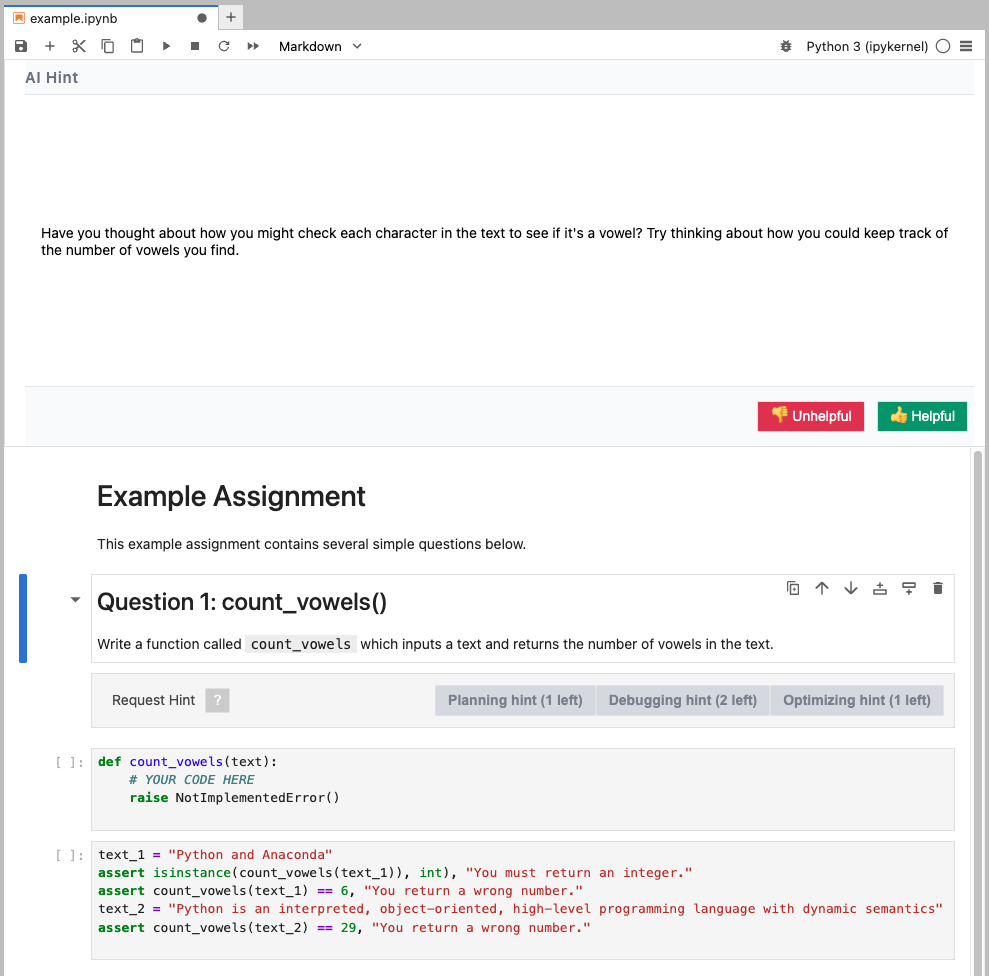
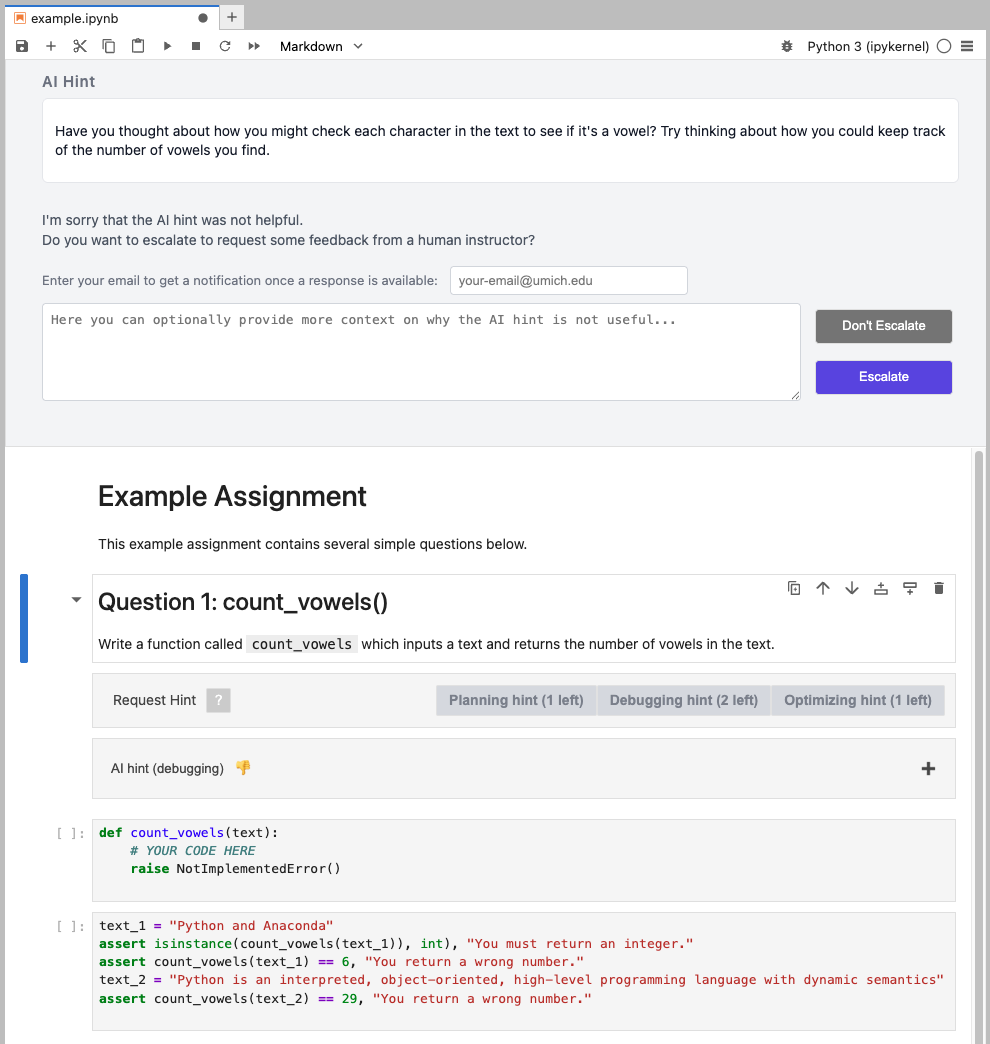
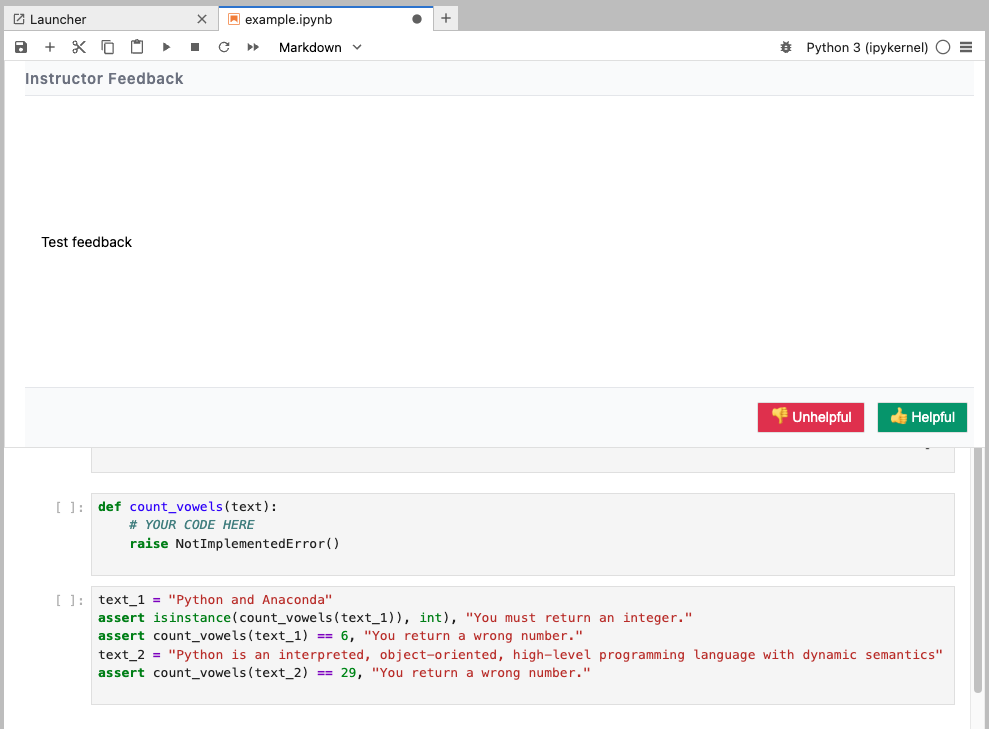
Illustrative screenshots
- Student programming environment.
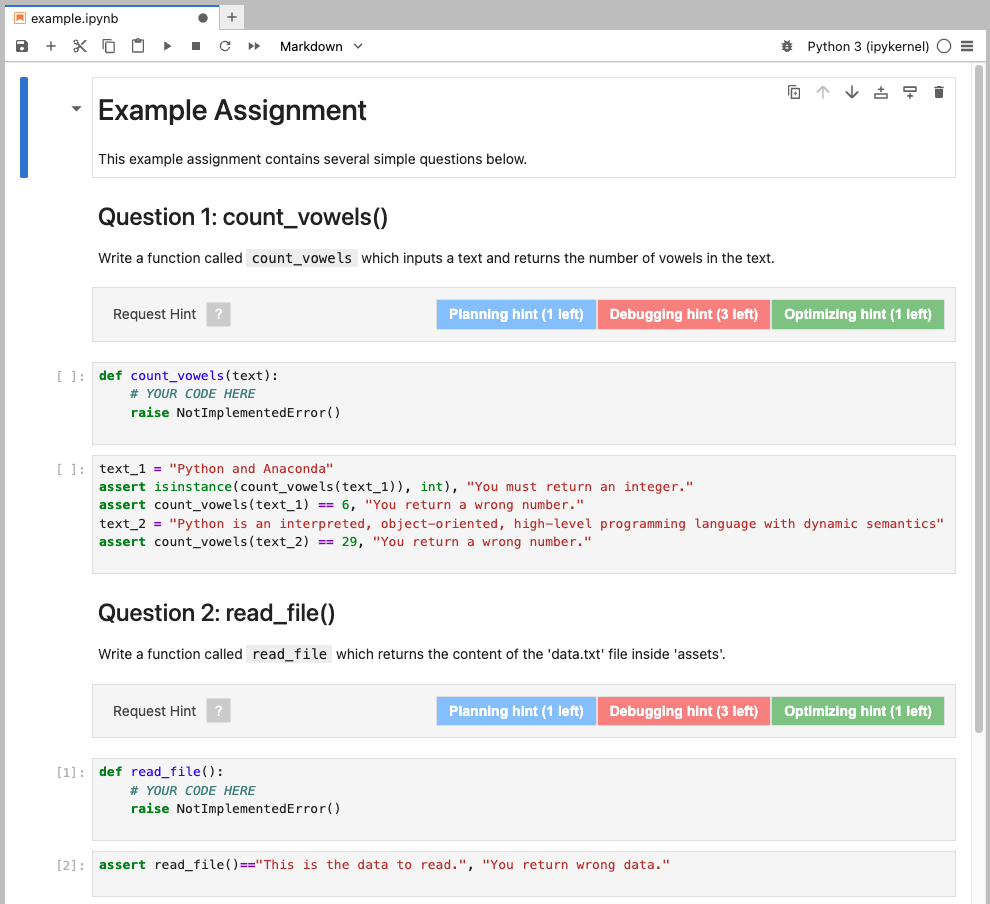
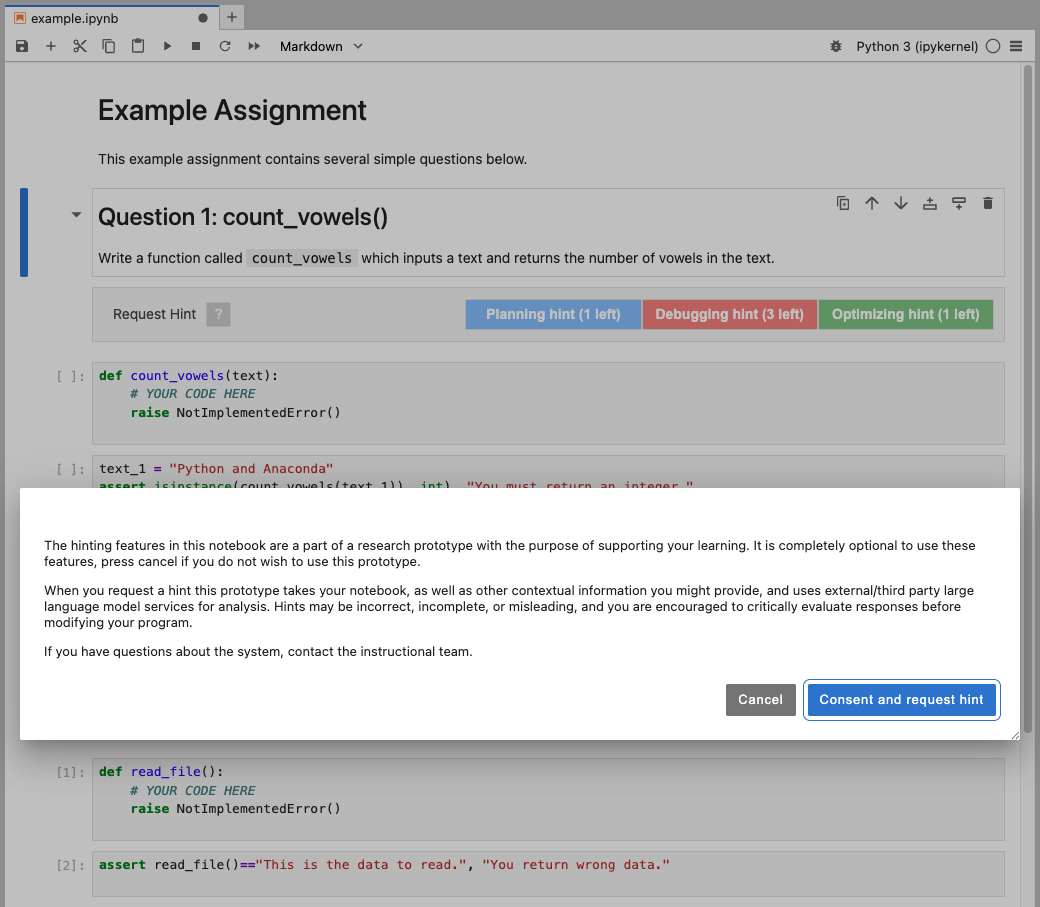
- Consent the use of the system.
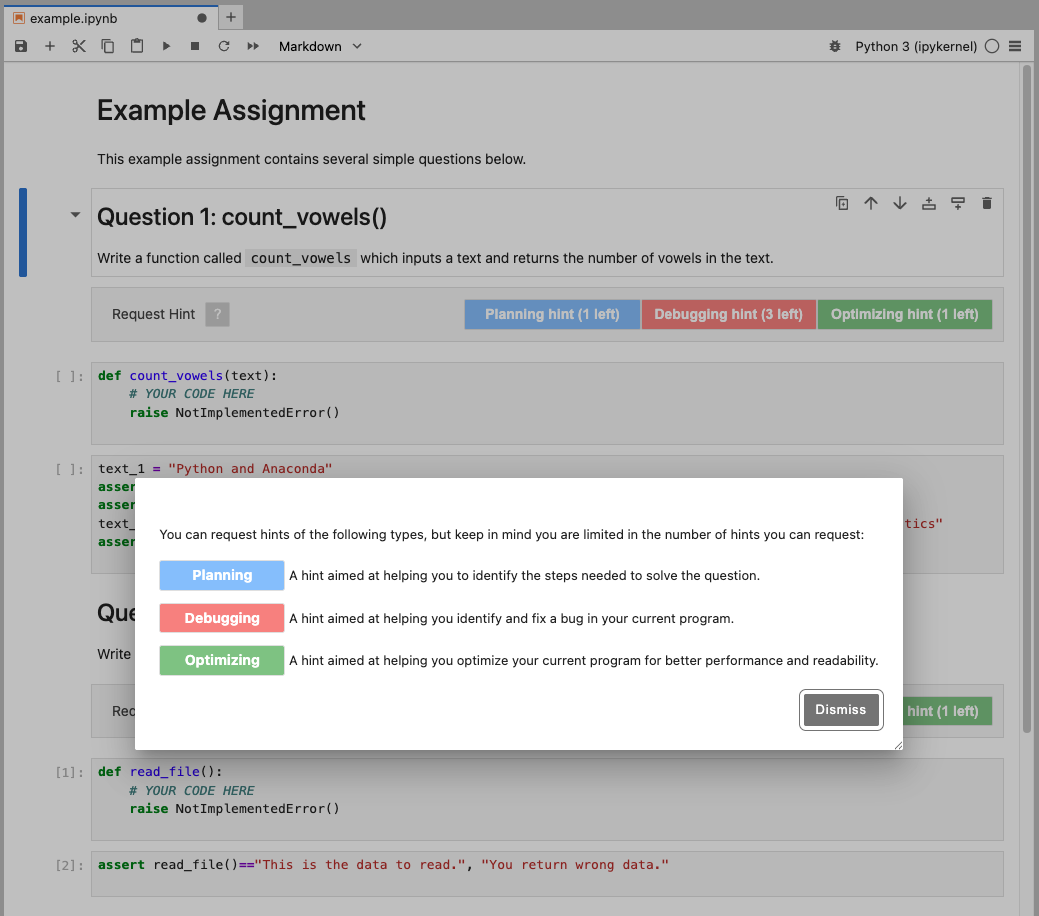
- (Optional) View description of the three hint types.
- Click one of the type buttons to request hint. Reflect on the problem.
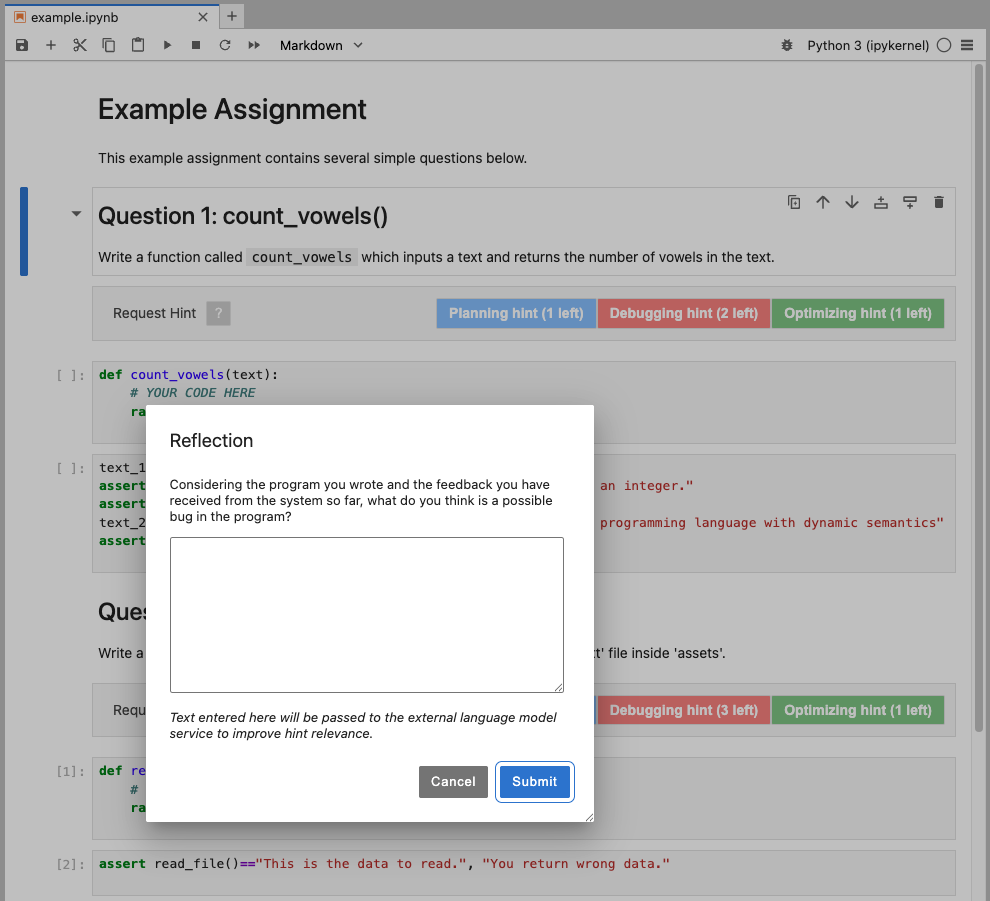
- Retrieve AI-generated hints based on the buggy code and reflection
- Optional to escalate the request to instructors if the hint is rated as unhelpful.
Requirements
- JupyterLab >= 4.0.0
Development
Note: You will need NodeJS to build the extension package.
# Clone the repo to your local environment
# Change directory to the frontend_student_jx directory
# Install package in development mode
source .venv/bin/activate
pip install -e "."
# Link your development version of the extension with JupyterLab
jupyter labextension develop . --overwrite
# Server extension must be manually installed in develop mode
jupyter server extension enable hintbot
# Rebuild extension Typescript source after making changes
jlpm build
You can watch the source directory and run JupyterLab at the same time in different terminals to watch for changes in the extension's source and automatically rebuild the extension.
# In one terminal:
jlpm run watch          # rebuilds on source changes
# In another terminal:
jupyter lab             # run Jupyterlab
With the watch command running, every saved change will immediately be built locally and available in your running JupyterLab. Refresh JupyterLab to load the change in your browser (you may need to wait several seconds for the extension to be rebuilt).
Packaging and Publish to PyPI
This project is already configured for Python packaging with Hatch and the JupyterLab builder (prebuilt extension for JupyterLab 4). To rebuild and publish a release on PyPI:
-
Clean everything
jlpm clean:all -
Rebuild the labextension (production)
jlpm build:prod -
Build wheel
hatch build -
Sanity check the build
- Test-install in a clean virtualenv:
pip install dist/*.whl, start JupyterLab, and confirm the extension is active.
- Upload to PyPI
- Create a PyPI account and an API token (Settings → API tokens).
- Install
twine:pip install twine. - Upload:
TWINE_USERNAME=__token__ TWINE_PASSWORD=<pypi-token> twine upload dist/*.
- Install as a user
- Users can then install with:
pip install jx-loop-hint. - Because this is a prebuilt extension, no
jupyter lab buildstep is required for JupyterLab 4.
Notes on Backend URL and Student ID configuration
The extension uses the environment variables HOST_URL and VOC_USERID to configure the orchestration backend URL and student identifier, respectively. If HOST_URL is not set, it defaults to localhost:8000. If VOC_USERID is not set, it falls back to a default, fixed identifier.
Tips: run JupyterLab from the terminal with the environment variables set, e.g.,
export HOST_URL="https://your-orchestration-backend-url.com" && export VOC_USERID="student-unique-id-123" && jupyter lab
Notes on Student ID for budget tracking
The extension uses the environment variable VOC_USERID to identify the student when making requests to the backend for hint budget tracking. If this environment variable is not set, it falls back to a default, fixed identifier.
Notes on the student program for a question is extracted from a notebook
The extension extracts a student's program for a particular question by scanning notebook cells starting from the question's markdown cell and concatenating subsequent code cells until it reaches a configured end-marker cell. This extracted program is sent along with other context (e.g., notebook JSON) to the backend when creating an AI hint request.
Key rules implemented by the extension (behavior mirrors src/requestHint.ts):
-
Question start detection
- If a
questions.jsonconfiguration is present underuser_customizable_configs/notebook_questions/, the extension treats any markdown cell whosenbgrader.grade_idequals aquestion_start_grade_idin that config as the start of a question.
- If a
-
Program extraction (end marker)
- The matching question entry in
questions.jsonshould provide aquestion_end_grade_id. The extractor will stop concatenating code cells when it encounters a cell whosenbgrader.grade_idequals thatquestion_end_grade_id.
- The matching question entry in
-
What is concatenated
- Only code cells are appended, in document order, starting from the cell immediately after the question-start markdown cell up to (but not including) the end-marker cell.
- Cell boundaries are preserved by inserting a single newline between appended cells so the backend can reason about cell separation.
-
Robust reading across JupyterLab versions
- The extractor tries multiple ways to read a cell's text to be resilient across JupyterLab versions and widget/model shapes:
cell.value.text(common for ICellModel)cell.model.value.text(widget wrappers)sharedModel.getSource()(some collaborative/shared models)cell.input.model.value.text(widget-level input model)
- The extractor tries multiple ways to read a cell's text to be resilient across JupyterLab versions and widget/model shapes:
Example config entry (user_customizable_configs/notebook_questions/questions.json):
[
	{
		"question_id": "q1",
		"question_start_grade_id": "cell-abc123",
		"question_end_grade_id": "cell-abc123_assert"
	}
]
This will cause the extractor to use q1 as the problem_id sent to the backend and to stop assembling the program when a cell with grade id cell-abc123_assert is encountered.
1 maintainer

Metadata
1 maintainer
Release files for jx-loop-hint 0.0.3
For a detailed explanation of source distributions (sdists) and built distributions (wheels), please see the package formats documentation.
Source distribution (sdist)
| File | Size | Uploaded | |
|---|---|---|---|
| jx_loop_hint-0.0.3.tar.gz | 855.0 kB | Details |
Built distribution (wheel)
| File | Interpreter | ABI | Platform | Reset |
|---|---|---|---|---|
| jx_loop_hint-0.0.3-py3-none-any.whl | Python 3 | none | any | Details |
Total release size: 1.7 MB
Release files / jx_loop_hint-0.0.3.tar.gz
| Download URL | jx_loop_hint-0.0.3.tar.gz |
|---|---|
| Size | 855.0 kB |
| Tags | Source |
|
SHA-256 checksum How to use checksums |
9bffc8f7774b36002175776e8393e4447032d403bf3dfe07955ce0fd06d26509
|
|
BLAKE2b-256 checksum How to use checksums |
c551deb74b8ec63df1d15bee9f67a5daddbaa82f4ffb6a59d35dd2fe3b31f4eb
|
| Upload date | |
|
Uploaded using Trusted Publishing? What is trusted publishing? |
No |
| Uploaded via |
twine/6.2.0 CPython/3.13.0
|
Release files / jx_loop_hint-0.0.3-py3-none-any.whl
| Download URL | jx_loop_hint-0.0.3-py3-none-any.whl |
|---|---|
| Size | 889.0 kB |
| Tags | Python 3 |
|
SHA-256 checksum How to use checksums |
8efb307f34be2eebb67cb673d90d1c866573bde45ea6300dc173eef79d3373cf
|
|
BLAKE2b-256 checksum How to use checksums |
980234178795a4fa805cdbb130531cdfc553e244341dead83051188d1a0618a0
|
| Upload date | |
|
Uploaded using Trusted Publishing? What is trusted publishing? |
No |
| Uploaded via |
twine/6.2.0 CPython/3.13.0
|














