
K1USN SST Logger




What it is
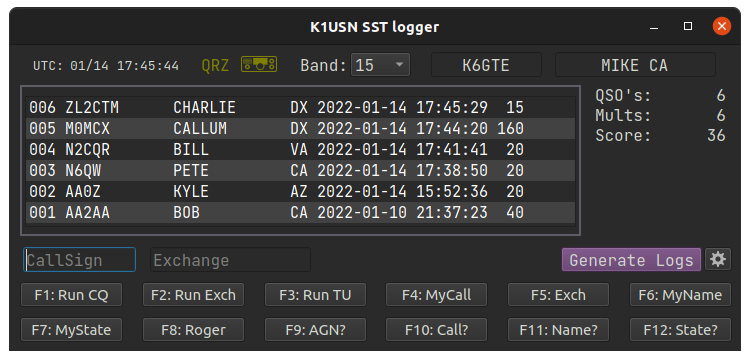
This is a scratch my own itch project. It's just a simple, lightweight logger for the K1USN slow speed CW contest. I consider it now in a usable stable state. Feel free to use it and give me your comments.
Recent Changes
- Can now send CW via rigctld CAT for those radios that support it.
- Interface is now resizable
- Repackaged for PyPi and it now pip installable
Installing
In a terminal type:
pip install k1usnsst
Running
In a terminal type:
k1usnsst
Settings
QRZ / HamDB
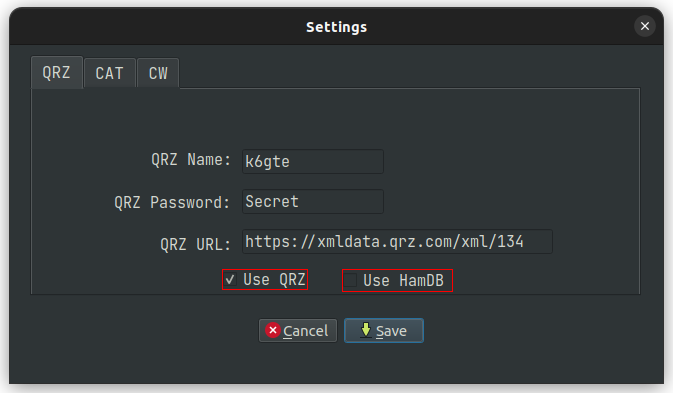
If you wish to used QRZ to look up the full name and gridsquare for inclusion in your adif log, Click the gear icon in the lower right corner and enter your username and password for QRZ. Then place a check in the 'use QRZ' box. If you don't subscribe to the QRZ service, you can place a check in the 'use HamDB' box.
CAT
The program can monitor your radio for band changes with either rigctld, FLRIG or None. Fill in the hostname and port for your choice.
Common port numbers are 4532 for rigctld and 12345 for FLRIG.
If you don't have rigctld or FLRIG and your a Debian/Ubuntu based Linux user you can install it/them with:
sudo apt install libhamlib-utils
sudo apt install flrig
Enabling CW Interface
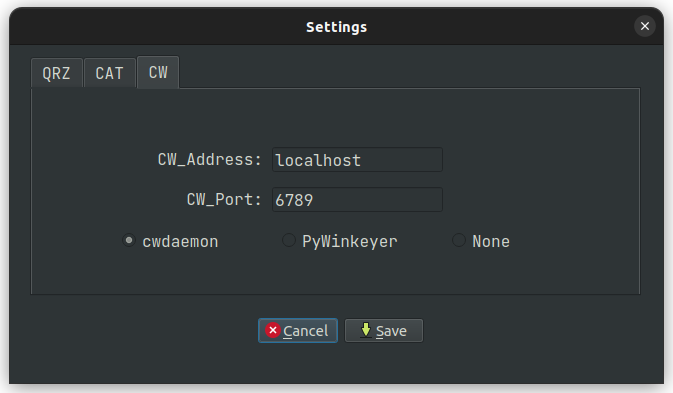
In the setting screen, switch to the CW tab. Set the host that is running either cwdaemon or PyWinkeyer. Most likely localhost. Set the port that the service is listening on. cwdaemon defaults to 6789, Pywinkeyer defaults to 8000. And lastly click the bullet next to the service you will be using.
You can now choose Key via CAT to use rigctld to key the radio, negating the need for a winkeyer.
CW Macros
The program will check in the current working directory for a file called cwmacros_sst.txt. If it is not there it will create one. It will parse the file and configure the new row of 12 buttons along the bottom half of the window. The macros can be activated by either pressing the corresponding function key, or by directly clicking on the button. You can check the file to glean it's structure, but it's pretty straight forward. Each line has 3 sections separated by the pipe | character. Here's an example line.
F3|Run TU|tu {HISNAME} 73 ee
The first field is the function key to program. The second is the name of the button. And lastly the third is the text you would like to send.
A limited set substitution macros are offered.
{MYCALL}
{HISCALL}
{MYNAME}
{HISNAME}
{MYSTATE}
{HISSTATE}
{MYEXCHANGE} in case you're too lazy to type {MYCALL} {MYSTATE}
When the event is over
Click the 'Generate Log' button in the lower right side of the screen. Two files will be generated.
SST_Statistics.txt, which holds a breakdown of bands / QSOs / Mults, and a points total for the event.
SST.adi, an ADIF file you can use to merge into your main log if you so choose.
Before the next SST event you should delete the SST.db file to start fresh.
1 maintainer

Metadata
1 maintainer
Release files for k1usnsst 24.5.13
For a detailed explanation of source distributions (sdists) and built distributions (wheels), please see the package formats documentation.
Source distribution (sdist)
| File | Size | Uploaded | |
|---|---|---|---|
| k1usnsst-24.5.13.tar.gz | 156.7 kB | Details |
Built distribution (wheel)
| File | Interpreter | ABI | Platform | Reset |
|---|---|---|---|---|
| k1usnsst-24.5.13-py3-none-any.whl | Python 3 | none | any | Details |
Total release size: 312.1 kB
Release files / k1usnsst-24.5.13.tar.gz
| Download URL | k1usnsst-24.5.13.tar.gz |
|---|---|
| Size | 156.7 kB |
| Tags | Source |
|
SHA-256 checksum How to use checksums |
7bb0bef450e97367a574e5857689b87f8c125a8b2ef124cdced8a58e059f9cc0
|
|
BLAKE2b-256 checksum How to use checksums |
4b1fd5a1e7a852584e9a809a82e344787c44fc100e4a7f10f507e5c8ff4e12ae
|
| Upload date | |
|
Uploaded using Trusted Publishing? What is trusted publishing? |
No |
| Uploaded via |
twine/4.0.2 CPython/3.12.3
|
Release files / k1usnsst-24.5.13-py3-none-any.whl
| Download URL | k1usnsst-24.5.13-py3-none-any.whl |
|---|---|
| Size | 155.4 kB |
| Tags | Python 3 |
|
SHA-256 checksum How to use checksums |
77088e84b3726ae9f831d45c3d39617bb5b700a1a59c871da16cf6d921523f54
|
|
BLAKE2b-256 checksum How to use checksums |
def076edc423db792e4345c9d65b50e265c6ebce74a2249a39783f89e23b82a7
|
| Upload date | |
|
Uploaded using Trusted Publishing? What is trusted publishing? |
No |
| Uploaded via |
twine/4.0.2 CPython/3.12.3
|














