
Kanban TUI for AI coding agents with a structural human review gate
Verified details
These details have been verified by PyPIProject links
GitHub Statistics
Maintainers

Project description









Docs · Quickstart · The review gate · MCP Setup · CLI Reference · Contributing
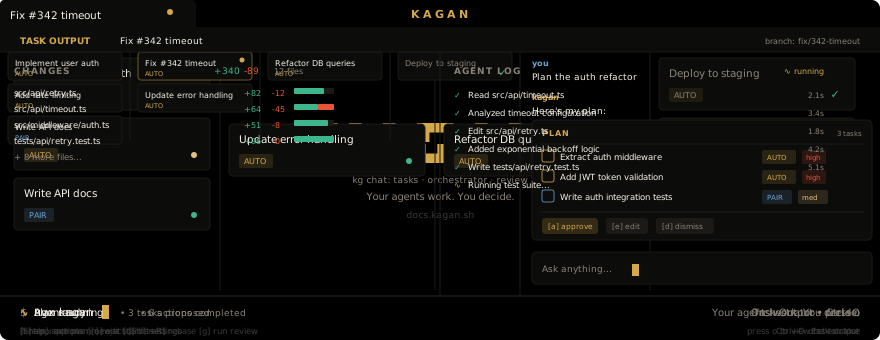
Kagan is a Kanban TUI for AI coding agents with a structural human review gate. No agent-authored task reaches your main branch without an explicit approval — the state machine enforces it.
The agent runs in an isolated git worktree. When it finishes, the task card moves to REVIEW. You read the diff, check the acceptance criteria, and press approve. Then merge fires. That transition — REVIEW to DONE — cannot be automated away. It is not a setting.
Install
uv tool install kagan # or: uvx kagan
Mac / Linux (no uv)
curl -fsSL https://uvget.me/install.sh | bash -s -- kagan
Windows (PowerShell)
iwr -useb uvget.me/install.ps1 -OutFile install.ps1; .\install.ps1 kagan
What you get
- Kanban board (BACKLOG → IN_PROGRESS → REVIEW → DONE) enforced by a state machine
- Each task runs in its own git worktree — your working copy stays untouched
- Managed runs (background agent) or interactive attach (you + agent in tmux/editor)
- REVIEW stage requires explicit human approval before merge; no path around it
- MCP server so Claude Code, Codex, or any MCP-capable client can drive the board
kagan doctorpreflight checks all required tools before first run
Tested agents: Claude Code · Codex · Gemini CLI · 11 more — see docs/backends.
Full docs: docs.kagan.sh
Companion surfaces
The TUI (kagan) is the primary operator surface. Two companion surfaces exist for specific workflows:
- Web dashboard (
kagan web) — browser-based board, useful for remote access or a second monitor - VS Code extension — sidebar panel and
@kaganchat participant inside VS Code
Both companions share the same state as the TUI via the same API server. Neither is required.
License
Project details
Verified details
These details have been verified by PyPIProject links
GitHub Statistics
Maintainers
Release history Release notifications | RSS feed


Download files
Download the file for your platform. If you're not sure which to choose, learn more about installing packages.
Source Distributions
Built Distribution
Filter files by name, interpreter, ABI, and platform.
If you're not sure about the file name format, learn more about wheel file names.
Copy a direct link to the current filters
File details
Details for the file kagan-0.19.0b34-py3-none-any.whl.
File metadata
- Download URL: kagan-0.19.0b34-py3-none-any.whl
- Upload date:
- Size: 1.5 MB
- Tags: Python 3
- Uploaded using Trusted Publishing? Yes
- Uploaded via: twine/6.1.0 CPython/3.13.13
File hashes
| Algorithm | Hash digest | |
|---|---|---|
| SHA256 |
866614a2f6efad17910544b798b7260eb694e869018a377e87e3931c943e0915
|
|
| MD5 |
20fbaad7b0b3605ebb852eadc7e7c6d8
|
|
| BLAKE2b-256 |
5453748ebb6177584d05bd146fbd518990d554f1d49f7248e95e2953ccf5d0c3
|
Provenance
The following attestation bundles were made for kagan-0.19.0b34-py3-none-any.whl:
Publisher:
cd.yaml on kagan-sh/kagan
-
Statement:
-
Statement type:
https://in-toto.io/Statement/v1 -
Predicate type:
https://docs.pypi.org/attestations/publish/v1 -
Subject name:
kagan-0.19.0b34-py3-none-any.whl -
Subject digest:
866614a2f6efad17910544b798b7260eb694e869018a377e87e3931c943e0915 - Sigstore transparency entry: 1450154701
- Sigstore integration time:
-
Permalink:
kagan-sh/kagan@f34286cbcca3cccd519dfe5c18684043fff5079b -
Branch / Tag:
refs/heads/main - Owner: https://github.com/kagan-sh
-
Access:
public
-
Token Issuer:
https://token.actions.githubusercontent.com -
Runner Environment:
github-hosted -
Publication workflow:
cd.yaml@f34286cbcca3cccd519dfe5c18684043fff5079b -
Trigger Event:
push
-
Statement type:






