
Python SDK for Kagura Memory Cloud — memory management, document ingestion (PDF → memory graph), and R2 file storage for AI agents
Verified details
These details have been verified by PyPIProject links
GitHub Statistics
Maintainers

Project description

Memory SDK — Python client for Kagura Memory Cloud








What is this?
This SDK connects your Python code to Kagura Memory Cloud, giving AI assistants the ability to remember, search, and learn from past interactions — and to ingest documents (PDFs, URLs) directly into a searchable memory graph. It provides four clients for different use cases:
| Client | Protocol | Use Case |
|---|---|---|
KaguraAgent |
MCP + LLM | AI-powered — auto-decides what to remember/recall from conversations |
KaguraClient |
MCP (JSON-RPC) | Direct memory ops — remember, recall, explore, reference, forget |
ResourceClient |
REST API | External data ingestion — push data from Slack, CI/CD, CRM into Kagura |
FilesClient |
REST + presigned PUT | File uploads with sha256 integrity binding (R2) |
FileIngestor |
CLI + SDK | Document ingestion — PDF text → memory graph + R2 archive (Phase 1; image/PPT/Excel in Phase 2) |
60-second demo
Turn a PDF into a structured graph of memories — one overview memory plus per-section summaries, linked via declared_link edges. The original file is archived to your workspace's storage so you can always pull the bytes back.
pip install 'kagura-memory[ingest-pdf]'
kagura auth login
kagura ingest ./report.pdf
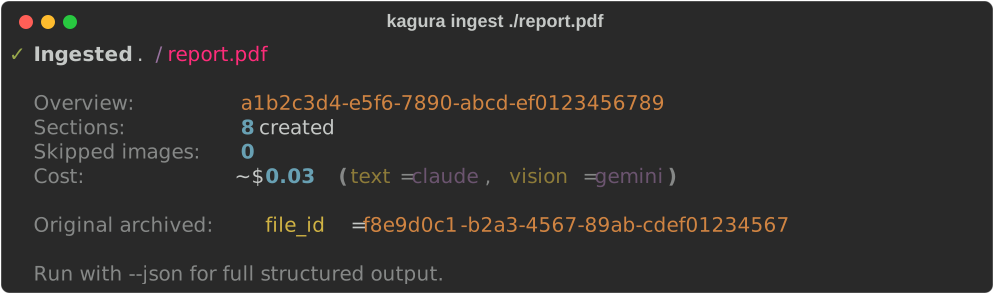
kagura recall "report findings" -k 5        # search across sections
kagura files download-url <file_id>          # short-lived GET on the original
Phase 1 ingests text only. A vision provider (Gemini 2.5 Flash by default) is configured and validated, but the orchestrator does not currently call it — no extractor in Phase 1 emits images, so neither _image.preprocess() nor Provider.describe_image() is invoked. Image-based OCR memories land in Phase 2. Pass --no-vision to skip provider configuration entirely, or --dry-run to see token / cost estimates without calling an LLM.
Installation
pip install kagura-memory                   # core SDK
pip install 'kagura-memory[ingest-pdf]'     # adds PDF ingestion support
pip install 'kagura-memory[ingest-all]'     # all document formats (see below)
# or
uv add kagura-memory
Supported document formats
kagura ingest (and FileIngestor) dispatch to a structural extractor based
on the file's MIME type / extension. Heavy parser dependencies are opt-in
extras — install only what you need, or ingest-all for everything:
| Format | Extensions | Extra | Parser |
|---|---|---|---|
| Plain text / Markdown | .txt, .md |
(none — base [ingest]) |
stdlib |
| HTML | .html, .htm |
[ingest-html] |
beautifulsoup4 |
.pdf |
[ingest-pdf] |
PyMuPDF | |
| Word | .docx |
[ingest-docx] |
python-docx |
| Excel | .xlsx |
[ingest-xlsx] |
openpyxl |
| PowerPoint | .pptx |
[ingest-pptx] |
python-pptx |
| EPUB | .epub |
[ingest-epub] |
PyMuPDF (reused) |
Each extractor is pure-parse — no network, no LLM. It maps the document
into structural sections (Markdown/HTML headings, Word heading styles, one
section per sheet/slide, PDF/EPUB outline) that the chunker and summarizer
then turn into memories. Office and EPUB files are ZIP containers, so each
extractor enforces decompression-bomb caps (max sheets/rows/slides/pages and
total decoded text). A missing extra surfaces as a clear
KaguraIngestError naming the package to install.
Quick Start
Configuration
Copy the example and fill in your credentials:
cp .kagura.json.example .kagura.json
# Edit .kagura.json — set api_key and mcp_url
Used by the CLI (kagura commands) and load_config() in Python code:
{
  "api_key": "kagura_your_api_key",
  "mcp_url": "http://localhost:8080/mcp/w/{workspace_id}",
  "model": "gpt-5.4-nano",
  "context_id": "auto"
}
Or use environment variables: KAGURA_API_KEY, KAGURA_MCP_URL, KAGURA_MODEL, KAGURA_CONTEXT_ID
Get your API key from the Kagura Memory Cloud Web UI: Integrations > API Keys
KaguraAgent — AI-Powered Memory
Let the AI analyze conversations and automatically decide what to remember and recall:
from kagura_memory import KaguraAgent, Session, Message

agent = KaguraAgent(api_key="kagura_...", model="gpt-5.4-nano")

session = Session(messages=[
    Message(role="user", content="FastAPIでOAuth2を実装したい"),
    Message(role="assistant", content="Authlibを使うパターンが推奨です..."),
    Message(role="user", content="なるほど、これ覚えておいて"),
])

async with agent:
    result = await agent.process(session, deep=True, verbose=2)
    print(f"Remembered: {len(result.remembered)}, Recalled: {len(result.recalled)}")
Supports OpenAI, Claude, Gemini via LiteLLM, and Ollama for local models:
# Local LLM via Ollama (no cloud API key needed)
agent = KaguraAgent(api_key="kagura_...", model="ollama/qwen3:30b")
Ollama Local Model Requirements
| Model | Size | Context | Min VRAM | Recommended GPU |
|---|---|---|---|---|
qwen3:30b (recommended) |
19 GB | 256K | 24 GB | RTX 4090 or equivalent |
qwen3:14b |
9.3 GB | 40K | 16 GB | RTX 4080 or equivalent |
Recommended minimum: qwen3:30b on an RTX 4090 (24 GB VRAM) or equivalent.
Smaller models (< 30B parameters) may produce lower quality memory analysis — summaries may lack searchable keywords, and recall query generation may be less precise.
Using Ollama Cloud
For Ollama Cloud (hosted, Bearer-authenticated), set the API key in the environment (the ollama signin CLI flow does this automatically) and point ollama_base_url at the cloud endpoint:
export OLLAMA_API_KEY="..." # or run `ollama signin`
# KaguraAgent — Ollama Cloud
agent = KaguraAgent(
    api_key="kagura_...",
    model="ollama/qwen3:30b",
    ollama_base_url="https://ollama.com",
    # ollama_api_key picks up OLLAMA_API_KEY from env by default;
    # pass it explicitly to override.
)
For ingestion, kagura ingest reads OLLAMA_API_KEY and OLLAMA_API_BASE from the environment (litellm picks them up directly for the ollama_chat/ route):
export OLLAMA_API_KEY="..."
export OLLAMA_API_BASE="https://ollama.com"
kagura ingest report.pdf --text-provider ollama
The ingest provider uses litellm's ollama_chat/ route (system messages preserved), so cloud and local share the same code path.
KaguraClient — Direct Memory Operations
For programmatic control without LLM:
from kagura_memory import KaguraClient

async with KaguraClient(api_key="kagura_...", mcp_url="https://...") as client:
    await client.remember(context_id="dev", summary="OAuth2 pattern", content="Use Authlib...")
    results = await client.recall(context_id="dev", query="OAuth2", k=5)
    await client.explore(context_id="dev", memory_id="uuid", depth=3)

    # Filtered recall — ALL listed tags, optional date range
    results = await client.recall(
        context_id="dev", query="budget",
        filters={"tags": ["予算", "2026"], "tags_match": "all",
                 "created_after": "2026-03-01T00:00:00Z"},
    )

    # Cross-context recall — search several contexts at once
    results = await client.recall(query="auth", context_ids=["ctx-1", "ctx-2"], k=10)

    # Trust-tier filter (provenance) — exclude untrusted / connector-ingested
    # memories from behaviour-influencing reads (OWASP LLM01/LLM03)
    safe = await client.recall(context_id="dev", query="policy",
                               filters={"trust_tier": "trusted"})
AI agent memory substrate (v0.28.0–v0.29.0)
Primitives for autonomous agents — a deterministic load path, a retrieval-feedback signal, and a TTL-bounded run-state lane kept separate from knowledge:
async with KaguraClient(api_key="kagura_...", mcp_url="https://...") as client:
    # Deterministic delivery — pin on write, load the full pinned set every turn
    # (Goal / Guardrail / critical-policy memories, distinct from probabilistic recall)
    await client.remember(context_id="dev", summary="Guardrail: never delete prod",
                          content="...", delivery_mode="always")
    pinned = await client.load_pinned(context_id="dev")

    # Time Memories — deterministic "what's upcoming" query (no semantic search)
    upcoming = await client.recall_upcoming(context_id="dev", from_="now")

    # Retrieval feedback — teach the substrate which recall results were useful
    await client.feedback(context_id="dev", memory_id="uuid", helpful=True, query="OAuth2")

    # Agent session-state lane — TTL-bounded, structurally excluded from recall()
    await client.set_state(context_id="dev", key="step", value={"n": 3}, ttl_seconds=3600)
    state = await client.get_state(context_id="dev", key="step")  # omit key → all live entries
⚠️ Error handling changed in v0.29.0 (breaking). Every
KaguraClientMCP tool method now raises on a server domain error instead of returning an error dict: a missing context/memory raisesKaguraNotFoundError, any other domain error raisesKaguraError. Replaceresult["status"] == "error"checks withtry/except:from kagura_memory import KaguraNotFoundError, KaguraError try: results = await client.recall(context_id="dev", query="auth") except KaguraNotFoundError: ... # context or memory not found except KaguraError: ... # other server-side error
More operations — tag-vocabulary discovery (list_tags), merge_contexts, context lifecycle (create_context/update_context/delete_context), workspace get_usage, get_memory_stats, find_duplicates, get_embedding_status — are runnable in examples/client_advanced.py; the API Coverage table lists the full surface.
ResourceClient — External Data Ingestion
Push data from external systems into Kagura so AI can search it:
from kagura_memory import ResourceClient, ResourceEventRequest

async with ResourceClient.from_mcp_url(api_key="kagura_...", mcp_url="http://localhost:8080/mcp/w/...") as client:
    # One-call setup: create public context + set resource_id + create token
    token = await client.setup_resource(resource_id="products", summary="Product catalog")
    print(f"Save this token: {token.token}")  # Shown only once!

    event = ResourceEventRequest(
        op="upsert", doc_id="SKU-001", version=1,
        payload={"name": "Wireless Headphones", "price": 79.99},
    )
    await client.ingest_event("products", token.token, event)

    # Check ingestion stats
    stats = await client.get_resource_impact("products")
    print(f"Memories: {stats.memory_count}, Tokens: {stats.token_count}")
See examples/ for complete working examples.
FilesClient — File Uploads with Checksum Binding
Upload files to the workspace's object store via short-lived presigned PUT URLs. The SDK binds the body's sha256 into the PUT signature so the server (memory-cloud v0.15.1+, R2_CHECKSUM_BINDING_ENABLED=true) can reject tampered uploads with 400 BadDigest:
from pathlib import Path
from kagura_memory import FilesClient

async with FilesClient.from_mcp_url(api_key="kagura_...", mcp_url="https://memory.kagura-ai.com/mcp") as client:
    # Upload from a Path (read fully into memory; server caps file size at 100 MiB)
    f = await client.upload(context_id="ctx-uuid", source=Path("./report.pdf"))
    print(f"Uploaded {f.id}, sha256={f.sha256}, size={f.size_bytes}")

    # Upload from bytes — filename is required (server enforces non-empty)
    f2 = await client.upload(context_id="ctx-uuid", source=b"...", filename="payload.bin")

    # Short-lived presigned GET URL
    url = await client.download_url(f.id)

    # List & delete
    page = await client.list(context_id="ctx-uuid", limit=50)
    await client.delete(f.id)
Re-uploading bytes whose sha256 already exists in the workspace returns the existing FileObject (idempotent dedup happy-path) — no exception.
Runnable: examples/files_upload.py.
SDK ↔ memory-cloud Compatibility
| SDK | Min memory-cloud | Notes |
|---|---|---|
| 0.27.0 – 0.29.x | 0.17.1 | Agent memory substrate. load_pinned + delivery_mode pin-on-write, recall_upcoming, feedback, set_state/get_state, and the trust_tier recall filter each need a memory-cloud carrying the matching #885 agent-substrate APIs (≈ v0.23.0+); against an older server those specific tools return an MCP "tool not found". MIN_SERVER_VERSION stays 0.17.1 — the rest of the SDK still works on 0.17.1+. v0.29.0 also changed error handling (breaking): MCP tool methods now raise KaguraNotFoundError/KaguraError instead of returning {"status":"error"} dicts (see the KaguraClient error-handling note above). |
| 0.15.0 – 0.20.x | 0.15.1 | FilesClient + R2 checksum binding. list_tags() additionally needs 0.15.4 — MIN_SERVER_VERSION is intentionally not bumped, only that one method requires the newer server. |
| 0.14.x | 0.15.1 | FilesClient + R2 checksum binding (x-amz-checksum-sha256 on PUT) |
| 0.13.x | 0.13.0 | Pre-FilesClient |
MIN_SERVER_VERSION in src/kagura_memory/client.py is the authoritative floor — the SDK refuses to call newer MCP tools against an older server. When pointing the SDK at a backend with R2_CHECKSUM_BINDING_ENABLED=true, the SDK must be v0.14.0+; older versions don't send the signed checksum header and uploads fail with HTTP 403 SignatureDoesNotMatch.
CLI
Authentication (OAuth2 device flow)
Log in once with kagura auth login — the SDK stores credentials at
~/.kagura/credentials.json (mode 0600) and KaguraClient() plus all
kagura CLI commands pick them up automatically:
kagura auth login                                    # default: memory:read + memory:write
kagura auth login --read-only                        # read-only scope
kagura auth login --scope "memory:read profile:read" # custom scope set
kagura auth login --no-browser                       # SSH / headless
kagura auth login --profile work                     # named profile for a second workspace

kagura auth status                                   # show profile, server, expiry, scope
kagura auth refresh                                  # manual token rotation
kagura auth refresh --scope "memory:write"           # incremental consent (re-runs device flow)
kagura auth token                                    # raw access_token to stdout (CI use)
kagura auth logout                                   # revoke + delete profile
kagura auth logout --all --yes                       # remove every profile
Two integration paths:
| You want… | Use |
|---|---|
CLI / KaguraClient (terminal use, scripts, KaguraAgent) |
kagura auth login — refresh happens automatically |
Claude Code MCP (Claude Code reads .mcp.json) |
kagura setup claude --profile <name> — OAuth via the refresh-aware kagura-mcp proxy (recommended) |
| CI / service accounts | kagura setup claude with a long-lived API key from the web UI |
Claude Code's MCP client reads its config once at startup and never
refreshes tokens, so a short-lived OAuth access_token baked into
.mcp.json would 401 silently after it expires. kagura setup claude --profile <name> instead points .mcp.json at the kagura-mcp
stdio proxy, which owns ~/.kagura/credentials.json, forwards every
MCP request to the server, and injects an always-fresh bearer token —
so the same kagura auth login credentials power both the CLI and
Claude Code. Use the long-lived API-key path only for CI / service
accounts, where a static token is preferable.
Credential resolution order when KaguraClient() is called with no
arguments: KAGURA_API_KEY env (CI / service accounts always win) →
KAGURA_PROFILE env or explicit profile= arg → default_profile
from ~/.kagura/credentials.json → legacy .kagura.json.
Diagnostics (kagura doctor)
Run kagura doctor when a local setup is not behaving as expected:
kagura doctor                  # human-readable pass/warn/fail report
kagura doctor --profile work   # inspect a named OAuth profile
kagura doctor --json           # machine-readable output for CI/scripts
The report covers effective auth source, OAuth/static API-key health,
Claude Code .mcp.json mode, kagura-mcp PATH wiring, MCP URL HTTPS,
server reachability/version, optional ingestion extras, LiteLLM supply-chain
status, and local LLM provider key/model diagnostics. Provider diagnostics are
local-only: GEMINI_API_KEY, ANTHROPIC_API_KEY, OPENAI_API_KEY, and
OLLAMA_API_KEY are reported with redacted previews, and model/key mismatches
are warnings only. doctor exits non-zero only on fail checks; warnings do
not fail CI.
Other commands
# AI-powered (requires LLM API key)
kagura process -m "Remember: FastAPI uses Depends() for DI"

# Direct memory operations
kagura remember -s "FastAPI DI" --content "Use Depends()..." -c dev
kagura recall "dependency injection" -k 10
kagura explore -m "memory-uuid" --depth 3
kagura forget -m "memory-uuid"
kagura contexts

# Resource tokens
kagura resource tokens create -r products -d "Product sync"
kagura resource ingest -r products -k TOKEN --doc-id SKU-001 -V 1 -p '{"name":"Widget"}'
kagura resource ingest-batch -r products -k TOKEN -f events.json
kagura resource stats -r products
kagura resource schema -r products

# Sleep Maintenance — observability + rollback
kagura sleep history <context-id> --limit 5
kagura sleep report <context-id> <report-id>
kagura sleep rollback <context-id> <report-id> -y    # destructive: prompts unless --yes / -y is set

# File uploads (R2 checksum binding)
kagura files upload ./report.pdf -c <context-id>
kagura files list -c <context-id> --limit 50
kagura files download-url <file-id>
kagura files delete <file-id>

# Config
kagura config show
Document ingestion (kagura ingest)
See the 60-second demo above for the happy path. The full option surface:
# Local file or URL → one overview + N sections + R2 archive
kagura ingest ./report.pdf
kagura ingest https://example.com/report.pdf --tags "Q1,research"

# Preview cost / sections without calling any LLM
kagura ingest ./report.pdf --dry-run

# Skip vision-provider configuration entirely (Phase 1 already ingests
# text only; this becomes meaningful once Phase 2 image extraction lands)
kagura ingest ./report.pdf --no-vision

# Storage: skip the R2 archive (no file_id stamped on the overview memory)
kagura ingest ./report.pdf --no-archive

# Machine-readable output for scripts
kagura ingest ./report.pdf --json
Exit codes: 0 when the overview memory is created (per-section errors are still 0, they show up in result.errors); 1 when the overview itself fails (corrupted PDF, network error, etc.); 0 for any --dry-run invocation.
For the SDK-level FileIngestor API, see examples/ingest_pdf.py.
Provider configuration (env vars, picked up automatically via litellm):
ANTHROPIC_API_KEY— text summarization (default modelclaude-sonnet-4-6via theclaudepreset)GEMINI_API_KEY— reserved for vision OCR (default modelgemini/gemini-2.5-flashvia thegeminipreset); not invoked in Phase 1- Override per invocation:
--text-provider {claude|gemini|ollama},--vision-provider {claude|gemini|ollama}
Claude Code Integration
Wire Kagura Memory into Claude Code as an MCP server. Recommended: OAuth via
the refresh-aware kagura-mcp proxy — log in once, then setup claude writes
the stdio .mcp.json form and tokens refresh automatically:
kagura auth login --profile default        # one-time OAuth device flow
kagura setup claude --profile default      # writes .mcp.json → kagura-mcp stdio proxy
This writes a .mcp.json that launches kagura-mcp as the MCP server (no secret
in the file), plus .claude/ hooks and /kagura-recall · /kagura-remember
skills. Check the active mode any time with kagura auth status (it reports
refresh-aware vs legacy static API-key token for the .mcp.json in the
current directory).
CI / service accounts — use a long-lived API key instead (static token, no refresh needed):
kagura setup claude --api-key kagura_xxx --mcp-url https://memory.kagura-ai.com/mcp
Or use the CLI directly:
kagura process -m "今日の学び:FastAPIのDIはDepends()を使う"
API Coverage
| Operation | SDK Client | Protocol | Auth |
|---|---|---|---|
| Memory (remember/recall/forget/explore/reference/update_memory) | KaguraClient |
MCP | API Key |
| Provenance / trust_tier recall filter | KaguraClient |
MCP | API Key |
| Deterministic delivery (load_pinned + delivery_mode pin-on-write) | KaguraClient |
MCP | API Key |
| Time Memory (recall_upcoming) | KaguraClient |
MCP | API Key |
| Retrieval feedback (feedback) | KaguraClient |
MCP | API Key |
| Agent session-state lane (set_state/get_state, TTL) | KaguraClient |
MCP | API Key |
| Context (create/update/list/delete/get_context_info) | KaguraClient |
MCP | API Key |
| Workspace (get_usage) | KaguraClient |
MCP | API Key |
| Search config (update_search_config) | KaguraClient |
MCP | API Key |
| Embedding status (get_embedding_status) | KaguraClient |
REST | API Key |
| Memory stats (get_memory_stats) | KaguraClient |
REST | API Key |
| Duplicate detection (find_duplicates) | KaguraClient |
REST | API Key |
| Sleep Maintenance (history / report / rollback) | KaguraClient |
MCP | API Key |
| Resource Token (create/list/update/revoke) | ResourceClient |
REST API | API Key |
| Resource Event ingestion | ResourceClient |
REST API | Resource Token |
| Resource Impact (stats) | ResourceClient |
REST API | API Key |
| Resource Schema | ResourceClient |
REST API | API Key |
| File upload / download-url / delete / list | FilesClient |
REST + presigned PUT | API Key |
| Account erasure (GDPR Art.17 / APPI) | — | Web UI only | Session |
Context deletion is a soft delete available via KaguraClient.delete_context() and kagura context delete (the CLI prompts for confirmation). Account erasure (GDPR Art.17 / APPI) is intentionally Web UI only — it is irreversible and requires session authentication and confirmation. kagura sleep rollback runs over the MCP API Key but is itself destructive (reverses edge creation, merges, importance updates, promotions, and archives) and the CLI requires --yes to skip the interactive confirmation. The server commits per-action without a Saga, so a 5xx response after partial success means SOME actions may have been reversed before the error surfaced — re-run kagura sleep report to inspect the post-failure state.
Development
git clone https://github.com/kagura-ai/kagura-memory-python-sdk.git
cd kagura-memory-python-sdk
uv sync --dev
uv run ruff check src/ tests/   # Lint
uv run ruff format src/ tests/  # Format
uv run pyright src/              # Type check
uv run pytest tests/ -v          # Test
Development with Claude Code
This project is developed with Claude Code:
/quality                # Run lint, format, type check, tests
/simplify               # Review for reuse, quality, efficiency
/self-review            # Pre-PR self-review
/self-maint             # Audit .claude/ config against codebase
/test                   # Run the test suite
/release <level>        # Bump version, tag, push, create GitHub Release
/kagura-memory:guide    # SDK usage reference (kagura-memory plugin)
Typical flow: Issue → Branch → Implement → /quality → /simplify → /self-review → PR → Merge → /release
Links
- Kagura Memory Cloud — the server this SDK connects to
- Releases — changelogs
- Issues — bug reports & feature requests
License
MIT License — see LICENSE for details.
Project details
Verified details
These details have been verified by PyPIProject links
GitHub Statistics
Maintainers
Release history Release notifications | RSS feed


Download files
Download the file for your platform. If you're not sure which to choose, learn more about installing packages.
Source Distribution
Built Distribution
Filter files by name, interpreter, ABI, and platform.
If you're not sure about the file name format, learn more about wheel file names.
Copy a direct link to the current filters
File details
Details for the file kagura_memory-0.30.0.tar.gz.
File metadata
- Download URL: kagura_memory-0.30.0.tar.gz
- Upload date:
- Size: 693.1 kB
- Tags: Source
- Uploaded using Trusted Publishing? Yes
- Uploaded via: twine/6.1.0 CPython/3.13.12
File hashes
| Algorithm | Hash digest | |
|---|---|---|
| SHA256 |
5d67214998600933e17ac57197f14e7ff2c1ac99a6bd29df2efe746f55240d8b
|
|
| MD5 |
725c68ead82ea23532375724f896d0d0
|
|
| BLAKE2b-256 |
c6f1f78356a4d40d8ae8891aeab5c87ae7e309570a98bb66feeb91aaebdd1216
|
Provenance
The following attestation bundles were made for kagura_memory-0.30.0.tar.gz:
Publisher:
publish.yml on kagura-ai/kagura-memory-python-sdk
-
Statement:
-
Statement type:
https://in-toto.io/Statement/v1 -
Predicate type:
https://docs.pypi.org/attestations/publish/v1 -
Subject name:
kagura_memory-0.30.0.tar.gz -
Subject digest:
5d67214998600933e17ac57197f14e7ff2c1ac99a6bd29df2efe746f55240d8b - Sigstore transparency entry: 1753733235
- Sigstore integration time:
-
Permalink:
kagura-ai/kagura-memory-python-sdk@a8dd0eef1d80db3ffc0e6965a3bdf0a6920693c8 -
Branch / Tag:
refs/tags/v0.30.0 - Owner: https://github.com/kagura-ai
-
Access:
public
-
Token Issuer:
https://token.actions.githubusercontent.com -
Runner Environment:
github-hosted -
Publication workflow:
publish.yml@a8dd0eef1d80db3ffc0e6965a3bdf0a6920693c8 -
Trigger Event:
push
-
Statement type:
File details
Details for the file kagura_memory-0.30.0-py3-none-any.whl.
File metadata
- Download URL: kagura_memory-0.30.0-py3-none-any.whl
- Upload date:
- Size: 217.3 kB
- Tags: Python 3
- Uploaded using Trusted Publishing? Yes
- Uploaded via: twine/6.1.0 CPython/3.13.12
File hashes
| Algorithm | Hash digest | |
|---|---|---|
| SHA256 |
e2e4019add218a6ae13f9264c71fce08b49df4f6e82ad3bbcae01d688eeac14c
|
|
| MD5 |
a304324c3ef2f214c22f4f3bc9bcd227
|
|
| BLAKE2b-256 |
451cd964be64b6e87b6ee48387c10b1fd7d4c354685c5bdfad296b2610a5b277
|
Provenance
The following attestation bundles were made for kagura_memory-0.30.0-py3-none-any.whl:
Publisher:
publish.yml on kagura-ai/kagura-memory-python-sdk
-
Statement:
-
Statement type:
https://in-toto.io/Statement/v1 -
Predicate type:
https://docs.pypi.org/attestations/publish/v1 -
Subject name:
kagura_memory-0.30.0-py3-none-any.whl -
Subject digest:
e2e4019add218a6ae13f9264c71fce08b49df4f6e82ad3bbcae01d688eeac14c - Sigstore transparency entry: 1753733283
- Sigstore integration time:
-
Permalink:
kagura-ai/kagura-memory-python-sdk@a8dd0eef1d80db3ffc0e6965a3bdf0a6920693c8 -
Branch / Tag:
refs/tags/v0.30.0 - Owner: https://github.com/kagura-ai
-
Access:
public
-
Token Issuer:
https://token.actions.githubusercontent.com -
Runner Environment:
github-hosted -
Publication workflow:
publish.yml@a8dd0eef1d80db3ffc0e6965a3bdf0a6920693c8 -
Trigger Event:
push
-
Statement type:






