
Client app for kalavai platform

Project description








⭐⭐⭐ Kalavai platform is open source, and free to use in both commercial and non-commercial purposes. If you find it useful, consider supporting us by giving a star to our GitHub project, joining our discord channel and follow our Substack.
Kalavai aggregates compute from spare GPU capacity
Kalavai is an open source platform that unlocks computing from spare capacity. It aggregates resources from multiple sources to increase your computing budget and run large AI workloads.
Core features
Kalavai's goal is to make using AI workloads in real applications accessible and affordable to all.
- Increase GPU utilisation from your devices (fractional GPU).
- Multi-node, multi-GPU and multi-architecture support (AMD and NVIDIA).
- Aggregate computing resources from multiple sources: home desktops, work computers, multi cloud VMs, raspberry pi's, Mac, etc.
- Ready-made templates to deploy common AI building blocks: model inference (vLLM, llama.cpp, SGLang), GPU clusters (Ray, GPUStack), automation workflows (n8n and Flowise), evaluation and monitoring tools (Langfuse), production dev tools (LiteLLM, OpenWebUI) and more.
- Easy to expand to custom workloads
Powered by Kalavai
- CoGen AI: A community hosted alternative to OpenAI API for unlimited inference.
- Create your own Free Cursor/Windsurf Clone
Latest updates
- November: Kalavai is now opening a managed service to create and manage AI workloads on a fleet of GPUs. We are inviting Beta Testers for early access. If you are interested Apply here
- September: Kalavai now supports Ray clusters for massively distributed ML.
- August 2025: Added support for AMD GPUs (experimental)
- July 2025: Added support for GPUStack clusters for managed LLM deployments (experimental).
- June 2025: Native support for Mac and Raspberry pi devices (ARM).
- May 2025: Added support for diffusion pipelines (experimental)
- April 2025: Added support for workflow automation engines n8n and Flowise (experimental)
- March 2025: Added support for AI Gateway LiteLLM
More news
- 20 February 2025: New shiny GUI interface to control LLM pools and deploy models- 31 January 2025:
kalavai-clientis now a PyPI package, easier to install than ever! - 27 January 2025: Support for accessing pools from remote computers
- 9 January 2025: Added support for SGLang models
- 9 January 2025: Added support for vLLM models
- 9 January 2025: Added support for llama.cpp models
- 24 December 2024: Release of public BOINC pool to donate computing to scientific projects
- 23 December 2024: Release of public petals swarm
- 24 November 2024: Common pools with private user spaces
Support for AI engines
We currently support out of the box the following AI engines:
- vLLM: most popular GPU-based model inference.
- llama.cpp: CPU-based GGUF model inference.
- SGLang: Super fast GPU-based model inference.
- n8n (experimental): no-code workload automation framework.
- Flowise (experimental): no-code agentic AI workload framework.
- Speaches: audio (speech-to-text and text-to-speech) model inference.
- Langfuse (experimental): open source evaluation and monitoring GenAI framework.
- OpenWebUI: ChatGPT-like UI playground to interface with any models.
- diffusers (experimental)
- RayServe inference.
- GPUstack (experimental)
Not what you were looking for? Tell us what engines you'd like to see.
Kalavai is at an early stage of its development. We encourage people to use it and give us feedback! Although we are trying to minimise breaking changes, these may occur until we have a stable version (v1.0).
Want to know more?
- Get a free Kalavai account and access unlimited AI.
- Full documentation for the project.
- Join our Substack for updates and be part of our community
- Join our discord community
Getting started
The kalavai-client is the main tool to interact with the Kalavai platform, to create and manage both local and public pools and also to interact with them (e.g. deploy models).
Requirements
For seed nodes:
- A 64 bits x86 based Linux machine (laptop, desktop or VM)
- Docker engine installed with privilege access.
For workers sharing resources with the pool:
- A laptop, desktop or Virtual Machine. Full support: Linux and Windows; x86 architecture. Limited support: Mac and ARM architecture.
- If self-hosting, workers should be on the same network as the seed node. Looking for over-the-internet connectivity? Check out our managed seeds
- Docker engine installed (for linux, Windows and MacOS) with privilege access.
Compatibility matrix
If your system is not currently supported, open an issue and request it. We are expanding this list constantly.
Install the client
The client is a python package and can be installed with one command:
pip install kalavai-client
Create a a local, private AI pool
You can create and manage your pools with the kalavai GUI or the Command Line Interface (CLI). For a quick start, get a pool going with:
kalavai pool start
And then start the GUI:
kalavai gui start
This will expose the GUI and the backend services in localhost. By default, the GUI is accessible via http://localhost:49153.

Check out our getting started guide for next steps on how to add more workers to your pool, or use our managed seeds service for over-the-internet AI pools.
Enough already, let's run stuff!
Check out our use cases documentation for inspiration on what you can do with Kalavai:
- Multi-GPU LLM
- Fine tune
- Autoscaling deployments
- BYO Model Gateway
- Easy LLMs with GPUstack
- Production GPU fleets
Contribute
Anything missing here? Give us a shout in the discussion board. We welcome discussions, feature requests, issues and PRs!
- Join the community and share ideas!
- Report bugs, issues and new features.
- Help improve our compatibility matrix by testing on different operative systems.
- Follow our Substack channel for news, guides and more.
- Community integrations are template jobs built by Kalavai and the community that makes deploying distributed workflows easy for users. Anyone can extend them and contribute to the repo.
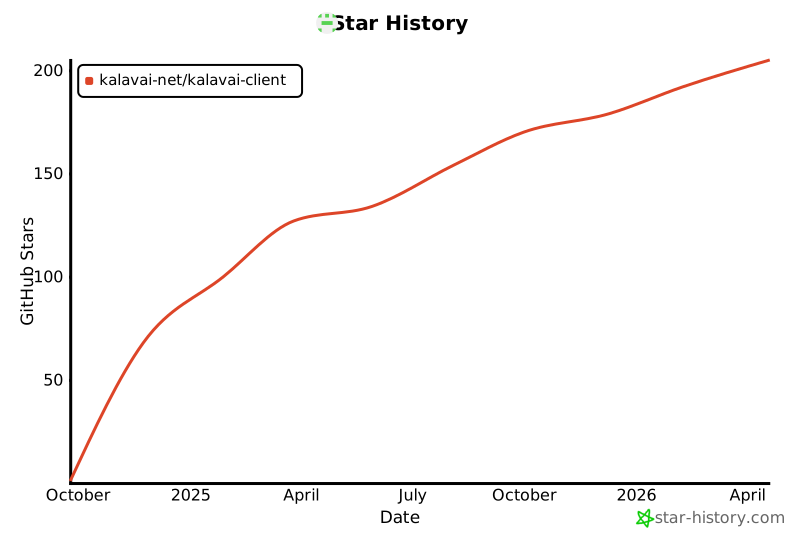
Star History
Build from source
Add Secrets to GitHub
You must store your Docker Hub username and the token you just created as secrets in your GitHub repository:
-
Go to your GitHub repository.
-
Navigate to Settings > Security > Secrets and variables > Actions.
-
Click New repository secret.
-
Create the following two secrets:
Name: DOCKER_HUB_USERNAME
Value: Your Docker Hub username or organization name.

Name: DOCKER_HUB_TOKEN
Value: The Personal Access Token you copied from Docker Hub.
Expand
Python version >= 3.10.
sudo add-apt-repository ppa:deadsnakes/ppa
sudo apt update
sudo apt install python3.10 python3.10-dev python3-virtualenv python3-venv
virtualenv -p python3.10 env
source env/bin/activate
sudo apt install  python3.10-venv python3.10-dev -y
pip install -U setuptools
pip install -e .[dev]
Build python wheels:
bash publish.sh build
Unit tests
To run the unit tests, use:
python -m unittest
Release history Release notifications | RSS feed


Download files
Download the file for your platform. If you're not sure which to choose, learn more about installing packages.
Source Distribution
Built Distribution
Filter files by name, interpreter, ABI, and platform.
If you're not sure about the file name format, learn more about wheel file names.
Copy a direct link to the current filters
File details
Details for the file kalavai_client-0.8.2.tar.gz.
File metadata
- Download URL: kalavai_client-0.8.2.tar.gz
- Upload date:
- Size: 49.6 kB
- Tags: Source
- Uploaded using Trusted Publishing? Yes
- Uploaded via: twine/6.1.0 CPython/3.13.7
File hashes
| Algorithm | Hash digest | |
|---|---|---|
| SHA256 |
30a458ba0e97d57e0f85017baa6dcfd9c99fed8208da13aafb37cb42aaf8c47c
|
|
| MD5 |
7af059150d3b11a38f2946f3ebdcda43
|
|
| BLAKE2b-256 |
2181405d913ea84388f2be8c06099918f3e2135db0c93ec821496a6407da628a
|
Provenance
The following attestation bundles were made for kalavai_client-0.8.2.tar.gz:
Publisher:
release.yml on kalavai-net/kalavai-client
-
Statement:
-
Statement type:
https://in-toto.io/Statement/v1 -
Predicate type:
https://docs.pypi.org/attestations/publish/v1 -
Subject name:
kalavai_client-0.8.2.tar.gz -
Subject digest:
30a458ba0e97d57e0f85017baa6dcfd9c99fed8208da13aafb37cb42aaf8c47c - Sigstore transparency entry: 789394157
- Sigstore integration time:
-
Permalink:
kalavai-net/kalavai-client@39a767d214cf11bbd4f289c44c30592e98689b4a -
Branch / Tag:
refs/tags/v0.8.2 - Owner: https://github.com/kalavai-net
-
Access:
public
-
Token Issuer:
https://token.actions.githubusercontent.com -
Runner Environment:
github-hosted -
Publication workflow:
release.yml@39a767d214cf11bbd4f289c44c30592e98689b4a -
Trigger Event:
push
-
Statement type:
File details
Details for the file kalavai_client-0.8.2-py3-none-any.whl.
File metadata
- Download URL: kalavai_client-0.8.2-py3-none-any.whl
- Upload date:
- Size: 53.6 kB
- Tags: Python 3
- Uploaded using Trusted Publishing? Yes
- Uploaded via: twine/6.1.0 CPython/3.13.7
File hashes
| Algorithm | Hash digest | |
|---|---|---|
| SHA256 |
9d0efba5628ab12f1bea4e9e2656fa06b597cad6d00085f46a07ca63e3a60ad3
|
|
| MD5 |
47e947aa630fad94319968402f09412a
|
|
| BLAKE2b-256 |
83bed3b0283db95007edd10101986172ac5072a976544db971cab9fc841a8364
|
Provenance
The following attestation bundles were made for kalavai_client-0.8.2-py3-none-any.whl:
Publisher:
release.yml on kalavai-net/kalavai-client
-
Statement:
-
Statement type:
https://in-toto.io/Statement/v1 -
Predicate type:
https://docs.pypi.org/attestations/publish/v1 -
Subject name:
kalavai_client-0.8.2-py3-none-any.whl -
Subject digest:
9d0efba5628ab12f1bea4e9e2656fa06b597cad6d00085f46a07ca63e3a60ad3 - Sigstore transparency entry: 789394164
- Sigstore integration time:
-
Permalink:
kalavai-net/kalavai-client@39a767d214cf11bbd4f289c44c30592e98689b4a -
Branch / Tag:
refs/tags/v0.8.2 - Owner: https://github.com/kalavai-net
-
Access:
public
-
Token Issuer:
https://token.actions.githubusercontent.com -
Runner Environment:
github-hosted -
Publication workflow:
release.yml@39a767d214cf11bbd4f289c44c30592e98689b4a -
Trigger Event:
push
-
Statement type:






