
Kalong
A new take on python debugging
Kalong is a modern, web-based Python debugger that provides a rich, interactive interface for inspecting and controlling your Python programs. It combines a powerful Python backend with a reactive frontend to offer a seamless debugging experience.
Features
- Web-Based Interface: A clean, modern UI built with React and CodeMirror.
- Interactive Debugging: Step through code, inspect variables, and evaluate expressions in real-time.
- Process Injection: Attach to running Python processes using GDB (requires
gdbandptracesupport). - Flexible Deployment: Run locally or remotely, with configurable host/port settings.
- Shell Mode: Launch an interactive shell with debugging capabilities.
Installation
pip install kalong
To include optional dependencies for code disassembly or recursive debugging:
pip install "kalong[disassembly,recursive]"
Usage
Basic Usage
Run a Python script with Kalong:
kalong my_script.py
This will start the debugger server and open the web interface.
By setting the PYTHONBREAKPOINT environment variable, you can also use Kalong with the built-in breakpoint() function in your code:
PYTHONBREAKPOINT=kalong.breakpoint
Interactive Shell
Launch an interactive shell:
kalong
Attaching to a Process
Inject Kalong into a running Python process (requires sudo or appropriate permissions):
kalong --inject <PID>
Command Line Options
| Option | Description | Default |
|---|---|---|
--server |
Launch the Kalong server (internal use) | False |
--host |
Host of the Kalong server | localhost |
--port |
Port of the Kalong server | 59999 |
--front-host |
Host of the frontend (defaults to host) | localhost |
--front-port |
Port of the frontend (defaults to port) | 59999 |
--ws-host |
Host of the WebSocket server (defaults to host) | localhost |
--ws-port |
Port of the WebSocket server (defaults to port) | 59999 |
--log |
Verbosity level (critical, error, warning, info, debug) |
warn |
--detached |
Keep server running after client disconnect | False |
--inject <PID> |
PID of a running process to inject into | None |
--break-at-start |
Break at the start of the Python file | False |
--base-path |
Base path for the frontend URL | / |
Frontend Interface
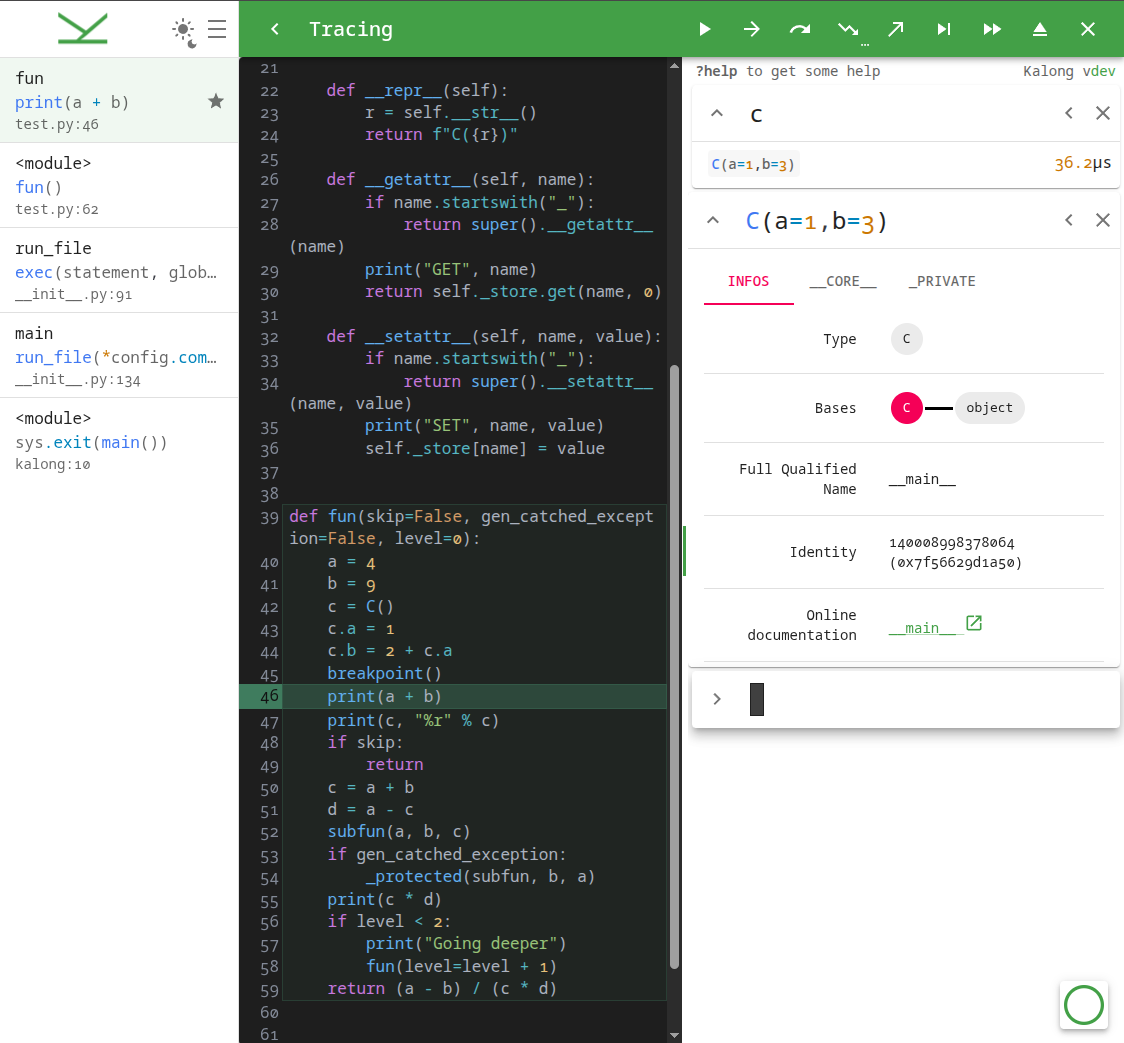
Kalong provides a responsive, split-pane interface designed for efficient debugging.
Top Bar (Debugger Controls)
Control the execution flow using the top bar buttons or keyboard shortcuts:
| Shortcut | Action | Description |
|---|---|---|
F8 |
Pause / Continue | Pause execution or resume until the next breakpoint. |
Alt+F8 |
Continue Condition | Continue until the expression in the prompt evaluates to true. |
F9 |
Step | Execute the current line. |
F10 |
Step Until | Execute until the next line in the current frame (bypass loops/calls). |
F11 |
Step Into | Step into a function call. |
Shift+F11 |
Step Out | Run until the current function returns. |
Shift+F12 |
Trace | Run and stop at every exception. |
F12 |
Run | Resume execution without stopping (fast forward). |
Shift+Esc |
Stop | Stop the debugging session. |
Ctrl+Esc |
Exit | Kill the debugged program. |
Code Editor (Source View)
- Syntax Highlighting: Full Python syntax highlighting powered by CodeMirror.
- Breakpoints: Click on the gutter (line numbers) to toggle breakpoints.
Interactive Terminal (REPL)
The terminal allows you to interact with the running process in real-time.
- Execute Code: Type any valid Python expression to evaluate it in the current context.
- Command History: Navigate through your command history using
UpandDownarrows. - Autocomplete: Press
Tabfor intelligent code completion. - Search History: Use
Ctrl+r(reverse) andCtrl+s(forward) to search through your command history.
Prompt Commands
Special commands can be entered in the terminal, prefixed with ?. Shortcuts are available for convenience.
| Command | Shortcut | Description |
|---|---|---|
?help |
Alt+h |
Show the help message. |
?inspect <expr> |
Alt+i |
Inspect an expression's properties and attributes. |
?diff <a> ? <b> |
Alt+d |
Show the difference between two expressions. |
?table <expr> ? <columns, ...> |
Alt+t |
Display an iterable (list, dict, etc.) as a table. |
?recursive_debug |
Alt+r |
Start a recursive debug session in the current context. |
?breakpoint <loc> |
Alt+b |
Toggle breakpoint at file:line or line or show active breakpoints. |
Side Panel
- Stack Frames: View the call stack and click on any frame to inspect its local variables and code context.
- Settings: Toggle Light/Dark mode and adjust UI density.
Keyboard Shortcuts
| Shortcut | Action |
|---|---|
Enter |
Execute command |
Up / Down |
Navigate history |
Tab |
Autocomplete |
Ctrl+r |
Reverse search history |
Ctrl+s |
Forward search history |
Ctrl+l |
Clear terminal output |
Ctrl+c |
Copy selection or clear input |
Ctrl+d |
Kill process (if input empty) |
Shift+PageUp / Shift+PageDown |
Scroll terminal output |
Configuration
You can also configure Kalong using environment variables. The variable names are prefixed with KALONG_ and correspond to the CLI options (e.g., KALONG_PORT, KALONG_HOST, KALONG_LOG).
Development
To set up the development environment:
-
Install Python dependencies:
pip install -e ".[dev]"
-
Install JavaScript dependencies:
yarn install -
Run the development server:
yarn startThis command runs the Vite dev server and the Python backend concurrently.
License
This project is licensed under the GPL-3.0-or-later license. See the LICENSE file for details.
Author
1 maintainer

Metadata
1 maintainer
Release files for kalong 0.9.1
For a detailed explanation of source distributions (sdists) and built distributions (wheels), please see the package formats documentation.
Source distribution (sdist)
| File | Size | Uploaded | |
|---|---|---|---|
| kalong-0.9.1.tar.gz | 687.0 kB | Details |
Built distribution (wheel)
| File | Interpreter | ABI | Platform | Reset |
|---|---|---|---|---|
| kalong-0.9.1-py3-none-any.whl | Python 3 | none | any | Details |
Total release size: 1.4 MB
Release files / kalong-0.9.1.tar.gz
| Download URL | kalong-0.9.1.tar.gz |
|---|---|
| Size | 687.0 kB |
| Tags | Source |
|
SHA-256 checksum How to use checksums |
4e6300372fd38879685c874673668514cff7bdd8dc89b4f8cca47edf97f1c378
|
|
BLAKE2b-256 checksum How to use checksums |
5bc1dc174e57dadfe6822b7de03bf219cfaff24f30695ef6e4873986697acbcf
|
| Upload date | |
|
Uploaded using Trusted Publishing? What is trusted publishing? |
No |
| Uploaded via |
Hatch/1.16.3 cpython/3.14.3 HTTPX/0.28.1
|
Release files / kalong-0.9.1-py3-none-any.whl
| Download URL | kalong-0.9.1-py3-none-any.whl |
|---|---|
| Size | 692.6 kB |
| Tags | Python 3 |
|
SHA-256 checksum How to use checksums |
5d1ea6bc3bf3d4040d70c01e3613b26ba1f9ceada97b29590458c4c192f7732a
|
|
BLAKE2b-256 checksum How to use checksums |
0531aa9dfa9b5b1fcef855764954043b0dd7f2987083a7b1e89accd5b6032a9a
|
| Upload date | |
|
Uploaded using Trusted Publishing? What is trusted publishing? |
No |
| Uploaded via |
Hatch/1.16.3 cpython/3.14.3 HTTPX/0.28.1
|














