
A new take on python debugging

Project description
Kalong
A new take on python debugging
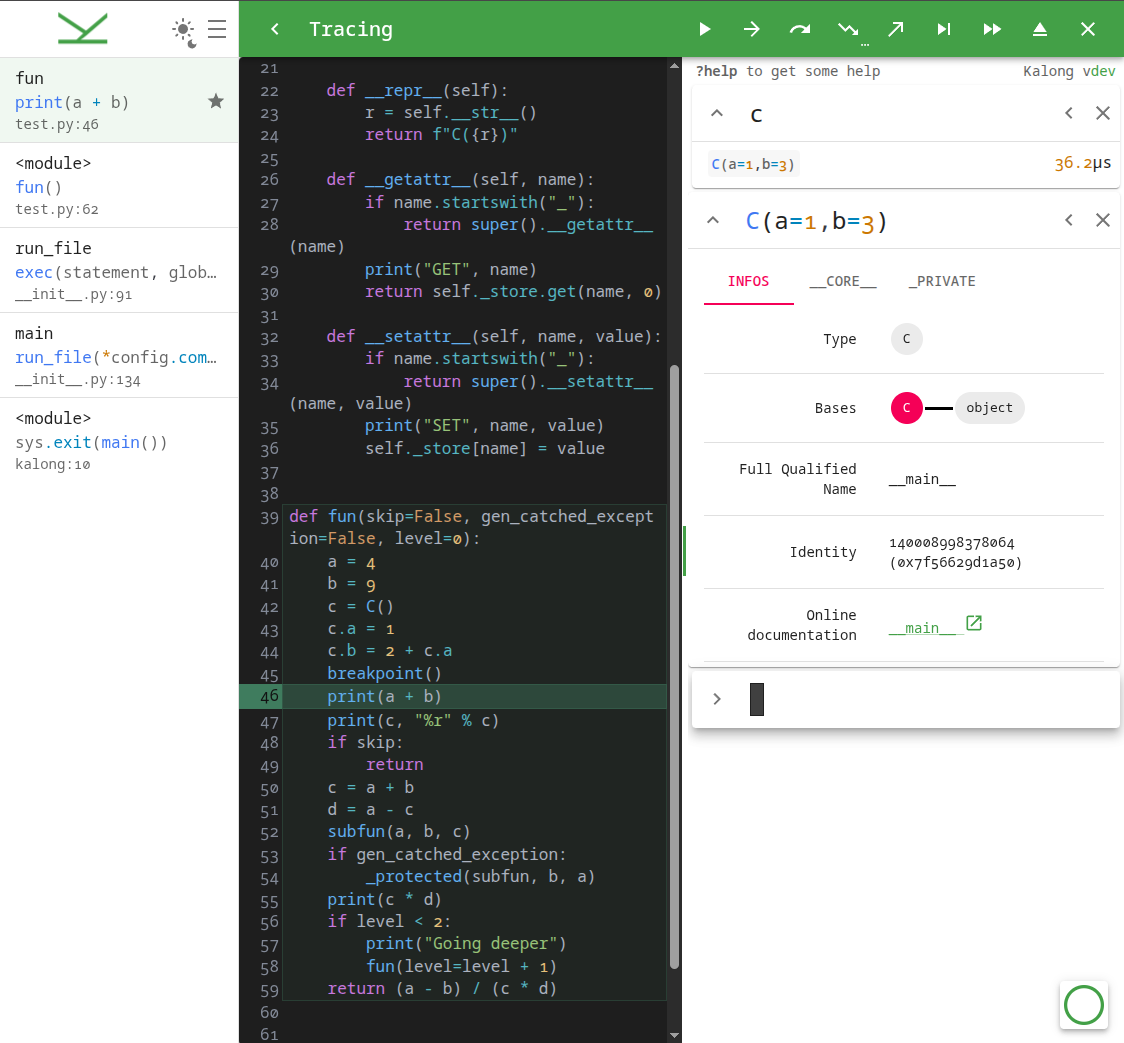
Kalong is a modern, web-based Python debugger that provides a rich, interactive interface for inspecting and controlling your Python programs. It combines a powerful Python backend with a reactive frontend to offer a seamless debugging experience.
Features
- Web-Based Interface: A clean, modern UI built with React and CodeMirror.
- Interactive Debugging: Step through code, inspect variables, and evaluate expressions in real-time.
- Process Injection: Attach to running Python processes using GDB (requires
gdbandptracesupport). - Flexible Deployment: Run locally or remotely, with configurable host/port settings.
- Shell Mode: Launch an interactive shell with debugging capabilities.
Installation
pip install kalong
To include optional dependencies for code disassembly or recursive debugging:
pip install "kalong[disassembly,recursive]"
Usage
Basic Usage
Run a Python script with Kalong:
kalong my_script.py
This will start the debugger server and open the web interface.
By setting the PYTHONBREAKPOINT environment variable, you can also use Kalong with the built-in breakpoint() function in your code:
PYTHONBREAKPOINT=kalong.breakpoint
Interactive Shell
Launch an interactive shell:
kalong
Attaching to a Process
Inject Kalong into a running Python process (requires sudo or appropriate permissions):
kalong --inject <PID>
Command Line Options
| Option | Description | Default |
|---|---|---|
--server |
Launch the Kalong server (internal use) | False |
--host |
Host of the Kalong server | localhost |
--port |
Port of the Kalong server | 59999 |
--front-host |
Host of the frontend (defaults to host) | localhost |
--front-port |
Port of the frontend (defaults to port) | 59999 |
--ws-host |
Host of the WebSocket server (defaults to host) | localhost |
--ws-port |
Port of the WebSocket server (defaults to port) | 59999 |
--log |
Verbosity level (critical, error, warning, info, debug) |
warn |
--detached |
Keep server running after client disconnect | False |
--inject <PID> |
PID of a running process to inject into | None |
--break-at-start |
Break at the start of the Python file | False |
--base-path |
Base path for the frontend URL | / |
Frontend Interface
Kalong provides a responsive, split-pane interface designed for efficient debugging.
Top Bar (Debugger Controls)
Control the execution flow using the top bar buttons or keyboard shortcuts:
| Shortcut | Action | Description |
|---|---|---|
F8 |
Pause / Continue | Pause execution or resume until the next breakpoint. |
Alt+F8 |
Continue Condition | Continue until the expression in the prompt evaluates to true. |
F9 |
Step | Execute the current line. |
F10 |
Step Until | Execute until the next line in the current frame (bypass loops/calls). |
F11 |
Step Into | Step into a function call. |
Shift+F11 |
Step Out | Run until the current function returns. |
Shift+F12 |
Trace | Run and stop at every exception. |
F12 |
Run | Resume execution without stopping (fast forward). |
Shift+Esc |
Stop | Stop the debugging session. |
Ctrl+Esc |
Exit | Kill the debugged program. |
Code Editor (Source View)
- Syntax Highlighting: Full Python syntax highlighting powered by CodeMirror.
- Breakpoints: Click on the gutter (line numbers) to toggle breakpoints.
Interactive Terminal (REPL)
The terminal allows you to interact with the running process in real-time.
- Execute Code: Type any valid Python expression to evaluate it in the current context.
- Command History: Navigate through your command history using
UpandDownarrows. - Autocomplete: Press
Tabfor intelligent code completion. - Search History: Use
Ctrl+r(reverse) andCtrl+s(forward) to search through your command history.
Prompt Commands
Special commands can be entered in the terminal, prefixed with ?. Shortcuts are available for convenience.
| Command | Shortcut | Description |
|---|---|---|
?help |
Alt+h |
Show the help message. |
?inspect <expr> |
Alt+i |
Inspect an expression's properties and attributes. |
?diff <a> ? <b> |
Alt+d |
Show the difference between two expressions. |
?table <expr> ? <columns, ...> |
Alt+t |
Display an iterable (list, dict, etc.) as a table. |
?recursive_debug |
Alt+r |
Start a recursive debug session in the current context. |
?breakpoint <loc> |
Alt+b |
Toggle breakpoint at file:line or line or show active breakpoints. |
Side Panel
- Stack Frames: View the call stack and click on any frame to inspect its local variables and code context.
- Settings: Toggle Light/Dark mode and adjust UI density.
Keyboard Shortcuts
| Shortcut | Action |
|---|---|
Enter |
Execute command |
Up / Down |
Navigate history |
Tab |
Autocomplete |
Ctrl+r |
Reverse search history |
Ctrl+s |
Forward search history |
Ctrl+l |
Clear terminal output |
Ctrl+c |
Copy selection or clear input |
Ctrl+d |
Kill process (if input empty) |
Shift+PageUp / Shift+PageDown |
Scroll terminal output |
Configuration
You can also configure Kalong using environment variables. The variable names are prefixed with KALONG_ and correspond to the CLI options (e.g., KALONG_PORT, KALONG_HOST, KALONG_LOG).
Development
To set up the development environment:
-
Install Python dependencies:
pip install -e ".[dev]"
-
Install JavaScript dependencies:
yarn install -
Run the development server:
yarn startThis command runs the Vite dev server and the Python backend concurrently.
License
This project is licensed under the GPL-3.0-or-later license. See the LICENSE file for details.
Author
Release history Release notifications | RSS feed


Download files
Download the file for your platform. If you're not sure which to choose, learn more about installing packages.
Source Distribution
Built Distribution
Filter files by name, interpreter, ABI, and platform.
If you're not sure about the file name format, learn more about wheel file names.
Copy a direct link to the current filters
File details
Details for the file kalong-0.9.1.tar.gz.
File metadata
- Download URL: kalong-0.9.1.tar.gz
- Upload date:
- Size: 687.0 kB
- Tags: Source
- Uploaded using Trusted Publishing? No
- Uploaded via: Hatch/1.16.3 cpython/3.14.3 HTTPX/0.28.1
File hashes
| Algorithm | Hash digest | |
|---|---|---|
| SHA256 |
4e6300372fd38879685c874673668514cff7bdd8dc89b4f8cca47edf97f1c378
|
|
| MD5 |
df883a6f42047143f180bb6f96104e66
|
|
| BLAKE2b-256 |
5bc1dc174e57dadfe6822b7de03bf219cfaff24f30695ef6e4873986697acbcf
|
File details
Details for the file kalong-0.9.1-py3-none-any.whl.
File metadata
- Download URL: kalong-0.9.1-py3-none-any.whl
- Upload date:
- Size: 692.6 kB
- Tags: Python 3
- Uploaded using Trusted Publishing? No
- Uploaded via: Hatch/1.16.3 cpython/3.14.3 HTTPX/0.28.1
File hashes
| Algorithm | Hash digest | |
|---|---|---|
| SHA256 |
5d1ea6bc3bf3d4040d70c01e3613b26ba1f9ceada97b29590458c4c192f7732a
|
|
| MD5 |
2adef6d4591edfef62395e88e7a278d5
|
|
| BLAKE2b-256 |
0531aa9dfa9b5b1fcef855764954043b0dd7f2987083a7b1e89accd5b6032a9a
|






