
Kamodo


Kamodo is an open source CCMC tool for access, interpolation, and visualization of space weather models and data in python. Kamodo allows model developers to represent simulation results as mathematical functions which may be manipulated directly by end users. This general approach allows observational data to be represented functionally, through the use of interpolators. Kamodo handles unit conversion transparently and supports interactive science discovery in a low coding environment through jupyter notebooks. These features allow Kamodo to be used in other fields of study and as a teaching tool for working with real world physical data.
This repository hosts the core Kamodo libraries under a permissive NASA open source license. The core library supports function registration, composition, unit conversion, automated plotting, LaTeX I/O, and Flask-backed REST API integrations.
Space weather simulation readers are implemented as subclasses of the Kamodo base class and are developed and maintained by the Community Coordinated Modeling Center, located at NASA Goddard Space Flight Center. CCMC's Kamodo readers may be found here https://github.com/nasa/Kamodo/
Usage
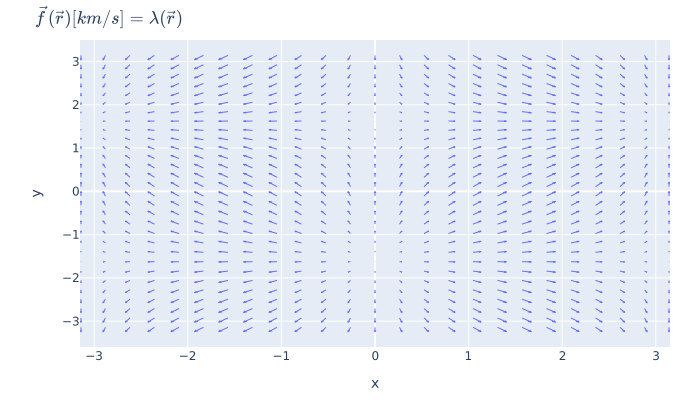
Suppose we have a vector field defined by a function of positions in the x-y plane:
from kamodo import kamodofy
import numpy as np

x = np.linspace(-np.pi, np.pi, 25)
y = np.linspace(-np.pi, np.pi, 30)
xx, yy = np.meshgrid(x,y)
points = np.array(list(zip(xx.ravel(), yy.ravel())))

@kamodofy(units = 'km/s')
def fvec(rvec = points):
    ux = np.sin(rvec[:,0])
    uy = np.cos(rvec[:,1])
    return np.vstack((ux,uy)).T
The @kamodofy decorator lets us register this field with units to enable unit-conversion downstream:
from kamodo import Kamodo

kamodo = Kamodo(fvec = fvec)
kamodo
When run in a jupyter notebook, the above kamodo object will render as a set of equations:
$$\vec{f}{\left (\vec{r} \right )} [km/s] = \lambda{\left (\vec{r} \right )}$$
We can now evaluate our function using dot notation:
kamodo.fvec(np.array([[-1,1]]))
array([[-0.84147098, 0.54030231]])
We can perform unit conversion by function composition:
kamodo['gvec[m/s]'] = 'fvec'
kamodo automatically generates the appropriate multiplicative factors: $$\vec{g}{\left (\vec{r} \right )} [m/s] = 1000 \vec{f}{\left (\vec{r} \right )}$$ we can verify these results through evaluation
kamodo.gvec(np.array([[-1,1]]))
array([[-841.47098481, 540.30230587]])
Kamodo also generates quick-look graphics via function inspection.
import plotly.io as pio

fig = kamodo.plot('fvec')
pio.write_image(fig, 'images/fig2d-usage.svg')
Head over to the Introduction page for more details.
Getting started
Kamodo may be installed from pip
pip install kamodo-core-official
To get the latest version of Kamodo Core, install from the NASA git repo:
pip install git+https://github.com/nasa/Kamodo-core.git
Kamodo Environment
We strongly recommend using the conda environment system to avoid library conflicts with your host machine's python.
Download and install miniconda from here. The advantage to using miniconda is that each new environment includes the bare-minimum for a project. This allows you to keep many different projects on a single work station.
Create Kamodo environment
Create a new environment for kamodo
conda create -n envkamodo python=3.14
conda activate envkamodo
(envkamodo) pip install kamodo-core-official
!!! note
The leading (envkamodo) in your prompt indicates that you have activated the envkamodo environment.
From here on, anything you install will be isolated to the envkamodo environment.
Loading example notebooks
If you want to run any of the notebooks in docs, you will need to install jupyter:
(envkamodo) pip install jupyter
Navigate to the top-level of the kamodo repo, then point jupyter to docs/notebooks:
(envkamodo) jupyter notebook docs/notebooks
This should open a browser window that will allow you to load any of the example notebooks.
Requirements
The core library requires:
- python-forge
- numpy
- scipy
- sympy>=1.12
- pandas
- plotly
- kaleido
- pytest
- Flask>=3.0
- flask-cors
- flask-restful
- antlr4-python3-runtime>=4.11,<4.12
- requests
- pyyaml
The antlr package may be necessary for rendering latex in a notebook
pip install antlr-python-runtime
Test Suite
Kamodo's unit tests are run with pytest. To install pytest with code coverage
pip install pytest pytest-cov
Then, from the base of the git repo, run tests
pytest
or check code coverage of tests with
PYTHONPATH=. coverage run -m pytest
coverage report -m
Run tests locally prior to pushing changes to GitHub.
1 maintainer

Download files
Download the file for your platform. If you're not sure which to choose, learn more about installing packages.
Source Distribution
Built Distribution
Filter files by name, interpreter, ABI, and platform.
If you're not sure about the file name format, learn more about wheel file names.
Copy a direct link to the current filters
File details
Details for the file kamodo_core_official-26.8.7.tar.gz.
File metadata
- Download URL: kamodo_core_official-26.8.7.tar.gz
- Upload date:
- Size: 114.6 kB
- Tags: Source
- Uploaded using Trusted Publishing? No
- Uploaded via:
twine/7.0.0 CPython/3.14.6
File hashes
| Algorithm | Hash digest | |
|---|---|---|
| SHA256 |
e61a31659c131ec5f74e081304714e7f6bb0cda85ac66da6406513d41a5e75d2
|
|
| MD5 |
fb2565a64806886d0d702aeb71b808cb
|
|
| BLAKE2b-256 |
3b42d37a0bf4ac795eb6db388f977a95e748958874909f9446adc8c6ba30b9df
|
File details
Details for the file kamodo_core_official-26.8.7-py3-none-any.whl.
File metadata
- Download URL: kamodo_core_official-26.8.7-py3-none-any.whl
- Upload date:
- Size: 115.8 kB
- Tags: Python 3
- Uploaded using Trusted Publishing? No
- Uploaded via:
twine/7.0.0 CPython/3.14.6
File hashes
| Algorithm | Hash digest | |
|---|---|---|
| SHA256 |
1a8856f16bd28600921010c07cad19afedc97a39177551b0e29a6af04d417352
|
|
| MD5 |
764a5d7f7becf8768e4f4b7c93759386
|
|
| BLAKE2b-256 |
52672584b897351d13625af3cd9be1494ea30e2ab269be0b8ab875d1583a7ed7
|













